Themes and options
Four presets that are option dictionaries, and every key they hold.
theme-default(), theme-booktabs(), theme-compact(), and theme-minimal() each return an option dictionary, so a preset and a table-options() call are the same kind of thing and compose by merging. Striping is row-striping: true on any of them, and the academic three-line style is theme-booktabs() plus options; a theme that differs by one boolean is not a theme.
Option names are Typst identifiers, so they are written unquoted: table-options(row-striping: true). An unknown key is an error rather than a silent no-op. tests/unit/test-options-read.typ holds every declared key to being read by the code. It searches the code with the comments cut out. It looks for the key as the argument of the call that reads it, so a key named in a comment or in a message does not count.
| Group | Keys |
|---|---|
| Table | table-font, table-font-size, table-align, table-width, table-border-top, table-border-bottom, breakable, infer-alignment, decimal-align, column-border, row-border |
| Header | header-title-size, header-title-weight, header-subtitle-size, header-align, header-border-bottom |
| Column labels | column-labels-align, column-labels-weight, column-labels-size, column-labels-border-top, column-labels-border-bottom, spanner-border-bottom |
| Stub and groups | stub-weight, stub-indent-step, row-group-weight, row-group-fill, row-group-border-top, row-group-repeat |
| Body | row-striping, row-striping-fill, cell-inset, cell-vertical-align, body-border-top, body-border-bottom |
| Summaries | summary-weight, summary-fill, summary-border-top, grand-summary-border-top |
| Formatter defaults | number-group-separator, number-decimal-separator, number-rounding |
| Footer | footer-align, footnote-marks, footnote-size, source-note-size, footer-border-top |
table-width is auto, which lets the table size itself to its content. Given a width, the columns no columns-width names share whatever the named ones leave, since a track sized to its content would never fill the width.
column-border and row-border are off by default, and rule the table as a grid rather than by part. column-labels-align is auto, which follows the column beneath the label. cell-vertical-align is auto, which leaves the placement to Typst: a cell sits at the top of its row. Give it horizon to centre every cell against the tallest one beside it, which is what a row of unequal heights usually wants.
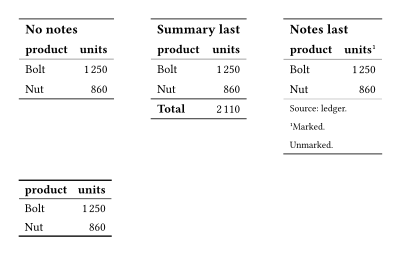
Rules on a shared edge do not add up: the line under the column labels is the line over the body, and the line over the footer is the line under it. A part draws its own edge, and that wins over the table’s, so body-border-top shows only where column-labels-border-bottom is none, and body-border-bottom only where footer-border-top is. Where the body closes the table, table-border-bottom claims that edge first.
row-border falls to every row edge the parts leave alone, which is why it draws between two body rows, between the title and the subtitle, and between two notes. Four edges are not among them: the table’s first and last, answered by table-border-top and table-border-bottom, and the body’s opening and closing edges, answered by body-border-top and body-border-bottom. On those four, none is an answer rather than a silence, so row-border never shows through. The two body keys are none on every preset, and theme-minimal answers none on the table’s own two as well, so a table ruled as a grid writes the rule it wants on those keys.
Which edge closes a table depends on what the table carries. The first three below differ only in what comes last: the body itself, then a summary row, then the notes. The fourth is a table with no notes under theme-booktabs, which is nothing but rules.
number-rounding answers a format-number(rounding: auto), as number-group-separator and number-decimal-separator answer the separators, so a document sets its rounding once rather than on every directive.