The Typst behind this circle
#circle(radius: 0.6cm, fill: green)
The options that shape a compiled block.
Every figure on this page is compiled by the Typst binary Quarto ships, as the page is built.
```{typst}
#circle(radius: 1cm, fill: blue)
```
Typst draws the table, and the result arrives as one image:
```{typst}
#table(
  columns: 3,
  [*Format*], [*Writer*], [*Figures*],
  [HTML], [html], [image],
  [PDF], [latex], [image],
  [Typst], [typst], [native or image],
)
```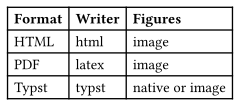
An image carries no text for a screen reader. Give a table alt text, or write it in Markdown when the data must stay readable.
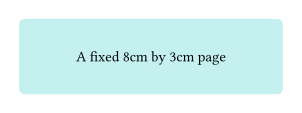
width and height set the page Typst compiles on, and margin sets the space around the drawing. The default page is auto, which shrinks to the content:
```{typst}
//| width: 8cm
//| height: 3cm
//| margin: 0.5cm
#rect(width: 100%, height: 100%, fill: teal.lighten(70%), radius: 4pt)[
  #align(center + horizon)[A fixed 8cm by 3cm page]
]
```
This site asks for SVG globally, so the figures stay sharp at any zoom:
extensions:
  typst-render:
    format: svg
One block can ask for another format. dpi applies to PNG alone:
```{typst}
//| format: png
//| dpi: 300
#rect(width: 3cm, height: 1.2cm, fill: orange.lighten(50%), radius: 4pt)
```
Without a format, the extension selects one from the output format.
| Value | Use it for |
|---|---|
svg |
HTML and slides, where the figure must stay sharp. |
png |
Word, PowerPoint, and any consumer that cannot read SVG. |
pdf |
PDF through LaTeX, where a vector figure is wanted. |
html |
Semantic markup with MathML maths, in HTML output. It needs Typst 0.15 and falls back to SVG. |
align places the image block on the page:
```{typst}
//| align: right
#rect(width: 2cm, height: 1cm, fill: purple.lighten(60%), radius: 4pt)
```
left, center, right, and default are accepted.
echo puts the Typst beside its output, and code-fold tucks it away:
```{typst}
//| echo: true
//| code-fold: true
//| code-summary: "The Typst behind this circle"
#circle(radius: 0.6cm, fill: green)
```#circle(radius: 0.6cm, fill: green)
echo: fenced includes the block markers and the option comments, so a reader sees the block exactly as it is written.
Per-block options are written as //| key: value at the top of the block. All of them can also be set globally as a default, apart from file, output-filename, label, cap, and alt, which belong to a block alone. The Reference lists them all.