element-typst
Typst-markup text element: same fields as element-text plus automatic Typst-markup evaluation for plain strings reaching this surface.
Drop-in replacement for element-text on any text key. Strings supplied via labels, scale names, or scale labels: callbacks are evaluated as Typst markup before rendering, so users do not need to wrap each value with typst. Per-call typst() and content ([…]) values still pass through unchanged.
Usage
element-typst(
  size: none,
  weight: none,
  colour: none,
  angle: none,
  font: none,
  margin: none,
  align: none,
)
Parameters
| Parameter | Default | Description |
|---|---|---|
size |
none |
Text size. Either an absolute Typst length (e.g., 12pt), a ratio (e.g., 80%) scaling the parent surface size, or none to inherit the parent size unchanged. |
weight |
none |
Font weight (e.g., "regular", "bold"), or none. |
colour |
none |
Text colour, or none to inherit. |
angle |
none |
Rotation angle (a Typst angle), or none to inherit. Honoured on every text surface: axis tick labels (axis-text, seeding the guide-axis angle, which overrides it), axis titles, strip text, the legend title and entry labels, and the plot title, subtitle, and caption. Axis titles fall back to their natural angle (0deg for x, 90deg for y) when unset. |
font |
none |
Font family, or none to inherit. |
margin |
none |
Per-side spacing built with margin. Each side accepts a Typst length (absolute or relative); em is preferred so spacing scales with the surface font size. Sides left at auto fall through to the renderer default. none keeps every side at the default. |
align |
none |
Horizontal alignment of the text within its surface as a Typst alignment (left, center, right), or none to use the per-surface default (title and subtitle left, caption right, axis titles and strip text centred, legend title left, legend entry labels centred in horizontal legends and left in vertical legends). Independent of the surrounding container’s alignment. Axis tick labels (axis-text) are positioned by anchor and ignore this field. |
Returns
Element dictionary consumed by theme.
Examples
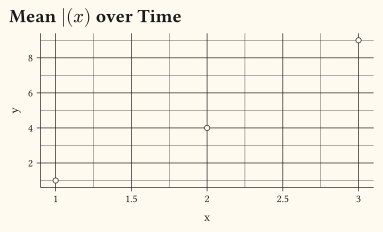
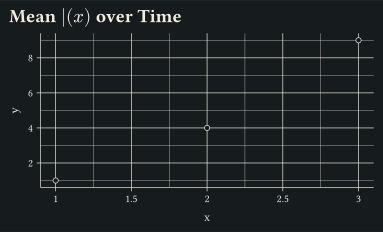
Enable Typst markup for every plot title in a session by setting plot-title: element-typst() on the theme.
#let d = ((x: 1, y: 1), (x: 2, y: 4), (x: 3, y: 9))
#plot(
  data: d,
  mapping: aes(x: "x", y: "y"),
  layers: (geom-point(size: 2pt),),
  labels: labels(title: "Mean $macron(x)$ over Time"),
  theme: theme(plot-title: element-typst(size: 14pt, weight: "bold")),
  width: 10cm,
  height: 6cm,
)
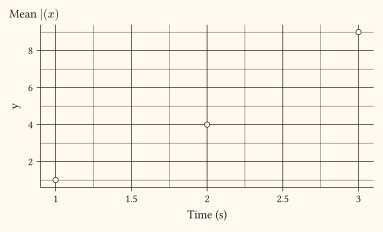
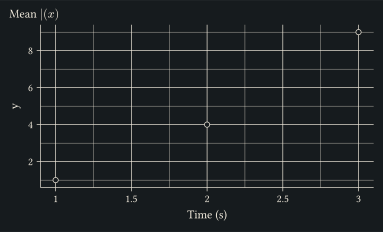
Mix typst and non-typst surfaces in the same theme:
#let d = ((x: 1, y: 1), (x: 2, y: 4), (x: 3, y: 9))
#plot(
  data: d,
  mapping: aes(x: "x", y: "y"),
  layers: (geom-point(size: 2pt),),
  labels: labels(title: "Mean $macron(x)$", x: "Time (s)"),
  theme: theme(
    plot-title: element-typst(),
    axis-title: element-text(),
  ),
  width: 10cm,
  height: 6cm,
)
See also
theme, element-text, typst, margin.