Accessibility
Alt text, tagged PDF, and colour choices for Gribouille plots.
A Gribouille plot is an image. Assistive technology, tagged-PDF readers, and search indexes need a text alternative for it, and colour-coded marks need a fallback for readers who cannot tell the colours apart or who print in black and white. This page covers the two things you control: the alt text on a plot, and the colour and shape channels it uses. Both apply whether you embed plots in a Quarto document or compile Typst yourself, but the alt text is set in a different place for each, so read the section that matches your workflow.
Alt text on a plot
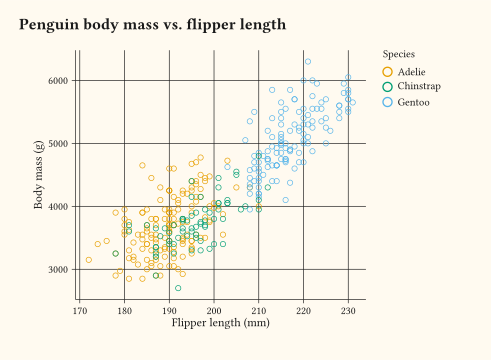
Every plot call accepts an alt: parameter: the text alternative a screen reader announces in place of the figure. Keep it to one or two short sentences, describe the takeaway rather than just naming the axes, and do not repeat the visible title word for word. The visible labels (title, subtitle, caption, axis and legend titles) belong on labs; alt: is the non-visible description, not a substitute for a caption.
#plot(
  data: penguins,
  mapping: aes(x: "flipper-len", y: "body-mass", colour: "species"),
  layers: (geom-point(size: 2pt),),
  labs: labs(
    title: "Penguin body mass vs. flipper length",
    x: "Flipper length (mm)",
    y: "Body mass (g)",
    colour: "Species",
  ),
  alt: "Body mass rises with flipper length for all three penguin species; Gentoo are the heaviest and have the longest flippers.",
)- Embedding a plot in a Quarto document through the
typst-renderextension: setalton the code block, not onplot(). See Plots in Quarto. - Compiling a Typst document yourself to PDF: set
alt:on theplot()call. See Tagged PDF from Typst.
Plots in Quarto
The typst-render extension compiles each {typst} block to a standalone image before it reaches the page, so the reader gets an <img> (HTML output) or an embedded image() call (Typst output), never your source. The alt text the reader hears therefore has to come from the code block, not from plot(alt: …): an SVG carries no PDF structure tags, so a figure(alt: …) produced inside the block would be discarded along with the rest of the source. Set it with the alt cell option; pair it with cap and label: fig-… when you want a numbered, cross-referenceable figure:
```{typst}
//| label: fig-penguins
//| cap: "Penguin body mass against flipper length, coloured by species."
//| alt: "Body mass rises with flipper length for all three penguin species."
//| output-filename: "/assets/typst-render/my-page/penguins.svg"
#import "@preview/gribouille:dev": *
#plot(
  data: penguins,
  mapping: aes(x: "flipper-len", y: "body-mass", colour: "species"),
  layers: (geom-point(size: 2pt),),
)
```
alt becomes the alt attribute on the rendered <img> in HTML and the alt argument of image() in Quarto Typst output, so the description survives in every format. output-filename follows this project’s convention of a leading / (resolved against the Quarto project root); in your own project use whatever path your _quarto.yml expects. Keep a plot(alt: …) inside the block only if you also compile the same .typ file directly, as in the next section; through typst-render it has no effect. The Get Started tutorial sets alt on every example block, so each step is a worked example of this pattern.
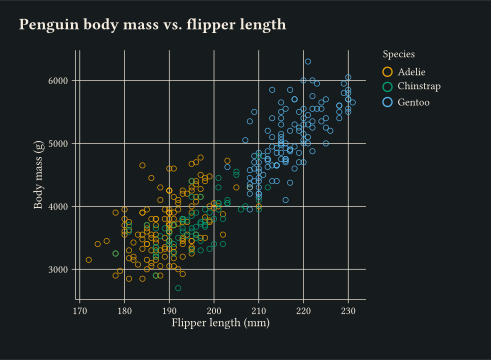
For example, this page renders a penguins plot through typst-render like so:
Tagged PDF from Typst
When you compile a Typst document, Typst writes a tagged PDF by default, even without a standard flag. Without alt:, every piece of the plot’s text (each axis tick value, the axis names, the legend title, the legend keys) lands in the reading order as one flat run, so a screen reader reads something like Flipper length (mm) Body mass (g) 170 180 190 200 210 220 230 3000 4000 5000 6000 Species Adelie Chinstrap Gentoo with no structure and no meaning.
Setting alt: on the plot() call fixes that: the plot becomes a figure whose PDF structure node carries your sentence, and the plot’s text labels are marked as PDF artifacts so a screen reader skips them. Two lines at the top of the document turn the example above into a complete, PDF/UA-1-ready file:
#import "@preview/gribouille:dev": *
#set document(title: "Penguin body mass")
Then compile it:
typst compile plot.typ plot.pdf --pdf-standard ua-1--pdf-standard ua-1 checks the document against PDF/UA-1, which requires (among other things) the document title above; a plain typst compile plot.typ plot.pdf still produces a tagged PDF, just without the conformance check. To confirm the result, pdfinfo -struct-text plot.pdf should show a single Figure ["…your alt text…"] node under Document, with no stray tick or legend text beside it.
Colour and redundant encoding
Gribouille’s default discrete colour scale is the Okabe-Ito palette (Wong 2011), chosen to stay distinguishable for the common forms of colour-vision deficiency, so a plain aes(colour: …) already starts on safe ground. Colour still fails, though, whenever colour is removed: greyscale print, photocopies, some projectors. Two things help.
- Continuous data:
scale-colour-viridis-c(and the binnedscale-colour-viridis-b) is perceptually uniform and increases monotonically in lightness, so it survives greyscale; usescale-colour-viridis-dfor the discrete version. - Other discrete palettes:
scale-colour-brewerexposes the ColorBrewer families; turn on the “colour-blind safe” filter on colorbrewer2.org to pick one. Avoidscale-colour-huefor categorical data unless you have a specific reason, as it is not colour-blind safe.
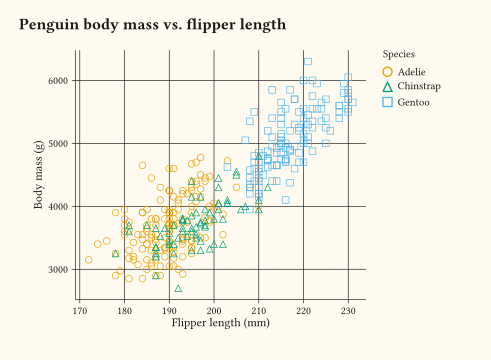
The reliable fix when a figure must read in black and white is a second, non-colour channel: map the grouping variable to shape: and/or linetype: as well as colour:, controlled by scale-shape and scale-linetype. Shape and linetype only stay legible for low-cardinality factors, roughly six levels or fewer.
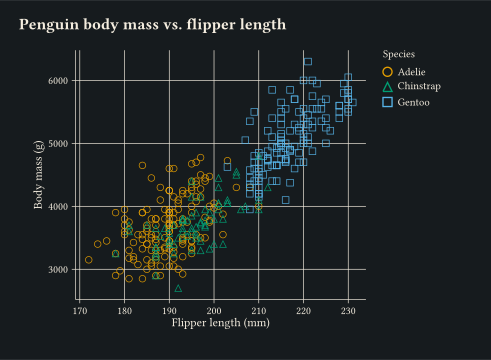
In the example below the colours are still the default Okabe-Ito, but species is also mapped to point shape, so the three groups remain separable with no colour at all.
#plot(
  data: penguins,
  mapping: aes(
    x: "flipper-len",
    y: "body-mass",
    colour: "species",
    shape: "species",
  ),
  layers: (geom-point(size: 2.5pt),),
  labs: labs(
    title: "Penguin body mass vs. flipper length",
    x: "Flipper length (mm)",
    y: "Body mass (g)",
    colour: "Species",
    shape: "Species",
  ),
  width: 12cm,
  height: 8cm,
)
See also
get-alt-textreads the alt text back off a plot spec, which is useful if you generate plots programmatically and want their descriptions in a manifest or index.