Minimal scatter
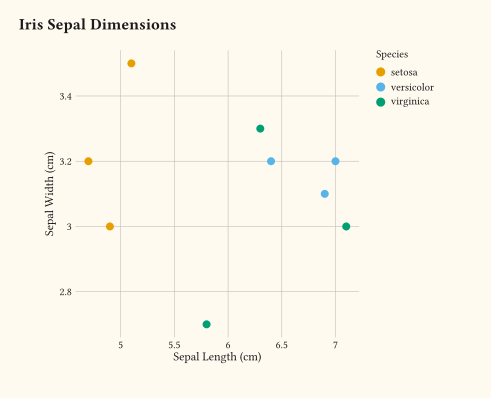
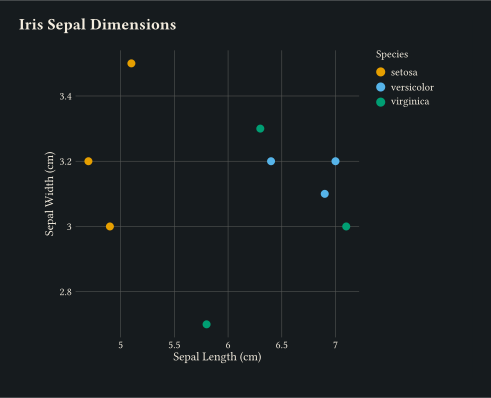
Inline iris sample plotted with a single geom-point layer and continuous x/y scales.
Rendered plots with the source code available for each.
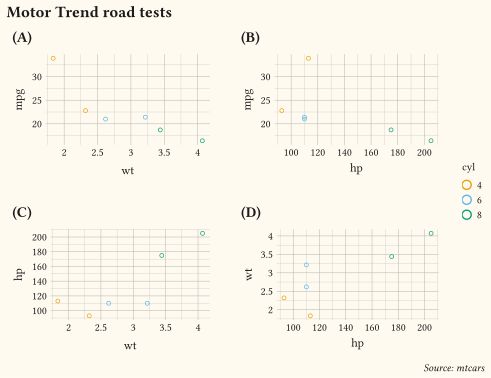
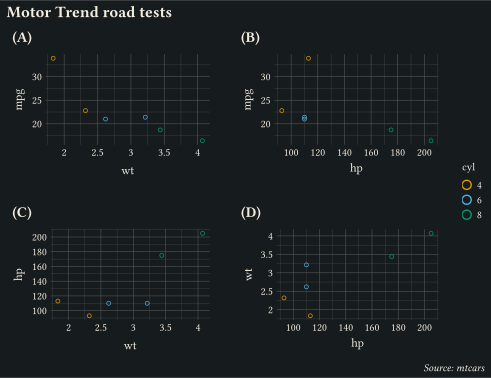
Every example below lives in the examples/ directory of the repository. Click any example to view its source.
Inline iris sample plotted with a single geom-point layer and continuous x/y scales.
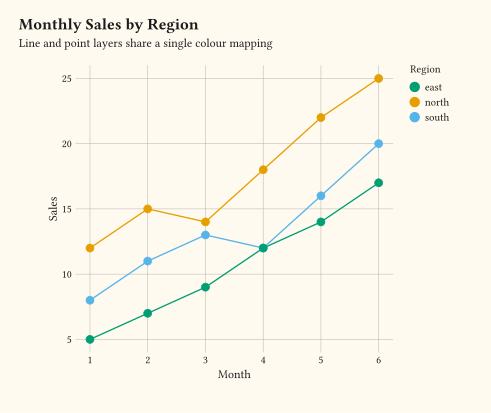
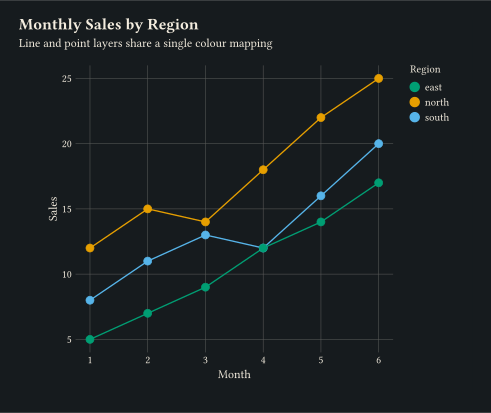
Lines and points share a discrete colour mapping. geom-line + geom-point.
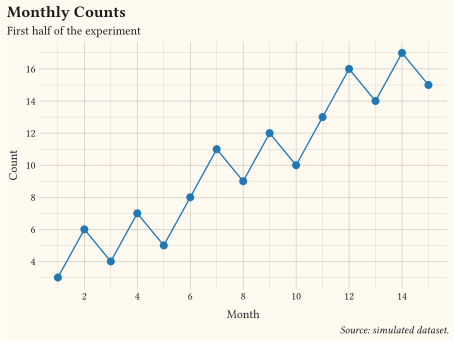
Title, subtitle, caption, and axis labels set in a single labels call.
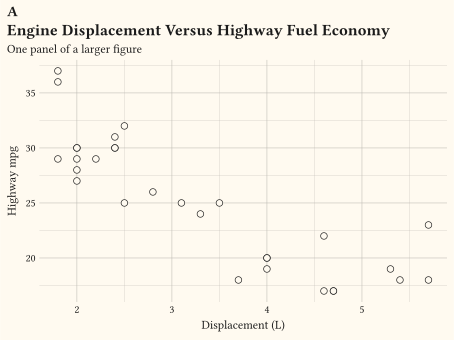
A figure tag drawn above the title via labels tag, styled by the plot-tag theme element.
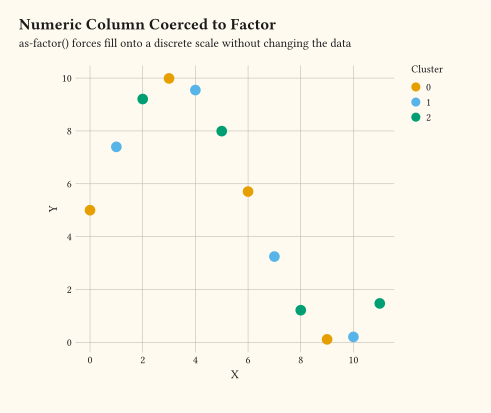
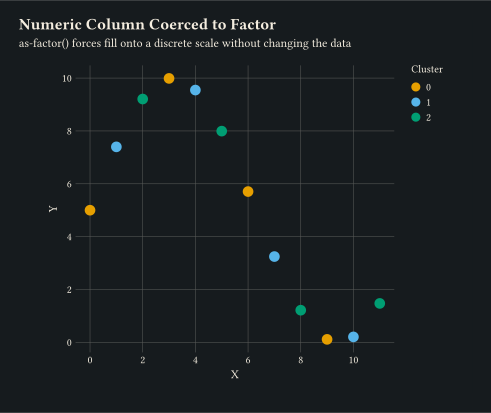
as-factor forces a numeric column to be treated as discrete for the colour aesthetic.
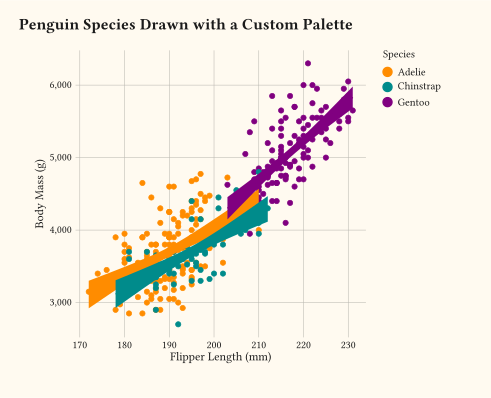
CSV-loaded dataset: flipper length versus body mass, coloured by species.
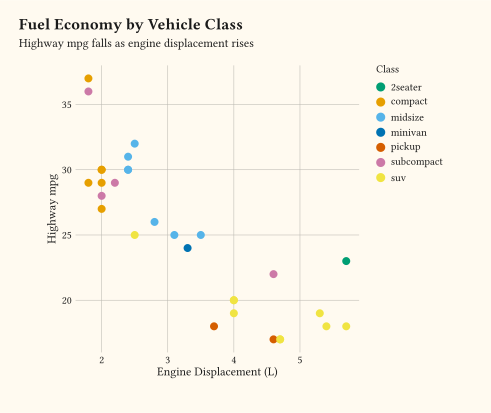
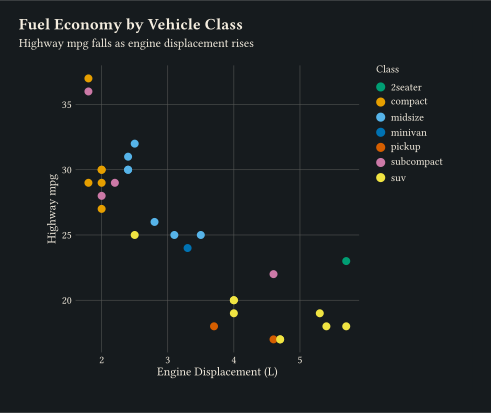
Highway mpg against engine displacement, filled by class — a quick look at the bundled mpg dataset.
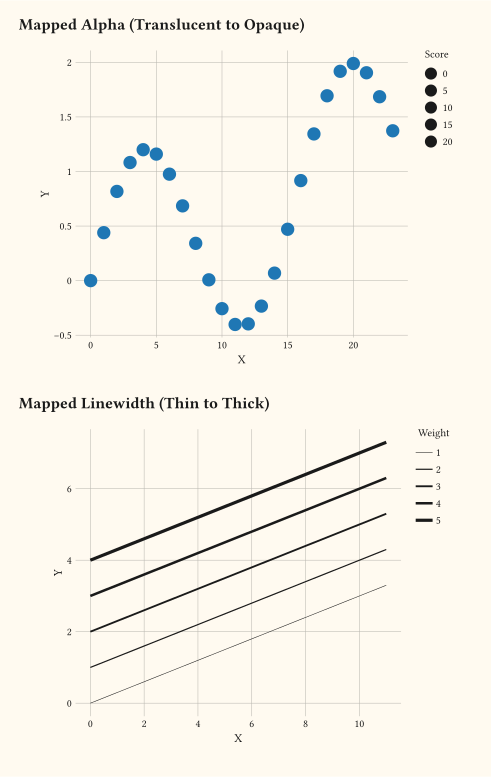
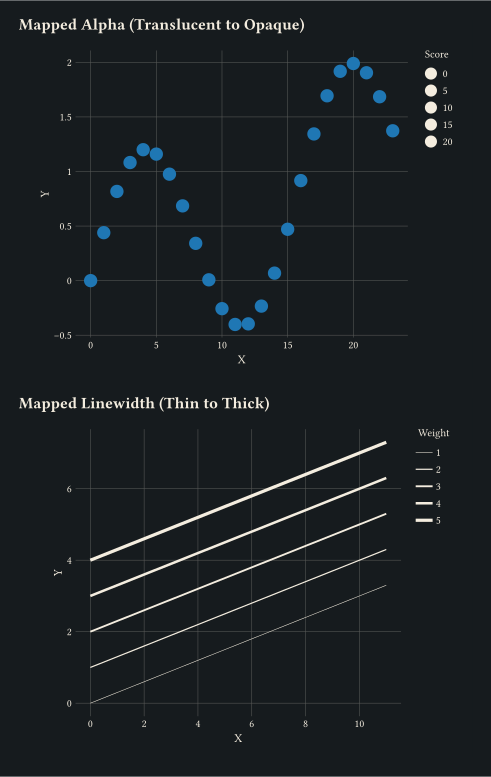
Promoted aesthetics: alpha and linewidth map directly to numeric columns through scale-continuous and scale-continuous.
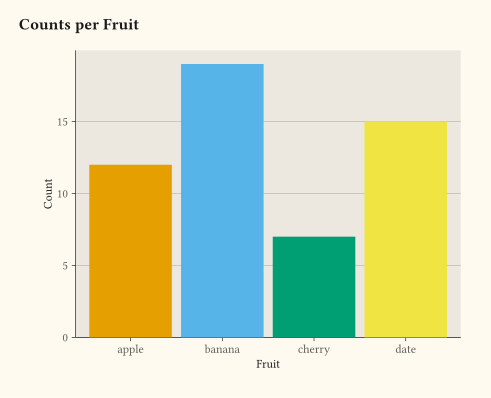
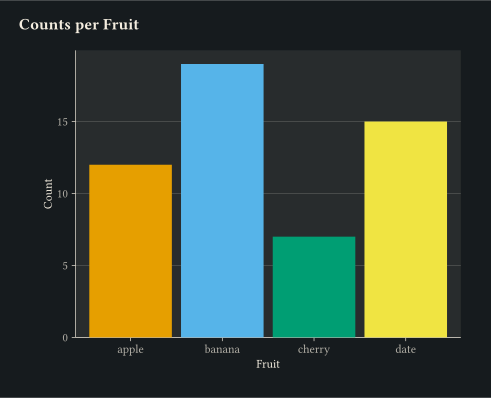
Discrete x counted with geom-bar.
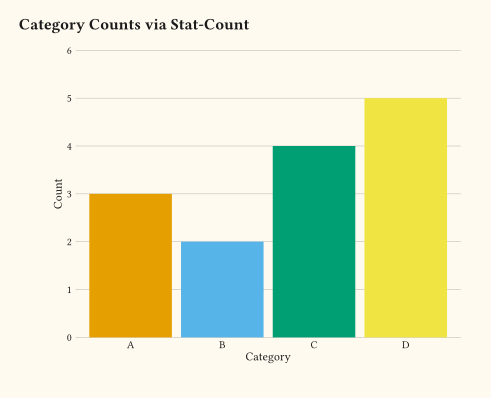
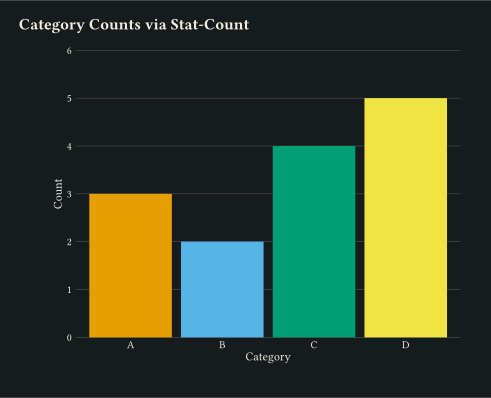
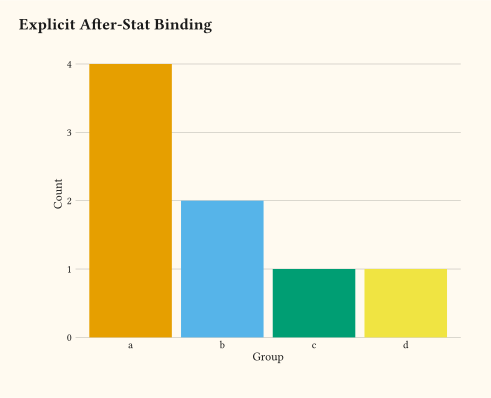
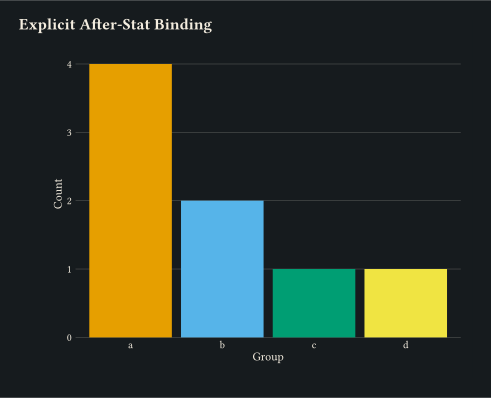
geom-bar backed by stat-count to tally observations per category.
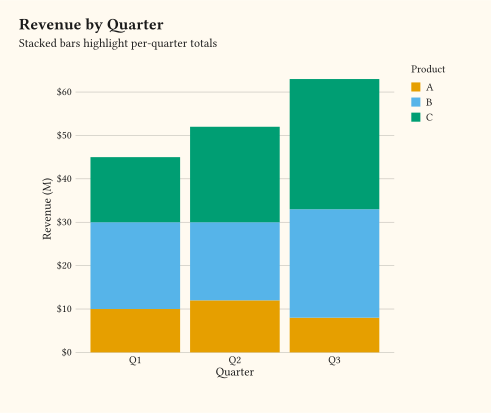
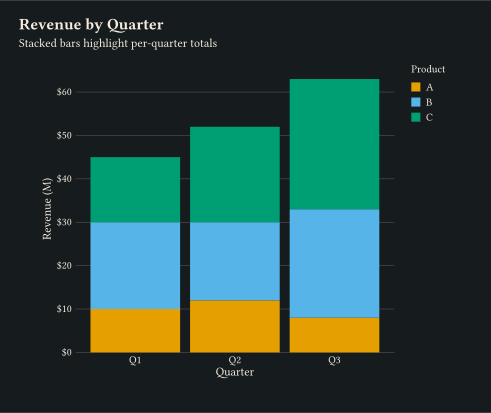
geom-col with position-stack for cumulative totals per group.
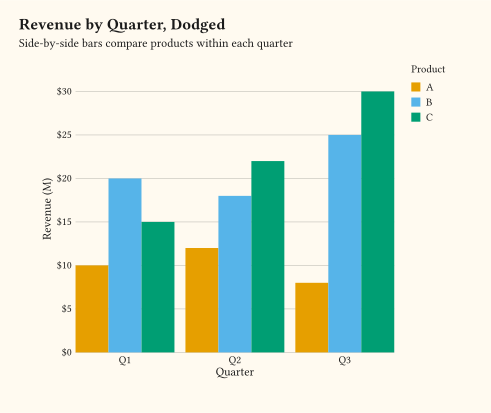
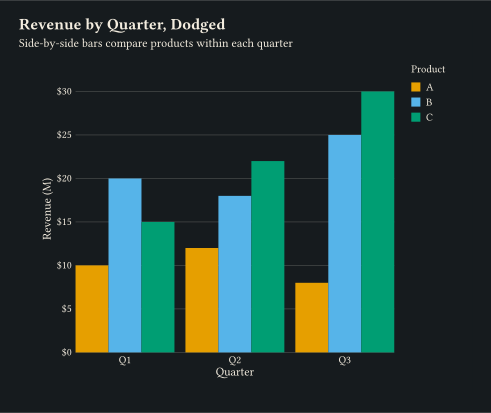
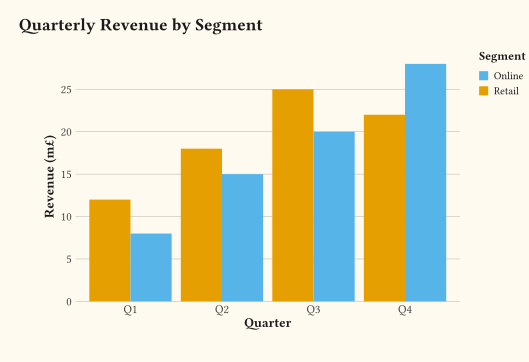
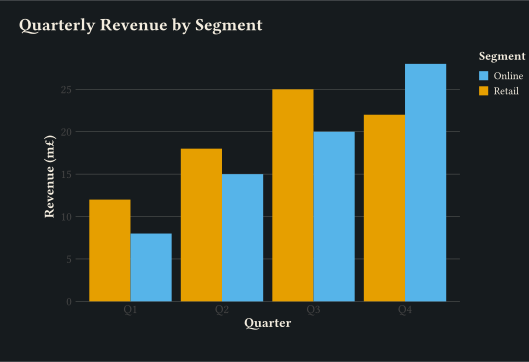
Side-by-side bars per group via position-dodge on geom-col.
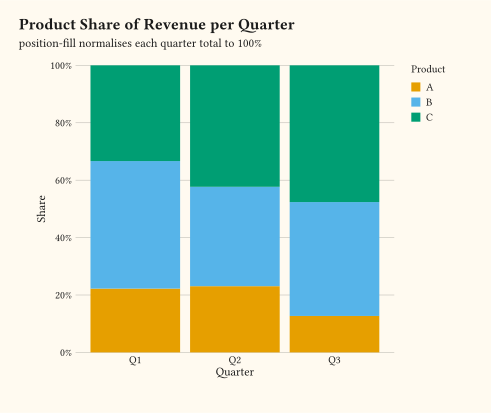
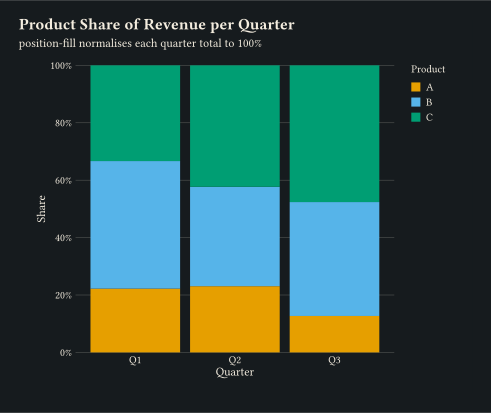
Each column normalised to 1 with position-fill to compare shares.
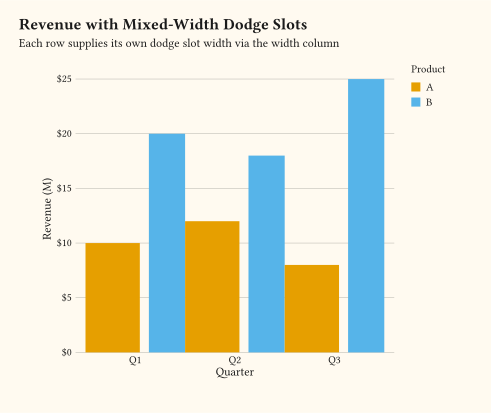
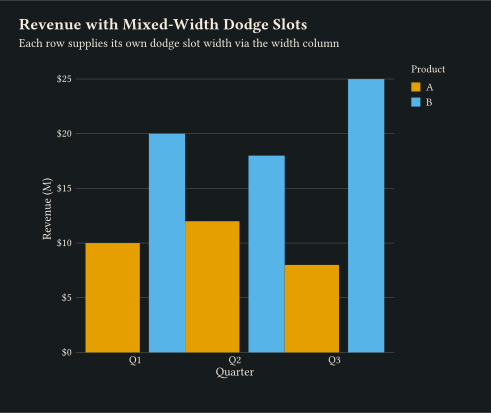
Per-row width column lets position-dodge give one product a wider slot than another.
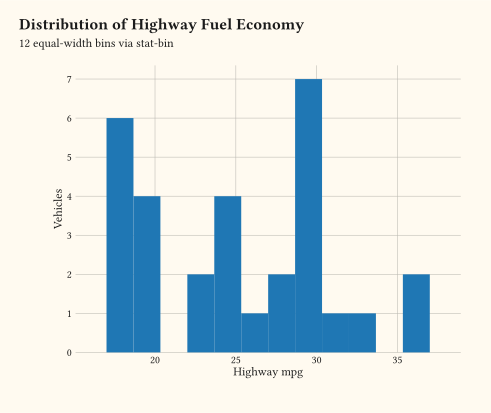
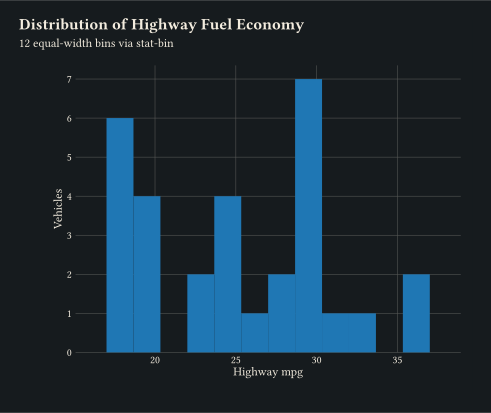
Continuous x binned with stat-bin via geom-histogram.
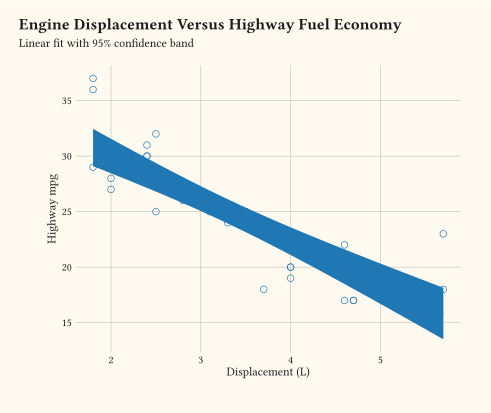
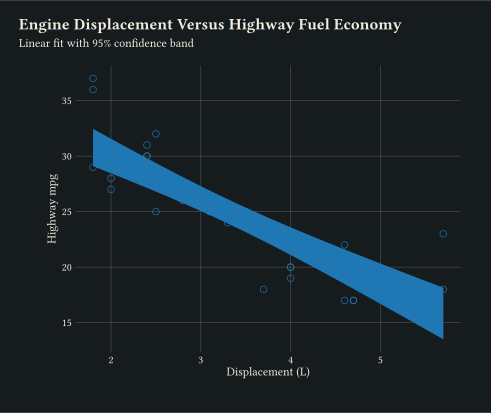
Scatter plus a linear fit with a 95% confidence ribbon from geom-smooth.
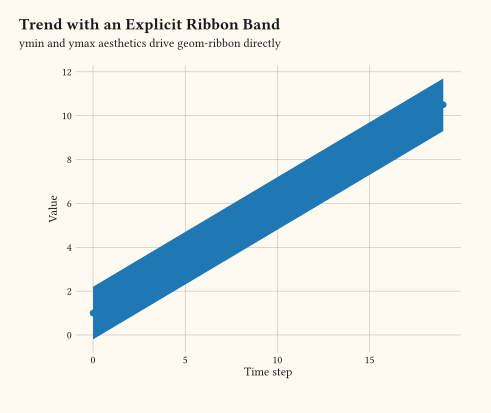
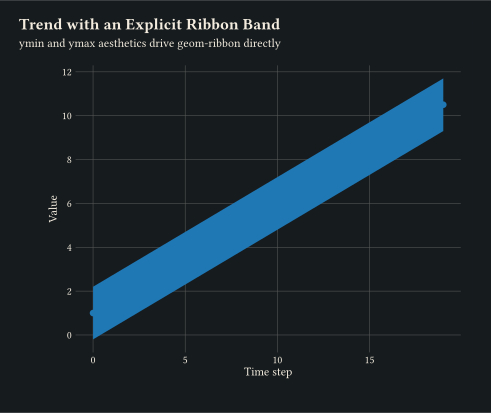
Explicit ymin / ymax aesthetics drive geom-ribbon around a fitted line.
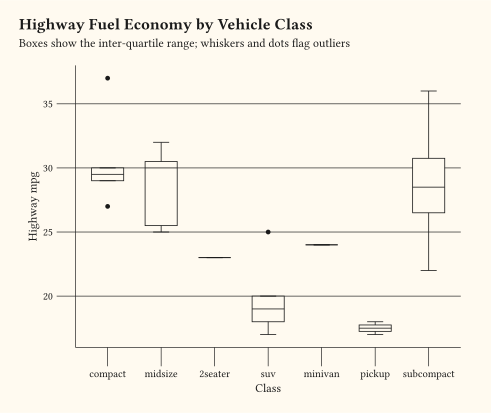
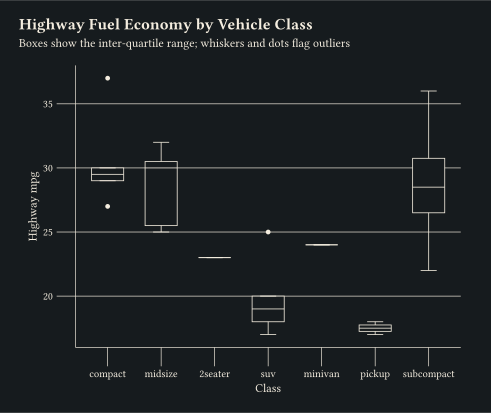
stat-boxplot reduces each group to a five-number summary; geom-boxplot draws the Tukey box.
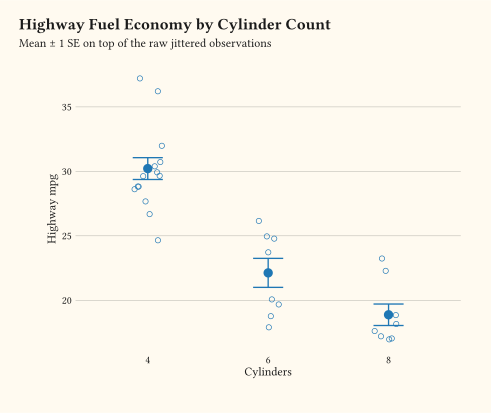
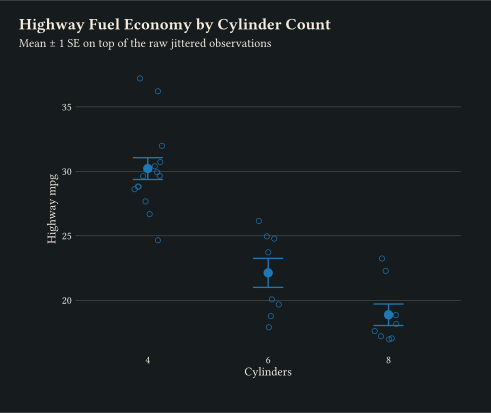
Per-x summary statistic via stat-summary, layered over the raw points.
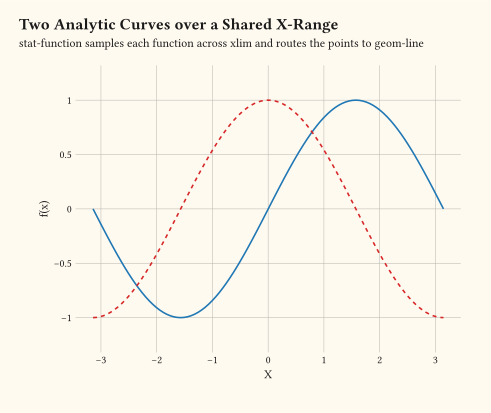
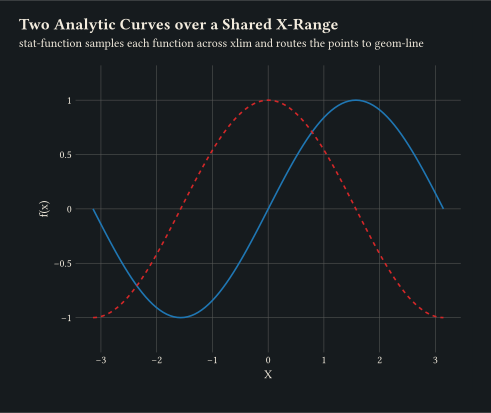
stat-function samples an analytic function over xlim and routes the points to any line geom.
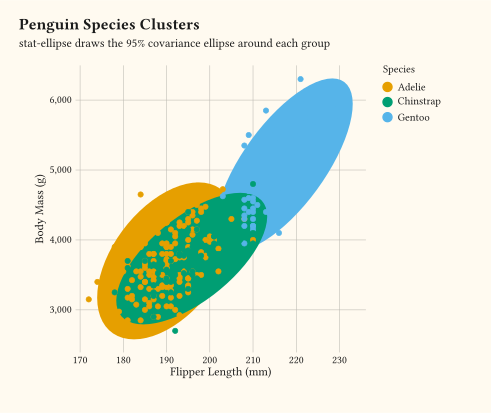
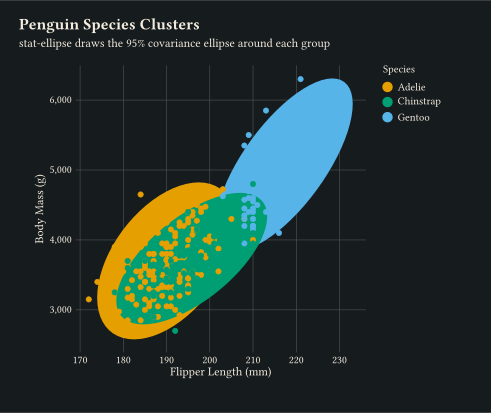
stat-ellipse draws the 95% covariance ellipse around each colour group.
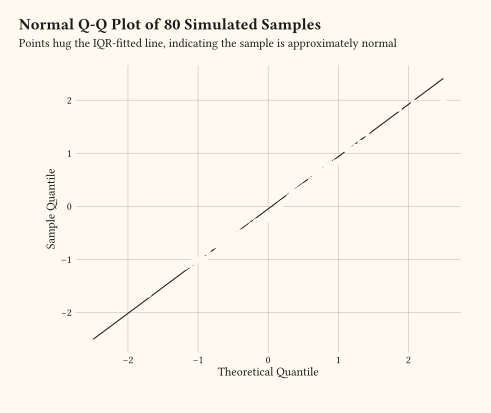
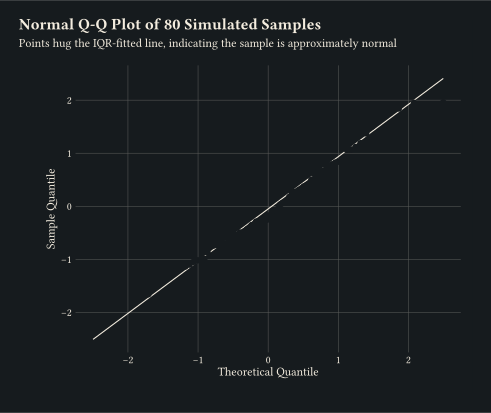
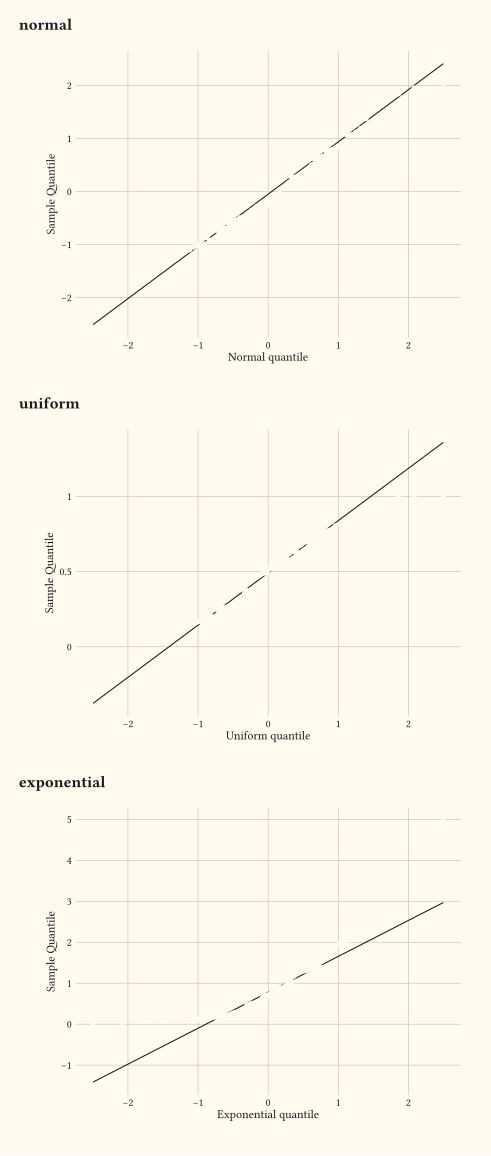
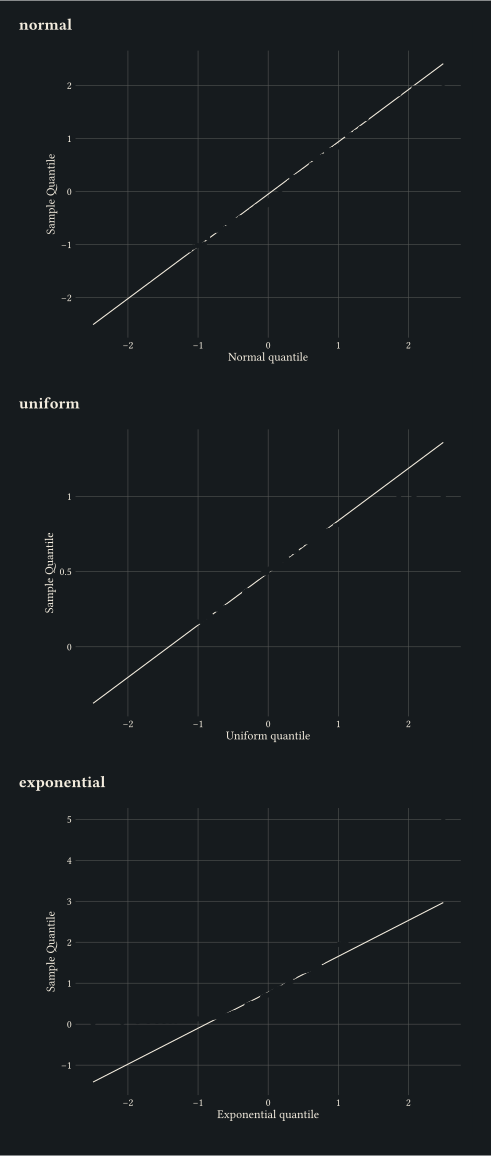
geom-qq with geom-qq-line compares sample quantiles to a theoretical distribution.
Pass distribution: to stat-qq / stat-qq-line to compare against uniform or exponential references.
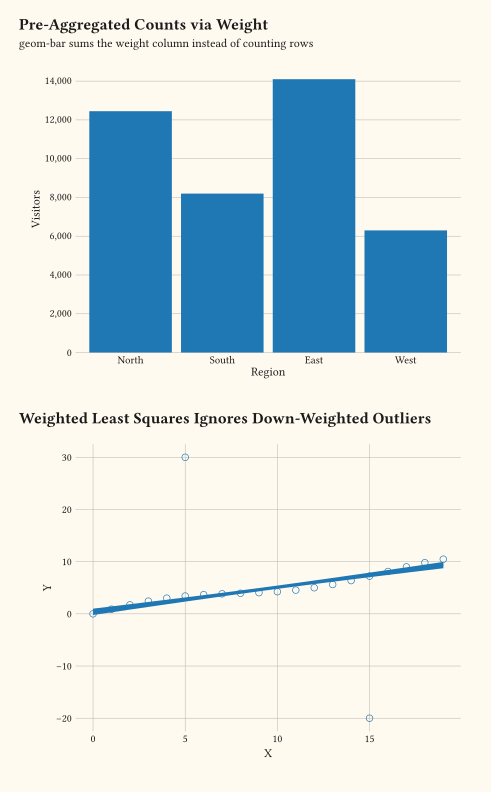
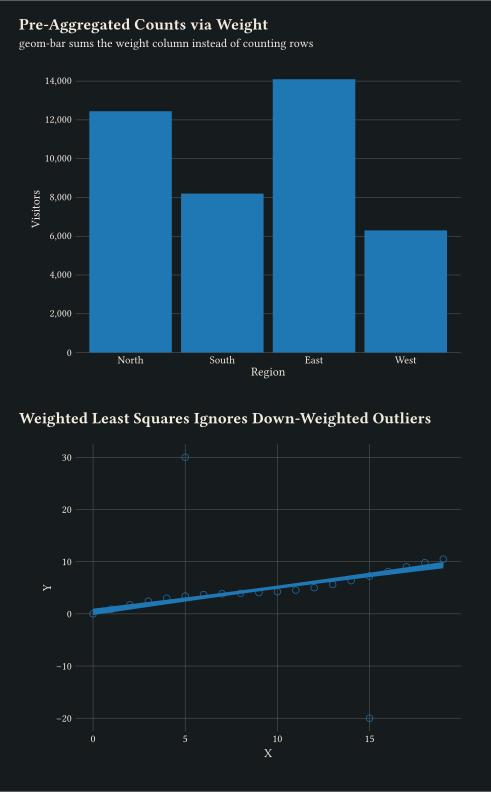
Per-row weights threaded into counts and smoothers: bars sum the weight column, weighted least squares ignores down-weighted outliers.
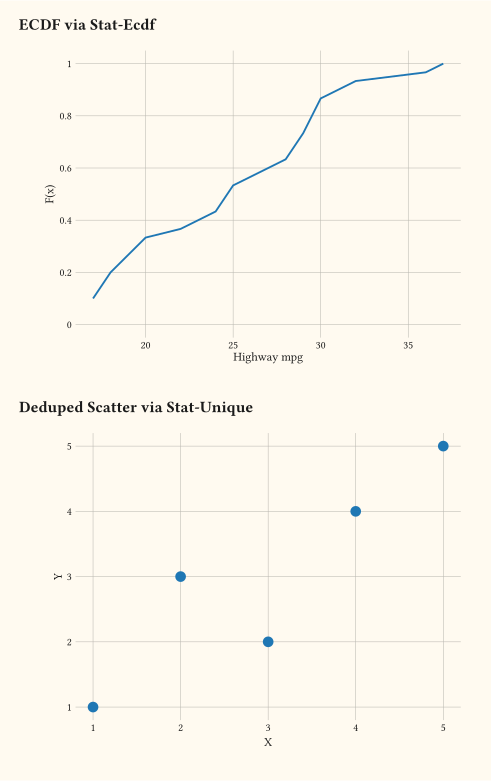
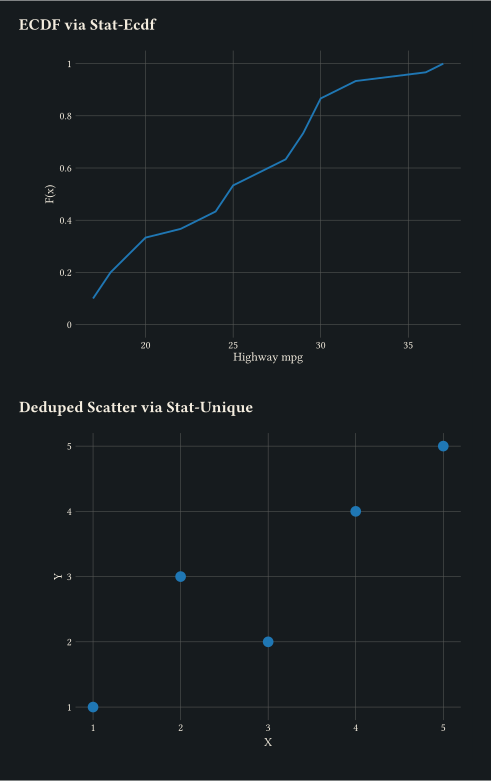
stat-ecdf draws an empirical CDF; stat-unique collapses repeated rows.
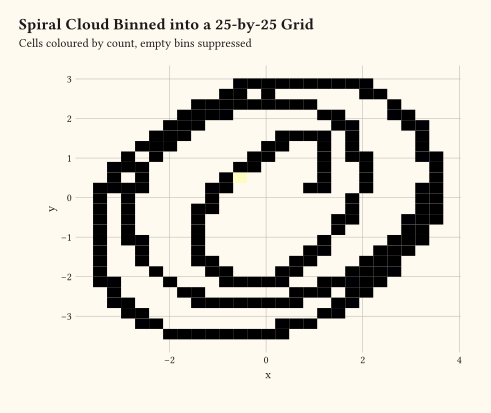
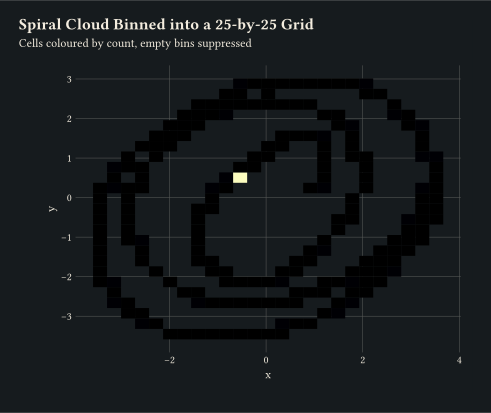
Drop (x, y) samples into a uniform grid via geom-bin-2d; cells colour by count.
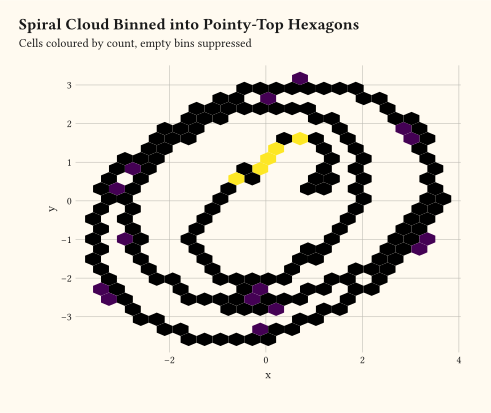
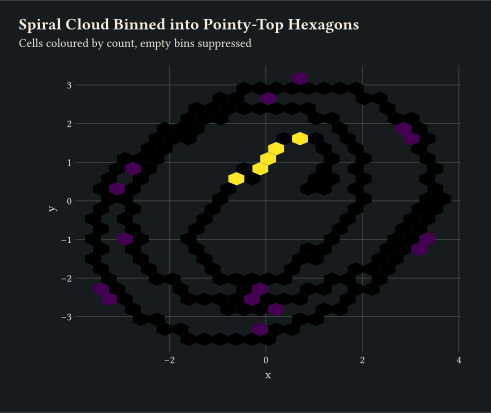
Pointy-top hex cells via geom-hex, the hexagonal counterpart to geom-bin-2d.
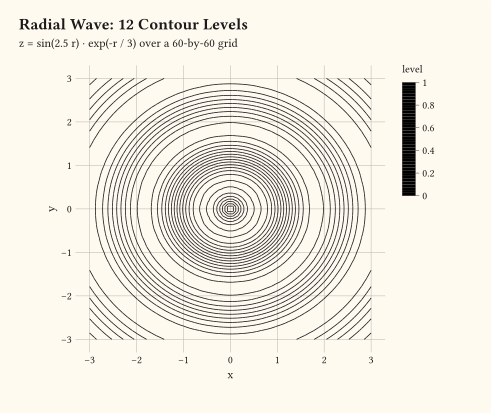
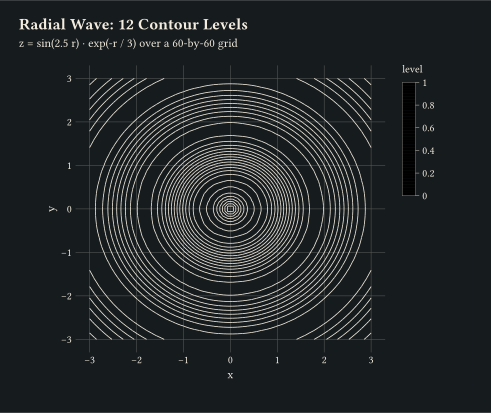
Marching-squares iso-lines on a regular (x, y, z) grid via geom-contour.
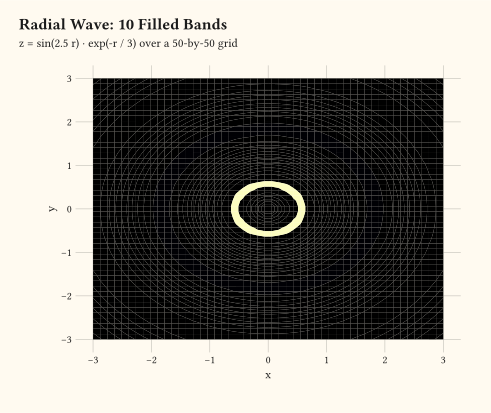
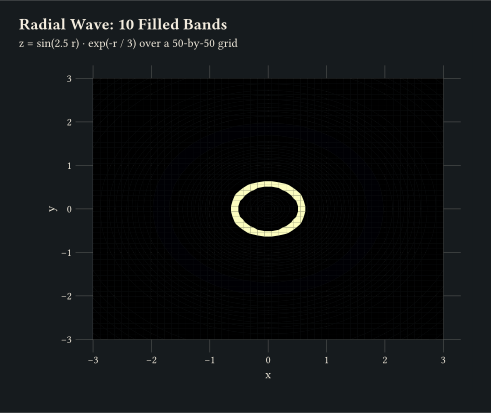
Closed iso-bands between contour levels via geom-contour-filled.
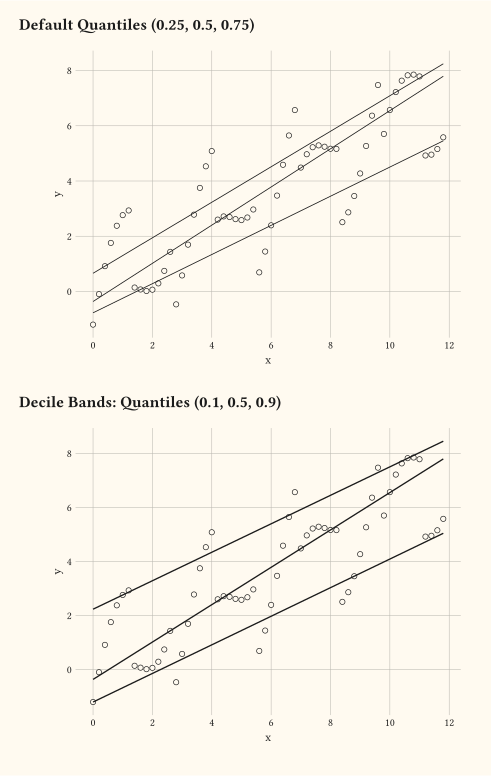
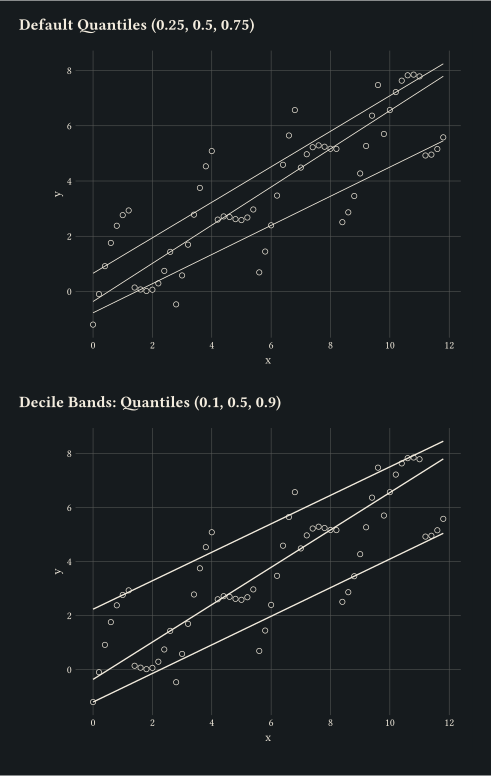
Per-tau quantile regression curves via geom-quantile.
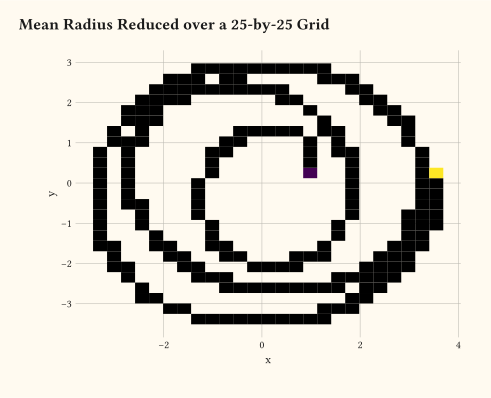
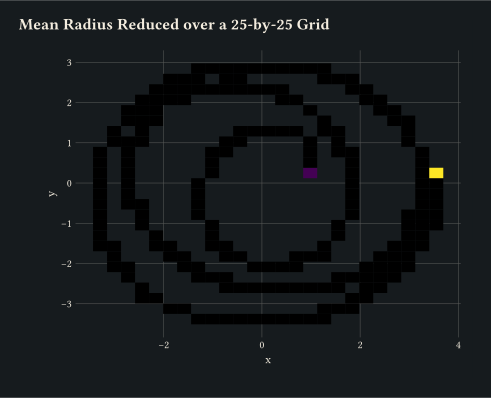
stat-summary-2d reduces a z aesthetic over a grid; cells colour by the mean rather than the count.
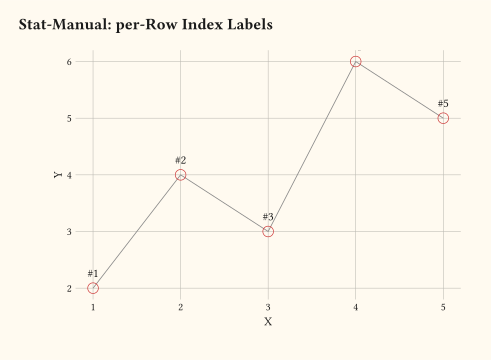
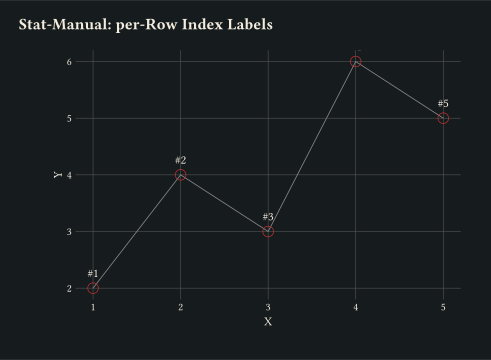
Splice a user closure into the layer pipeline via stat-manual(fun: ...); here the closure decorates each row with a per-row index used as a text label.
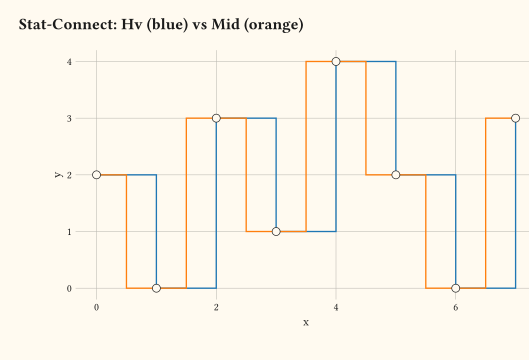
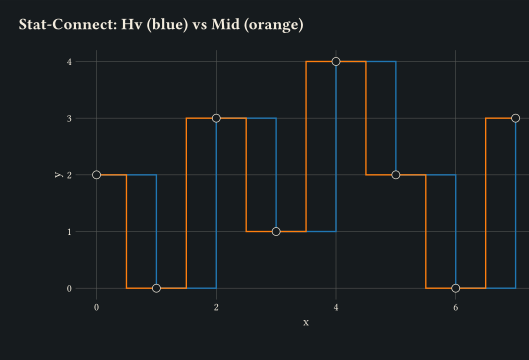
Insert intermediate vertices between consecutive points via stat-connect; two paths overlay the same data with connection: "hv" (step) and connection: "mid" (midpoint corner).
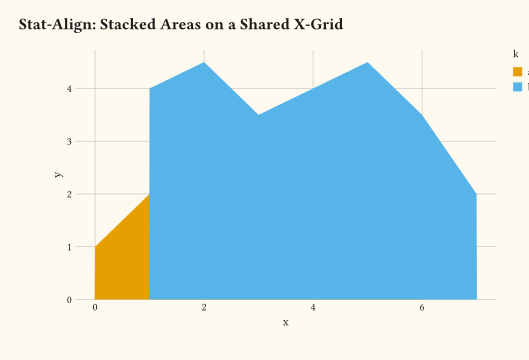
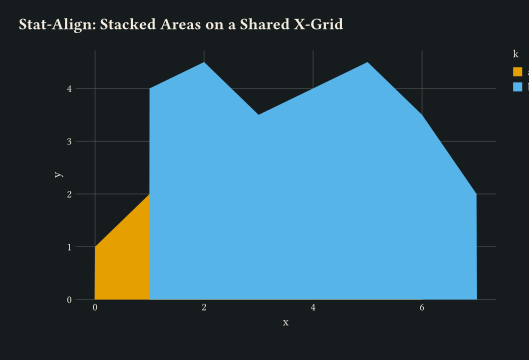
Resample groups onto a shared x-grid via stat-align so stacked geom-area layers join cleanly even when the per-group x values are mismatched.
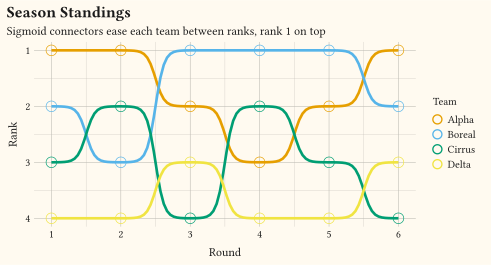
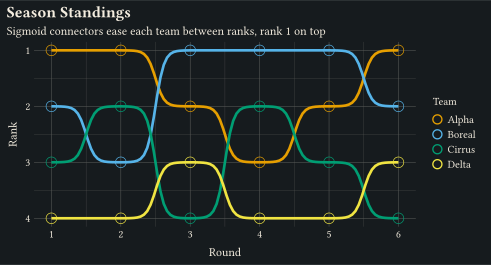
stat-connect(connection: "sigmoid") eases geom-line between ranks with logistic connectors; a reversed y scale puts rank 1 on top.
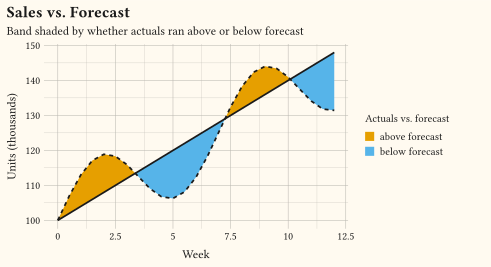
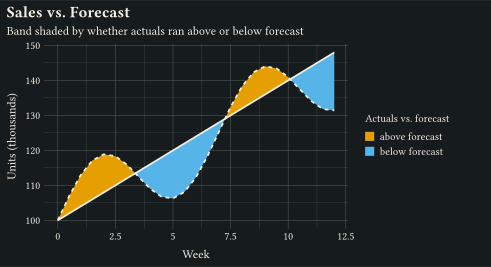
stat-difference shades the geom-ribbon between forecast and actuals by which series leads, splitting the band cleanly at every crossing via fill: after-stat("_sign").
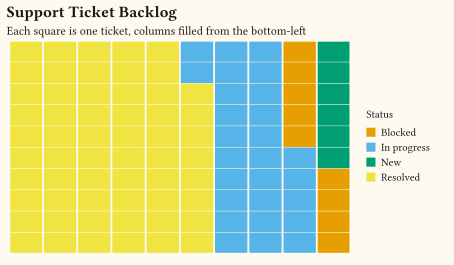
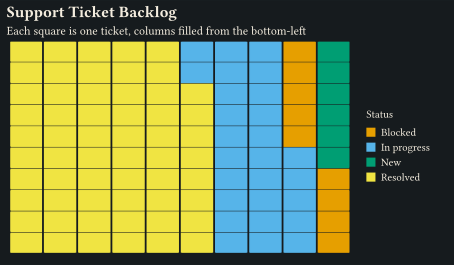
stat-waffle turns per-group counts into unit geom-tile cells, filling the grid column by column from the bottom-left.
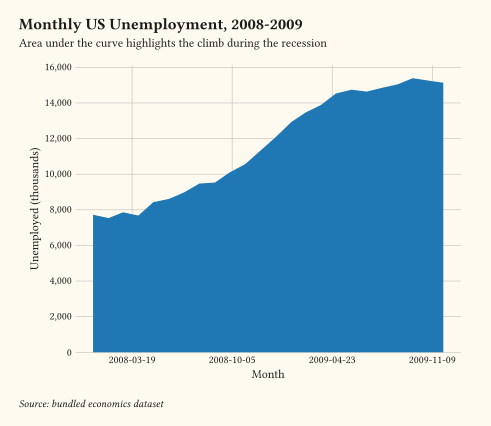
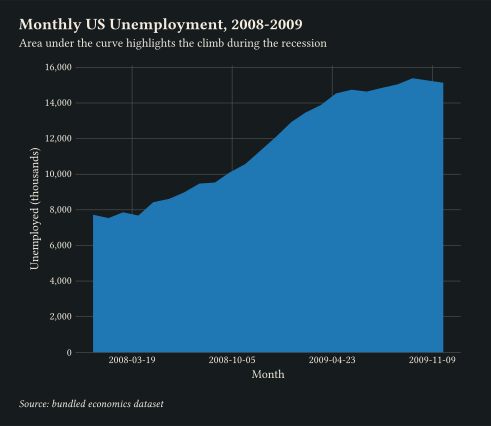
Filled polygon from y = 0 to y, drawn by geom-area.
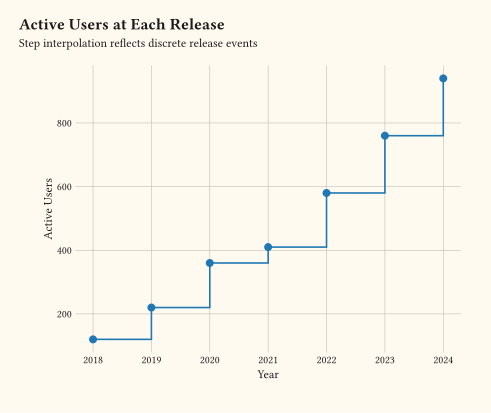
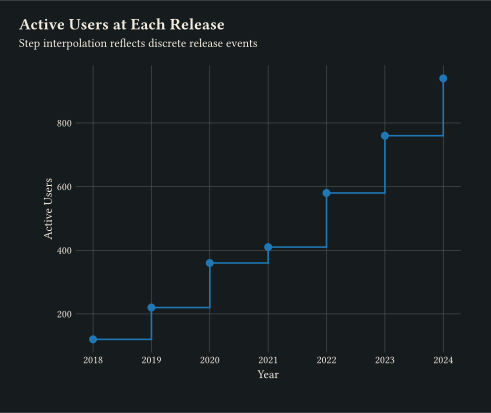
Discrete jumps between consecutive points via geom-step.
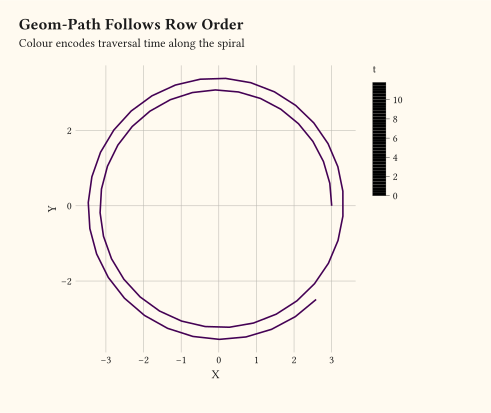
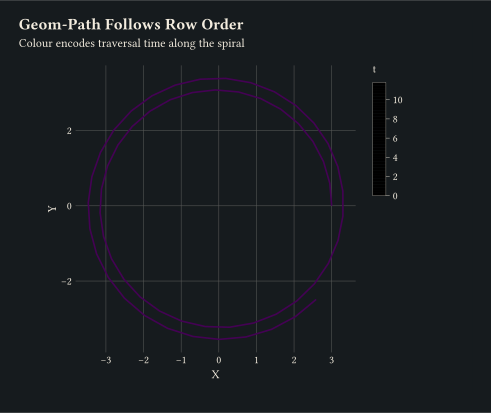
geom-path connects rows in input order, useful for trajectories.
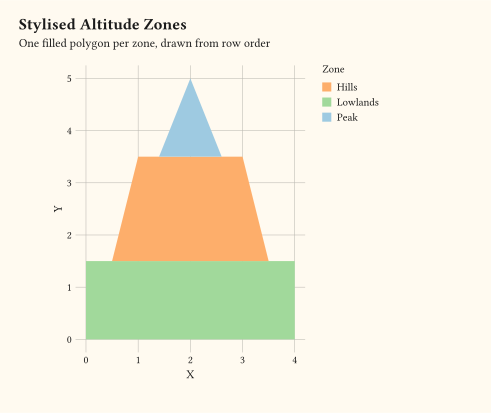
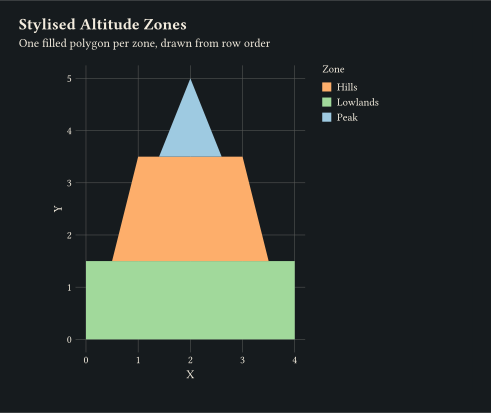
Closed filled regions, one per group, drawn by geom-polygon.
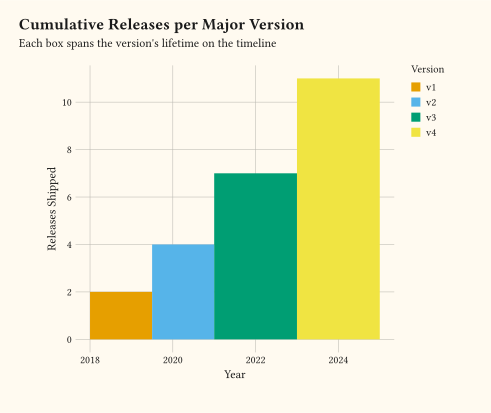
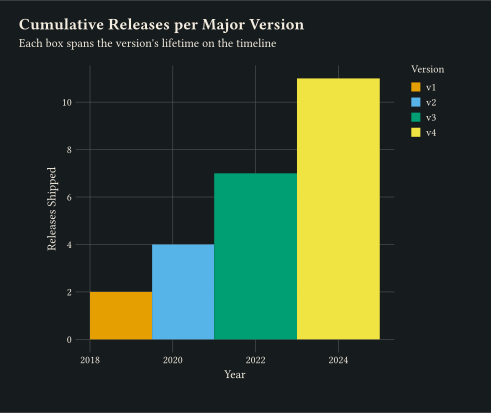
geom-rect draws filled boxes from xmin/xmax/ymin/ymax.
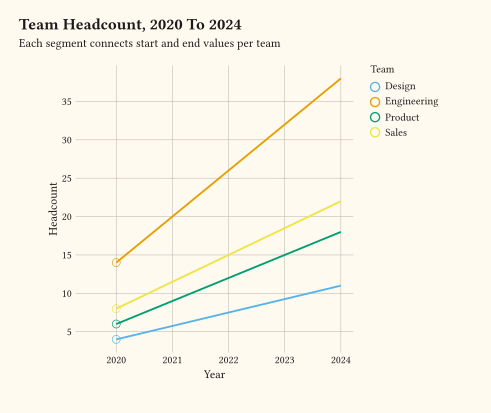
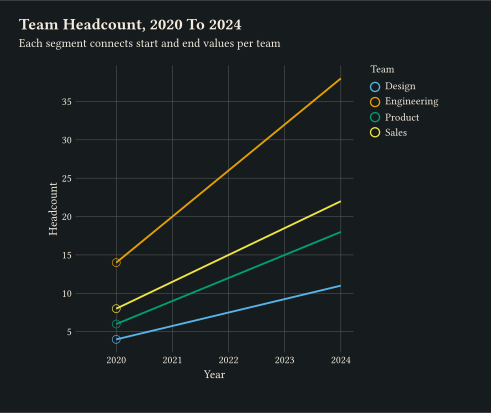
Lines from (x, y) to (xend, yend) via geom-segment.
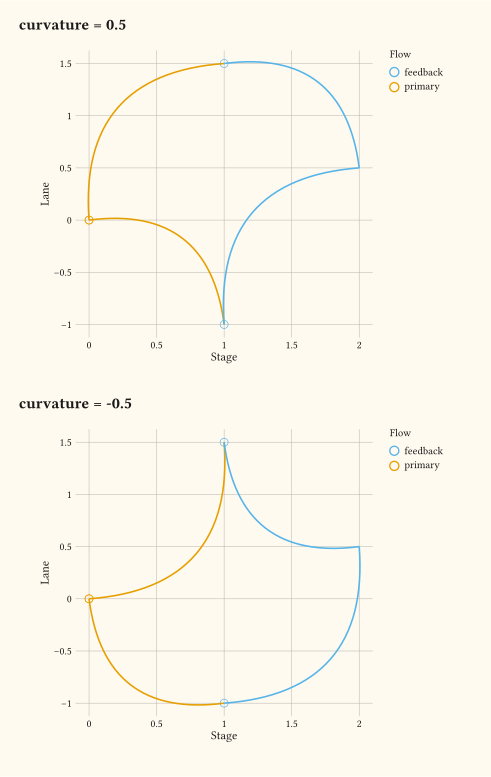
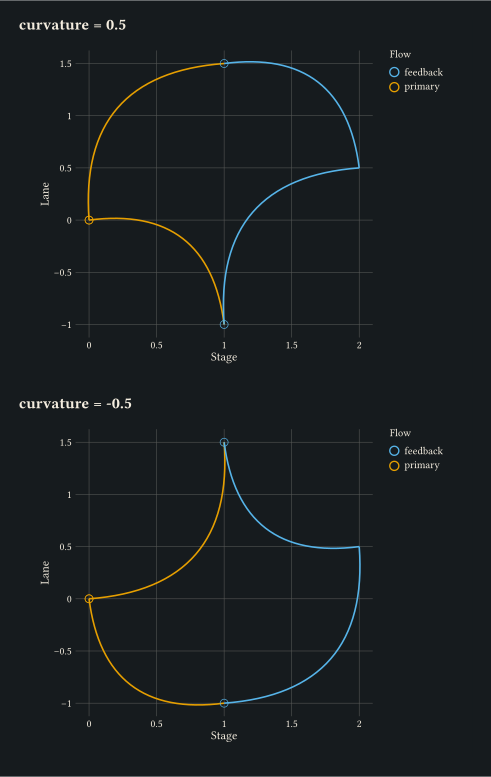
Quadratic bezier connectors with mapped colour via geom-curve.
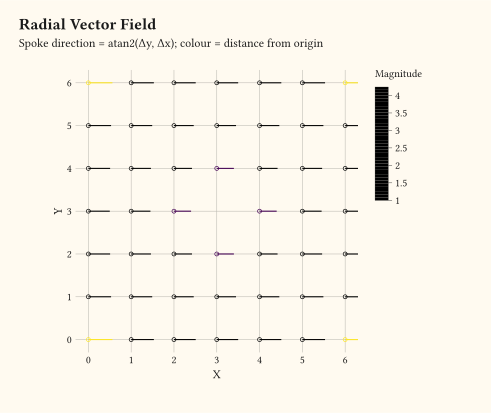
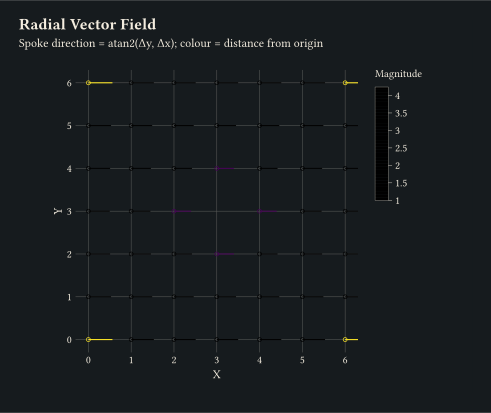
geom-spoke draws short oriented segments from an angle and a radius.
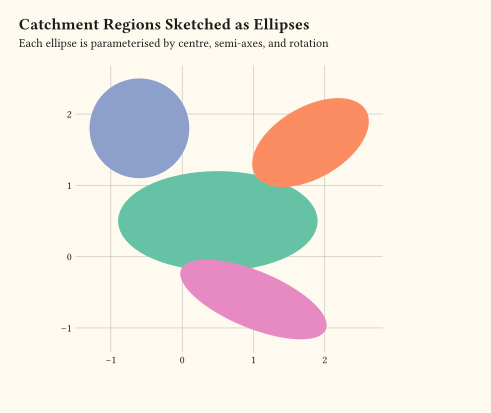
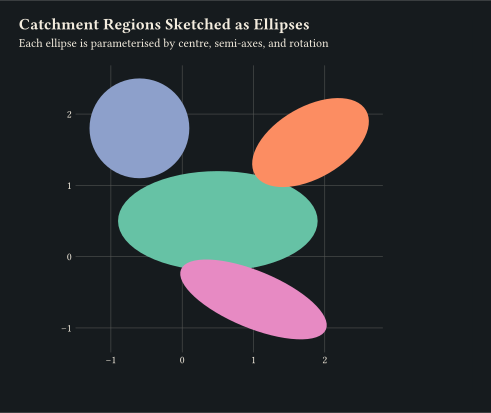
Ellipses with mapped centre, semi-axes, and rotation via geom-ellipse.
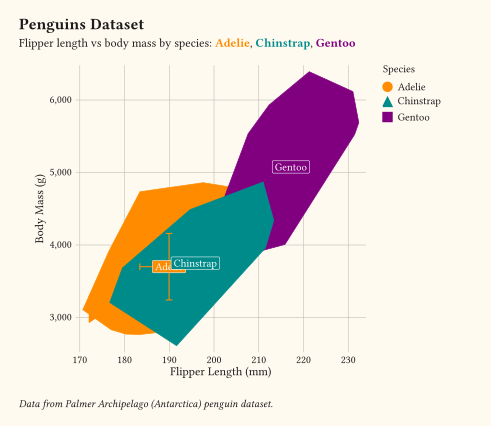
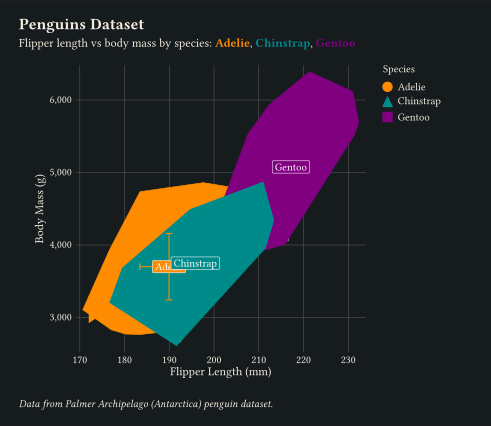
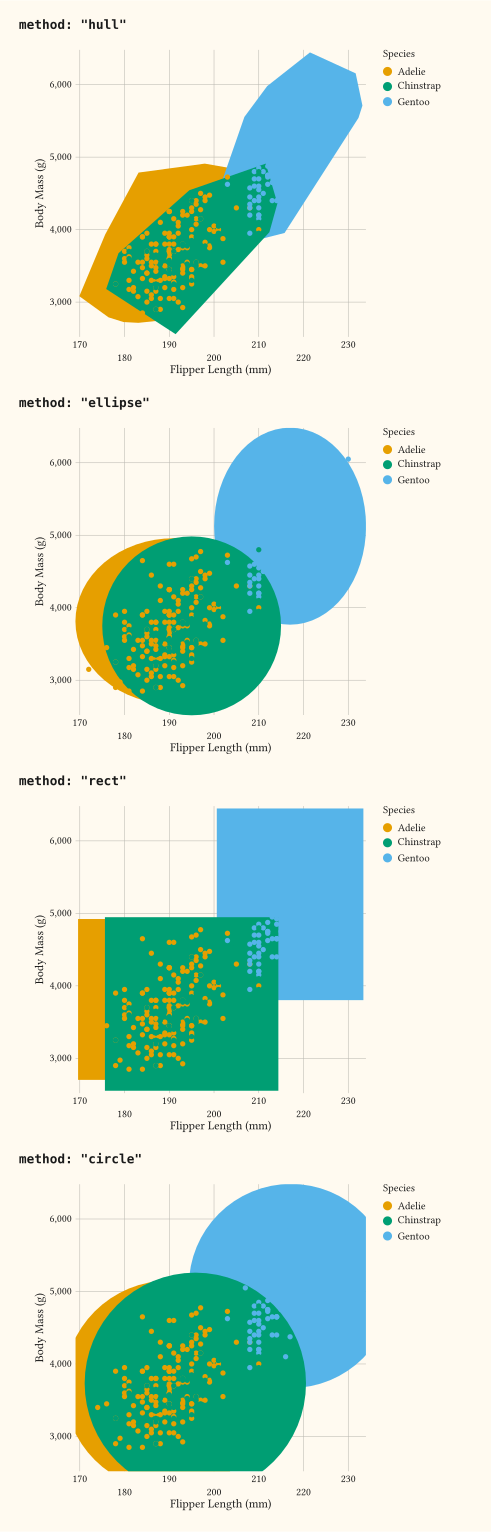
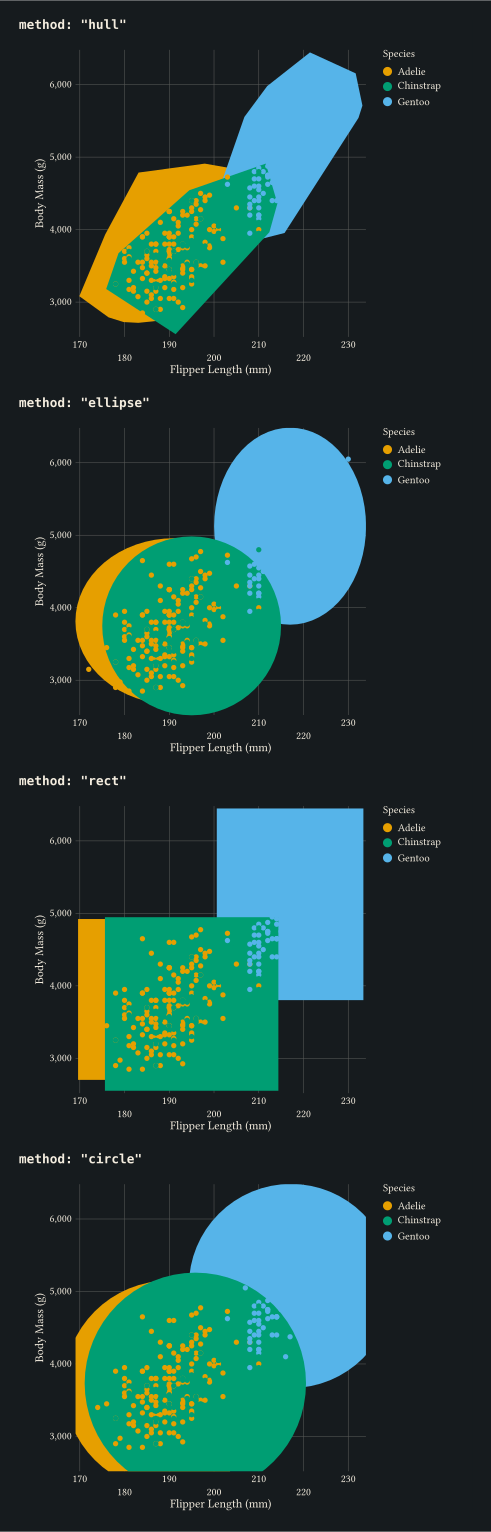
Enclose each cluster with a chosen shape via geom-mark (hull, ellipse, rect, circle).
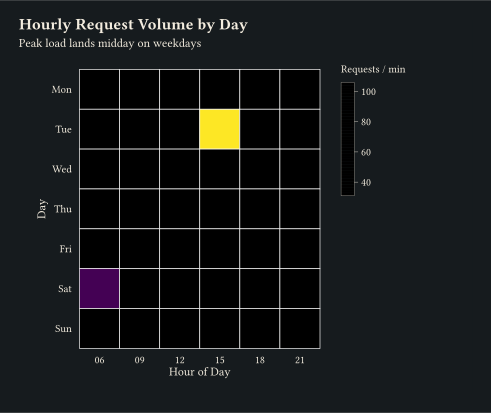
geom-tile renders an x/y/fill grid as filled rectangles.
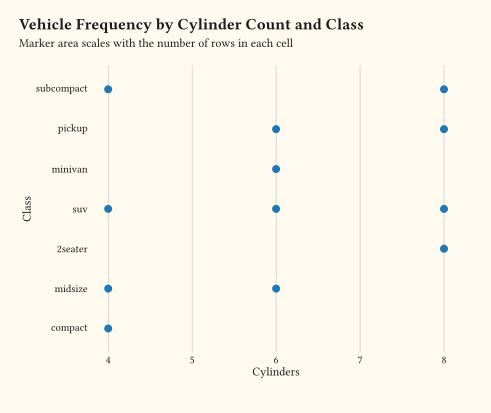
geom-count uses stat-sum to draw one marker per unique (x, y) sized by count.
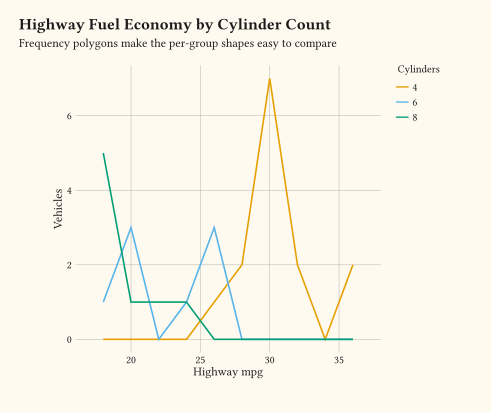
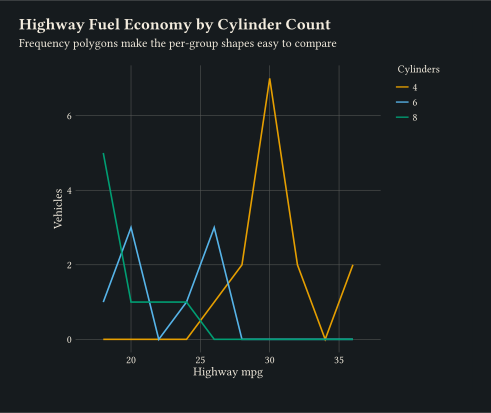
Line through binned counts via geom-freqpoly, the line counterpart to a histogram.
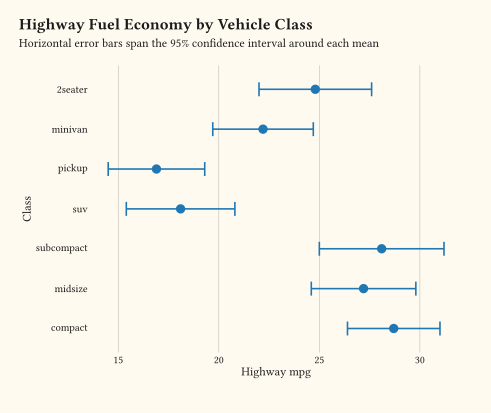
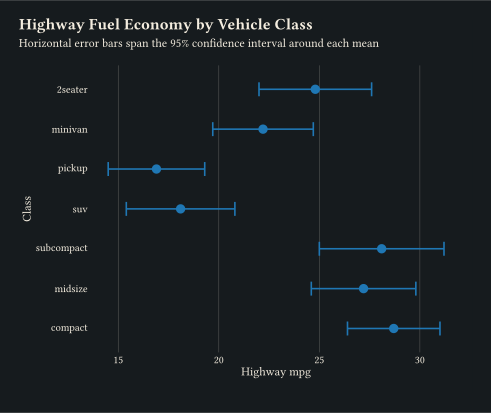
Per-category horizontal ranges via geom-errorbarh with point estimates.
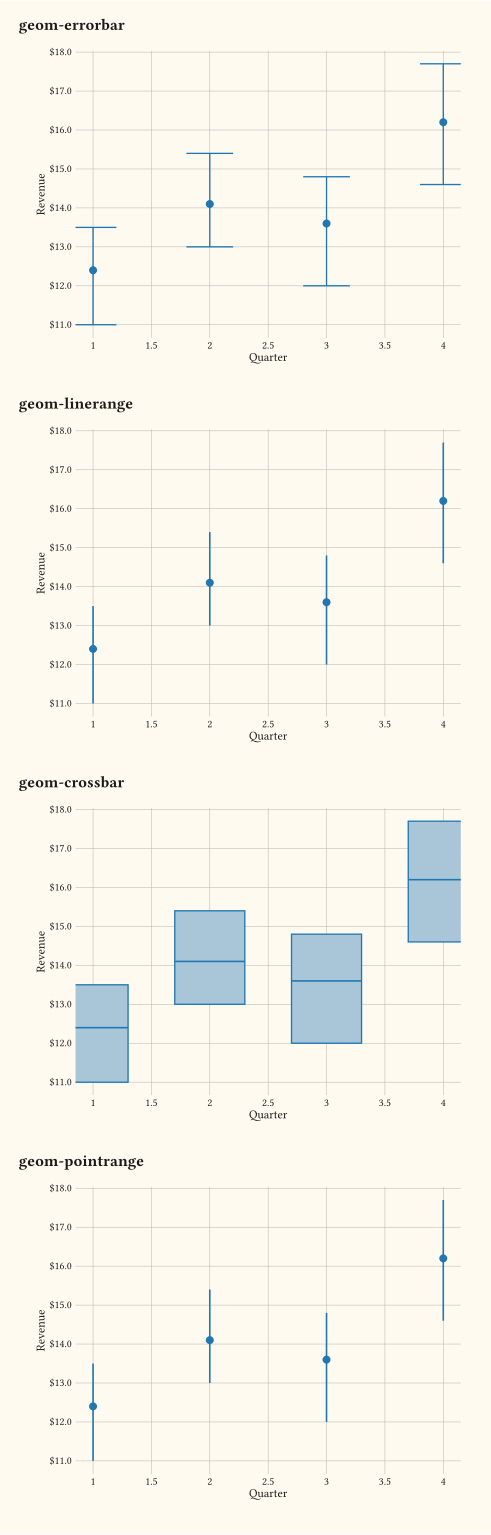
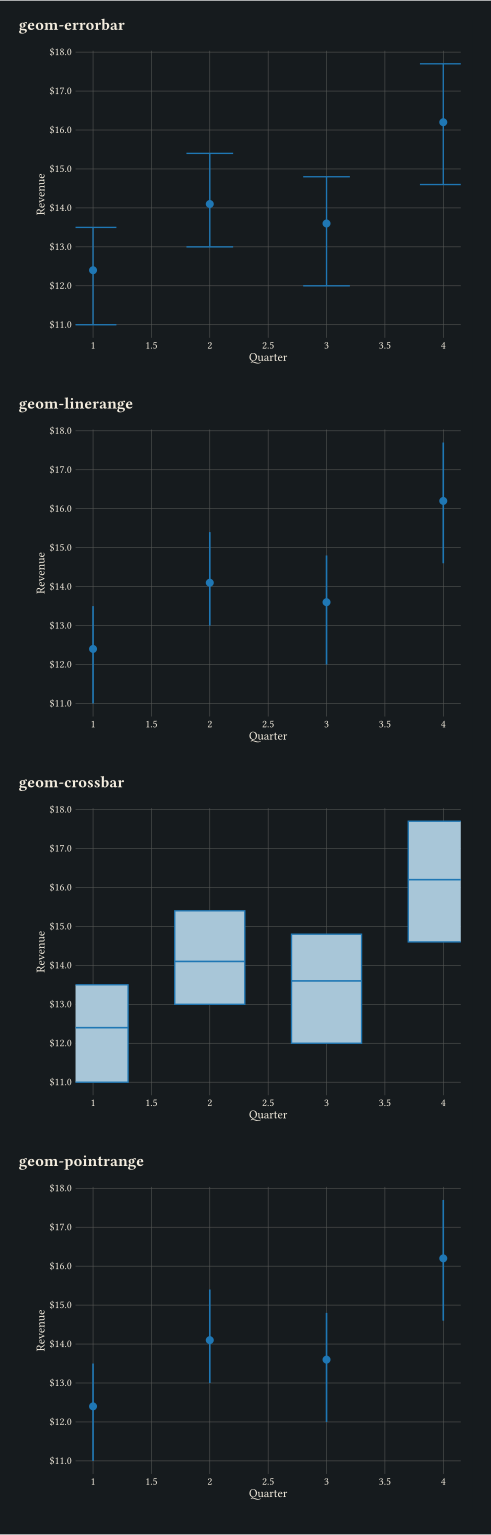
Side-by-side comparison of geom-errorbar, geom-linerange, geom-crossbar, and geom-pointrange.
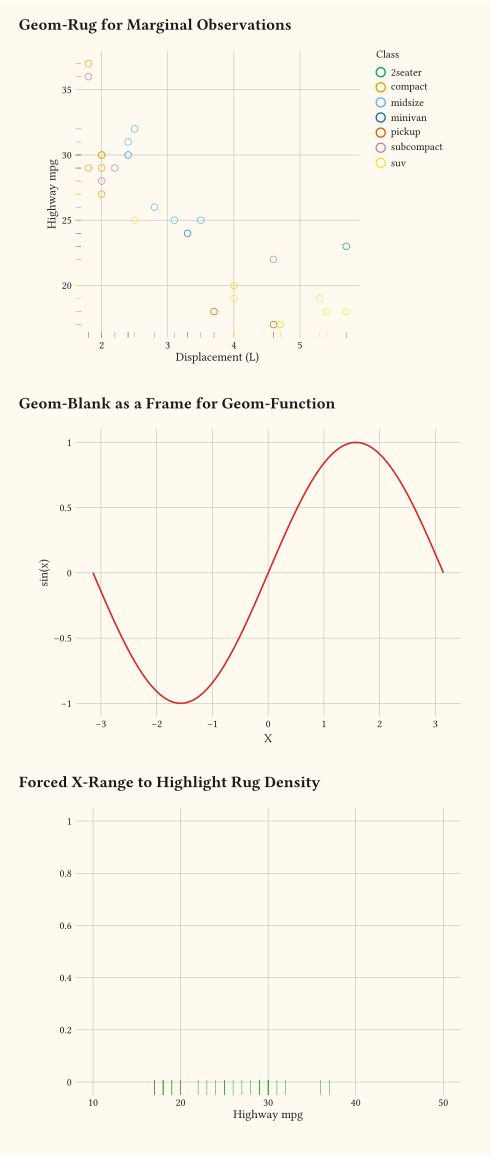
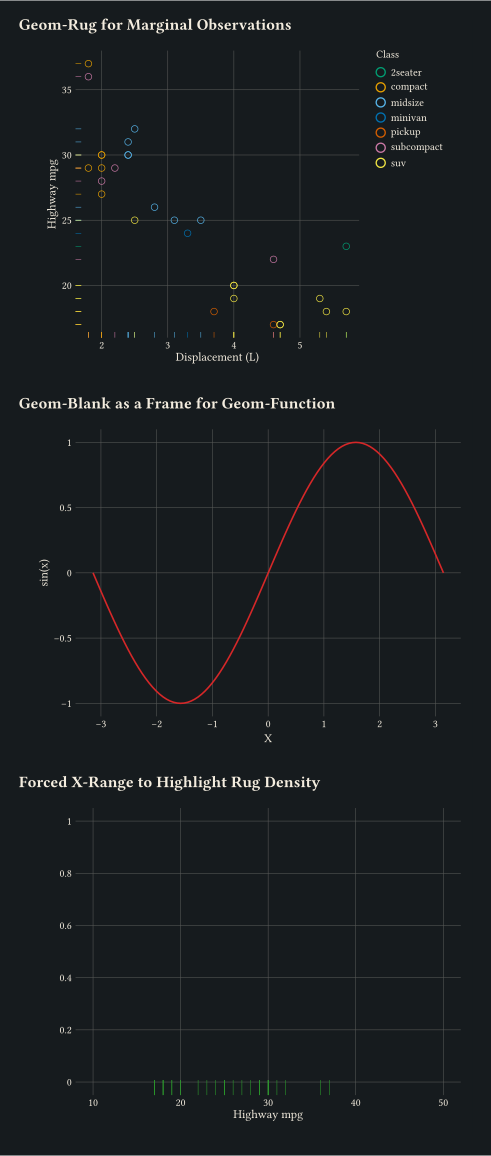
geom-rug for marginal density, geom-blank for empty frames, geom-function for analytic curves.
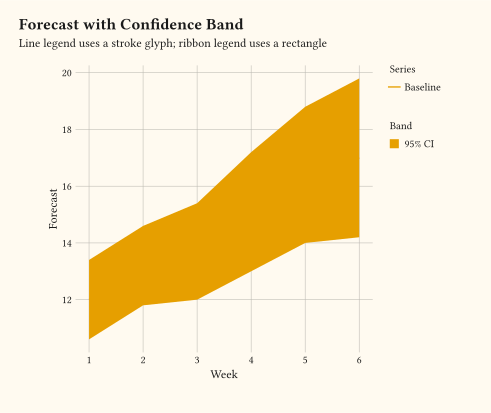
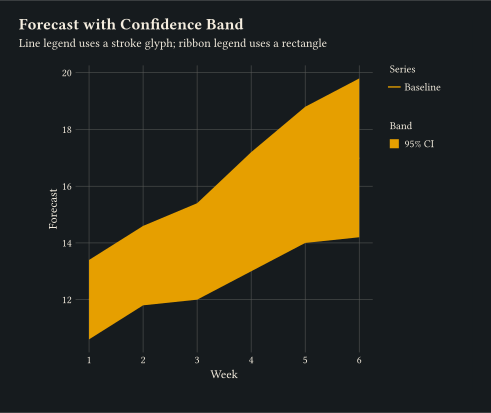
Layer geoms drive different legend glyphs: geom-line renders as a stroke, geom-ribbon as a filled rectangle.
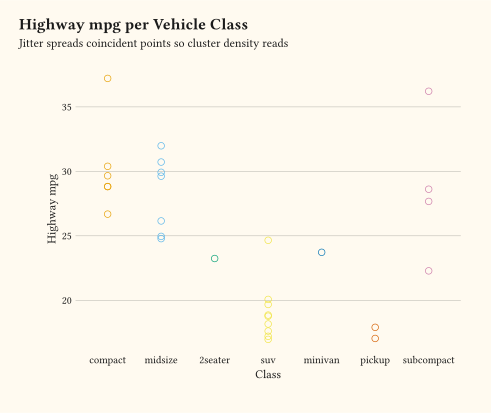
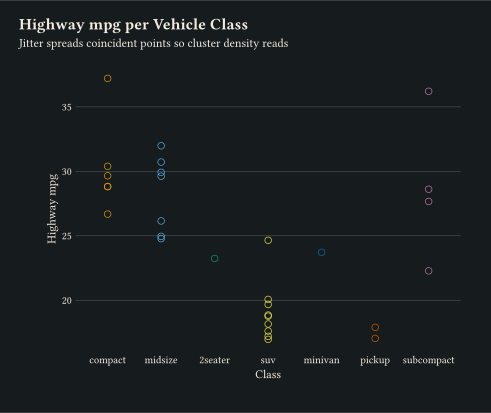
geom-jitter spreads coincident points using position-jitter.
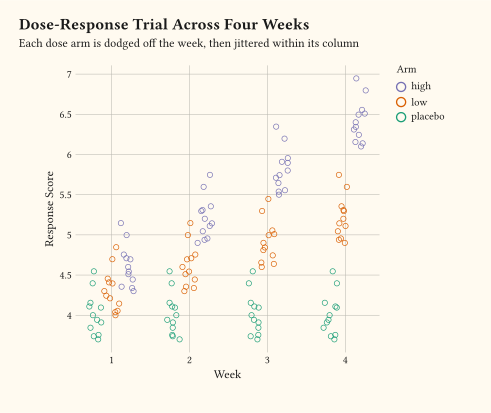
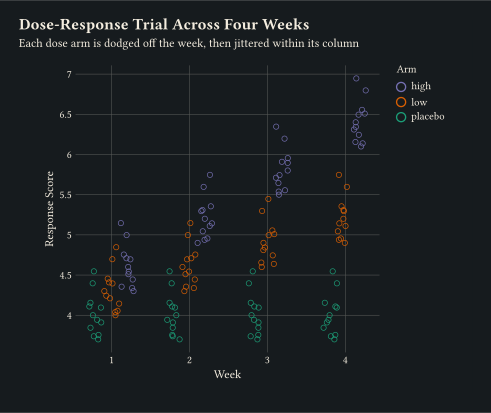
position-jitterdodge dodges colour groups apart, then jitters within each.
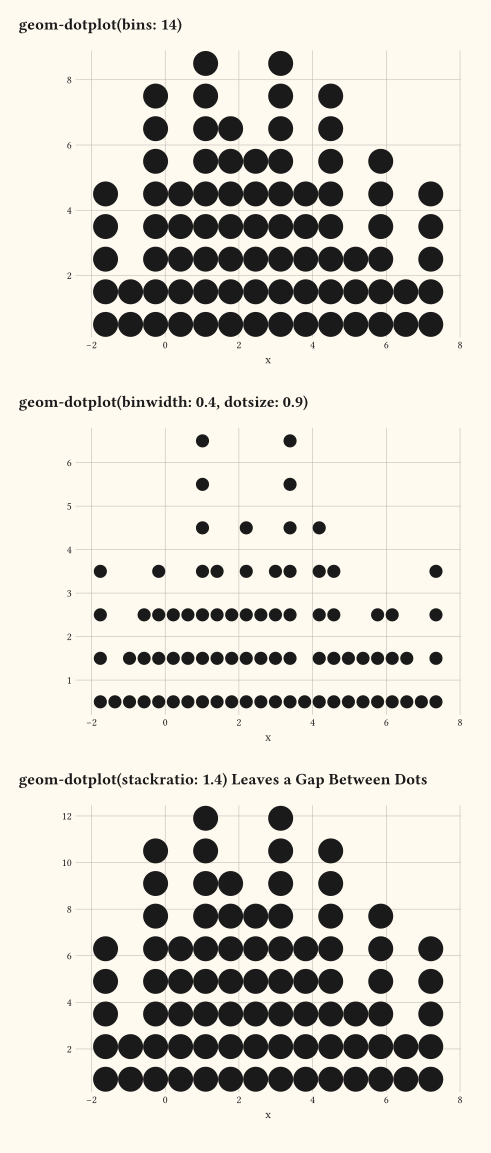
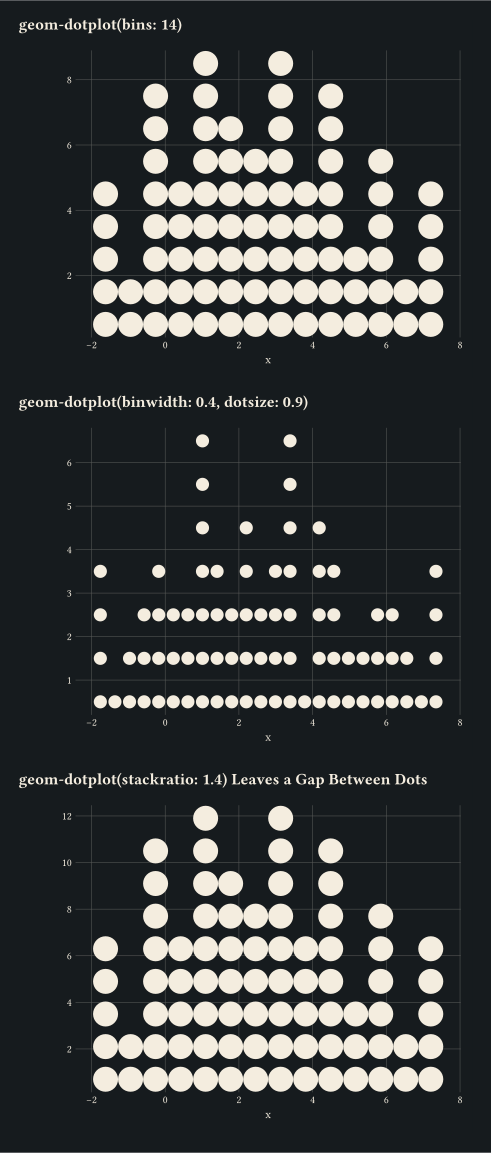
Stacked dots over a binned x distribution via geom-dotplot; tune bins, binwidth, dotsize, and stackratio.
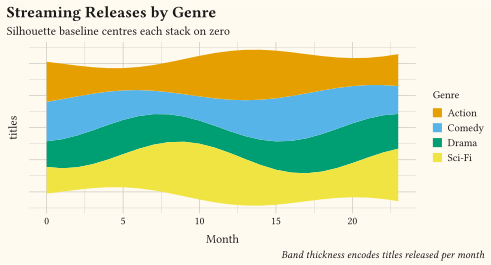
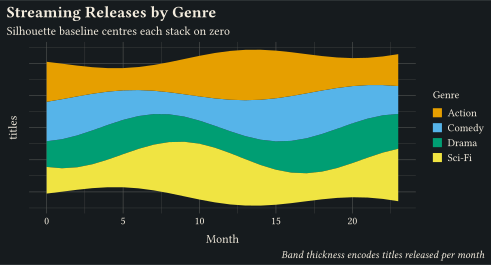
geom-area on a position-stack(offset: "silhouette") baseline centres each stack on zero for the classic ThemeRiver flow.
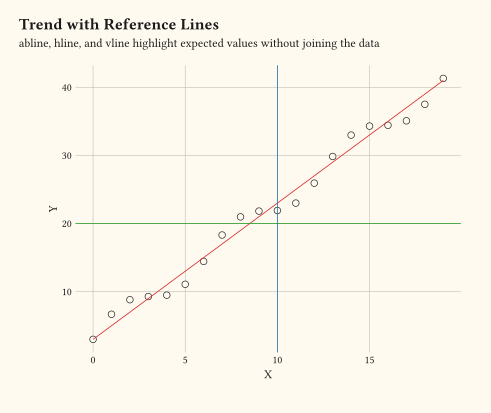
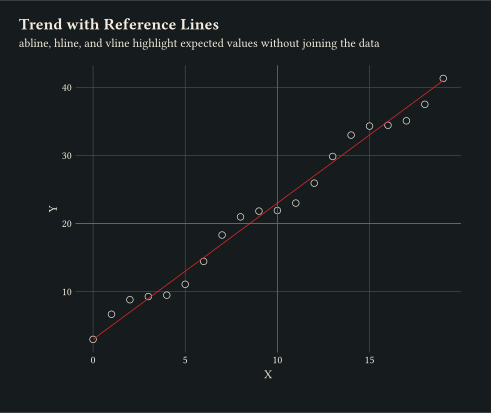
geom-abline, geom-hline, and geom-vline overlaid on a trend.
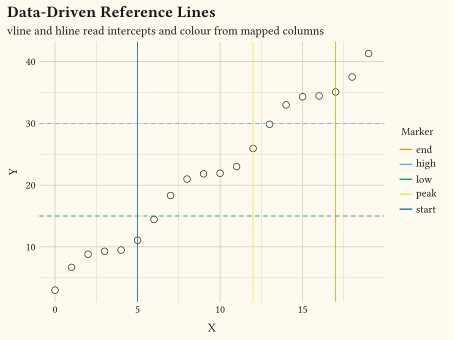
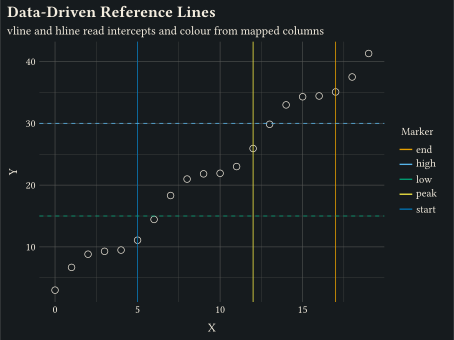
geom-vline and geom-hline read their intercepts and colour from mapped columns via aes.
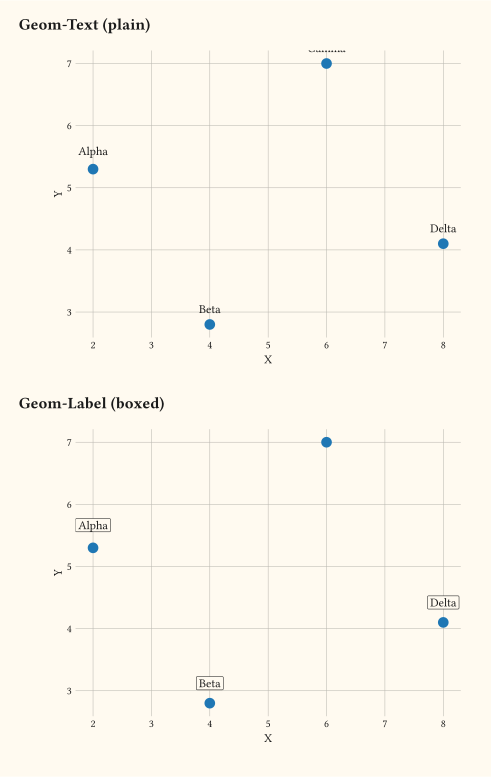
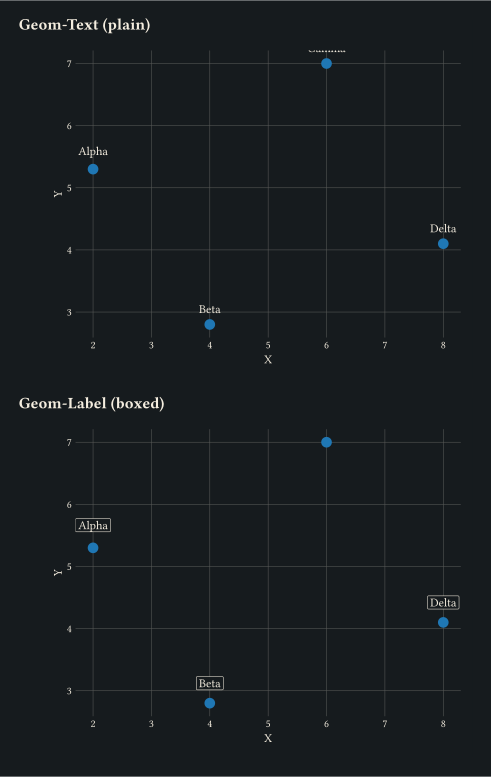
Points annotated with geom-text and boxed geom-label.
A single grouping maps to scale-discrete, scale-discrete, and a discrete colour.
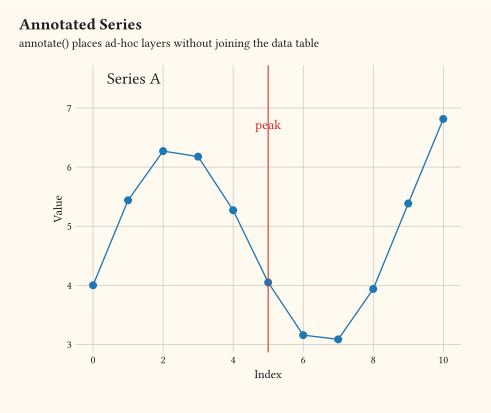
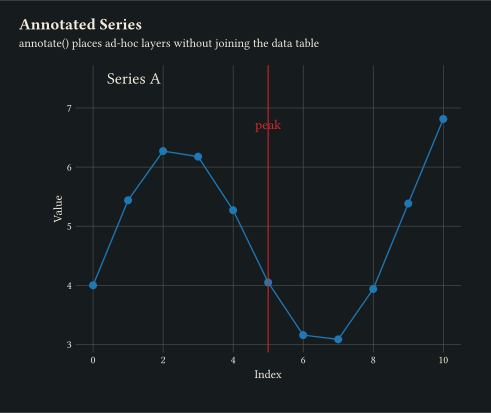
annotate places extra layers (text, vline) without joining them to the data table.
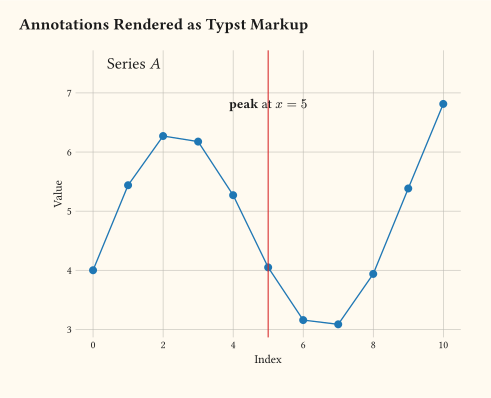
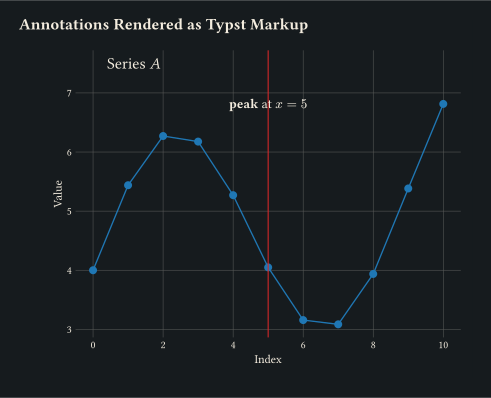
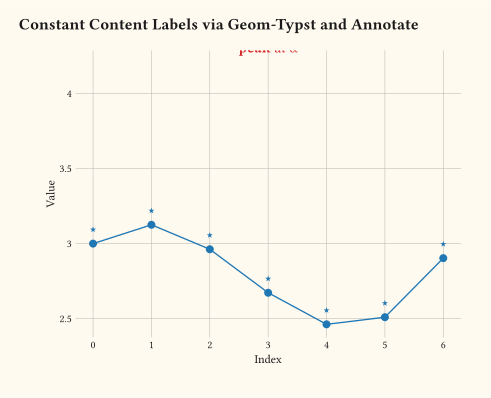
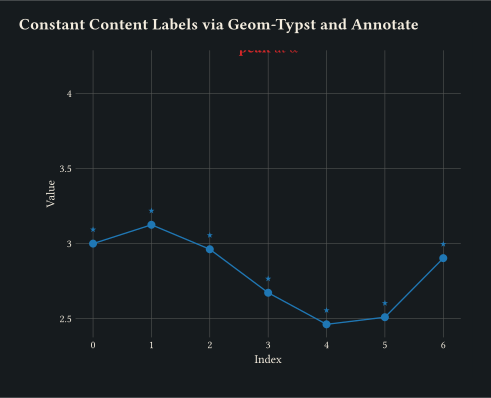
annotate("typst", label: "...") always evaluates the label as Typst markup; typst() forces evaluation inside annotate("text", ...).
Set a content block on every row via geom-typst(label: [...]); or place a single content label with annotate("typst", label: [...]).
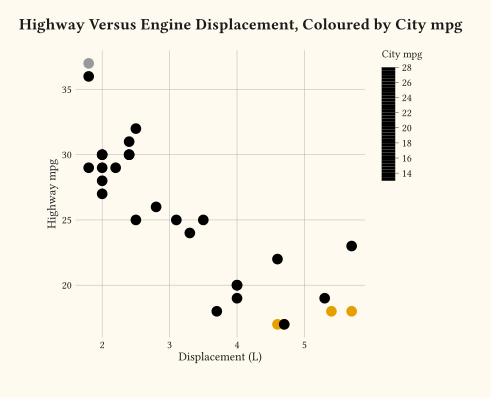
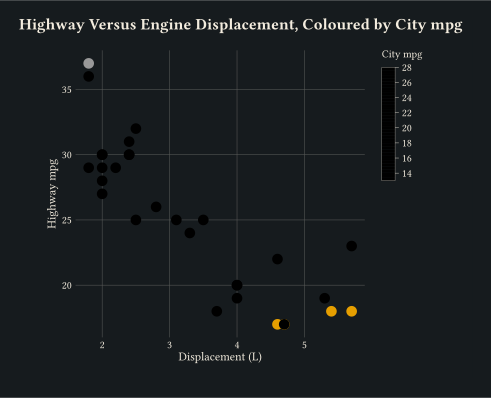
A colourbar appears automatically when colour is trained on a continuous variable via scale-continuous.
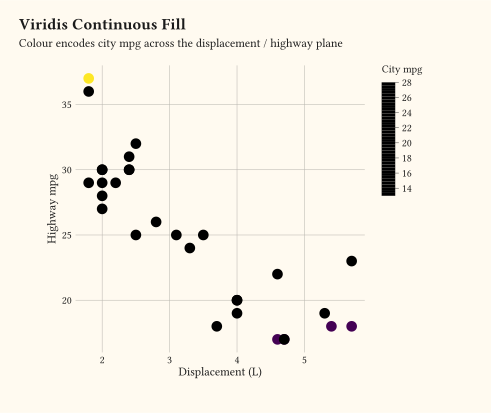
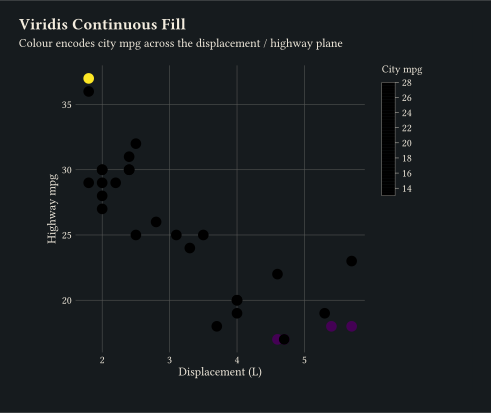
scale-viridis-c maps a continuous variable through the Viridis palette.
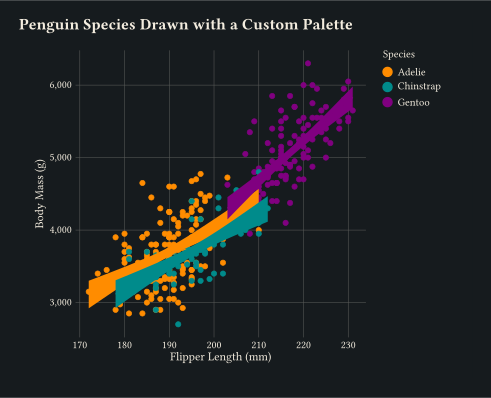
User-supplied colours passed to scale-manual.
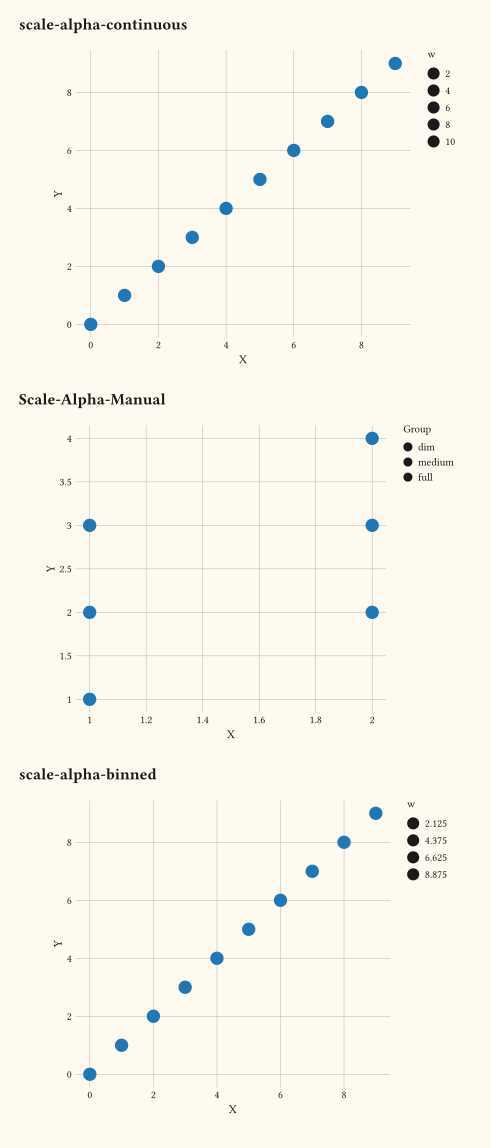
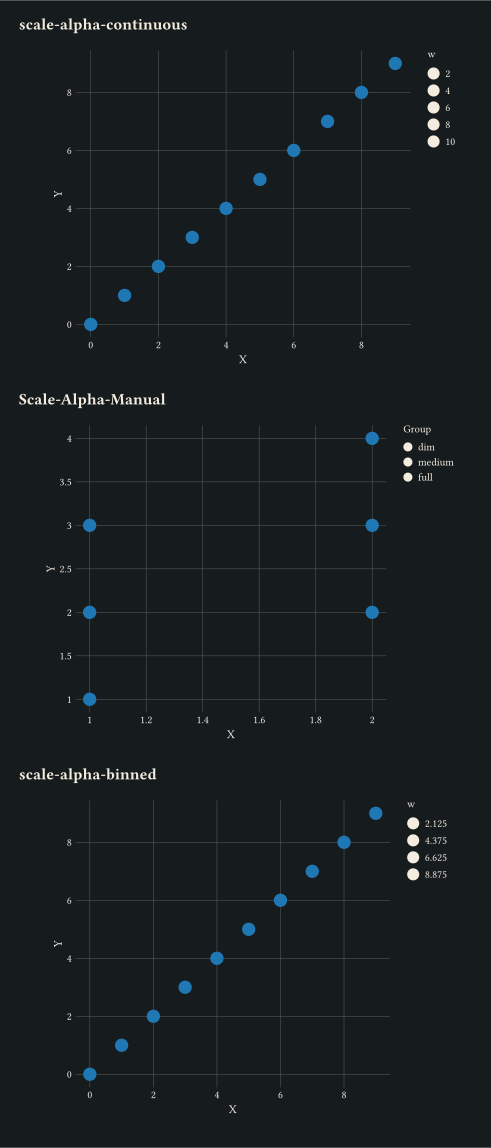
Continuous, manual per-level, and binned variants via the scale-alpha-* family.
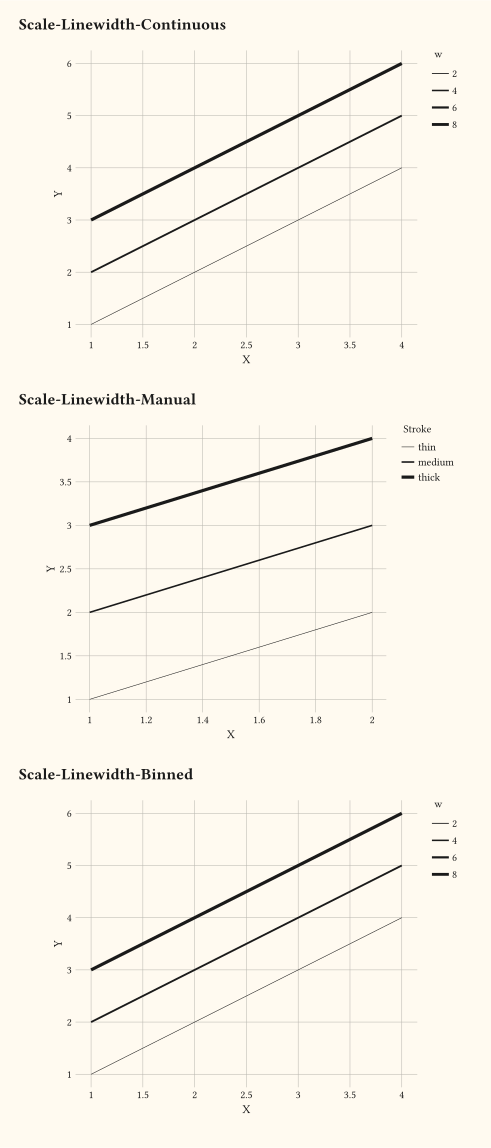
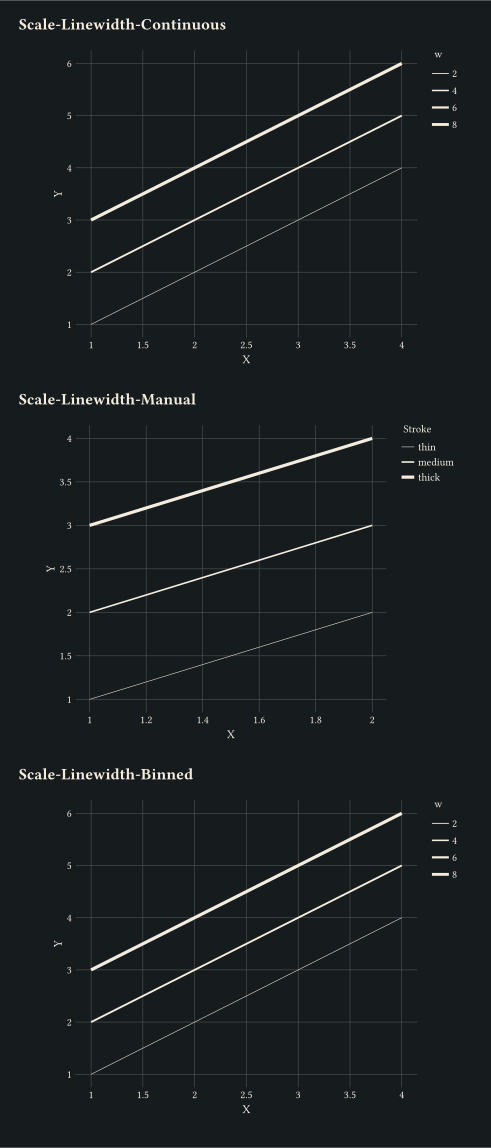
Continuous, manual per-level, and binned variants via the scale-linewidth-* family.
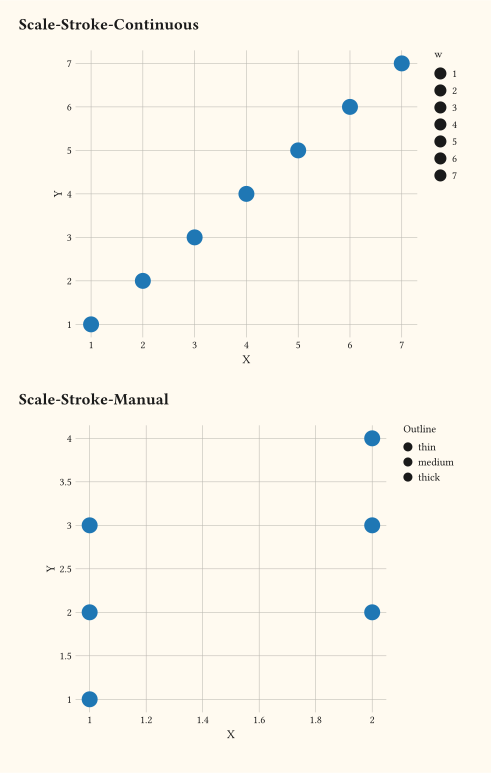
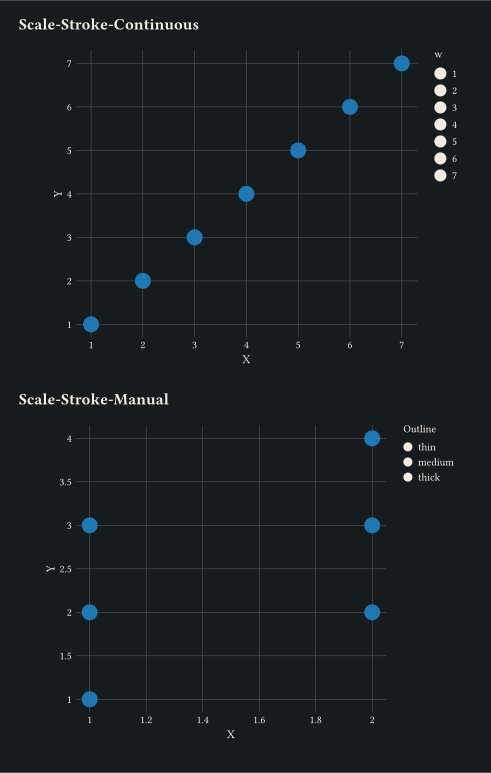
Marker-outline thickness driven by the stroke aesthetic via scale-continuous or scale-manual.
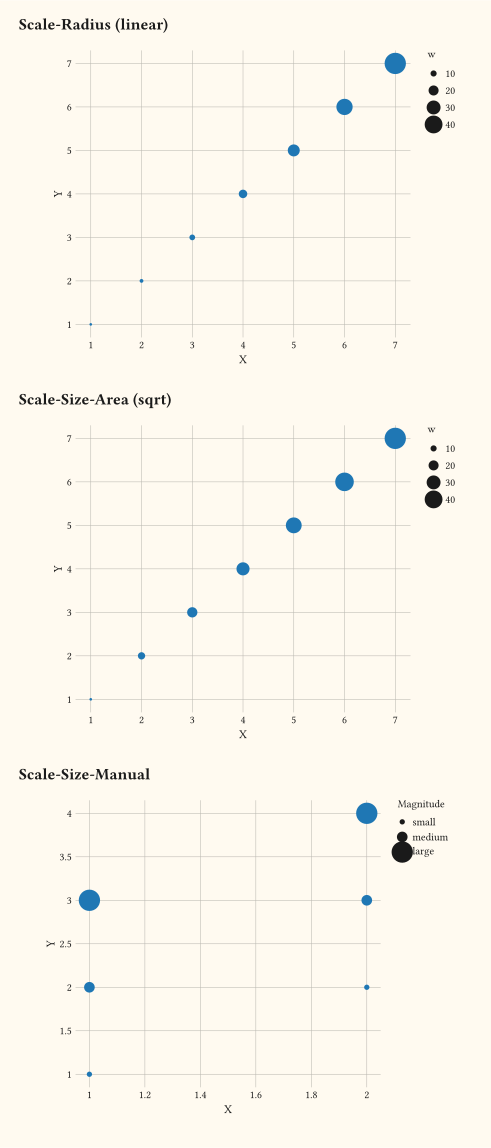
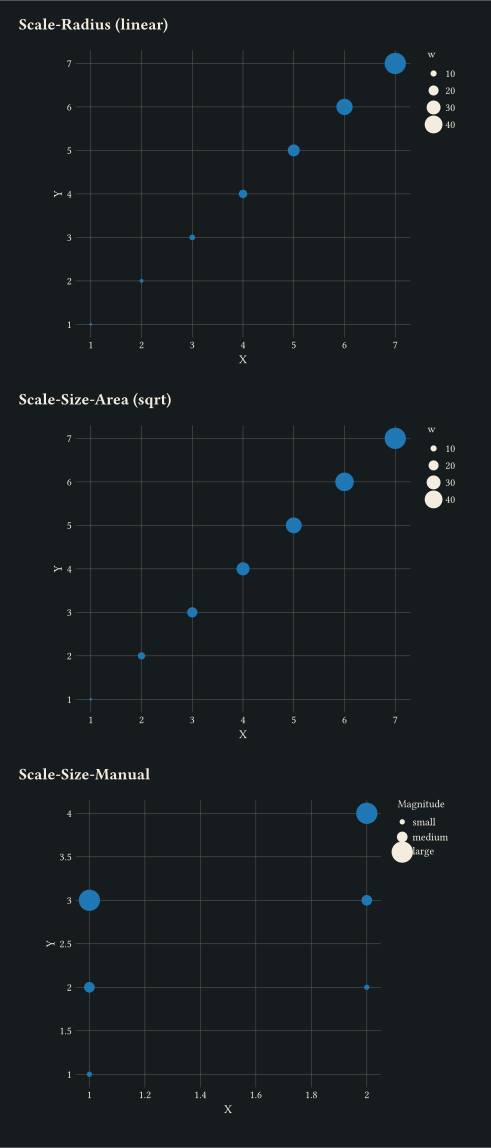
scale-radius, scale-area, and scale-manual compared on the same data.
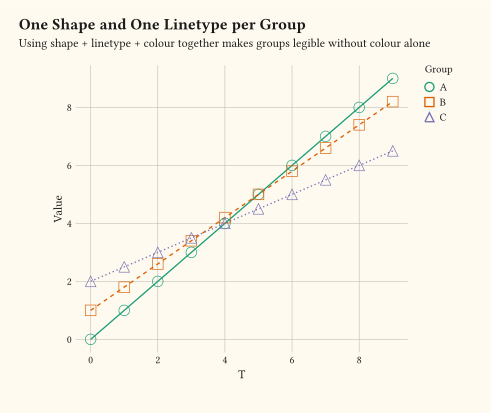
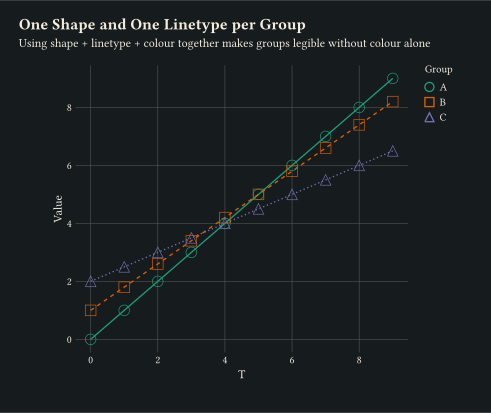
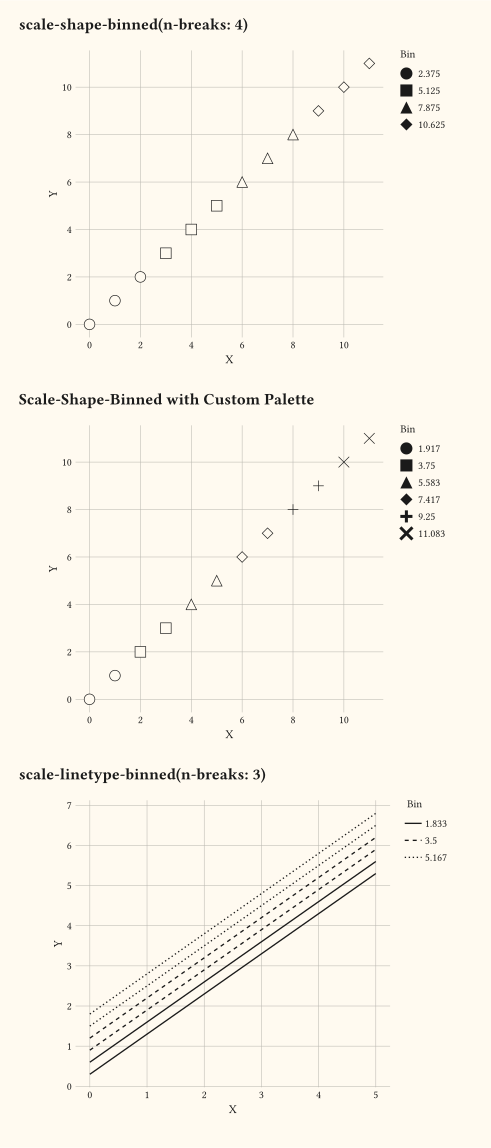
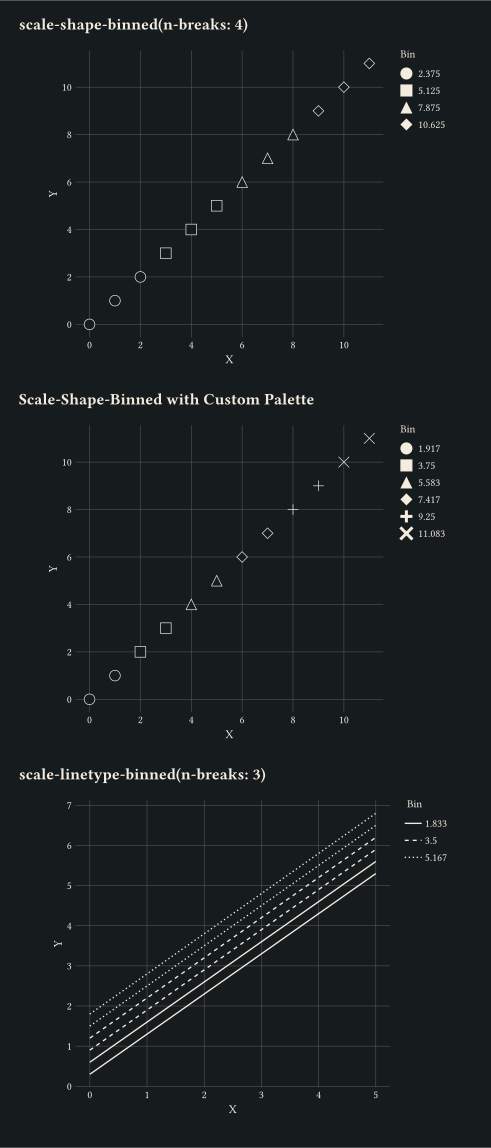
Cut a continuous variable into shape or dash bins with scale-binned keyed to shape or linetype.
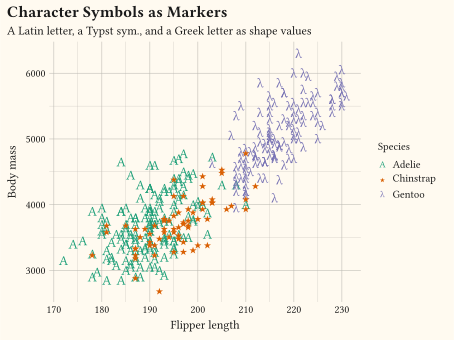
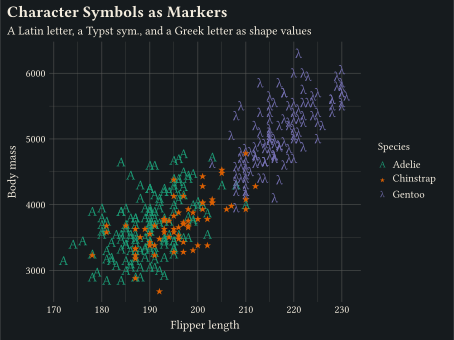
Map scale-manual to a plain character, a Typst sym. symbol, or an emoji; any value outside the built-in keywords renders as a literal glyph.
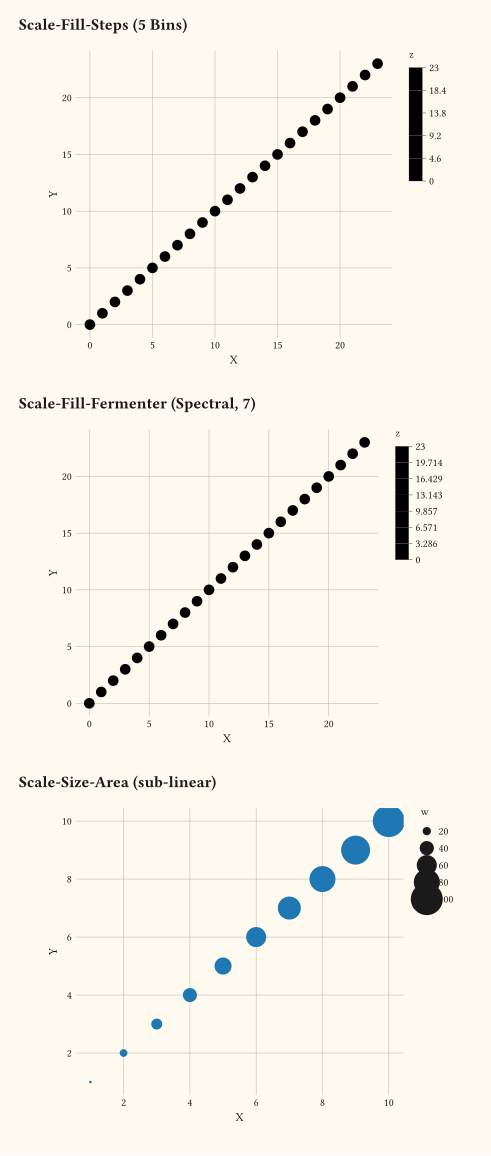
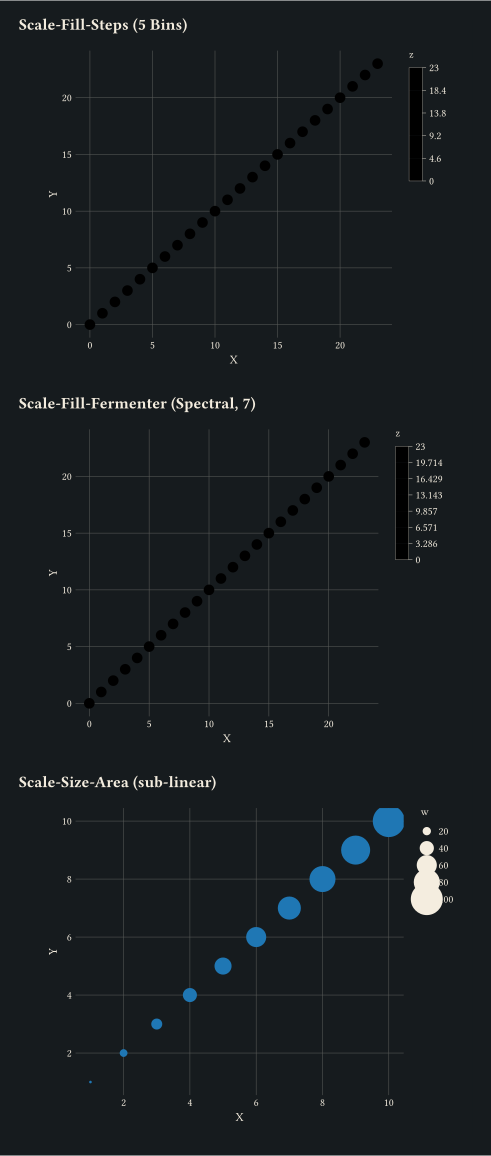
Stepped colour gradients and area-preserving size scales via scale-steps, scale-fermenter, and scale-area.
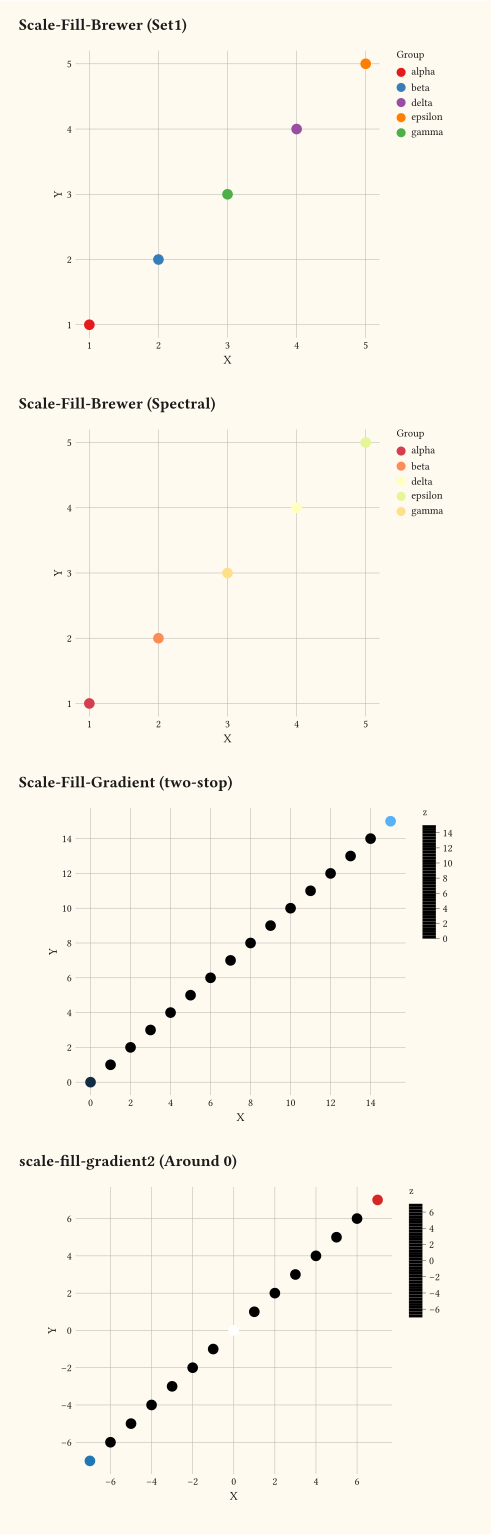
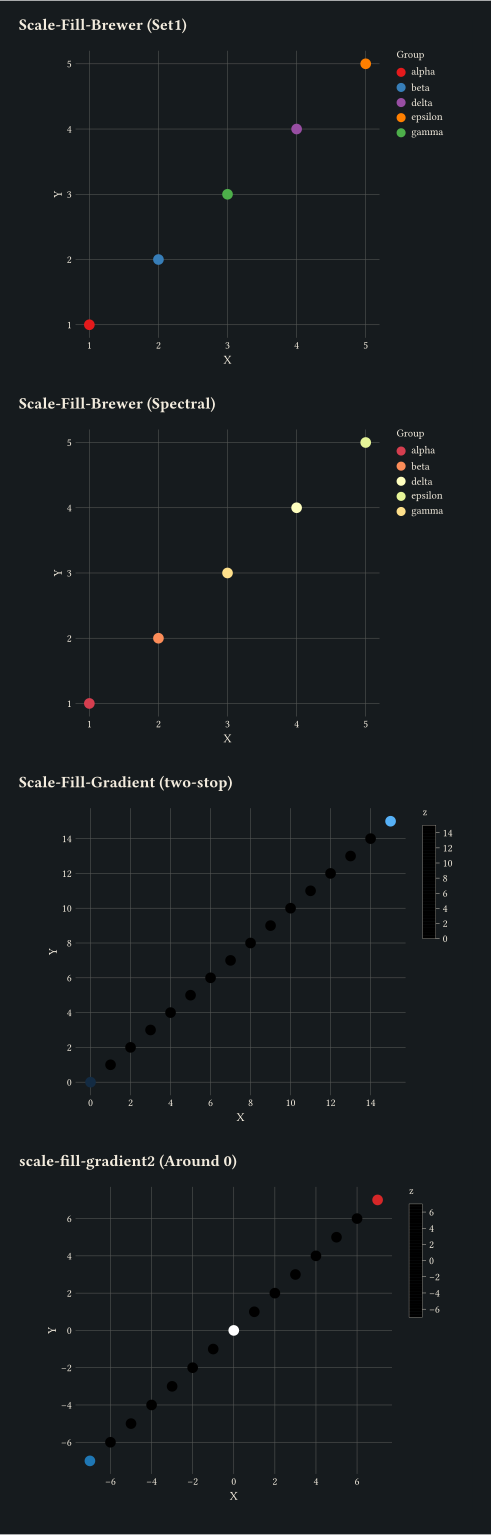
Discrete scale-brewer palettes alongside continuous scale-gradient and scale-gradient2.
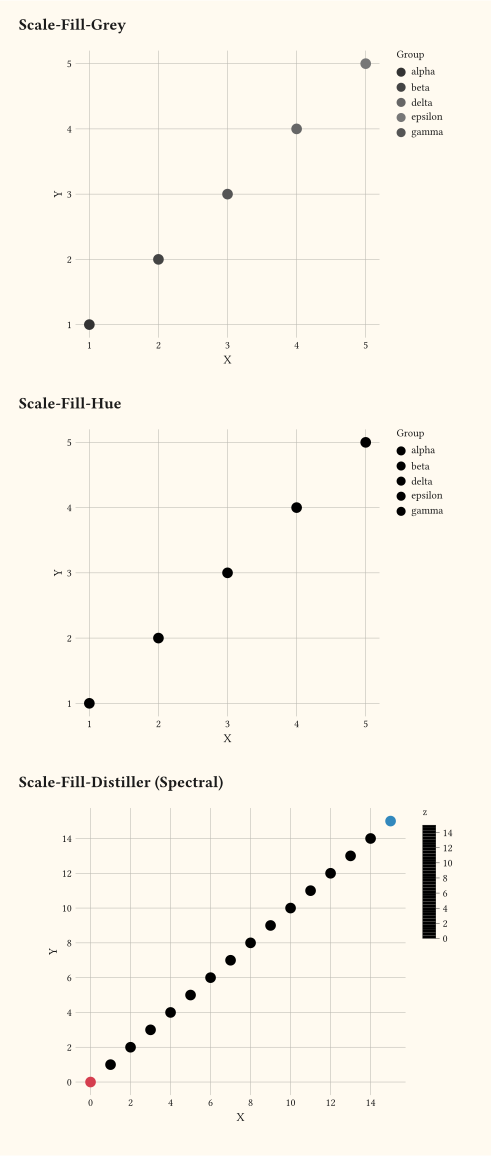
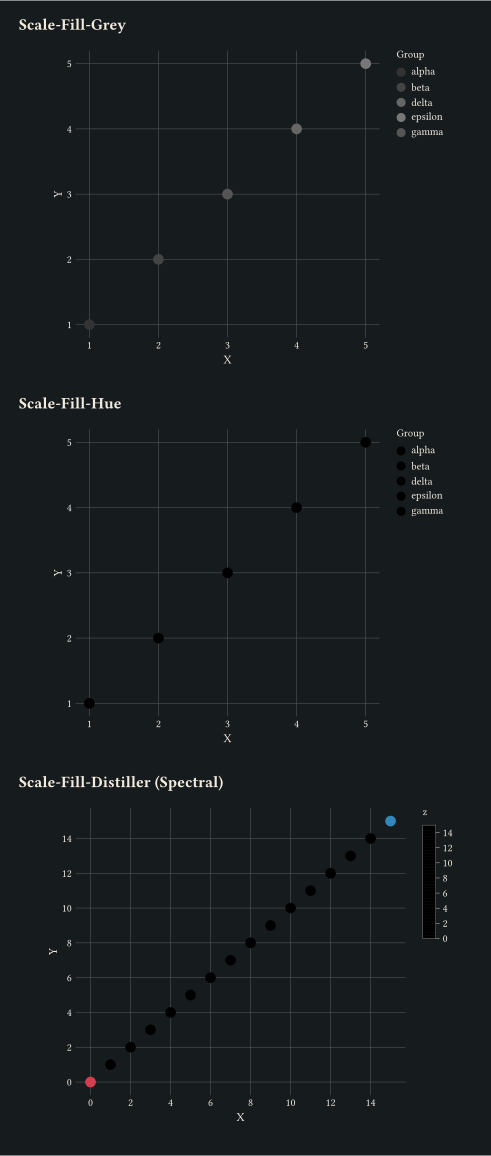
Niche fill scales: scale-grey, scale-hue, and scale-distiller.
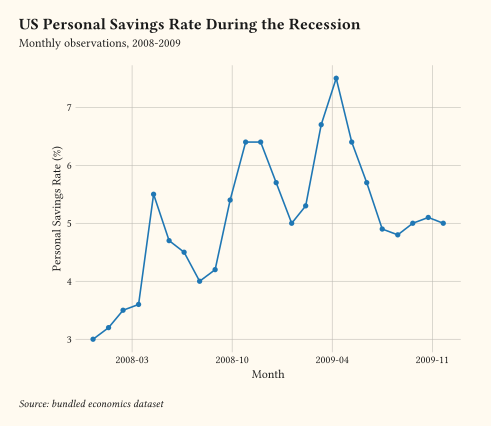
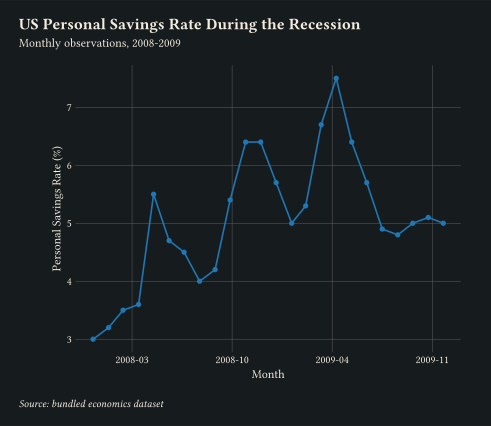
ISO date strings on x parsed and laid out by scale-date with year-month tick labels.
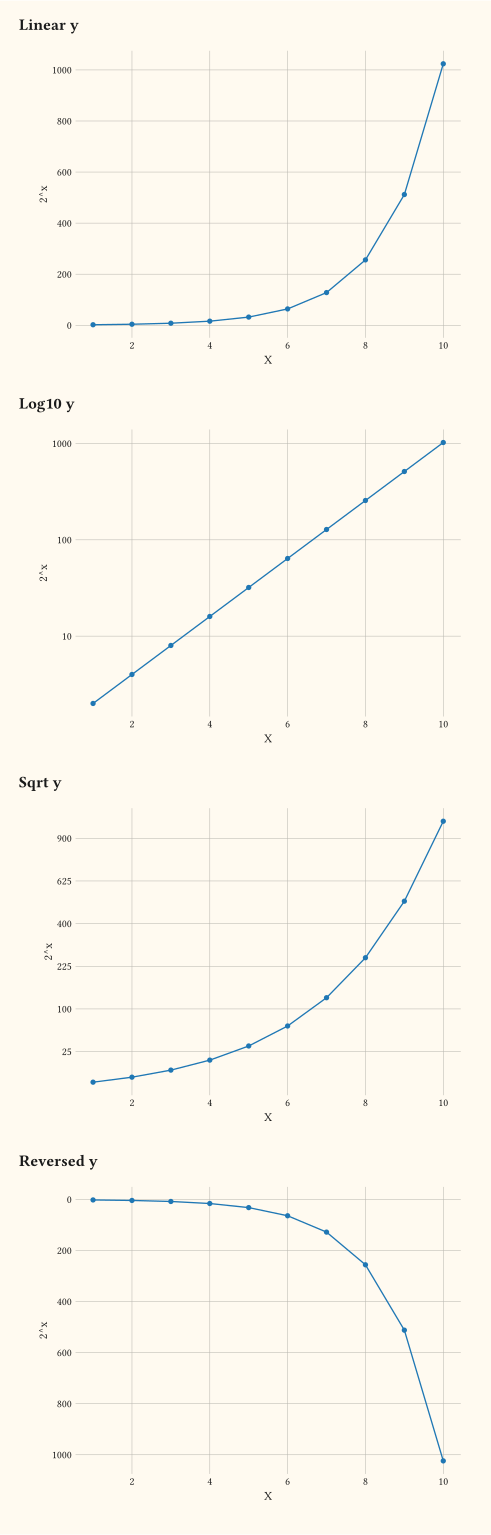
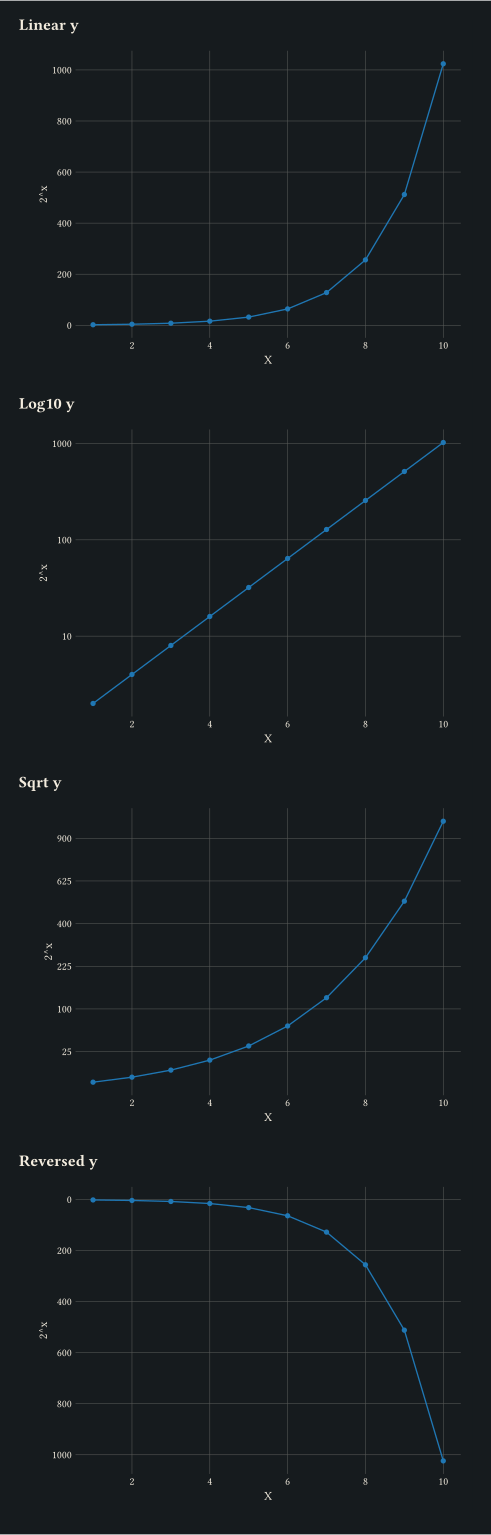
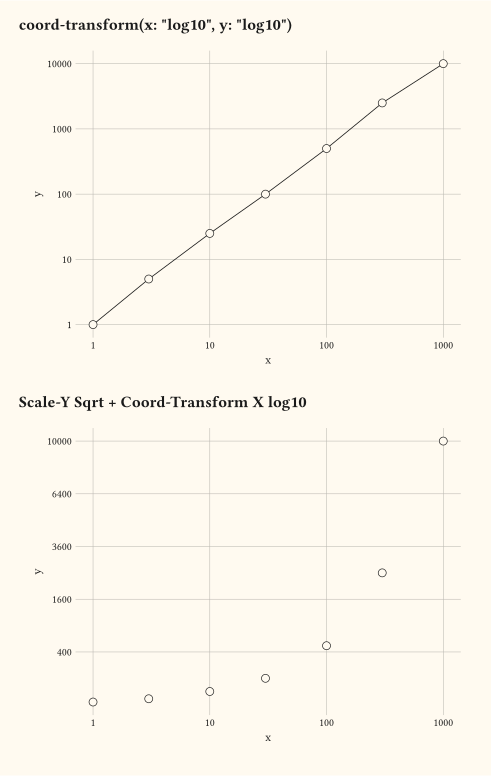
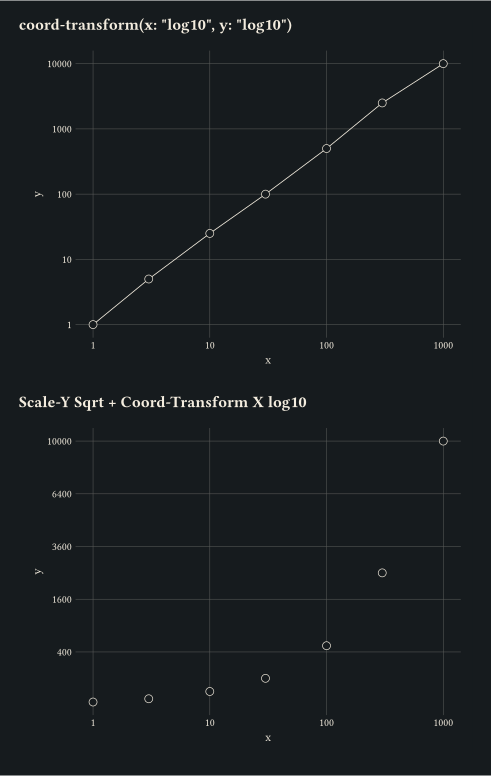
Continuous axis transformations via scale-log10, scale-sqrt, and scale-reverse.
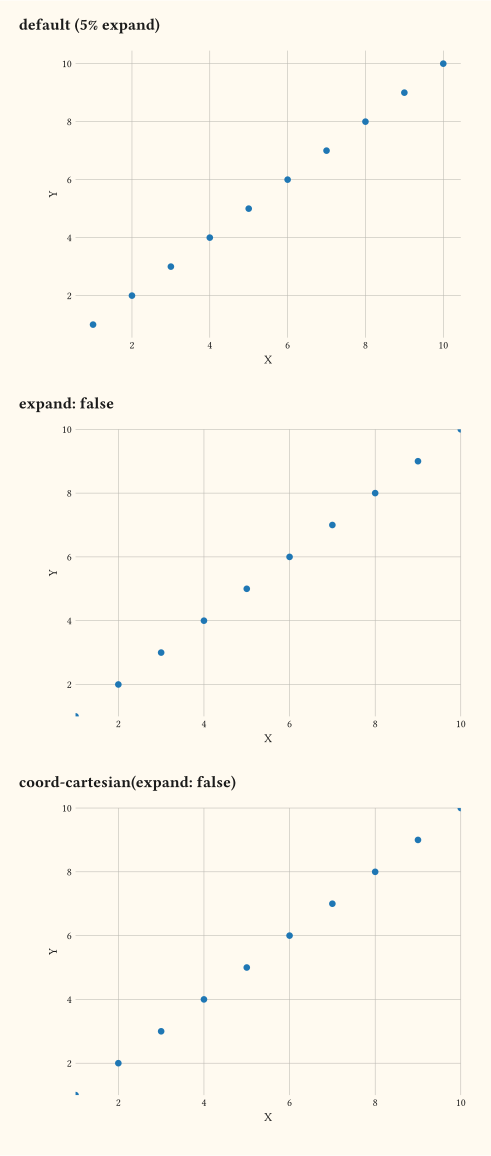
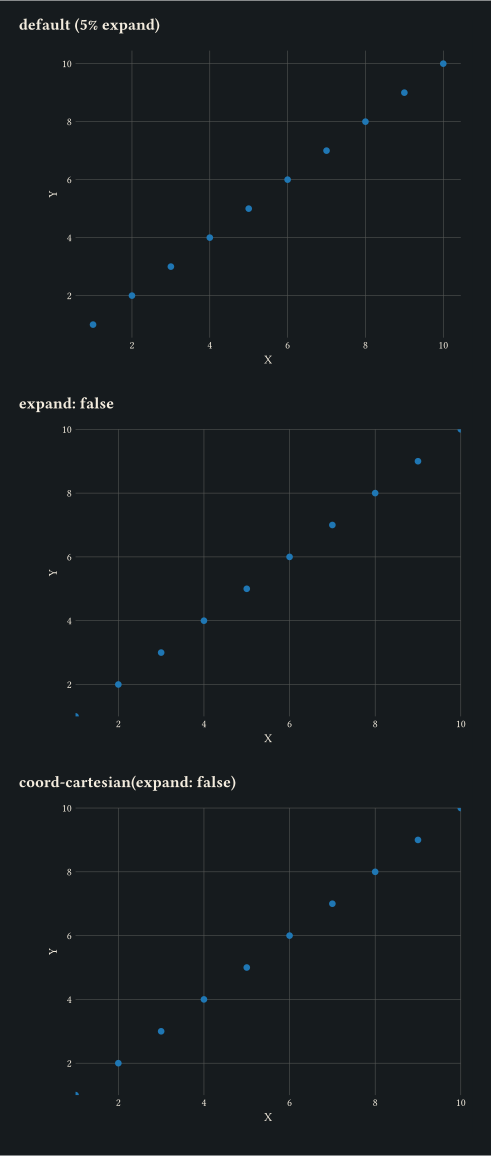
Tune axis breathing room via scale-*-continuous(expand:) or via coord-cartesian(expand: false).
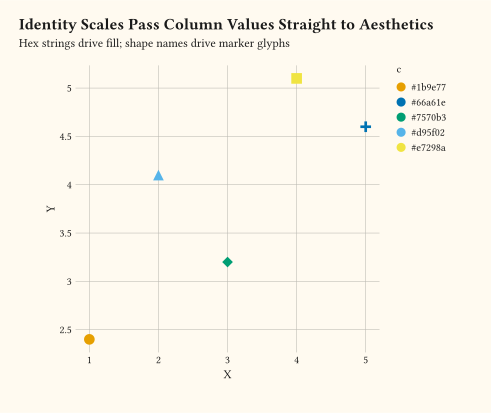
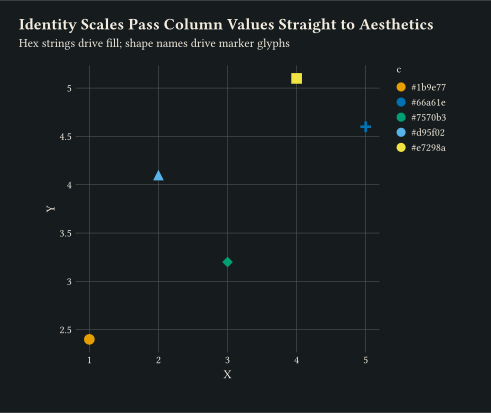
scale-identity and scale-identity pass column values directly to the visual property.
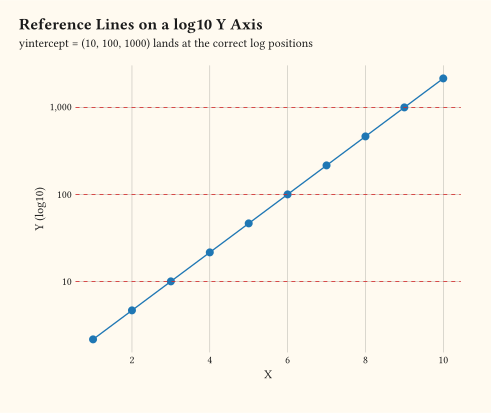
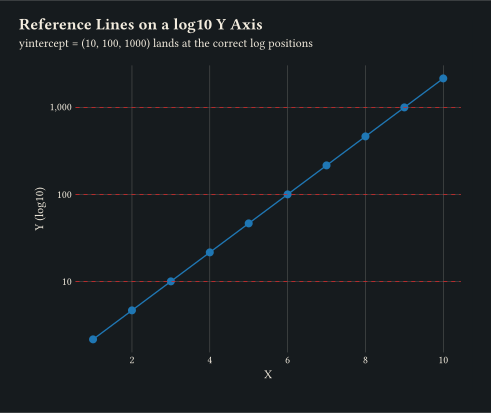
geom-hline intercepts route through the active y-axis transform so they land at the correct log positions.
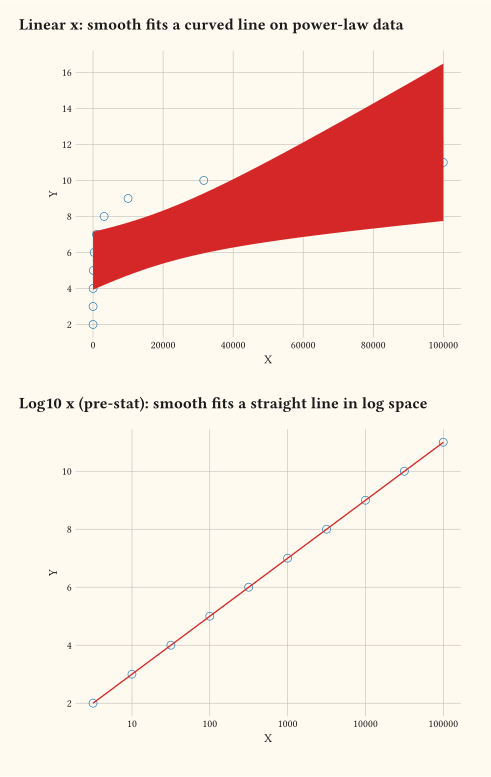
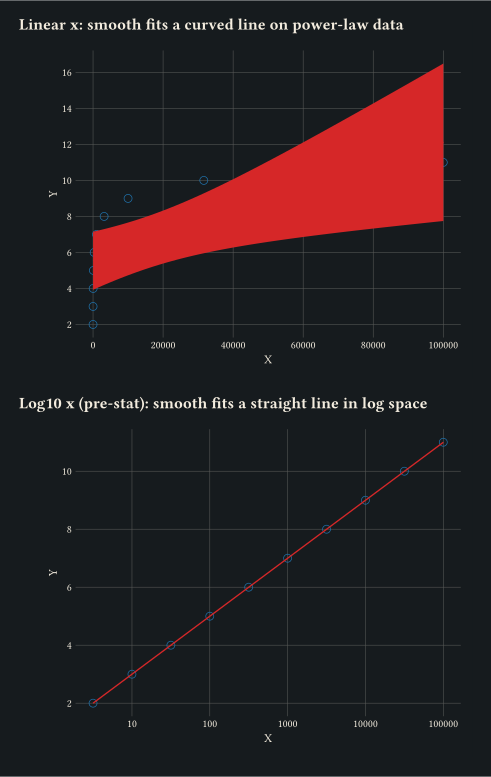
scale-log10 transforms data before stats run; geom-smooth fits the line in log space.
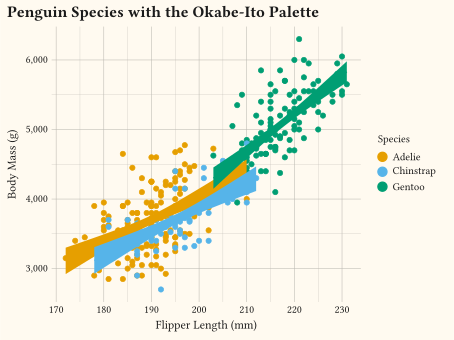
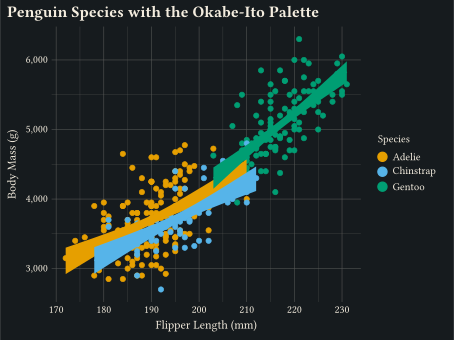
The colour-vision-deficiency-safe discrete palette applied through scale-okabe-ito and scale-okabe-ito.
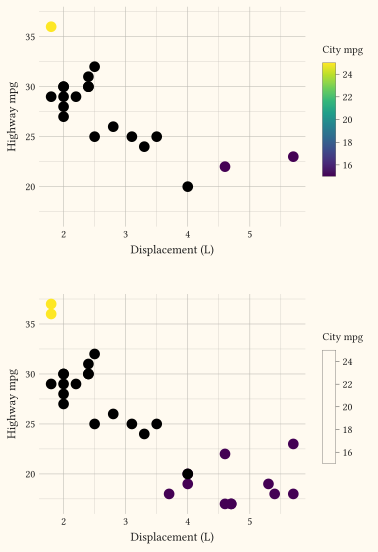
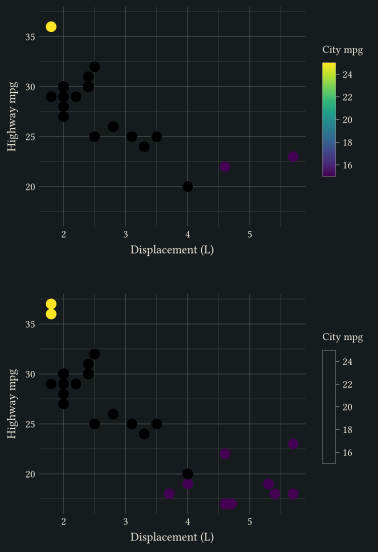
With a scale limits set, oob: "drop" removes out-of-range values while oob: "squish" clamps them to the nearest endpoint of scale-viridis-c.
after-stat binds an aesthetic to a column produced by the layer’s stat — here y is mapped to the _count column emitted by stat-count.
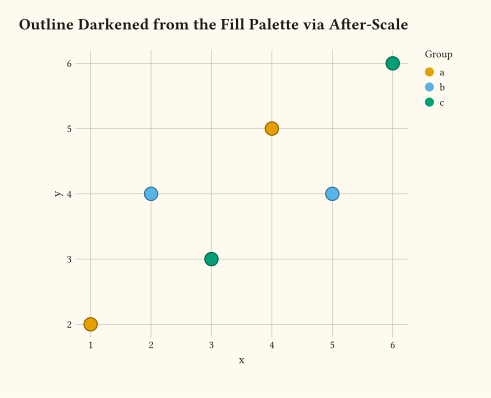
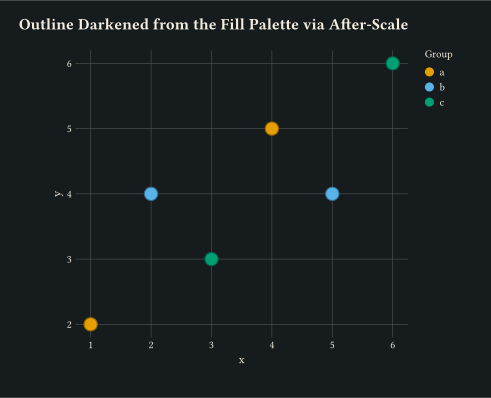
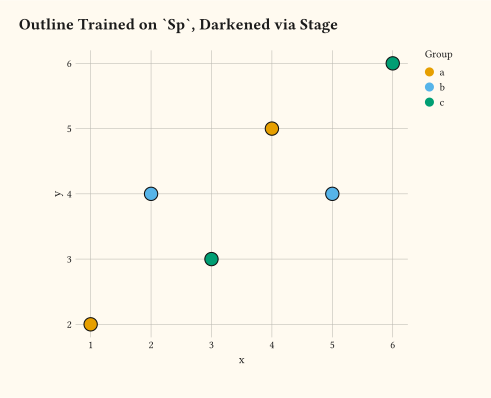
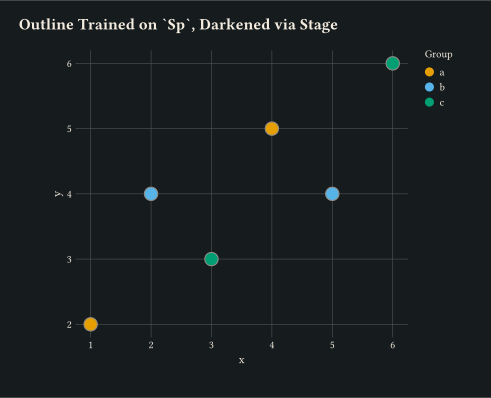
after-scale mirrors the trained fill palette into the colour channel and darkens it, so each marker outline tracks its own fill.
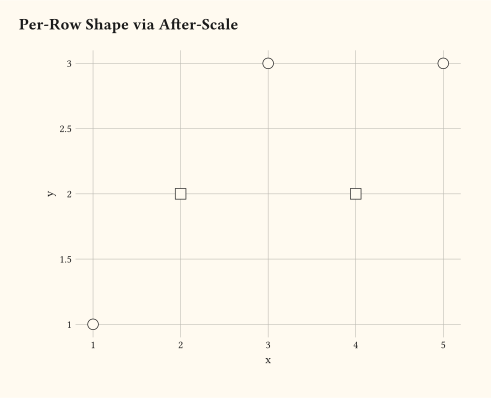
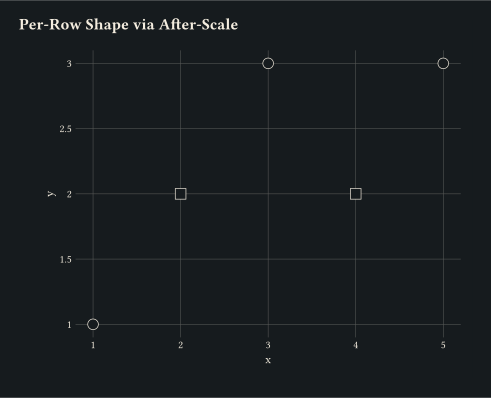
after-scale on the shape channel transforms the resolved shape kind per row, flipping between two glyphs based on a per-row predicate.
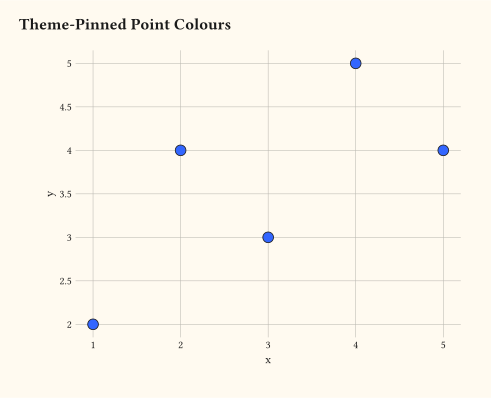
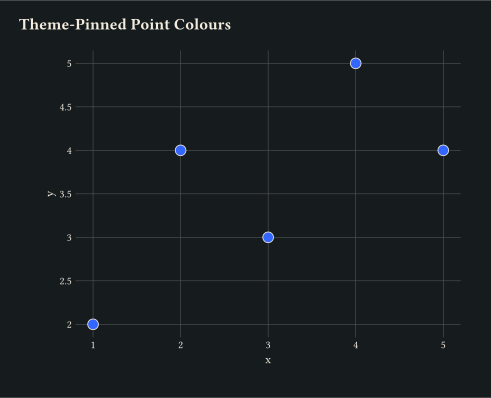
from-theme pins a layer’s stroke to the active theme’s ink and the marker fill to the accent colour, resolved once at layer prepare time.
stage trains the colour aesthetic on the same column the fill scale uses, then transparentises the resolved palette swatch as the marker outline.
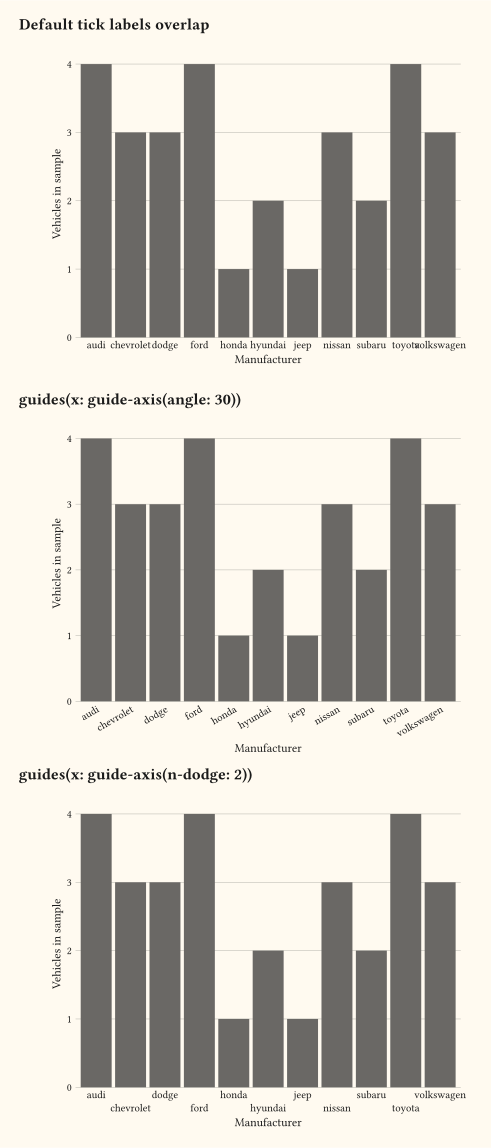
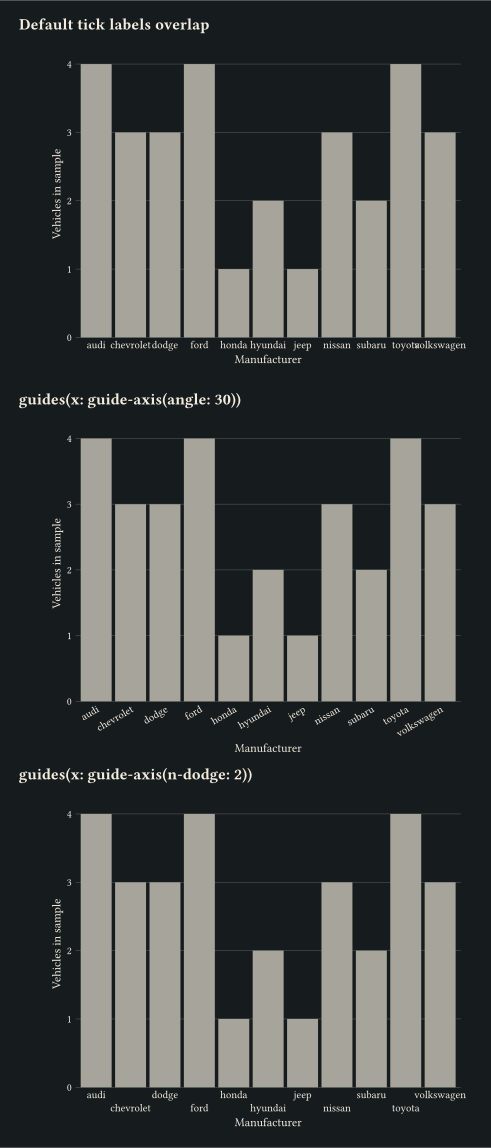
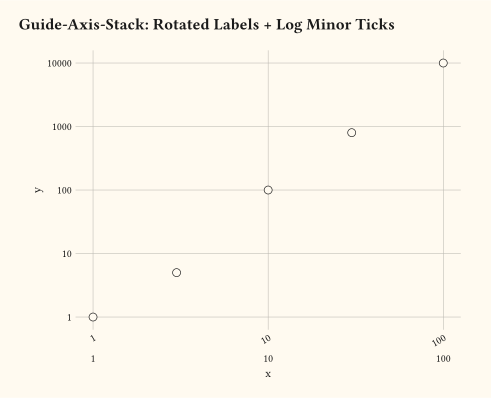
guide-axis rotates or dodges discrete tick labels so long category names stay readable.
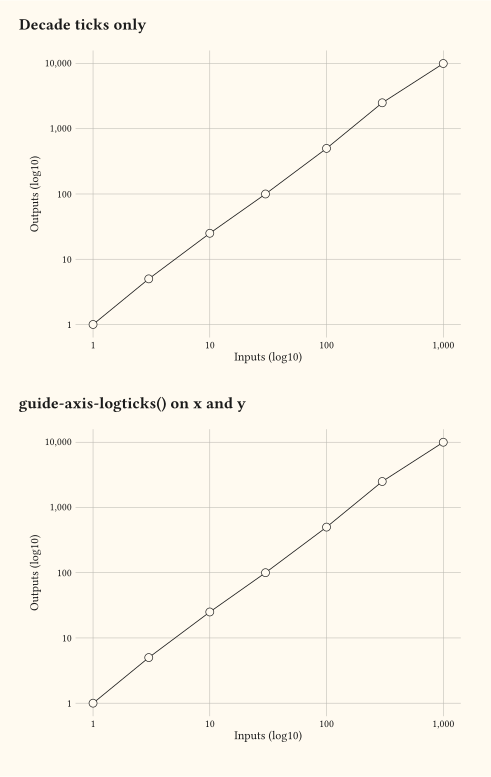
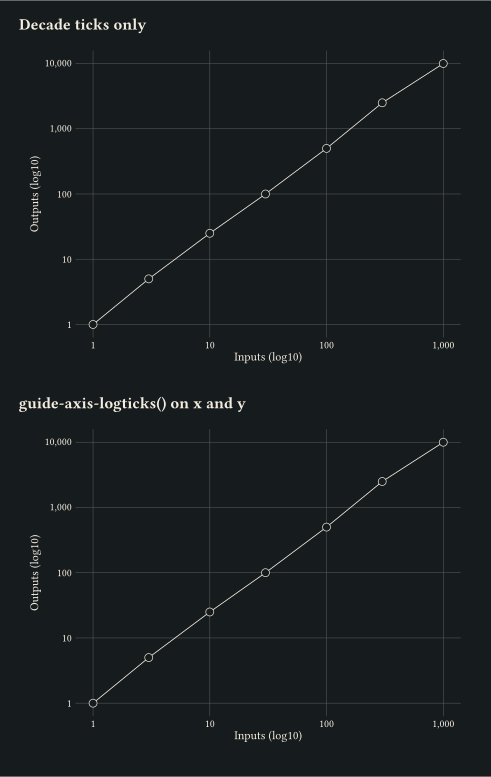
guide-axis-logticks draws minor ticks at log-scale subdivisions on a log10-transformed axis.
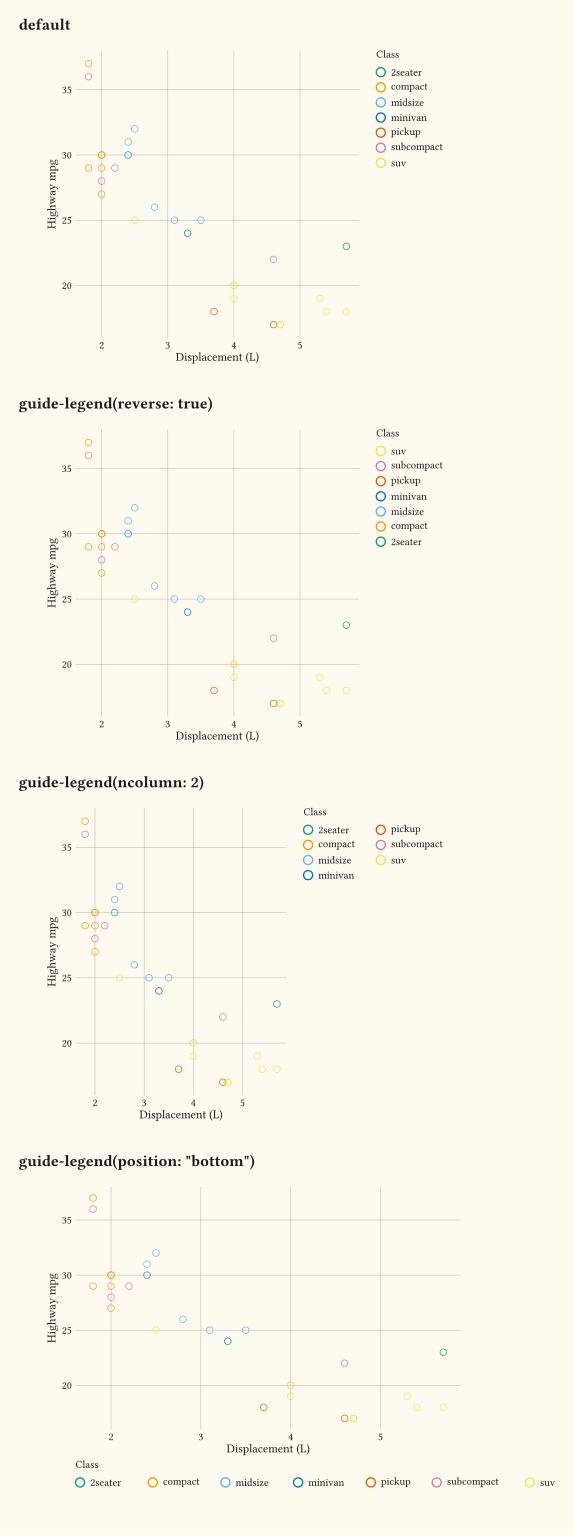
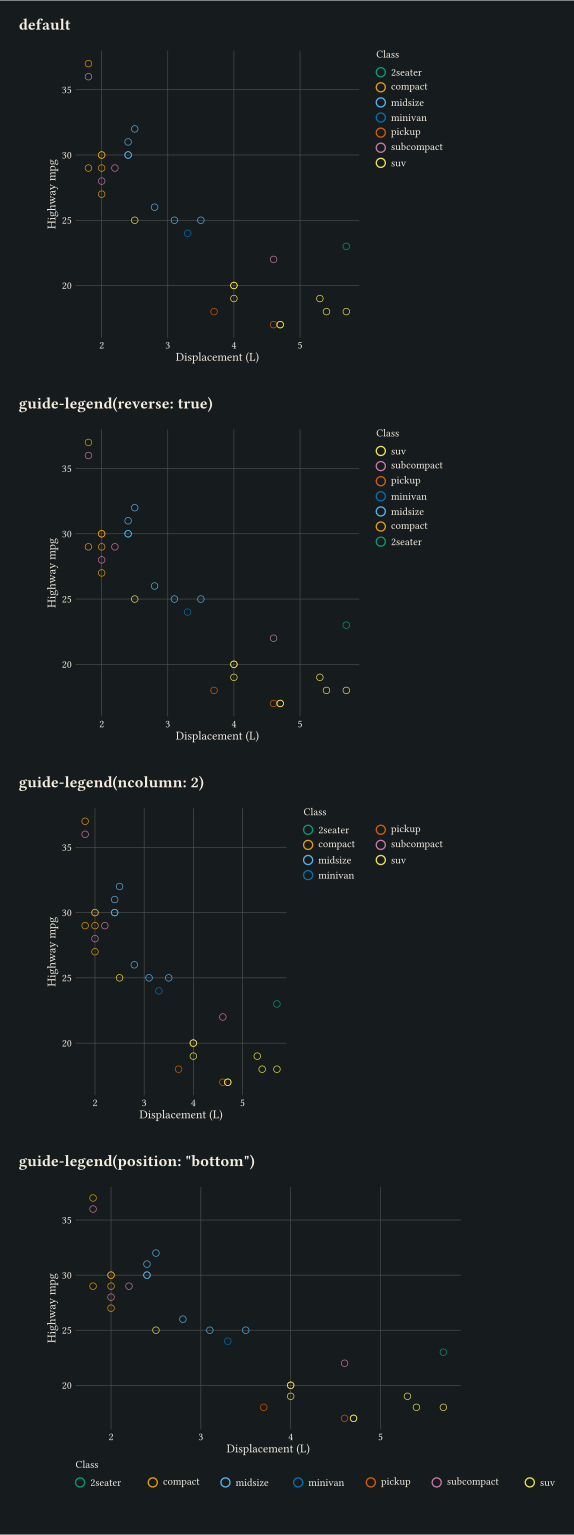
Layout knobs on guide-legend: reverse flips the key order, ncol wraps it onto multiple columns.
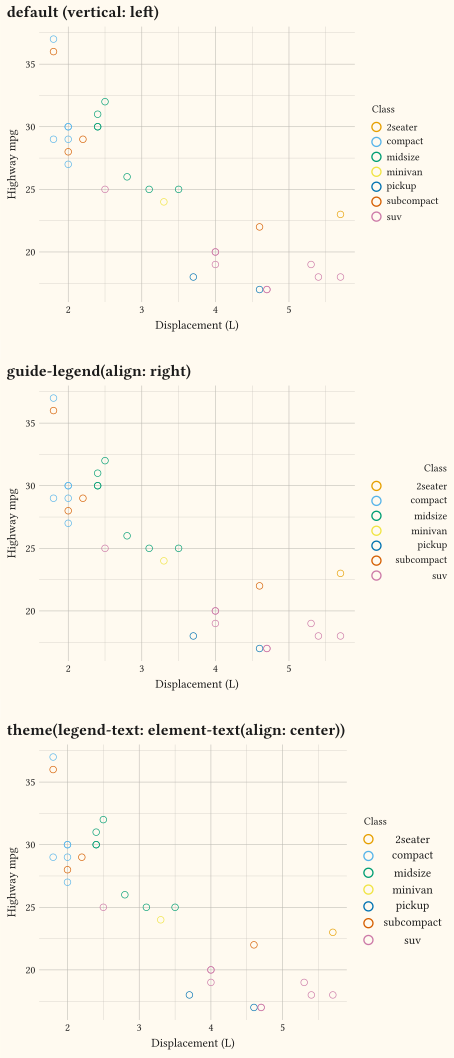
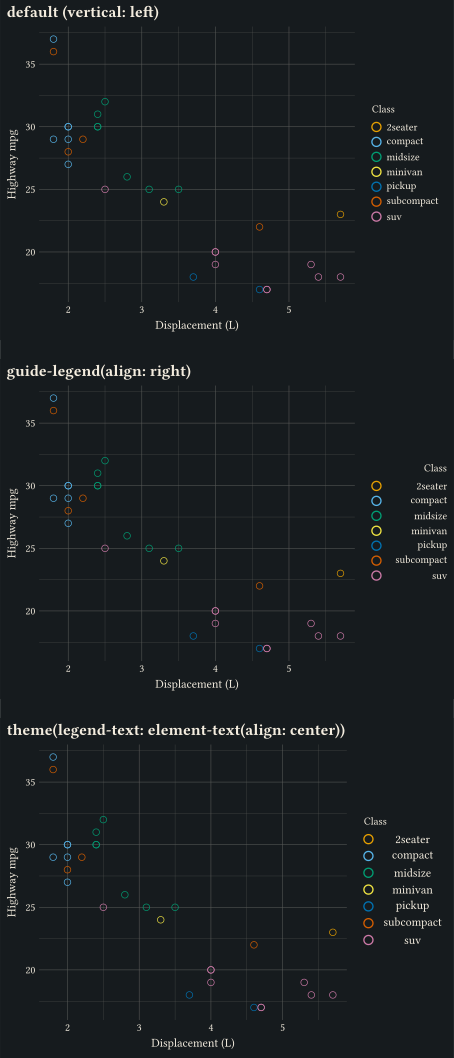
Justify legend entry labels with guide-legend(align:) or theme(legend-text: element-text(align: ...)); horizontal legends centre labels and vertical legends keep them left by default.
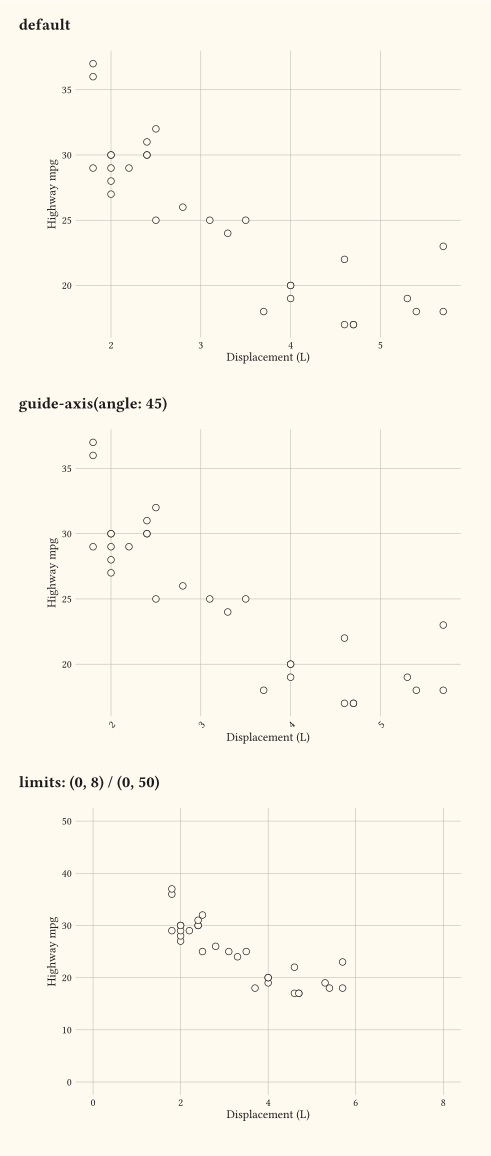
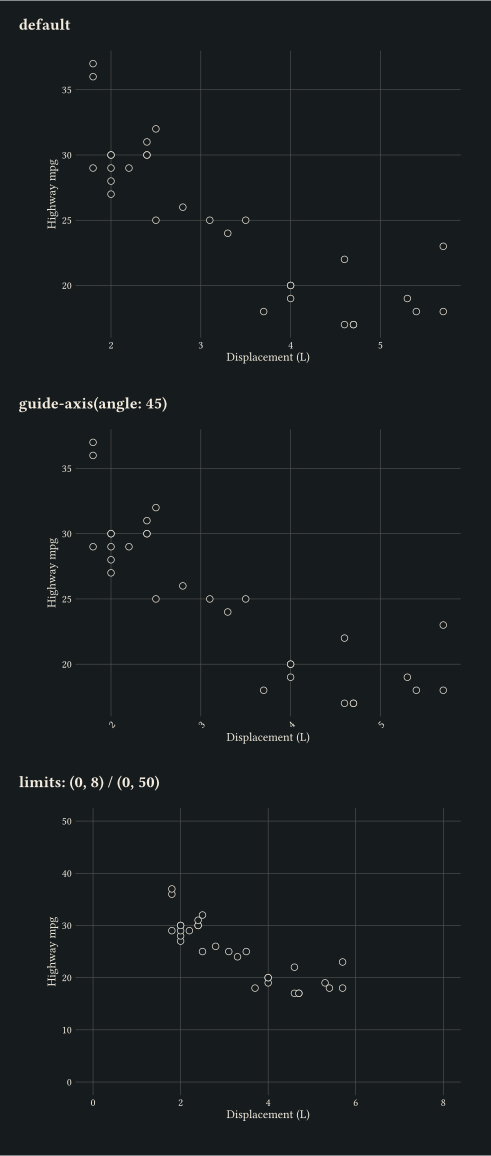
Explicit domains set by scale-continuous(limits:) alongside tidied tick text from guide-axis.
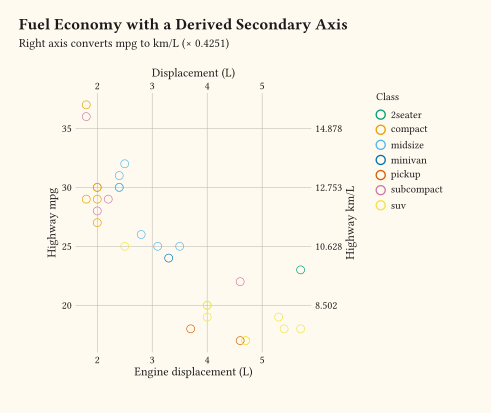
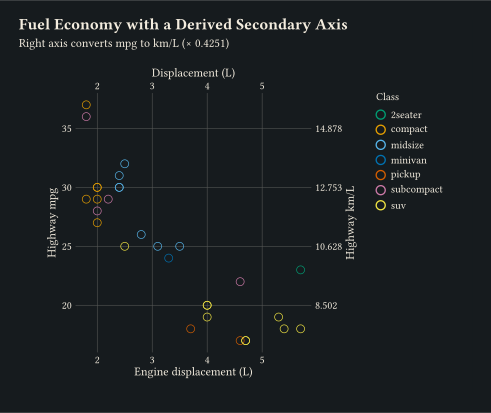
Add a duplicate axis with dup-axis or a derived axis via sec-axis on a continuous scale.
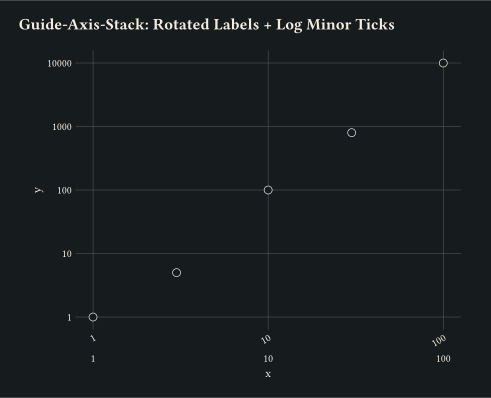
Stack a rotated guide-axis over a guide-axis-logticks pass via guide-axis-stack on the same x axis.
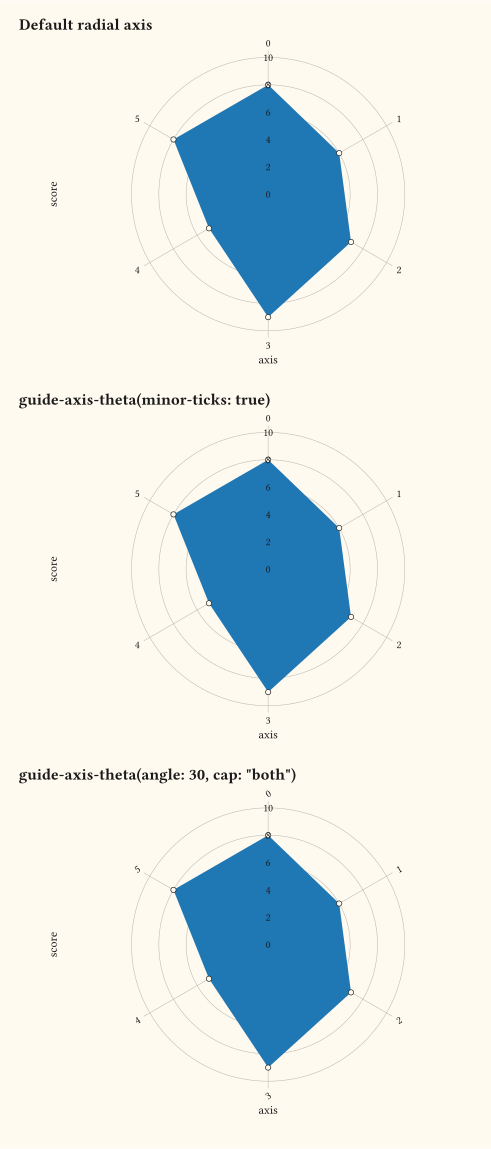
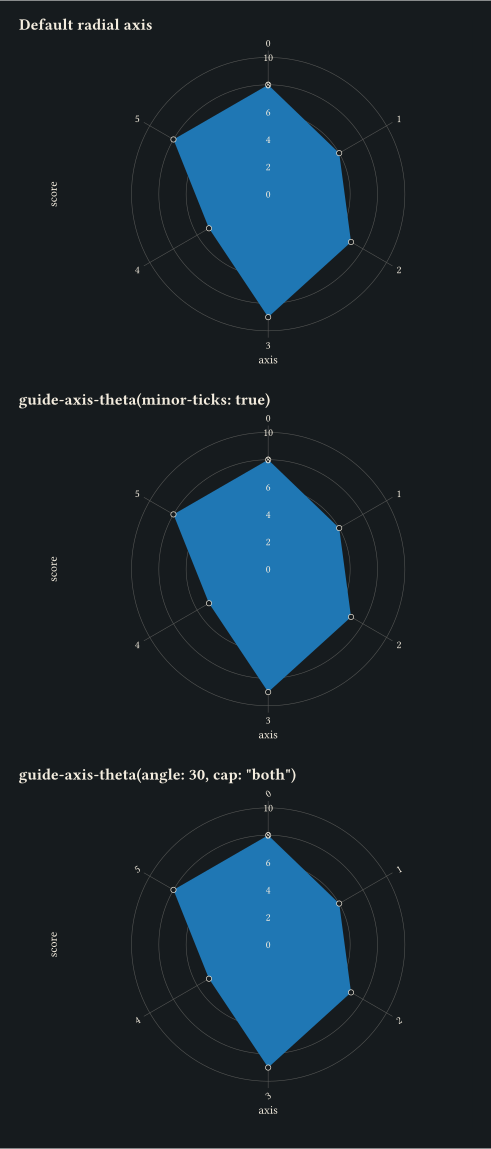
guide-axis-theta rotates radial tick labels, emits half-step minor ticks, and draws an outer axis arc with optional cap.
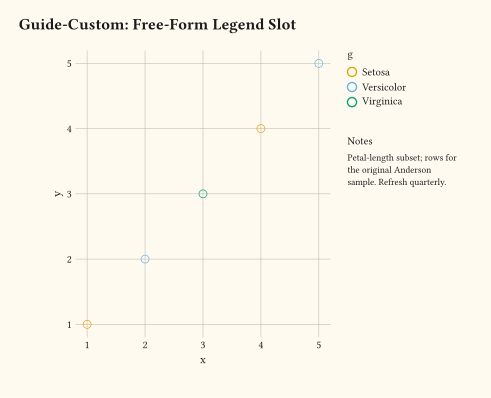
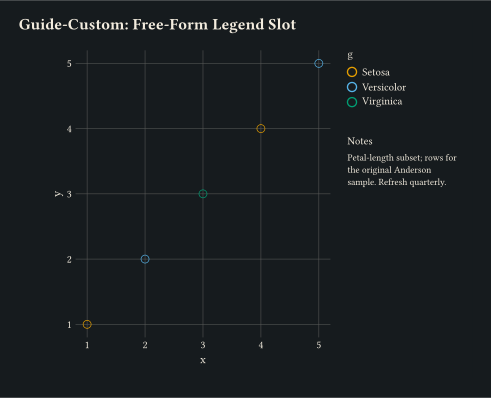
guide-custom drops arbitrary Typst content into the legend area alongside the auto-built colour swatch.
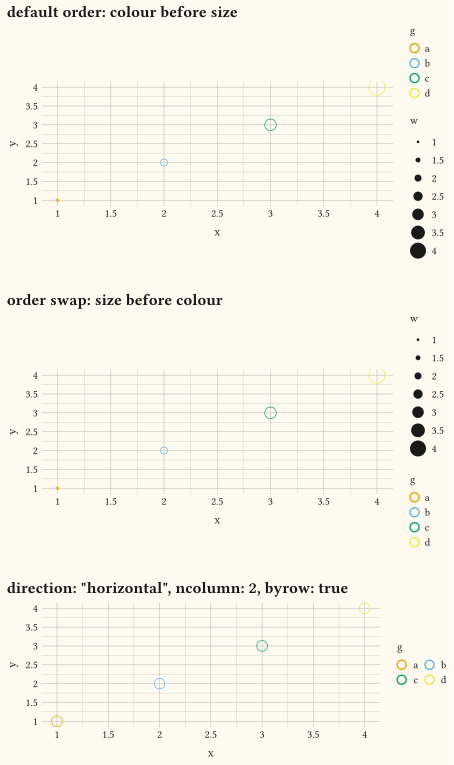
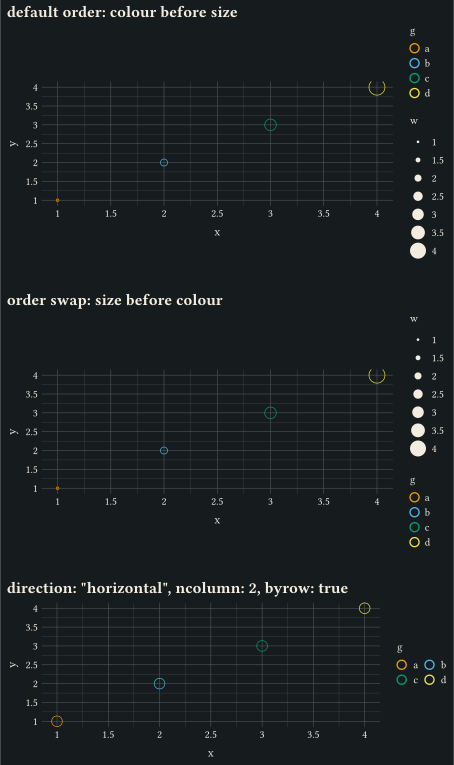
guide-legend order sets stacking priority across aesthetics, while direction and byrow control the swatch grid flow.
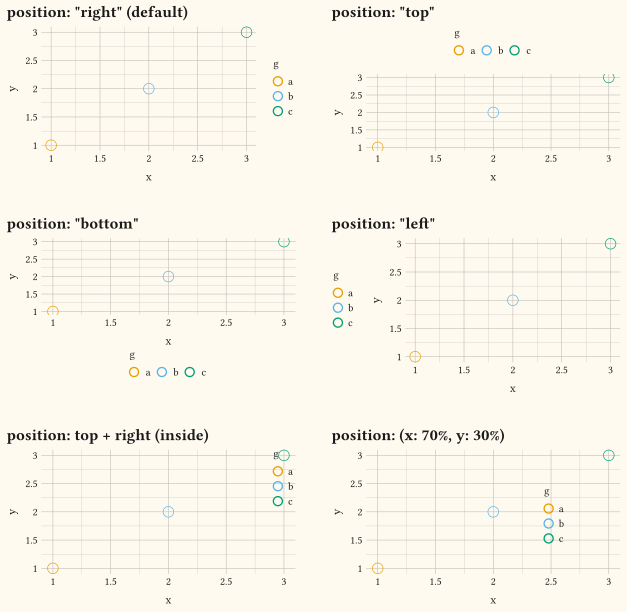
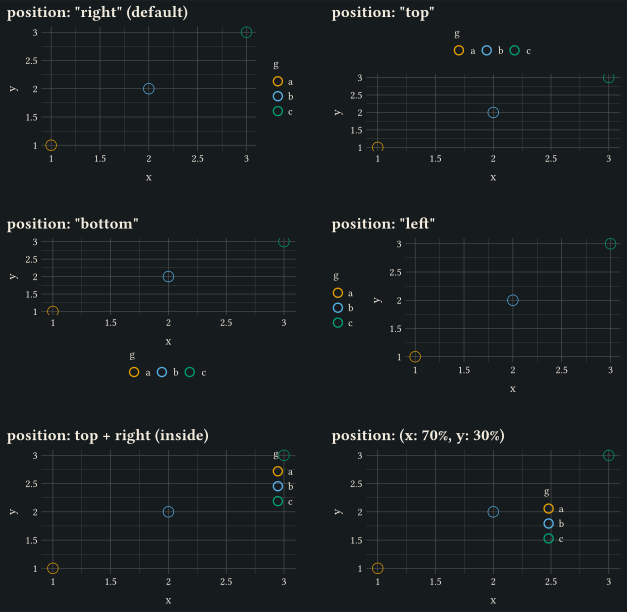
Every guide-legend position value: the four margin sides, an inside corner via a Typst alignment, and an arbitrary (x:, y:) canvas offset.
compose arranges several deferred plots and hoists legends shared across panels via collect, with guides(default: guide-legend(position: ...)) controlling where the merged legend sits.
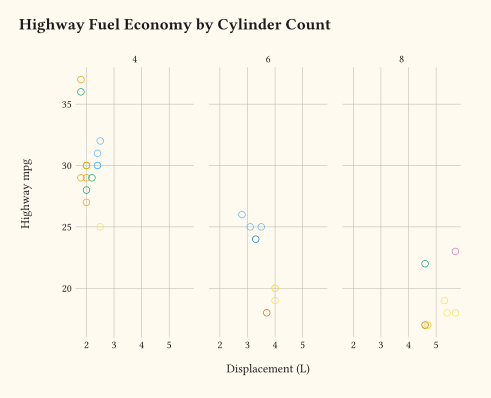
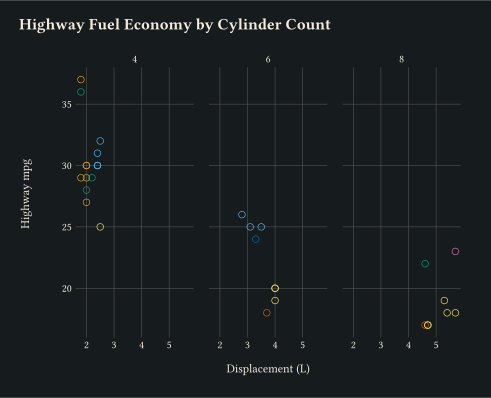
One panel per level of a discrete variable via facet-wrap.
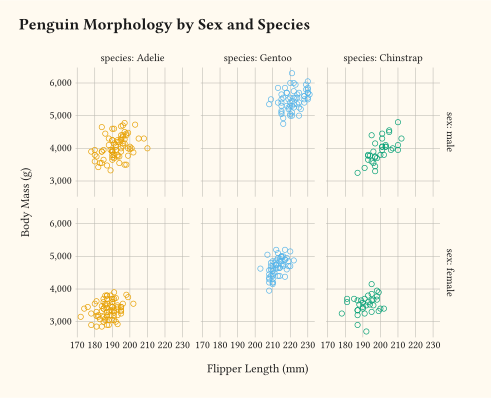
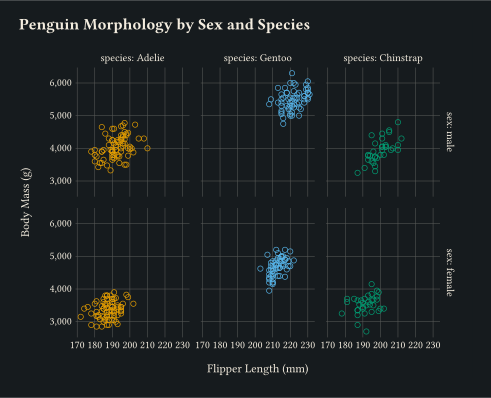
Panels laid out on a row × column grid with facet-grid.
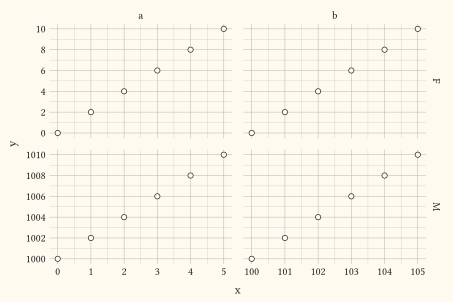
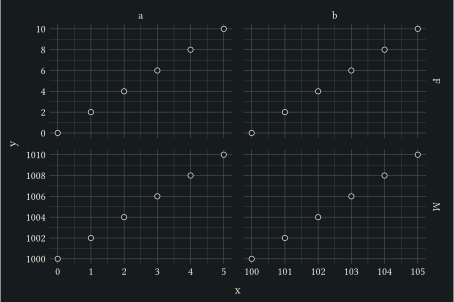
Pass scales: "free" to facet-grid so x is freed per column and y per row.
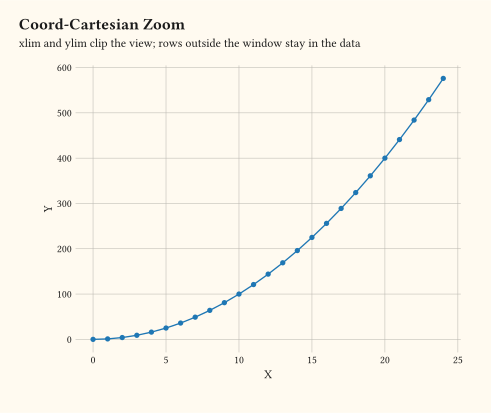
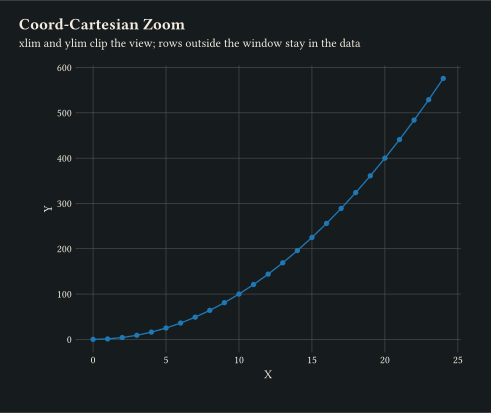
coord-cartesian clips the view via xlim and ylim without dropping data.
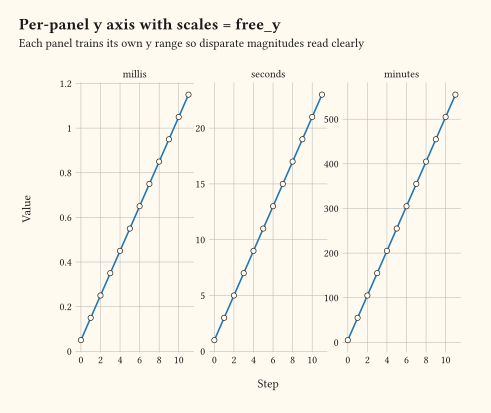
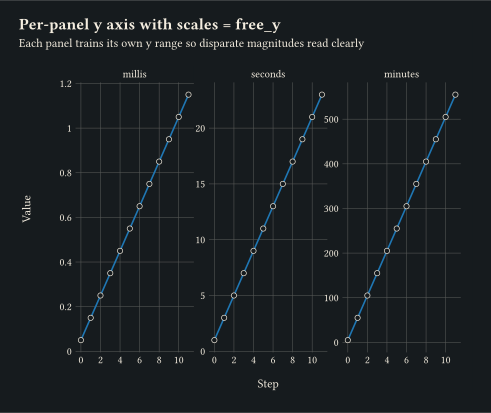
Pass scales: "free_y" to facet-wrap so each panel trains its own y range.
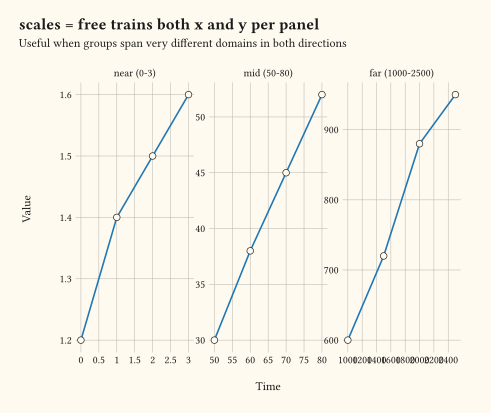
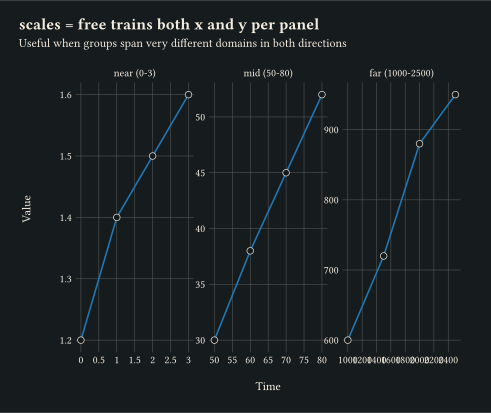
Pass scales: "free" to facet-wrap to train both axes per panel.
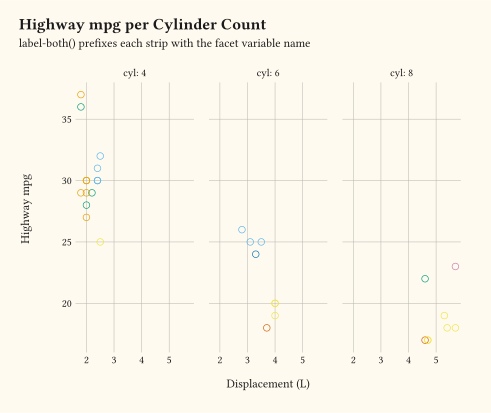
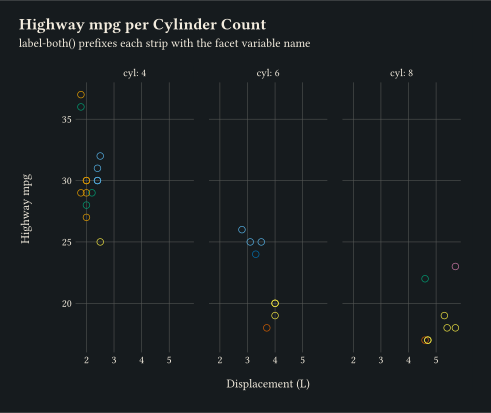
label-both prefixes each strip with the facet variable name (e.g., cyl: 4).
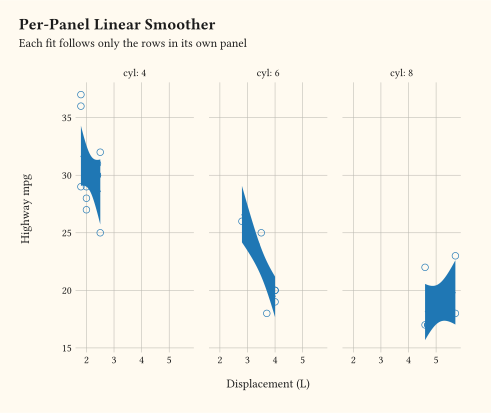
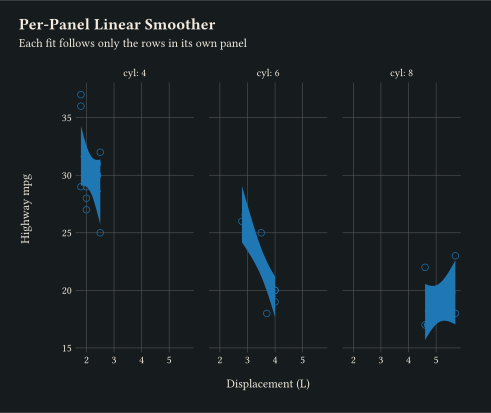
geom-smooth inside facet-wrap fits each panel only on its own subset.
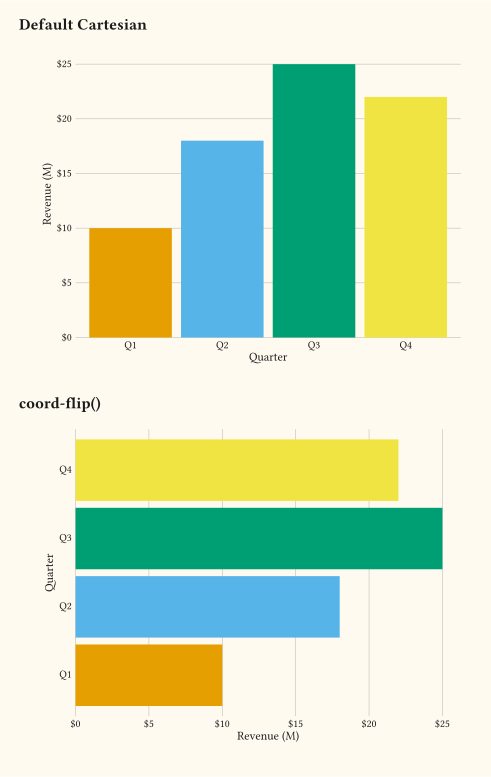
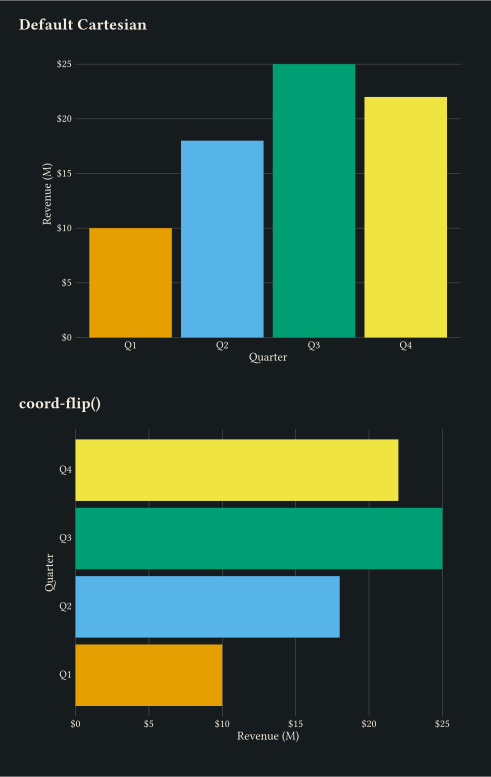
coord-flip swaps x and y so vertical bars read horizontally.
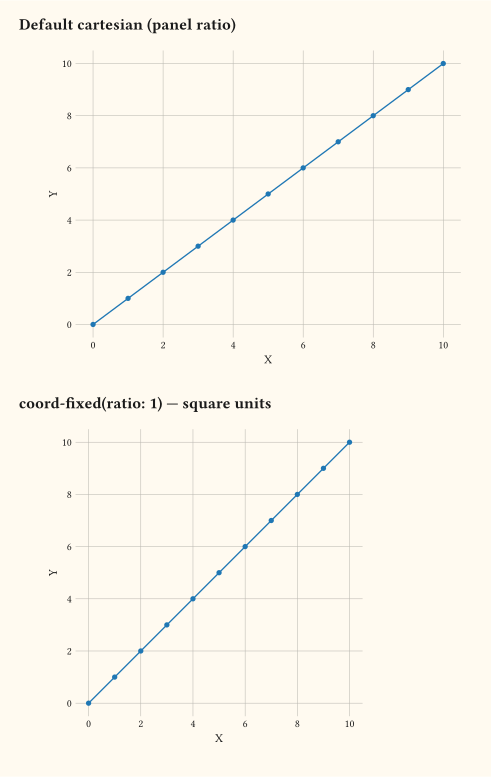
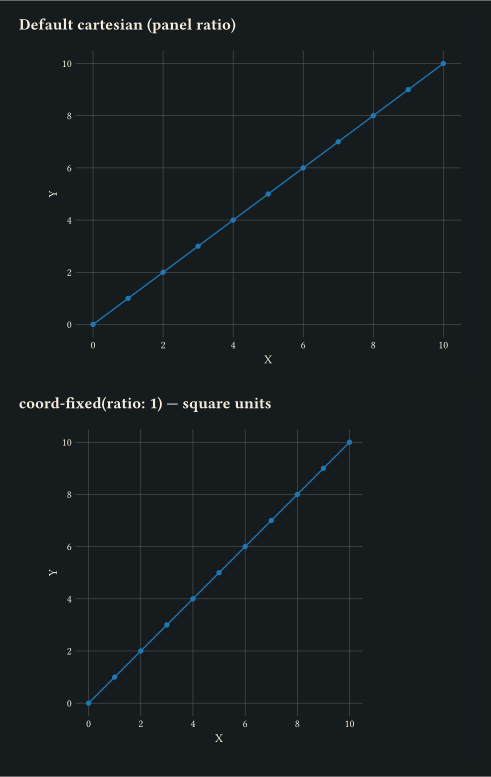
coord-fixed locks one x unit equal to ratio y units regardless of panel size.
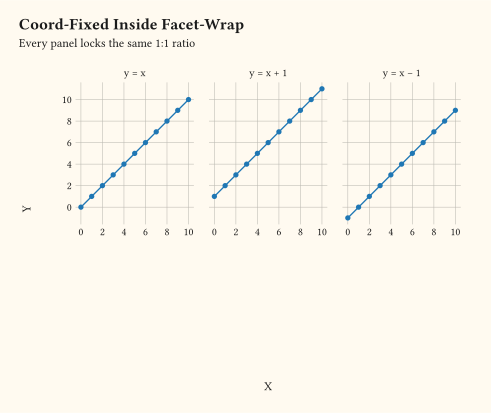
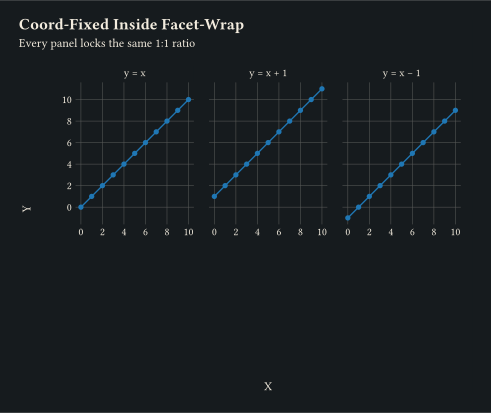
coord-fixed applies inside every facet-wrap panel.
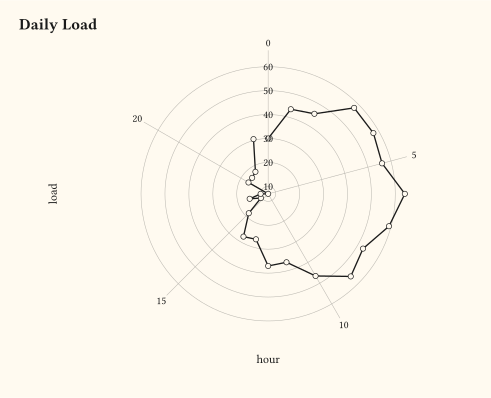
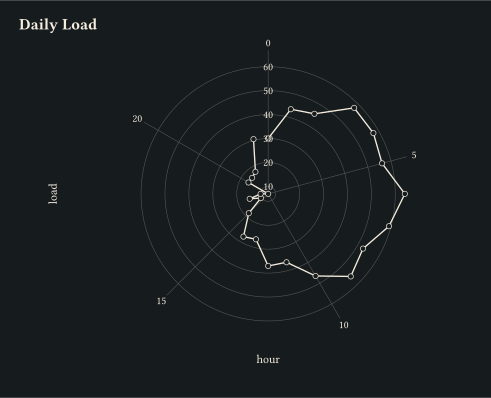
Wrap an hourly series around a circle via coord-radial(theta: "x"): hour drives the angle and load the radius.
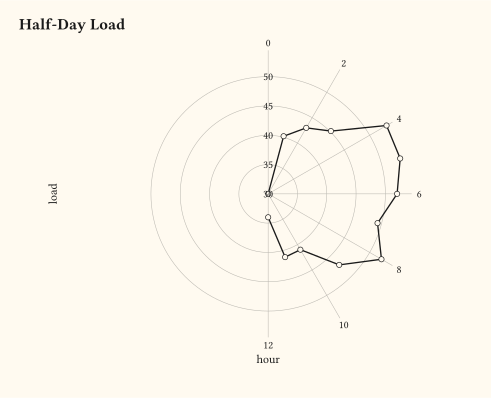
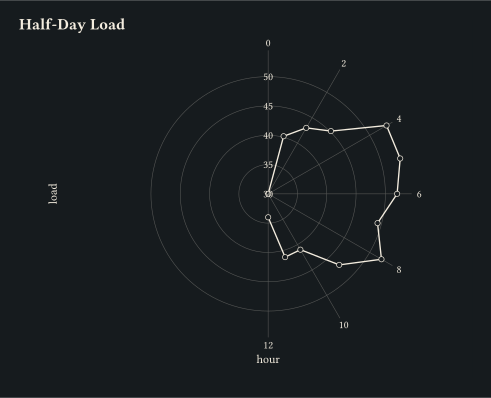
Pass end: calc.pi to coord-radial for a partial sweep; the panel becomes a half-circle and domain endpoints land at distinct angles instead of stacking.
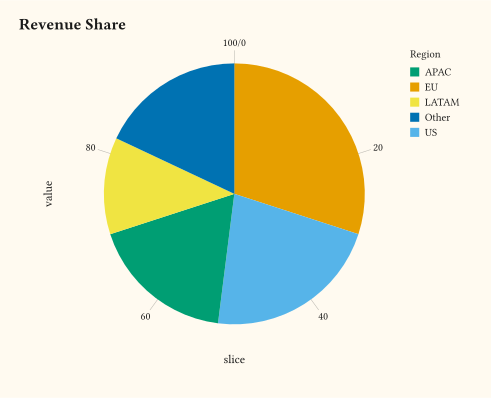
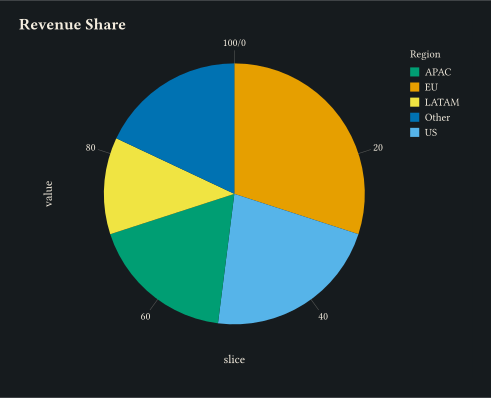
coord-radial(theta: "y") with stacked geom-col turns one stacked bar into a pie chart of revenue share.
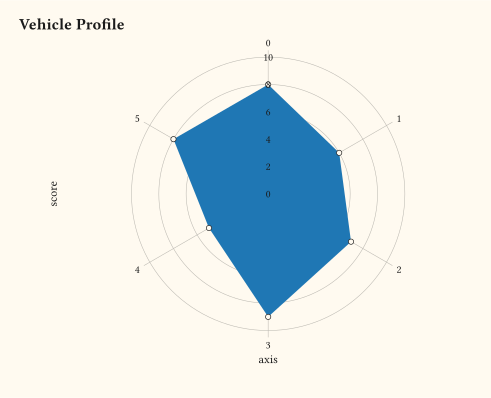
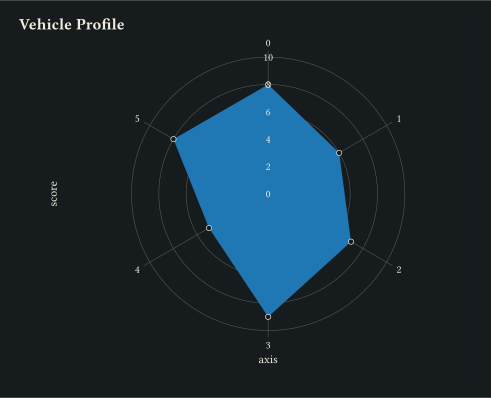
Closed polygon under coord-radial(theta: "x") with one vertex per axis, drawn via geom-polygon.
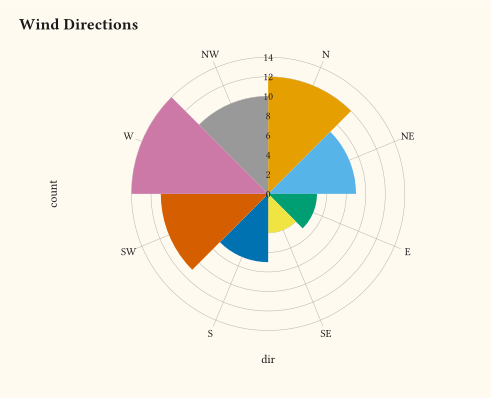
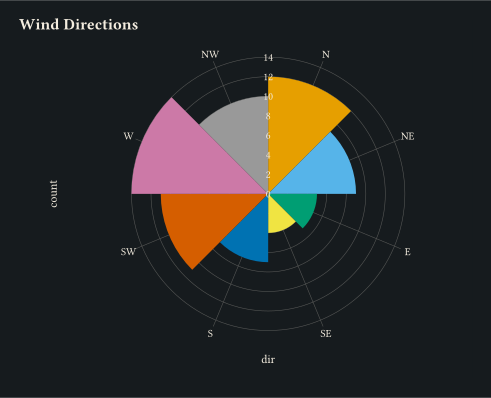
Discrete categories distributed around the circle via coord-radial(theta: "x") with geom-col; bar height encodes the count.
coord-transform warps the displayed coordinates without setting transform on each scale; overrides any scale-level transform.
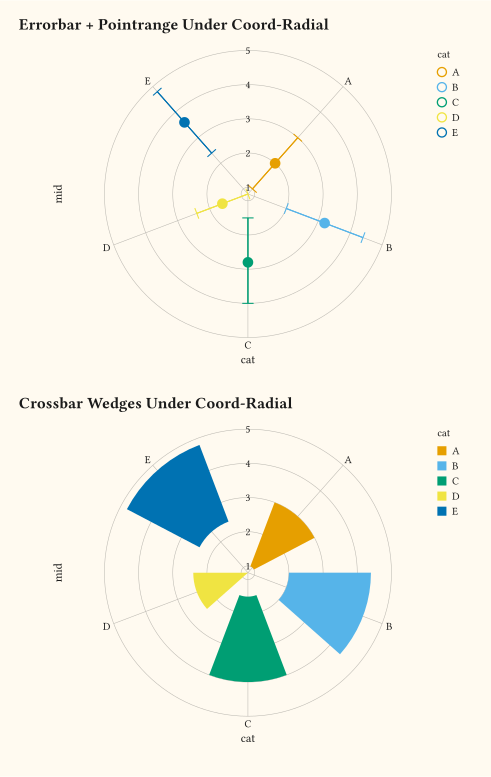
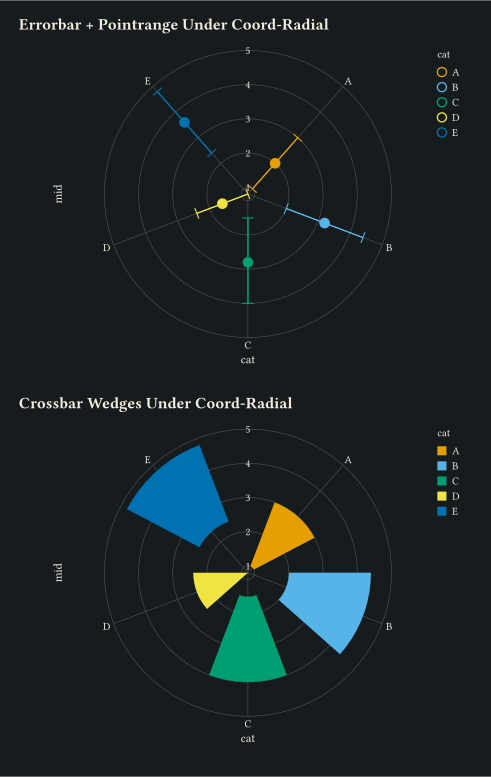
Errorbars, point ranges, line ranges, crossbars, and boxplots all switch to polar wedges, radial spines, and arc caps under coord-radial.
Per-element overrides with theme on top of theme-minimal.
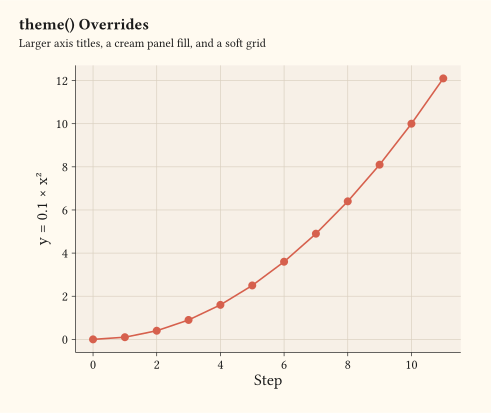
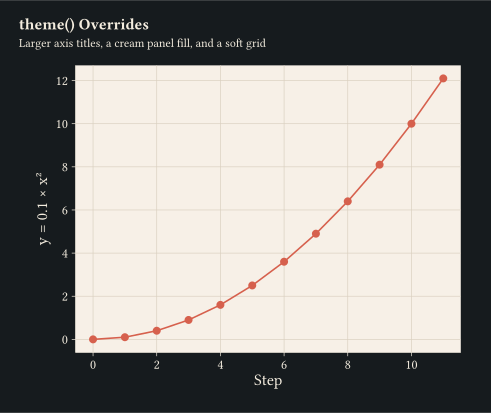
Custom text sizes, panel fill, and grid colour passed through theme.
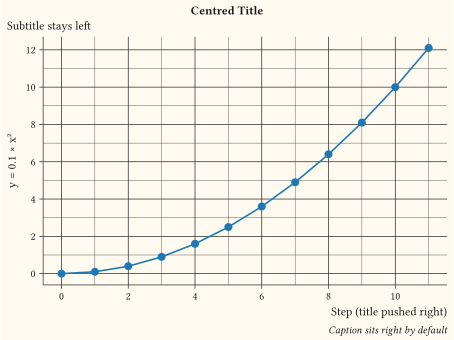
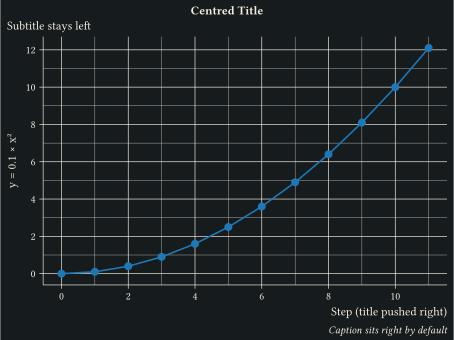
Per-surface horizontal alignment via element-text align: title and subtitle default left, caption right, axis titles centred.
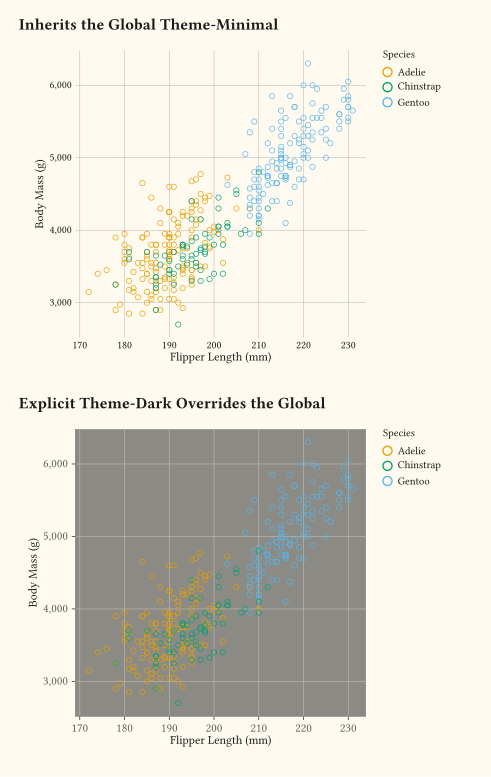
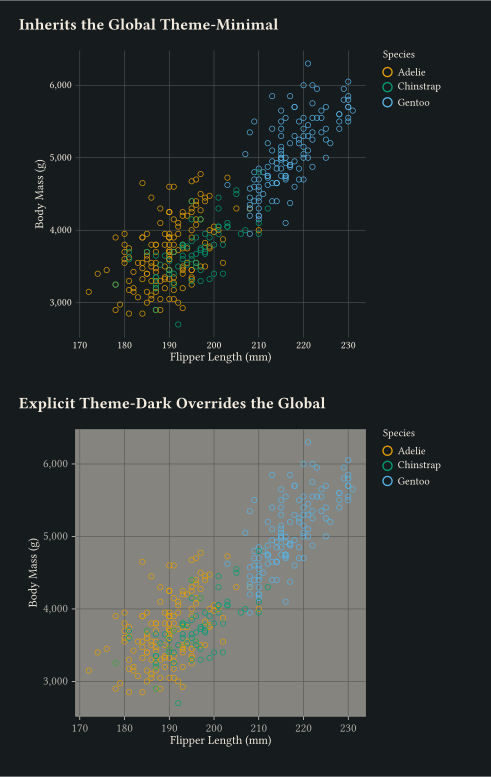
theme-set installs a global default; explicit theme: arguments still take precedence per plot.
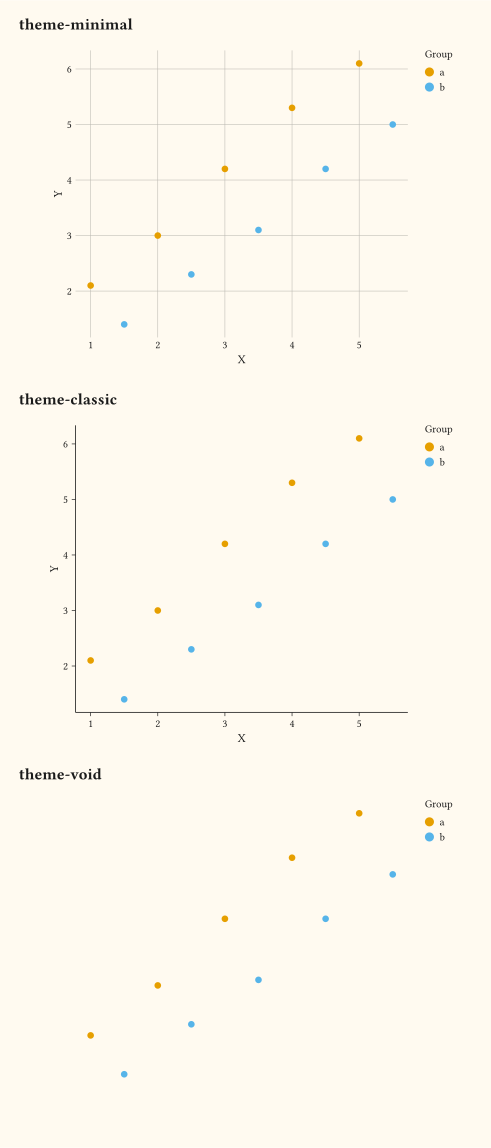
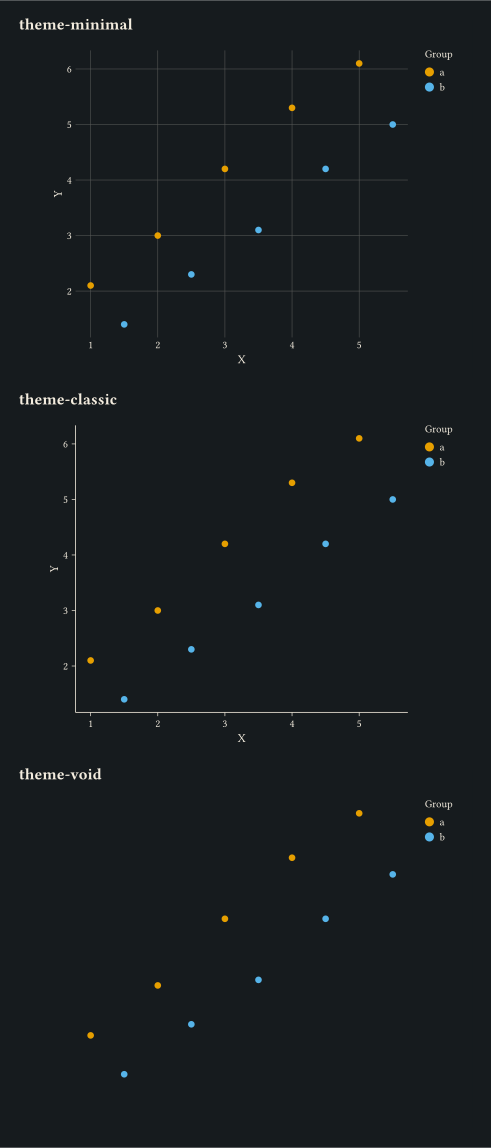
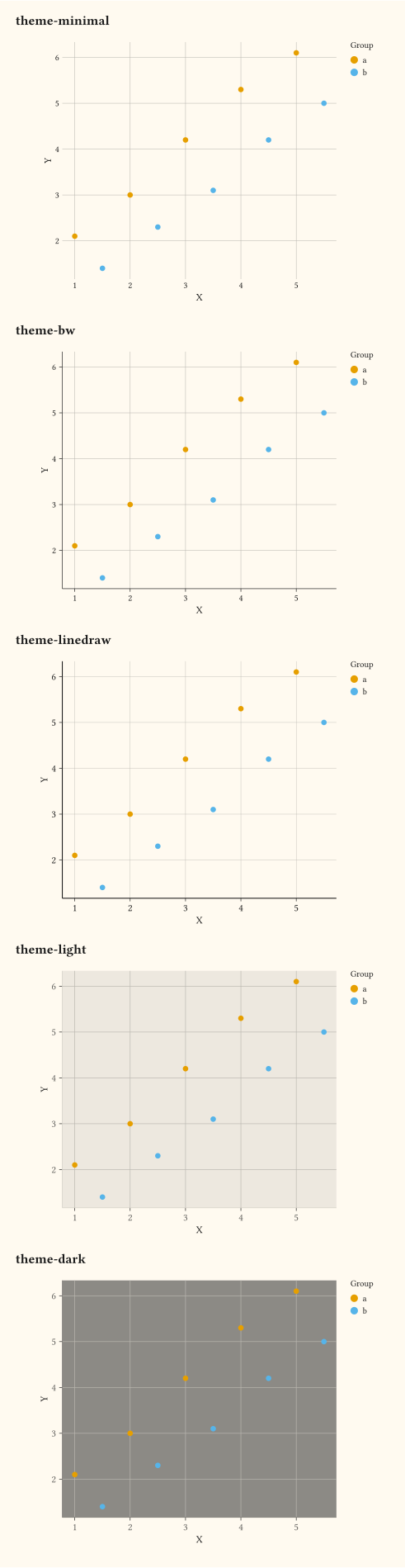
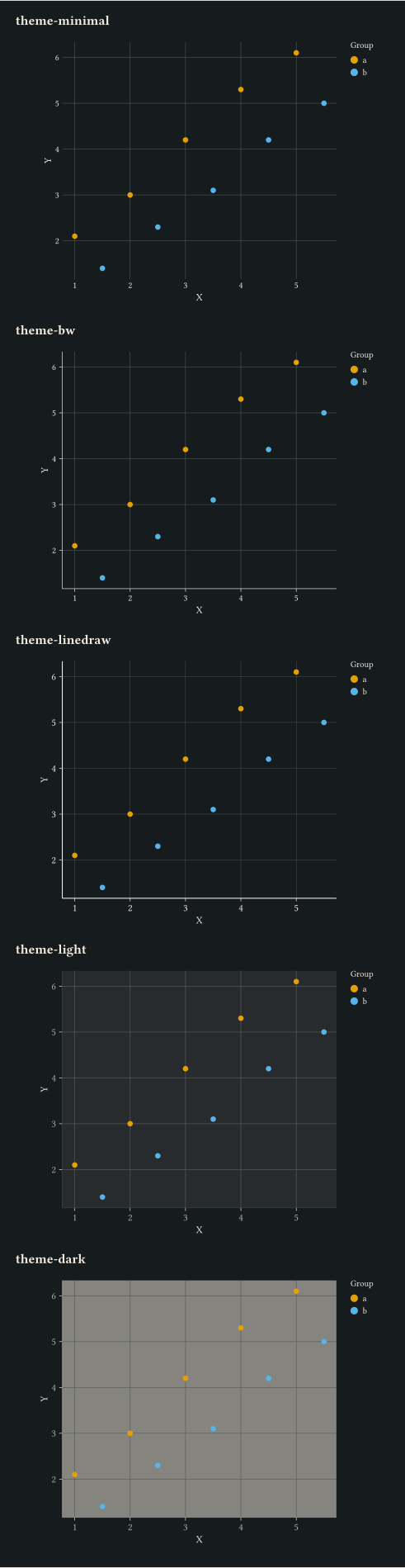
Side-by-side gallery of theme-bw, theme-linedraw, theme-light, theme-dark, and theme-minimal.
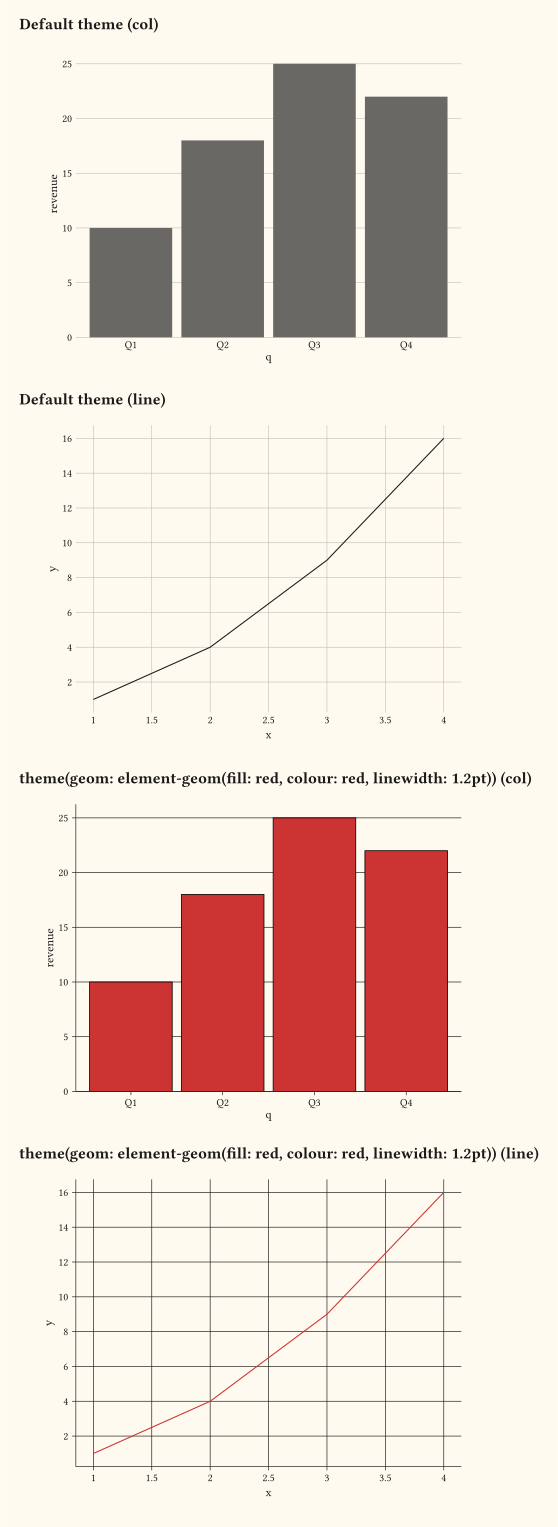
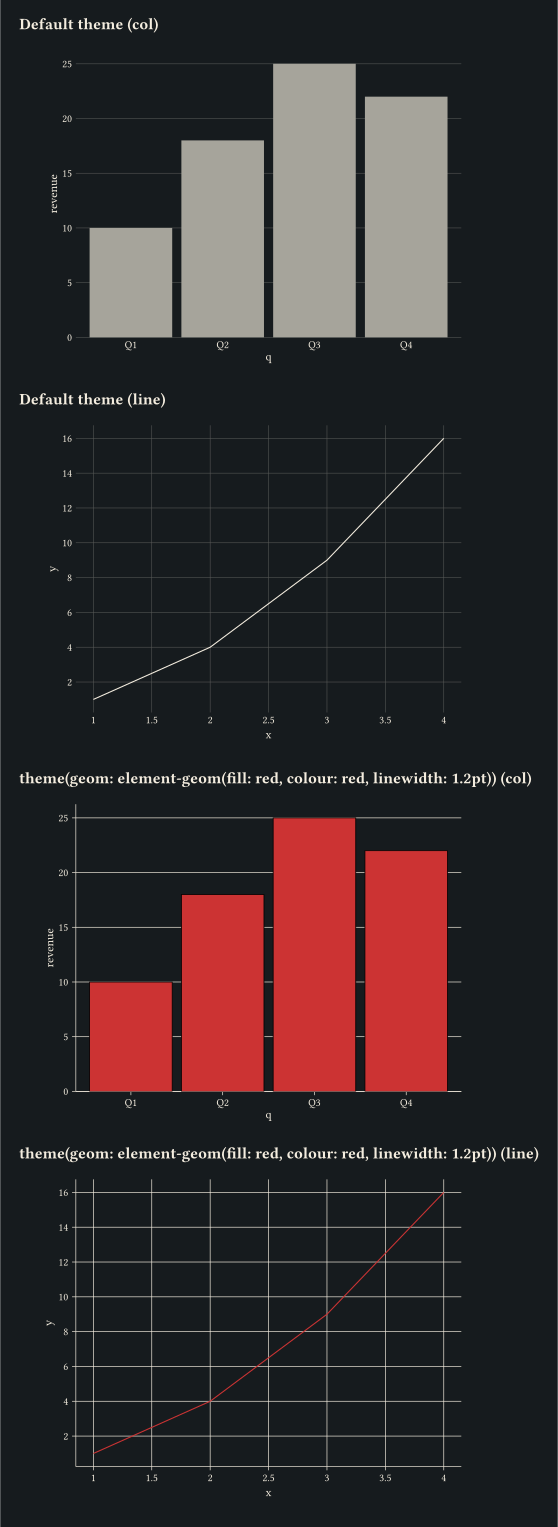
Pin layer-default fill, colour, and linewidth across the supporting geoms via element-geom on theme.geom.
Compose theme overrides via family-scoped theme-sub-axis, theme-sub-legend, and theme-sub-plot to keep verbose theme blocks readable.
// Minimal scatter plot with inline data.

#import "@preview/gribouille:0.6.0": *

#set page(width: auto, height: auto, margin: 0cm)

#let iris = (
  (sepal-length: 5.1, sepal-width: 3.5, species: "setosa"),
  (sepal-length: 4.9, sepal-width: 3.0, species: "setosa"),
  (sepal-length: 4.7, sepal-width: 3.2, species: "setosa"),
  (sepal-length: 7.0, sepal-width: 3.2, species: "versicolor"),
  (sepal-length: 6.4, sepal-width: 3.2, species: "versicolor"),
  (sepal-length: 6.9, sepal-width: 3.1, species: "versicolor"),
  (sepal-length: 6.3, sepal-width: 3.3, species: "virginica"),
  (sepal-length: 5.8, sepal-width: 2.7, species: "virginica"),
  (sepal-length: 7.1, sepal-width: 3.0, species: "virginica"),
)

#plot(
  data: iris,
  mapping: aes(x: "sepal-length", y: "sepal-width", fill: "species"),
  layers: (geom-point(size: 3pt),),
  labels: labels(
    title: "Iris Sepal Dimensions",
    x: "Sepal Length (cm)",
    y: "Sepal Width (cm)",
    fill: "Species",
  ),
  theme: theme-minimal(),
  width: 12cm,
  height: 9cm,
)// Line plus point layers sharing discrete colour and fill mappings.
#import "@preview/gribouille:0.6.0": *
#set page(width: auto, height: auto, margin: 0cm)
#let trend = (
(month: 1, sales: 12, region: "north"),
(month: 2, sales: 15, region: "north"),
(month: 3, sales: 14, region: "north"),
(month: 4, sales: 18, region: "north"),
(month: 5, sales: 22, region: "north"),
(month: 6, sales: 25, region: "north"),
(month: 1, sales: 8, region: "south"),
(month: 2, sales: 11, region: "south"),
(month: 3, sales: 13, region: "south"),
(month: 4, sales: 12, region: "south"),
(month: 5, sales: 16, region: "south"),
(month: 6, sales: 20, region: "south"),
(month: 1, sales: 5, region: "east"),
(month: 2, sales: 7, region: "east"),
(month: 3, sales: 9, region: "east"),
(month: 4, sales: 12, region: "east"),
(month: 5, sales: 14, region: "east"),
(month: 6, sales: 17, region: "east"),
)
#plot(
data: trend,
mapping: aes(x: "month", y: "sales", colour: "region", fill: "region"),
layers: (
geom-line(stroke: 1pt),
geom-point(size: 3pt),
),
scales: scales(x: scale-continuous(breaks: (1, 2, 3, 4, 5, 6))),
labels: labels(
title: "Monthly Sales by Region",
subtitle: "Line and point layers share a single colour mapping",
x: "Month",
y: "Sales",
colour: "Region",
fill: "Region",
),
theme: theme-minimal(),
width: 12cm,
height: 9cm,
)// labels(): title, subtitle, caption, and axis labels in one call.
#import "@preview/gribouille:0.6.0": *
#set page(width: auto, height: auto, margin: 0cm)
#let df = range(1, 16).map(i => (x: i, y: i + calc.rem(i * 7, 5)))
#plot(
data: df,
mapping: aes(x: "x", y: "y"),
layers: (
geom-line(stroke: 1pt, colour: rgb("#1f77b4")),
geom-point(size: 3pt, fill: rgb("#1f77b4")),
),
labels: labels(
title: "Monthly Counts",
subtitle: "First half of the experiment",
caption: "Source: simulated dataset.",
x: "Month",
y: "Count",
),
theme: theme-minimal(),
width: 12cm,
height: 9cm,
)// A figure tag drawn above the title, styled by the plot-tag theme element.
#import "@preview/gribouille:0.6.0": *
#set page(width: auto, height: auto, margin: 0cm)
#plot(
data: mpg,
mapping: aes(x: "displ", y: "hwy"),
layers: (geom-point(size: 2.5pt, alpha: 0.75),),
labels: labels(
tag: "A",
title: "Engine Displacement Versus Highway Fuel Economy",
subtitle: "One panel of a larger figure",
x: "Displacement (L)",
y: "Highway mpg",
),
theme: theme-minimal(),
width: 12cm,
height: 9cm,
)// Inline aesthetic coercion: force a numeric column to be treated as discrete
// for the fill aesthetic without changing the underlying data.
#import "@preview/gribouille:0.6.0": *
#set page(width: auto, height: auto, margin: 0cm)
#let obs = ()
#for i in range(0, 12) {
obs.push((x: i, y: calc.sin(i / 2.0) * 5 + 5, cluster: calc.rem(i, 3)))
}
#plot(
data: obs,
mapping: aes(x: "x", y: "y", fill: as-factor("cluster")),
layers: (geom-point(size: 4pt),),
labels: labels(
title: "Numeric Column Coerced to Factor",
subtitle: "as-factor() forces fill onto a discrete scale without changing the data",
x: "X",
y: "Y",
fill: "Cluster",
),
theme: theme-minimal(),
width: 12cm,
height: 9cm,
)// Bundled penguins dataset: flipper length vs body mass by species.
#import "@preview/gribouille:0.6.0": *
#set page(width: auto, height: auto, margin: 0cm)
#let species-colours = (
Adelie: rgb("#ff8c00"),
Chinstrap: rgb("#008B8B"),
Gentoo: rgb("#800080"),
)
#plot(
data: penguins,
mapping: aes(
x: "flipper-len",
y: "body-mass",
colour: "species",
fill: "species",
shape: "species",
),
layers: (
geom-point(size: 2pt, alpha: 0.25, stroke: 0.5pt, colour: rgb("#ffffff")),
geom-smooth(method: "lm", se: true, alpha: 0.2),
geom-mark(method: "hull", expand: 5pt, alpha: 0.25),
geom-errorbar(stat: stat-summary(fun: "mean-sd"), width: 5pt),
geom-errorbarh(stat: stat-summary(fun: "mean-sd"), height: 5pt),
geom-label(
stat: stat-summary(fun: "mean"),
mapping: aes(label: "species"),
colour: rgb("#ffffff"),
size: 8pt,
),
),
scales: scales(x: scale-continuous(), y: scale-continuous(labels: format-comma()), colour: scale-discrete(limits: species-colours.keys(),
palette: species-colours.values(),), fill: scale-discrete(limits: species-colours.keys(),
palette: species-colours.values(),)),
labels: labels(
title: typst("Penguins *Dataset*"),
subtitle: typst({
[Flipper length vs body mass by species: ]
species-colours
.pairs()
.map(p => text(fill: p.at(1), weight: "bold")[#p.at(0)])
.join(", ")
}),
caption: "Data from Palmer Archipelago (Antarctica) penguin dataset.",
colour: "Species",
fill: "Species",
shape: "Species",
x: "Flipper Length (mm)",
y: "Body Mass (g)",
),
theme: theme-minimal(),
width: 12cm,
height: 9cm,
)// Bundled mpg dataset: highway mpg vs engine displacement, filled by class.
#import "@preview/gribouille:0.6.0": *
#set page(width: auto, height: auto, margin: 0cm)
#plot(
data: mpg,
mapping: aes(x: "displ", y: "hwy", fill: "class"),
layers: (geom-point(size: 3pt, alpha: 0.85),),
labels: labels(
title: "Fuel Economy by Vehicle Class",
subtitle: "Highway mpg falls as engine displacement rises",
x: "Engine Displacement (L)",
y: "Highway mpg",
fill: "Class",
),
theme: theme-minimal(),
width: 12cm,
height: 9cm,
)// Promoted alpha and linewidth aesthetics, both mapped to numeric columns.
#import "@preview/gribouille:0.6.0": *
#set page(width: auto, height: auto, margin: 0cm)
#let scatter-data = ()
#for i in range(0, 24) {
scatter-data.push((x: i, y: calc.sin(i * 0.4) + i * 0.05, score: i))
}
#let line-data = ()
#for grp-idx in range(0, 5) {
let weight = grp-idx + 1
for i in range(0, 12) {
line-data.push((
x: i,
y: i * 0.3 + grp-idx,
grp: str(grp-idx),
w: weight,
))
}
}
#grid(
columns: 1,
row-gutter: 0.5cm,
plot(
data: scatter-data,
mapping: aes(x: "x", y: "y", alpha: "score"),
layers: (geom-point(size: 5pt, fill: rgb("#1f77b4")),),
scales: scales(alpha: scale-continuous(range: (0.1, 1))),
labels: labels(
title: "Mapped Alpha (Translucent to Opaque)",
x: "X",
y: "Y",
alpha: "Score",
),
theme: theme-minimal(),
width: 12cm,
height: 9cm,
),
plot(
data: line-data,
mapping: aes(x: "x", y: "y", group: "grp", linewidth: "w"),
layers: (geom-line(),),
scales: scales(linewidth: scale-continuous(range: (0.4pt, 2.4pt))),
labels: labels(
title: "Mapped Linewidth (Thin to Thick)",
x: "X",
y: "Y",
linewidth: "Weight",
),
theme: theme-minimal(),
width: 12cm,
height: 9cm,
),
)// Simple bar chart with discrete x.
#import "@preview/gribouille:0.6.0": *
#set page(width: auto, height: auto, margin: 0cm)
#let fruits = (
(fruit: "apple", count: 12),
(fruit: "banana", count: 19),
(fruit: "cherry", count: 7),
(fruit: "date", count: 15),
)
#plot(
data: fruits,
mapping: aes(x: "fruit", y: "count", fill: "fruit"),
layers: (geom-col(),),
guides: guides(fill: none),
labels: labels(title: "Counts per Fruit", x: "Fruit", y: "Count"),
theme: theme-grey(),
width: 12cm,
height: 9cm,
)// geom-bar: counts observations per category.
#import "@preview/gribouille:0.6.0": *
#set page(width: auto, height: auto, margin: 0cm)
#let items = (
(cat: "A"),
(cat: "A"),
(cat: "A"),
(cat: "B"),
(cat: "B"),
(cat: "C"),
(cat: "C"),
(cat: "C"),
(cat: "C"),
(cat: "D"),
(cat: "D"),
(cat: "D"),
(cat: "D"),
(cat: "D"),
)
#plot(
data: items,
mapping: aes(x: "cat", fill: "cat"),
layers: (geom-bar(),),
scales: scales(y: scale-continuous(expand: (0%, 20%))),
guides: guides(fill: none),
labels: labels(
title: "Category Counts via Stat-Count",
x: "Category",
y: "Count",
),
theme: theme-minimal(),
width: 12cm,
height: 9cm,
)// Stacked bars: quarters on x, revenue by product stacked within each quarter.
#import "@preview/gribouille:0.6.0": *
#set page(width: auto, height: auto, margin: 0cm)
#let sales = (
(q: "Q1", product: "A", revenue: 10),
(q: "Q1", product: "B", revenue: 20),
(q: "Q1", product: "C", revenue: 15),
(q: "Q2", product: "A", revenue: 12),
(q: "Q2", product: "B", revenue: 18),
(q: "Q2", product: "C", revenue: 22),
(q: "Q3", product: "A", revenue: 8),
(q: "Q3", product: "B", revenue: 25),
(q: "Q3", product: "C", revenue: 30),
)
#plot(
data: sales,
mapping: aes(x: "q", y: "revenue", fill: "product"),
layers: (geom-col(position: "stack"),),
scales: scales(y: scale-continuous(labels: format-currency(symbol: "$", digits: 0))),
labels: labels(
title: "Revenue by Quarter",
subtitle: "Stacked bars highlight per-quarter totals",
x: "Quarter",
y: "Revenue (M)",
fill: "Product",
),
theme: theme-minimal(),
width: 12cm,
height: 9cm,
)// Dodged bars: products shown side-by-side per quarter.
#import "@preview/gribouille:0.6.0": *
#set page(width: auto, height: auto, margin: 0cm)
#let sales = (
(q: "Q1", product: "A", revenue: 10),
(q: "Q1", product: "B", revenue: 20),
(q: "Q1", product: "C", revenue: 15),
(q: "Q2", product: "A", revenue: 12),
(q: "Q2", product: "B", revenue: 18),
(q: "Q2", product: "C", revenue: 22),
(q: "Q3", product: "A", revenue: 8),
(q: "Q3", product: "B", revenue: 25),
(q: "Q3", product: "C", revenue: 30),
)
#plot(
data: sales,
mapping: aes(x: "q", y: "revenue", fill: "product"),
layers: (geom-col(position: "dodge"),),
scales: scales(x: scale-discrete(expand: false), y: scale-continuous(expand: (0%, 10%), labels: format-currency(
symbol: "$",
digits: 0,
))),
labels: labels(
title: "Revenue by Quarter, Dodged",
subtitle: "Side-by-side bars compare products within each quarter",
x: "Quarter",
y: "Revenue (M)",
fill: "Product",
),
theme: theme-minimal(),
width: 12cm,
height: 9cm,
)// Filled bars: each quarter's total normalised to 1 (product share).
#import "@preview/gribouille:0.6.0": *
#set page(width: auto, height: auto, margin: 0cm)
#let sales = (
(q: "Q1", product: "A", revenue: 10),
(q: "Q1", product: "B", revenue: 20),
(q: "Q1", product: "C", revenue: 15),
(q: "Q2", product: "A", revenue: 12),
(q: "Q2", product: "B", revenue: 18),
(q: "Q2", product: "C", revenue: 22),
(q: "Q3", product: "A", revenue: 8),
(q: "Q3", product: "B", revenue: 25),
(q: "Q3", product: "C", revenue: 30),
)
#plot(
data: sales,
mapping: aes(x: "q", y: "revenue", fill: "product"),
layers: (geom-col(position: "fill"),),
scales: scales(y: scale-continuous(labels: format-percent())),
labels: labels(
title: "Product Share of Revenue per Quarter",
subtitle: "position-fill normalises each quarter total to 100%",
x: "Quarter",
y: "Share",
fill: "Product",
),
theme: theme-minimal(),
width: 12cm,
height: 9cm,
)// Histogram: continuous x binned via stat-bin.
#import "@preview/gribouille:0.6.0": *
#set page(width: auto, height: auto, margin: 0cm)
#plot(
data: mpg,
mapping: aes(x: "hwy"),
layers: (geom-histogram(bins: 12, fill: rgb("#1f77b4"), alpha: 0.85),),
labels: labels(
title: "Distribution of Highway Fuel Economy",
subtitle: "12 equal-width bins via stat-bin",
x: "Highway mpg",
y: "Vehicles",
),
theme: theme-minimal(),
width: 12cm,
height: 9cm,
)// Scatter with an OLS smoother and 95% CI band.
#import "@preview/gribouille:0.6.0": *
#set page(width: auto, height: auto, margin: 0cm)
#let accent = rgb("#1f77b4")
#plot(
data: mpg,
mapping: aes(x: "displ", y: "hwy"),
layers: (
geom-point(size: 2.5pt, alpha: 0.75, colour: accent),
geom-smooth(method: "lm", colour: accent, fill: accent, alpha: 0.2),
),
labels: labels(
title: "Engine Displacement Versus Highway Fuel Economy",
subtitle: "Linear fit with 95% confidence band",
x: "Displacement (L)",
y: "Highway mpg",
),
theme: theme-minimal(),
width: 12cm,
height: 9cm,
)// Ribbon + line: explicit ymin/ymax bounds around a fitted trend.
#import "@preview/gribouille:0.6.0": *
#set page(width: auto, height: auto, margin: 0cm)
#let accent = rgb("#1f77b4")
#let df = ()
#for i in range(0, 20) {
let mid = i * 0.5 + 1
df.push((t: i, y: mid, lo: mid - 1.2, hi: mid + 1.2))
}
#plot(
data: df,
mapping: aes(x: "t", y: "y", ymin: "lo", ymax: "hi"),
layers: (
geom-ribbon(fill: accent, alpha: 0.3),
geom-line(colour: accent, stroke: 1.2pt),
geom-point(size: 2.5pt, fill: accent),
),
scales: scales(x: scale-continuous(name: "Time step"), y: scale-continuous(name: "Value")),
labels: labels(
title: "Trend with an Explicit Ribbon Band",
subtitle: "ymin and ymax aesthetics drive geom-ribbon directly",
),
theme: theme-minimal(),
width: 12cm,
height: 9cm,
)// Reference lines: hline, vline, and abline overlaid on a scatter plot.
#import "@preview/gribouille:0.6.0": *
#set page(width: auto, height: auto, margin: 0cm)
#let df = range(0, 20).map(i => (x: i, y: 2 * i + 3 + calc.sin(i) * 2))
#plot(
data: df,
mapping: aes(x: "x", y: "y"),
layers: (
geom-point(size: 2.5pt, alpha: 0.85),
geom-abline(slope: 2, intercept: 3, colour: rgb("#d62728")),
geom-hline(yintercept: 20, colour: rgb("#2ca02c")),
geom-vline(xintercept: 10, colour: rgb("#1f77b4")),
),
labels: labels(
title: "Trend with Reference Lines",
subtitle: "abline, hline, and vline highlight expected values without joining the data",
x: "X",
y: "Y",
),
theme: theme-minimal(),
width: 12cm,
height: 9cm,
)// Data-driven reference lines: bind the intercept channels through `aes()` so
// each row of an annotations frame draws its own line, coloured per row.
#import "@preview/gribouille:0.6.0": *
#set page(width: auto, height: auto, margin: 0cm)
#let df = range(0, 20).map(i => (x: i, y: 2 * i + 3 + calc.sin(i) * 2))
#let events = (
(at: 5, grp: "start"),
(at: 12, grp: "peak"),
(at: 17, grp: "end"),
)
#let bands = (
(lo: 15, lvl: "low"),
(lo: 30, lvl: "high"),
)
#plot(
data: df,
mapping: aes(x: "x", y: "y"),
layers: (
geom-point(size: 2.5pt, alpha: 0.85),
geom-vline(mapping: aes(xintercept: "at", colour: "grp"), data: events),
geom-hline(
mapping: aes(yintercept: "lo", colour: "lvl"),
data: bands,
linetype: "dashed",
),
),
labels: labels(
title: "Data-Driven Reference Lines",
subtitle: "vline and hline read intercepts and colour from mapped columns",
x: "X",
y: "Y",
colour: "Marker",
),
theme: theme-minimal(),
width: 12cm,
height: 9cm,
)// geom-text and geom-label: annotate points with their name.
#import "@preview/gribouille:0.6.0": *
#set page(width: auto, height: auto, margin: 0cm)
#let cities = (
(x: 2.0, y: 5.3, name: "Alpha"),
(x: 4.0, y: 2.8, name: "Beta"),
(x: 6.0, y: 7.0, name: "Gamma"),
(x: 8.0, y: 4.1, name: "Delta"),
)
#let accent = rgb("#1f77b4")
#grid(
columns: 1,
row-gutter: 0.5cm,
plot(
data: cities,
mapping: aes(x: "x", y: "y", label: "name"),
layers: (
geom-point(size: 4pt, fill: accent),
geom-text(mapping: aes(nudge-y: 0.3cm), size: 9pt, anchor: "south"),
),
scales: scales(y: scale-continuous(expand: (5%, 15%))),
labels: labels(title: "Geom-Text (plain)", x: "X", y: "Y"),
theme: theme-minimal(),
width: 12cm,
height: 9cm,
),
plot(
data: cities,
mapping: aes(x: "x", y: "y", label: "name"),
layers: (
geom-point(size: 4pt, fill: accent),
geom-label(mapping: aes(nudge-y: 0.35cm), size: 9pt, anchor: "south"),
),
scales: scales(y: scale-continuous(expand: (5%, 15%))),
labels: labels(title: "Geom-Label (boxed)", x: "X", y: "Y"),
theme: theme-minimal(),
width: 12cm,
height: 9cm,
),
)// shape and linetype aesthetics: one mark and one dash style per group.
#import "@preview/gribouille:0.6.0": *
#set page(width: auto, height: auto, margin: 0cm)
#let obs = ()
#for i in range(0, 10) {
obs.push((t: i, value: i, group: "A"))
obs.push((t: i, value: i * 0.8 + 1, group: "B"))
obs.push((t: i, value: i * 0.5 + 2, group: "C"))
}
#plot(
data: obs,
mapping: aes(
x: "t",
y: "value",
shape: "group",
linetype: "group",
colour: "group",
),
layers: (
geom-line(stroke: 1pt),
geom-point(size: 4pt),
),
scales: scales(colour: scale-brewer(palette: "Dark2")),
labels: labels(
title: "One Shape and One Linetype per Group",
subtitle: "Using shape + linetype + colour together makes groups legible without colour alone",
x: "T",
y: "Value",
colour: "Group",
shape: "Group",
linetype: "Group",
),
theme: theme-minimal(),
width: 12cm,
height: 9cm,
)// A colourbar guide appears automatically when fill is trained continuously.
#import "@preview/gribouille:0.6.0": *
#set page(width: auto, height: auto, margin: 0cm)
#plot(
data: mpg,
mapping: aes(x: "displ", y: "hwy", fill: "cty"),
layers: (geom-point(size: 4pt, alpha: 0.85),),
labels: labels(
title: "Highway Versus Engine Displacement, Coloured by City mpg",
x: "Displacement (L)",
y: "Highway mpg",
fill: "City mpg",
),
theme: theme-minimal(),
width: 12cm,
height: 9cm,
)// Viridis continuous fill scale.
#import "@preview/gribouille:0.6.0": *
#set page(width: auto, height: auto, margin: 0cm)
#plot(
data: mpg,
mapping: aes(x: "displ", y: "hwy", fill: "cty"),
layers: (geom-point(size: 4pt, alpha: 0.9),),
scales: scales(fill: scale-viridis-c()),
labels: labels(
title: "Viridis Continuous Fill",
subtitle: "Colour encodes city mpg across the displacement / highway plane",
x: "Displacement (L)",
y: "Highway mpg",
fill: "City mpg",
),
theme: theme-minimal(),
width: 12cm,
height: 9cm,
)// scale-manual and scale-manual: user-supplied palettes.
#import "@preview/gribouille:0.6.0": *
#set page(width: auto, height: auto, margin: 0cm)
#let palette = (rgb("#ff8c00"), rgb("#800080"), rgb("#008B8B"))
#plot(
data: penguins,
mapping: aes(
x: "flipper-len",
y: "body-mass",
colour: "species",
fill: "species",
),
layers: (
geom-point(size: 2pt, alpha: 0.7),
geom-smooth(method: "lm", alpha: 0.15),
),
scales: scales(colour: scale-manual(values: palette), fill: scale-manual(values: palette), y: scale-continuous(labels: format-comma())),
labels: labels(
title: "Penguin Species Drawn with a Custom Palette",
x: "Flipper Length (mm)",
y: "Body Mass (g)",
colour: "Species",
fill: "Species",
),
theme: theme-minimal(),
width: 12cm,
height: 9cm,
)// facet-wrap: one panel per level of a discrete variable.
#import "@preview/gribouille:0.6.0": *
#set page(width: auto, height: auto, margin: 0cm)
#plot(
data: mpg,
mapping: aes(x: "displ", y: "hwy", colour: "class"),
layers: (geom-point(size: 2.5pt, alpha: 0.85),),
facet: facet-wrap("cyl", ncolumn: 3),
guides: guides(colour: none),
labels: labels(
title: "Highway Fuel Economy by Cylinder Count",
x: "Displacement (L)",
y: "Highway mpg",
),
theme: theme-minimal(),
width: 12cm,
height: 9cm,
)// facet-grid: panels arranged on a row × column grid of two discrete variables.
#import "@preview/gribouille:0.6.0": *
#set page(width: auto, height: auto, margin: 0cm)
#plot(
data: penguins,
mapping: aes(x: "flipper-len", y: "body-mass", colour: "species"),
layers: (geom-point(size: 2pt, alpha: 0.85),),
facet: facet-grid(rows: "sex", columns: "species", labeller: label-both()),
scales: scales(y: scale-continuous(labels: format-comma())),
guides: guides(colour: none),
labels: labels(
title: "Penguin Morphology by Sex and Species",
x: "Flipper Length (mm)",
y: "Body Mass (g)",
),
theme: theme-minimal(),
width: 12cm,
height: 9cm,
)// facet-grid with free scales: x is free per column, y is free per row.
#import "@preview/gribouille:0.6.0": *
#set page(width: auto, height: auto, margin: 0cm)
// Each species (column) lives on a distinct x range; each sex (row) on a
// distinct y range, so shared scales would crush most panels to a corner.
#let d = ()
#for (sp, x0) in (("a", 0), ("b", 100)) {
for (sex, y0) in (("F", 0), ("M", 1000)) {
for i in range(0, 6) {
d.push((sp: sp, sex: sex, x: x0 + i, y: y0 + i * 2))
}
}
}
#plot(
data: d,
mapping: aes(x: "x", y: "y"),
layers: (geom-point(size: 2pt),),
facet: facet-grid(rows: "sex", columns: "sp", scales: "free"),
labels: labels(x: "x", y: "y"),
width: 12cm,
height: 8cm,
)// coord-cartesian: zoom in via x-limits/y-limits without dropping rows.
#import "@preview/gribouille:0.6.0": *
#set page(width: auto, height: auto, margin: 0cm)
#let accent = rgb("#1f77b4")
#let df = range(0, 25).map(i => (x: i, y: i * i))
#plot(
data: df,
mapping: aes(x: "x", y: "y"),
layers: (
geom-line(stroke: 1pt, colour: accent),
geom-point(size: 2pt, fill: accent),
),
coord: coord-cartesian(x-limits: (5, 15), y-limits: (0, 250)),
labels: labels(
title: "Coord-Cartesian Zoom",
subtitle: "x-limits and y-limits clip the view; rows outside the window stay in the data",
x: "X",
y: "Y",
),
theme: theme-minimal(),
width: 12cm,
height: 9cm,
)// Same scatter rendered in three contrasting themes side-by-side.
#import "@preview/gribouille:0.6.0": *
#set page(width: auto, height: auto, margin: 0cm)
#let pts = (
(x: 1.0, y: 2.1, g: "a"),
(x: 2.0, y: 3.0, g: "a"),
(x: 3.0, y: 4.2, g: "a"),
(x: 4.0, y: 5.3, g: "a"),
(x: 5.0, y: 6.1, g: "a"),
(x: 1.5, y: 1.4, g: "b"),
(x: 2.5, y: 2.3, g: "b"),
(x: 3.5, y: 3.1, g: "b"),
(x: 4.5, y: 4.2, g: "b"),
(x: 5.5, y: 5.0, g: "b"),
)
#let panel(title, t) = plot(
data: pts,
mapping: aes(x: "x", y: "y", fill: "g"),
layers: (geom-point(size: 2.5pt),),
labels: labels(title: title, x: "X", y: "Y", fill: "Group"),
theme: t,
width: 12cm,
height: 9cm,
)
#grid(
columns: 1,
row-gutter: 0.4cm,
panel("theme-minimal", theme-minimal()),
panel("theme-classic", theme-classic()),
panel("theme-void", theme-void()),
)// theme() overrides: tune text sizes, panel background, and grid colour.
#import "@preview/gribouille:0.6.0": *
#set page(width: auto, height: auto, margin: 0cm)
#let df = range(0, 12).map(i => (x: i, y: i * i * 0.1))
#plot(
data: df,
mapping: aes(x: "x", y: "y"),
layers: (
geom-line(stroke: 1.2pt, colour: rgb("#d6604d")),
geom-point(size: 3pt, fill: rgb("#d6604d")),
),
theme: theme(
axis-title: element-text(size: 12pt),
axis-text: element-text(size: 10pt),
panel-background: element-rect(fill: rgb("#f7f0e7")),
panel-grid: element-line(colour: rgb("#d9cfbf")),
),
labels: labels(
title: "theme() Overrides",
subtitle: "Larger axis titles, a cream panel fill, and a soft grid",
x: "Step",
y: "y = 0.1 × x²",
),
width: 12cm,
height: 9cm,
)// element-text align: title/subtitle default left, caption right, axis titles
// centred; each is independent of the container and overridable per surface.
#import "@preview/gribouille:0.6.0": *
#set page(width: auto, height: auto, margin: 0cm)
#let df = range(0, 12).map(i => (x: i, y: i * i * 0.1))
#plot(
data: df,
mapping: aes(x: "x", y: "y"),
layers: (
geom-line(stroke: 1.2pt, colour: rgb("#1f77b4")),
geom-point(size: 3pt, fill: rgb("#1f77b4")),
),
theme: theme(
plot-title: element-text(weight: "bold", align: center),
axis-title-x: element-text(align: right),
),
labels: labels(
title: "Centred Title",
subtitle: "Subtitle stays left",
caption: "Caption sits right by default",
x: "Step (title pushed right)",
y: "y = 0.1 × x²",
),
width: 12cm,
height: 9cm,
)// guide-axis customises tick label rotation and dodging on a discrete axis.
#import "@preview/gribouille:0.6.0": *
#set page(width: auto, height: auto, margin: 0cm)
#let make-panel(title, gs) = plot(
data: mpg,
mapping: aes(x: "manufacturer"),
layers: (geom-bar(),),
guides: gs,
scales: scales(y: scale-continuous(name: "Vehicles in sample")),
labels: labels(title: title, x: "Manufacturer"),
theme: theme-minimal(),
width: 12cm,
height: 9cm,
)
#grid(
columns: 1,
row-gutter: 0.4cm,
make-panel("Default tick labels overlap", (:)),
make-panel("guides(x: guide-axis(angle: 30))", guides(
x: guide-axis(angle: 30),
)),
make-panel("guides(x: guide-axis(n-dodge: 2))", guides(
x: guide-axis(n-dodge: 2),
)),
)// guide-axis-logticks adds minor ticks at log-scale subdivisions on a log10 axis.
#import "@preview/gribouille:0.6.0": *
#set page(width: auto, height: auto, margin: 0cm)
#let d = (
(x: 1, y: 1),
(x: 3, y: 5),
(x: 10, y: 25),
(x: 30, y: 100),
(x: 100, y: 500),
(x: 300, y: 2500),
(x: 1000, y: 10000),
)
#let panel(title, gs) = plot(
data: d,
mapping: aes(x: "x", y: "y"),
layers: (
geom-line(stroke: 0.6pt, alpha: 0.4),
geom-point(size: 3pt),
),
scales: scales(x: scale-continuous(transform: "log10", labels: format-comma()), y: scale-continuous(transform: "log10", labels: format-comma())),
guides: gs,
labels: labels(title: title, x: "Inputs (log10)", y: "Outputs (log10)"),
theme: theme-minimal(),
width: 12cm,
height: 9cm,
)
#grid(
columns: 1,
row-gutter: 0.5cm,
panel("Decade ticks only", (:)),
panel(
"guide-axis-logticks() on x and y",
guides(x: guide-axis-logticks(), y: guide-axis-logticks()),
),
)// guide-legend(): customise per-aesthetic legends; pass `none` to suppress one.
#import "@preview/gribouille:0.6.0": *
#set page(width: auto, height: auto, margin: 0cm)
#let make-panel(title, gs, th: theme-minimal()) = plot(
data: mpg,
mapping: aes(x: "displ", y: "hwy", colour: "class"),
layers: (geom-point(size: 2.5pt),),
guides: gs,
labels: labels(
title: title,
x: "Displacement (L)",
y: "Highway mpg",
colour: "Class",
),
theme: th,
width: 12cm,
height: 9cm,
)
#grid(
columns: 1,
row-gutter: 0.5cm,
make-panel("default", (:)),
make-panel("guide-legend(reverse: true)", guides(
colour: guide-legend(reverse: true),
)),
make-panel("guide-legend(ncolumn: 2)", guides(
colour: guide-legend(ncolumn: 2),
)),
make-panel(
"guide-legend(position: \"bottom\")",
guides(colour: guide-legend(position: "bottom")),
),
make-panel(
"guide-legend(key-size: 0.4cm)",
guides(colour: guide-legend(key-size: 0.4cm)),
),
make-panel(
"theme-minimal(legend-key: 0.4cm)",
(:),
th: theme-minimal(legend-key: 0.4cm),
),
)// guide-legend(align:) and the legend-text align: justify entry labels.
#import "@preview/gribouille:0.6.0": *
#set page(width: auto, height: auto, margin: 0cm)
#let make-panel(title, ..args) = plot(
data: mpg,
mapping: aes(x: "displ", y: "hwy", colour: "class"),
layers: (geom-point(size: 2.5pt),),
labels: labels(
title: title,
x: "Displacement (L)",
y: "Highway mpg",
colour: "Class",
),
theme: theme-minimal(),
width: 12cm,
height: 9cm,
..args,
)
#grid(
columns: 1,
row-gutter: 0.5cm,
make-panel("default (vertical: left)"),
make-panel(
"guide-legend(align: right)",
guides: guides(colour: guide-legend(align: right)),
),
make-panel(
"theme(legend-text: element-text(align: center))",
theme: theme-minimal() + theme(legend-text: element-text(align: center)),
),
)// scale-*-continuous(limits:) sets explicit data domains; guide-axis tweaks tick text.
#import "@preview/gribouille:0.6.0": *
#set page(width: auto, height: auto, margin: 0cm)
#let base(title, extra-scales: (:), extra-guides: (:)) = plot(
data: mpg,
mapping: aes(x: "displ", y: "hwy"),
layers: (geom-point(size: 2.5pt, alpha: 0.7),),
scales: extra-scales,
guides: extra-guides,
labels: labels(title: title, x: "Displacement (L)", y: "Highway mpg"),
theme: theme-minimal(),
width: 12cm,
height: 9cm,
)
#grid(
columns: 1,
row-gutter: 0.5cm,
base("default"),
base(
"guide-axis(angle: 45)",
extra-guides: guides(x: guide-axis(angle: 45)),
),
base(
"limits: (0, 8) / (0, 50)",
extra-scales: scales(x: scale-continuous(limits: (0, 8)), y: scale-continuous(limits: (0, 50))),
),
)// dup-axis duplicates an axis; sec-axis derives a transformed companion.
#import "@preview/gribouille:0.6.0": *
#set page(width: auto, height: auto, margin: 0cm)
#plot(
data: mpg,
mapping: aes(x: "displ", y: "hwy", colour: "class"),
layers: (geom-point(size: 3pt, alpha: 0.8),),
scales: scales(x: scale-continuous(name: "Engine displacement (L)",
secondary: dup-axis(name: "Displacement (L)"),), y: scale-continuous(name: "Highway mpg",
secondary: sec-axis(
transform: v => v * 0.4251,
name: "Highway km/L",
),)),
labels: labels(
title: "Fuel Economy with a Derived Secondary Axis",
subtitle: "Right axis converts mpg to km/L (× 0.4251)",
colour: "Class",
),
theme: theme-minimal(),
width: 12cm,
height: 9cm,
)// geom-area: filled polygon from y = 0 up to y along x.
#import "@preview/gribouille:0.6.0": *
#set page(width: auto, height: auto, margin: 0cm)
#plot(
data: economics,
mapping: aes(x: "date", y: "unemploy"),
layers: (
geom-area(alpha: 0.35, fill: rgb("#1f77b4")),
geom-line(stroke: 1pt, colour: rgb("#1f77b4")),
),
scales: scales(x: scale-date(), y: scale-continuous(labels: format-comma())),
labels: labels(
title: "Monthly US Unemployment, 2008-2009",
subtitle: "Area under the curve highlights the climb during the recession",
x: "Month",
y: "Unemployed (thousands)",
caption: "Source: bundled economics dataset",
),
theme: theme-minimal(),
width: 12cm,
height: 9cm,
)// geom-step: stair-step interpolation between consecutive points.
#import "@preview/gribouille:0.6.0": *
#set page(width: auto, height: auto, margin: 0cm)
#let releases = (
(version: 1, year: 2018, users: 120),
(version: 2, year: 2019, users: 220),
(version: 3, year: 2020, users: 360),
(version: 4, year: 2021, users: 410),
(version: 5, year: 2022, users: 580),
(version: 6, year: 2023, users: 760),
(version: 7, year: 2024, users: 940),
)
#plot(
data: releases,
mapping: aes(x: "year", y: "users"),
layers: (
geom-step(stroke: 1.2pt, direction: "hv", colour: rgb("#1f77b4")),
geom-point(size: 3pt, fill: rgb("#1f77b4")),
),
scales: scales(x: scale-continuous(breaks: (2018, 2020, 2022, 2024)), y: scale-continuous(labels: format-comma())),
labels: labels(
title: "Active Users at Each Release",
subtitle: "Step interpolation reflects discrete release events",
x: "Year",
y: "Active Users",
),
theme: theme-minimal(),
width: 12cm,
height: 9cm,
)// geom-path: connects rows in input order, not sorted by x.
#import "@preview/gribouille:0.6.0": *
#set page(width: auto, height: auto, margin: 0cm)
#let spiral = ()
#for i in range(0, 60) {
let t = i * 0.2
let r = 3 + t * 0.05
spiral.push((x: calc.cos(t) * r, y: calc.sin(t) * r, t: t))
}
#plot(
data: spiral,
mapping: aes(x: "x", y: "y", colour: "t"),
layers: (geom-path(stroke: 1.2pt),),
scales: scales(colour: scale-viridis-c(), x: scale-continuous(breaks: (-6, -3, 0, 3, 6)), y: scale-continuous(breaks: (-6, -3, 0, 3, 6))),
coord: coord-fixed(),
labels: labels(
title: "Geom-Path Follows Row Order",
subtitle: "Colour encodes traversal time along the spiral",
x: "X",
y: "Y",
colour: "t",
),
theme: theme-minimal(),
width: 12cm,
height: 9cm,
)// geom-polygon: closed filled polygons, one per group.
#import "@preview/gribouille:0.6.0": *
#set page(width: auto, height: auto, margin: 0cm)
#let zones = (
(x: 0, y: 0, zone: "Lowlands"),
(x: 4, y: 0, zone: "Lowlands"),
(x: 4, y: 1.5, zone: "Lowlands"),
(x: 0, y: 1.5, zone: "Lowlands"),
(x: 0.5, y: 1.5, zone: "Hills"),
(x: 3.5, y: 1.5, zone: "Hills"),
(x: 3, y: 3.5, zone: "Hills"),
(x: 1, y: 3.5, zone: "Hills"),
(x: 1.4, y: 3.5, zone: "Peak"),
(x: 2.6, y: 3.5, zone: "Peak"),
(x: 2, y: 5, zone: "Peak"),
)
#plot(
data: zones,
mapping: aes(x: "x", y: "y", fill: "zone"),
layers: (geom-polygon(alpha: 0.6, stroke: 0.6pt),),
scales: scales(fill: scale-manual(values: (
rgb("#a1d99b"),
rgb("#fdae6b"),
rgb("#9ecae1"),
))),
coord: coord-fixed(),
labels: labels(
title: "Stylised Altitude Zones",
subtitle: "One filled polygon per zone, drawn from row order",
x: "X",
y: "Y",
fill: "Zone",
),
theme: theme-minimal(),
width: 12cm,
height: 9cm,
)// geom-rect: filled boxes from xmin/xmax/ymin/ymax.
#import "@preview/gribouille:0.6.0": *
#set page(width: auto, height: auto, margin: 0cm)
#let releases = (
(xmin: 2018, xmax: 2019.5, ymin: 0, ymax: 2, version: "v1"),
(xmin: 2019.5, xmax: 2021, ymin: 0, ymax: 4, version: "v2"),
(xmin: 2021, xmax: 2023, ymin: 0, ymax: 7, version: "v3"),
(xmin: 2023, xmax: 2025, ymin: 0, ymax: 11, version: "v4"),
)
#plot(
data: releases,
mapping: aes(
xmin: "xmin",
xmax: "xmax",
ymin: "ymin",
ymax: "ymax",
fill: "version",
),
layers: (geom-rect(alpha: 0.5, stroke: 0.5pt),),
scales: scales(x: scale-continuous(breaks: (2018, 2020, 2022, 2024))),
labels: labels(
title: "Cumulative Releases per Major Version",
subtitle: "Each box spans the version's lifetime on the timeline",
x: "Year",
y: "Releases Shipped",
fill: "Version",
),
theme: theme-minimal(),
width: 12cm,
height: 9cm,
)// geom-segment: straight lines from (x, y) to (xend, yend).
#import "@preview/gribouille:0.6.0": *
#set page(width: auto, height: auto, margin: 0cm)
#let changes = (
(
team: "Engineering",
year-start: 2020,
headcount-start: 14,
year-end: 2024,
headcount-end: 38,
),
(
team: "Design",
year-start: 2020,
headcount-start: 4,
year-end: 2024,
headcount-end: 11,
),
(
team: "Product",
year-start: 2020,
headcount-start: 6,
year-end: 2024,
headcount-end: 18,
),
(
team: "Sales",
year-start: 2020,
headcount-start: 8,
year-end: 2024,
headcount-end: 22,
),
)
#plot(
data: changes,
mapping: aes(
x: "year-start",
y: "headcount-start",
xend: "year-end",
yend: "headcount-end",
colour: "team",
),
layers: (
geom-segment(stroke: 1.4pt),
geom-point(size: 3pt),
),
scales: scales(x: scale-continuous(breaks: (2020, 2022, 2024))),
labels: labels(
title: "Team Headcount, 2020 To 2024",
subtitle: "Each segment connects start and end values per team",
x: "Year",
y: "Headcount",
colour: "Team",
),
theme: theme-minimal(),
width: 12cm,
height: 9cm,
)// geom-curve: quadratic bezier connectors with mapped colour.
#import "@preview/gribouille:0.6.0": *
#set page(width: auto, height: auto, margin: 0cm)
#let connections = (
(x: 0, y: 0, xend: 1, yend: 1.5, flow: "primary"),
(x: 0, y: 0, xend: 1, yend: -1, flow: "primary"),
(x: 1, y: 1.5, xend: 2, yend: 0.5, flow: "feedback"),
(x: 1, y: -1, xend: 2, yend: 0.5, flow: "feedback"),
)
#let panel(title, curvature) = plot(
data: connections,
mapping: aes(x: "x", y: "y", xend: "xend", yend: "yend", colour: "flow"),
layers: (
geom-curve(curvature: curvature, stroke: 1.2pt),
geom-point(size: 3pt),
),
scales: scales(x: scale-continuous(breaks: (0, 1, 2)), y: scale-continuous(breaks: (-1, 0, 1, 1.5))),
labels: labels(title: title, x: "Stage", y: "Lane", colour: "Flow"),
theme: theme-minimal(),
width: 12cm,
height: 9cm,
)
#grid(
columns: 1,
row-gutter: 0.5cm,
panel("curvature = 0.5", 0.5),
panel("curvature = -0.5", -0.5),
)// geom-spoke: vector field of unit-length arrows on a small grid.
#import "@preview/gribouille:0.6.0": *
#set page(width: auto, height: auto, margin: 0cm)
#let field = ()
#for i in range(0, 7) {
for j in range(0, 7) {
let dx = i - 3
let dy = j - 3
let mag = calc.sqrt(dx * dx + dy * dy)
if mag == 0 { continue }
field.push((
x: i,
y: j,
angle: calc.atan2(dy, dx),
r: 0.35 + 0.05 * mag,
mag: mag,
))
}
}
#plot(
data: field,
mapping: aes(x: "x", y: "y", angle: "angle", radius: "r", colour: "mag"),
layers: (
geom-spoke(stroke: 0.8pt),
geom-point(size: 1.5pt),
),
scales: scales(colour: scale-viridis-c()),
coord: coord-fixed(),
labels: labels(
title: "Radial Vector Field",
subtitle: "Spoke direction = atan2(Δy, Δx); colour = distance from origin",
x: "X",
y: "Y",
colour: "Magnitude",
),
theme: theme-minimal(),
width: 12cm,
height: 9cm,
)// geom-ellipse: parametric ellipses with mapped fill and rotation.
#import "@preview/gribouille:0.6.0": *
#set page(width: auto, height: auto, margin: 0cm)
#let regions = (
(x0: 0.5, y0: 0.5, a: 1.4, b: 0.7, angle: 0, region: "Coastal"),
(x0: 1.8, y0: 1.6, a: 0.9, b: 0.5, angle: calc.pi / 6, region: "Mountain"),
(x0: -0.6, y0: 1.8, a: 0.7, b: 0.7, angle: 0, region: "Plateau"),
(x0: 1.0, y0: -0.6, a: 1.1, b: 0.4, angle: -calc.pi / 8, region: "Valley"),
)
#plot(
data: regions,
mapping: aes(
x0: "x0",
y0: "y0",
a: "a",
b: "b",
angle: "angle",
fill: "region",
),
layers: (geom-ellipse(alpha: 0.5, stroke: 0.6pt),),
scales: scales(fill: scale-brewer(palette: "Set2")),
coord: coord-fixed(),
labels: labels(
title: "Catchment Regions Sketched as Ellipses",
subtitle: "Each ellipse is parameterised by centre, semi-axes, and rotation",
x: "Easting (km)",
y: "Northing (km)",
fill: "Region",
),
theme: theme-minimal(),
width: 12cm,
height: 9cm,
)// geom-mark: enclose each cluster with a chosen shape.
#import "@preview/gribouille:0.6.0": *
#set page(width: auto, height: auto, margin: 0cm)
#let panel(title, method, expand) = plot(
data: penguins,
mapping: aes(x: "flipper-len", y: "body-mass", fill: "species"),
layers: (
geom-mark(method: method, expand: expand, alpha: 0.25),
geom-point(size: 2pt, alpha: 0.85),
),
scales: scales(y: scale-continuous(labels: format-comma())),
guides: guides(
x: guide-axis(n-dodge: 2),
),
labels: labels(
title: title,
x: "Flipper Length (mm)",
y: "Body Mass (g)",
fill: "Species",
),
theme: theme-minimal(),
width: 12cm,
height: 9cm,
)
#grid(
columns: 1,
row-gutter: 0.5cm,
panel(`method: "hull"`, "hull", 8pt),
panel(`method: "ellipse"`, "ellipse", 10pt),
panel(`method: "rect"`, "rect", 8pt),
panel(`method: "circle"`, "circle", 8pt),
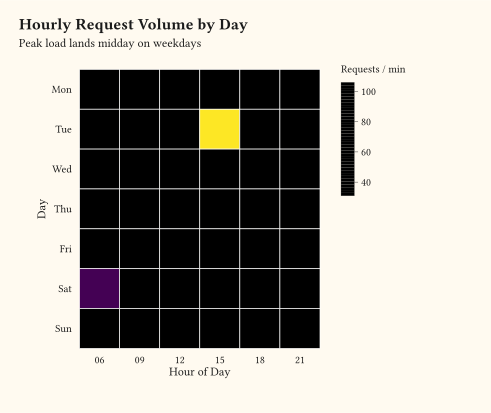
)// geom-tile: heatmap of x/y/fill.
#import "@preview/gribouille:0.6.0": *
#set page(width: auto, height: auto, margin: 0cm)
#let weeks = ("Mon", "Tue", "Wed", "Thu", "Fri", "Sat", "Sun")
#let hours = ("06", "09", "12", "15", "18", "21")
#let traffic = ()
#for (i, day) in weeks.enumerate() {
for (j, hour) in hours.enumerate() {
let weekend = day == "Sat" or day == "Sun"
let peak = if weekend { 60 } else { 100 }
let request-count = (
peak * (1.0 - calc.abs(j - 2.5) / 5.0) + calc.rem(i * 7 + j * 3, 17)
)
traffic.push((day: day, hour: hour, requests: request-count))
}
}
#plot(
data: traffic,
mapping: aes(x: "hour", y: "day", fill: "requests"),
layers: (geom-tile(stroke: 0.5pt, colour: rgb("#ffffff")),),
scales: scales(fill: scale-viridis-c(name: "Requests / min"), x: scale-discrete(limits: hours), y: scale-discrete(limits: weeks.rev())),
labels: labels(
title: "Hourly Request Volume by Day",
subtitle: "Peak load lands midday on weekdays",
x: "Hour of Day",
y: "Day",
),
theme: theme-minimal(),
width: 12cm,
height: 9cm,
)// geom-count: scatter where each unique (x, y) is drawn once and the count
// is exposed as the size aesthetic via stat-sum.
#import "@preview/gribouille:0.6.0": *
#set page(width: auto, height: auto, margin: 0cm)
#plot(
data: mpg,
mapping: aes(x: "cyl", y: "class"),
layers: (geom-count(fill: rgb("#1f77b4"), alpha: 0.7),),
scales: scales(x: scale-continuous(breaks: (4, 6, 8))),
labels: labels(
title: "Vehicle Frequency by Cylinder Count and Class",
subtitle: "Marker area scales with the number of rows in each cell",
x: "Cylinders",
y: "Class",
size: "Vehicles",
),
theme: theme-minimal(),
width: 12cm,
height: 9cm,
)// geom-freqpoly: line through binned counts, the line counterpart to a histogram.
#import "@preview/gribouille:0.6.0": *
#set page(width: auto, height: auto, margin: 0cm)
#plot(
data: mpg,
mapping: aes(x: "hwy", colour: as-factor("cyl")),
layers: (geom-freqpoly(bins: 10, stroke: 1.2pt),),
labels: labels(
title: "Highway Fuel Economy by Cylinder Count",
subtitle: "Frequency polygons make the per-group shapes easy to compare",
x: "Highway mpg",
y: "Vehicles",
colour: "Cylinders",
),
theme: theme-minimal(),
width: 12cm,
height: 9cm,
)// geom-errorbarh: horizontal error bars per category, plus point estimates.
#import "@preview/gribouille:0.6.0": *
#set page(width: auto, height: auto, margin: 0cm)
#let summary = (
(class: "compact", mean: 28.7, lo: 26.4, hi: 31.0),
(class: "midsize", mean: 27.2, lo: 24.6, hi: 29.8),
(class: "subcompact", mean: 28.1, lo: 25.0, hi: 31.2),
(class: "suv", mean: 18.1, lo: 15.4, hi: 20.8),
(class: "pickup", mean: 16.9, lo: 14.5, hi: 19.3),
(class: "minivan", mean: 22.2, lo: 19.7, hi: 24.7),
(class: "2seater", mean: 24.8, lo: 22.0, hi: 27.6),
)
#plot(
data: summary,
mapping: aes(y: "class", x: "mean", xmin: "lo", xmax: "hi"),
layers: (
geom-errorbarh(height: 0.35, stroke: 1.2pt, colour: rgb("#1f77b4")),
geom-point(size: 3.5pt, fill: rgb("#1f77b4")),
),
labels: labels(
title: "Highway Fuel Economy by Vehicle Class",
subtitle: "Horizontal error bars span the 95% confidence interval around each mean",
x: "Highway mpg",
y: "Class",
),
theme: theme-minimal(),
width: 12cm,
height: 9cm,
)// Errorbar family: four range-style geoms over the same per-quarter summary.
#import "@preview/gribouille:0.6.0": *
#set page(width: auto, height: auto, margin: 0cm)
#let accent = rgb("#1f77b4")
#let revenue = (
(quarter: 1, mean: 12.4, lo: 11.0, hi: 13.5),
(quarter: 2, mean: 14.1, lo: 13.0, hi: 15.4),
(quarter: 3, mean: 13.6, lo: 12.0, hi: 14.8),
(quarter: 4, mean: 16.2, lo: 14.6, hi: 17.7),
)
#let panel(title, layers) = plot(
data: revenue,
mapping: aes(x: "quarter", y: "mean", ymin: "lo", ymax: "hi"),
layers: layers,
scales: scales(x: scale-continuous(breaks: (1, 2, 3, 4)), y: scale-continuous(labels: format-currency(symbol: "$", digits: 1))),
labels: labels(title: title, x: "Quarter", y: "Revenue"),
theme: theme-minimal(),
width: 12cm,
height: 9cm,
)
#grid(
columns: 1,
row-gutter: 0.5cm,
panel("geom-errorbar", (
geom-errorbar(width: 0.4, stroke: 1pt, colour: accent),
geom-point(size: 3pt, fill: accent),
)),
panel("geom-linerange", (
geom-linerange(stroke: 1.2pt, colour: accent),
geom-point(size: 3pt, fill: accent),
)),
panel("geom-crossbar", (
geom-crossbar(fill: rgb("#a8c6d8"), stroke: 1pt, colour: accent),
)),
panel("geom-pointrange", (
geom-pointrange(size: 3pt, stroke: 1.2pt, colour: accent),
)),
)// Long-tail geoms: blank, rug, function across three panels.
#import "@preview/gribouille:0.6.0": *
#set page(width: auto, height: auto, margin: 0cm)
#let p1 = plot(
data: mpg,
mapping: aes(x: "displ", y: "hwy", colour: "class"),
layers: (
geom-point(size: 2.5pt, alpha: 0.85),
geom-rug(sides: "bl"),
),
labels: labels(
title: "Geom-Rug for Marginal Observations",
x: "Displacement (L)",
y: "Highway mpg",
colour: "Class",
),
theme: theme-minimal(),
width: 12cm,
height: 9cm,
)
#let frame = ((x: -calc.pi, y: -1), (x: calc.pi, y: 1))
#let p2 = plot(
data: frame,
mapping: aes(x: "x", y: "y"),
layers: (
geom-blank(),
geom-function(
fun: x => calc.sin(x),
x-limits: (-calc.pi, calc.pi),
colour: rgb("#d62728"),
stroke: 1.2pt,
),
),
scales: scales(x: scale-continuous(breaks: (-3, -1.5, 0, 1.5, 3))),
labels: labels(
title: "Geom-Blank as a Frame for Geom-Function",
x: "X",
y: "sin(x)",
),
theme: theme-minimal(),
width: 12cm,
height: 9cm,
)
#let p3 = plot(
data: mpg,
mapping: aes(x: "hwy"),
layers: (
geom-blank(
data: ((x: 10, y: 0), (x: 50, y: 1)),
mapping: aes(x: "x", y: "y"),
inherit-aes: false,
),
geom-rug(sides: "b", colour: rgb("#2ca02c"), length: 0.4cm),
),
scales: scales(x: scale-continuous(name: "Highway mpg")),
labels: labels(title: "Forced X-Range to Highlight Rug Density", y: ""),
theme: theme-minimal(),
width: 12cm,
height: 9cm,
)
#grid(
columns: 1,
row-gutter: 0.5cm,
p1,
p2,
p3,
)// Per-geom legend glyphs: line layers contribute strokes, ribbon layers
// contribute filled rectangles, so the `colour` and `fill` aesthetics each
// resolve to the right glyph automatically.
#import "@preview/gribouille:0.6.0": *
#set page(width: auto, height: auto, margin: 0cm)
#let forecast = (
(week: 1, fit: 12.0, lo: 10.6, hi: 13.4, band: "95% CI", series: "Baseline"),
(week: 2, fit: 13.2, lo: 11.8, hi: 14.6, band: "95% CI", series: "Baseline"),
(week: 3, fit: 13.7, lo: 12.0, hi: 15.4, band: "95% CI", series: "Baseline"),
(week: 4, fit: 15.1, lo: 13.0, hi: 17.2, band: "95% CI", series: "Baseline"),
(week: 5, fit: 16.4, lo: 14.0, hi: 18.8, band: "95% CI", series: "Baseline"),
(week: 6, fit: 17.0, lo: 14.2, hi: 19.8, band: "95% CI", series: "Baseline"),
)
#plot(
data: forecast,
mapping: aes(x: "week", y: "fit", colour: "series", fill: "band"),
layers: (
geom-ribbon(
mapping: aes(ymin: "lo", ymax: "hi"),
alpha: 0.3,
inherit-aes: true,
),
geom-line(stroke: 1.2pt),
),
scales: scales(x: scale-continuous(name: "Week"), y: scale-continuous(name: "Forecast", labels: format-comma())),
labels: labels(
title: "Forecast with Confidence Band",
subtitle: "Line legend uses a stroke glyph; ribbon legend uses a rectangle",
colour: "Series",
fill: "Band",
),
theme: theme-minimal(),
width: 12cm,
height: 9cm,
)// geom-jitter spreads overlapping points so density per category is visible.
#import "@preview/gribouille:0.6.0": *
#set page(width: auto, height: auto, margin: 0cm)
#plot(
data: mpg,
mapping: aes(x: "class", y: "hwy", colour: "class"),
layers: (
geom-jitter(
size: 2.5pt,
alpha: 0.85,
position: position-jitter(width: 0.25),
),
),
scales: scales(y: scale-continuous(breaks: (15, 20, 25, 30, 35, 40))),
guides: guides(colour: none),
labels: labels(
title: "Highway mpg per Vehicle Class",
subtitle: "Jitter spreads coincident points so cluster density reads",
x: "Class",
y: "Highway mpg",
),
theme: theme-minimal(),
width: 12cm,
height: 9cm,
)// position-jitterdodge: dodge groups apart, then jitter within each group.
#import "@preview/gribouille:0.6.0": *
#set page(width: auto, height: auto, margin: 0cm)
#let trial = ()
#for arm in ("placebo", "low", "high") {
for week in (1, 2, 3, 4) {
for i in range(0, 12) {
let drift = if arm == "high" { 0.6 } else if arm == "low" { 0.3 } else {
0.0
}
let baseline = 4.0 + drift * week + 0.05 * (i - 6)
trial.push((
week: week,
response: baseline + calc.sin(i * 0.7) * 0.3,
arm: arm,
))
}
}
}
#plot(
data: trial,
mapping: aes(x: "week", y: "response", colour: "arm"),
layers: (
geom-jitter(
size: 2pt,
alpha: 0.85,
position: position-jitterdodge(width: 0.12, dodge-width: 0.6),
),
),
scales: scales(x: scale-continuous(breaks: (1, 2, 3, 4)), colour: scale-brewer(palette: "Dark2")),
labels: labels(
title: "Dose-Response Trial Across Four Weeks",
subtitle: "Each dose arm is dodged off the week, then jittered within its column",
x: "Week",
y: "Response Score",
colour: "Arm",
),
theme: theme-minimal(),
width: 12cm,
height: 9cm,
)// stat-boxplot reduces each group to a five-number summary; geom-boxplot draws the Tukey box.
#import "@preview/gribouille:0.6.0": *
#set page(width: auto, height: auto, margin: 0cm)
#plot(
data: mpg,
mapping: aes(x: "class", y: "hwy", fill: "class"),
layers: (geom-boxplot(),),
guides: guides(fill: none),
labels: labels(
title: "Highway Fuel Economy by Vehicle Class",
subtitle: "Boxes show the inter-quartile range; whiskers and dots flag outliers",
x: "Class",
y: "Highway mpg",
),
theme: theme(
axis-ticks: element-tick(length: 0.5cm),
),
width: 12cm,
height: 9cm,
)// stat-summary collapses each x bucket to a summary statistic per layer.
#import "@preview/gribouille:0.6.0": *
#set page(width: auto, height: auto, margin: 0cm)
#let accent = rgb("#1f77b4")
#plot(
data: mpg,
mapping: aes(x: as-factor("cyl"), y: "hwy"),
layers: (
geom-jitter(
size: 2pt,
alpha: 0.4,
colour: accent,
position: position-jitter(width: 0.12),
),
geom-errorbar(
stat: stat-summary(fun: "mean-se", fun-args: (multiplier: 1)),
width: 0.25,
stroke: 1pt,
colour: accent,
),
geom-point(
stat: stat-summary(fun: "mean-se", fun-args: (multiplier: 1)),
size: 3.5pt,
fill: accent,
),
),
labels: labels(
title: "Highway Fuel Economy by Cylinder Count",
subtitle: "Mean ± 1 SE on top of the raw jittered observations",
x: "Cylinders",
y: "Highway mpg",
),
theme: theme-minimal(),
width: 12cm,
height: 9cm,
)// stat-function samples an analytic function and feeds the result into any geom.
#import "@preview/gribouille:0.6.0": *
#set page(width: auto, height: auto, margin: 0cm)
#let frame = ((x: -calc.pi, y: -1.2), (x: calc.pi, y: 1.2))
#plot(
data: frame,
mapping: aes(x: "x", y: "y"),
layers: (
geom-blank(),
geom-line(
stat: stat-function(fun: x => calc.sin(x), x-limits: (-calc.pi, calc.pi)),
colour: rgb("#1f77b4"),
stroke: 1.2pt,
),
geom-line(
stat: stat-function(fun: x => calc.cos(x), x-limits: (-calc.pi, calc.pi)),
colour: rgb("#d62728"),
stroke: 1.2pt,
linetype: "dashed",
),
),
scales: scales(x: scale-continuous(breaks: (-3, -1.5, 0, 1.5, 3))),
labels: labels(
title: "Two Analytic Curves over a Shared X-Range",
subtitle: "stat-function samples each function across x-limits and routes the points to geom-line",
x: "X",
y: "f(x)",
),
theme: theme-minimal(),
width: 12cm,
height: 9cm,
)// stat-ellipse: per-group covariance ellipse drawn through geom-ellipse.
#import "@preview/gribouille:0.6.0": *
#set page(width: auto, height: auto, margin: 0cm)
#plot(
data: penguins,
mapping: aes(
x: "flipper-len",
y: "body-mass",
fill: "species",
colour: "species",
),
layers: (
geom-ellipse(stat: stat-ellipse(level: 0.95), alpha: 0.2),
geom-point(size: 2pt, alpha: 0.85),
),
scales: scales(y: scale-continuous(labels: format-comma())),
labels: labels(
title: "Penguin Species Clusters",
subtitle: "stat-ellipse draws the 95% covariance ellipse around each group",
x: "Flipper Length (mm)",
y: "Body Mass (g)",
colour: "Species",
fill: "Species",
),
theme: theme-minimal(),
width: 12cm,
height: 9cm,
)// Q-Q plot: 80 normal-ish samples (sum of 12 uniforms) against standard-normal quantiles.
#import "@preview/gribouille:0.6.0": *
#set page(width: auto, height: auto, margin: 0cm)
// Linear-congruential generator: 80 normal-ish draws via the sum of 12
// uniforms minus 6. Seeded for reproducibility.
#let _draw-samples(n) = {
let seed = 1234567
let out = ()
let i = 0
while i < n {
let acc = 0.0
let j = 0
while j < 12 {
seed = calc.rem(seed * 1103515245 + 12345, 2147483648)
acc = acc + seed / 2147483648
j = j + 1
}
out.push((v: acc - 6.0))
i = i + 1
}
out
}
#plot(
data: _draw-samples(80),
mapping: aes(y: "v"),
layers: (
geom-qq-line(stroke: 0.8pt),
geom-qq(size: 2.5pt, alpha: 0.85),
),
labels: labels(
title: "Normal Q-Q Plot of 80 Simulated Samples",
subtitle: "Points hug the IQR-fitted line, indicating the sample is approximately normal",
x: "Theoretical Quantile",
y: "Sample Quantile",
),
theme: theme-minimal(),
width: 12cm,
height: 9cm,
)// Q-Q plots against three reference distributions: normal, uniform, exponential.
#import "@preview/gribouille:0.6.0": *
#set page(width: auto, height: auto, margin: 0cm)
#let _lcg(seed) = {
calc.rem(seed * 1103515245 + 12345, 2147483648)
}
#let _draw-normal(n) = {
let seed = 1234567
let out = ()
let i = 0
while i < n {
let acc = 0.0
let j = 0
while j < 12 {
seed = _lcg(seed)
acc = acc + seed / 2147483648
j = j + 1
}
out.push((v: acc - 6.0))
i = i + 1
}
out
}
#let _draw-uniform(n) = {
let seed = 2468013
let out = ()
let i = 0
while i < n {
seed = _lcg(seed)
out.push((v: seed / 2147483648))
i = i + 1
}
out
}
#let _draw-exponential(n) = {
let seed = 9876543
let out = ()
let i = 0
while i < n {
seed = _lcg(seed)
let u = (seed + 1) / 2147483649
out.push((v: -calc.ln(1 - u)))
i = i + 1
}
out
}
#let panel(title, data, dist, x-name) = plot(
data: data,
mapping: aes(y: "v"),
layers: (
geom-qq-line(stroke: 0.8pt, distribution: dist),
geom-qq(size: 2pt, alpha: 0.85, distribution: dist),
),
labels: labels(title: title, x: x-name, y: "Sample Quantile"),
theme: theme-minimal(),
width: 12cm,
height: 9cm,
)
#grid(
columns: 1,
row-gutter: 0.5cm,
panel("normal", _draw-normal(80), "normal", "Normal quantile"),
panel("uniform", _draw-uniform(80), "uniform", "Uniform quantile"),
panel(
"exponential",
_draw-exponential(80),
"exponential",
"Exponential quantile",
),
)// weight aesthetic: per-row weights threaded into counts, bins, and smoothers.
#import "@preview/gribouille:0.6.0": *
#set page(width: auto, height: auto, margin: 0cm)
#let accent = rgb("#1f77b4")
#let totals = (
(region: "North", visitors: 12450),
(region: "South", visitors: 8200),
(region: "East", visitors: 14100),
(region: "West", visitors: 6300),
)
#let bars = plot(
data: totals,
mapping: aes(x: "region", weight: "visitors"),
layers: (geom-bar(fill: accent),),
scales: scales(y: scale-continuous(labels: format-comma())),
labels: labels(
title: "Pre-Aggregated Counts via Weight",
subtitle: "geom-bar sums the weight column instead of counting rows",
x: "Region",
y: "Visitors",
),
theme: theme-minimal(),
width: 12cm,
height: 9cm,
)
#let pts = ()
#for i in range(0, 20) {
pts.push((x: i, y: i * 0.5 + calc.sin(i * 0.4), w: 1))
}
// Two outliers with negligible weight: WLS pulls the fit back to the trend.
#pts.push((x: 5, y: 30, w: 0.001))
#pts.push((x: 15, y: -20, w: 0.001))
#let scatter = plot(
data: pts,
mapping: aes(x: "x", y: "y", weight: "w"),
layers: (
geom-point(size: 2.5pt, alpha: 0.8, colour: accent),
geom-smooth(method: "lm", colour: accent, fill: accent, alpha: 0.2),
),
labels: labels(
title: "Weighted Least Squares Ignores Down-Weighted Outliers",
x: "X",
y: "Y",
),
theme: theme-minimal(),
width: 12cm,
height: 9cm,
)
#grid(
columns: 1,
row-gutter: 0.5cm,
bars,
scatter,
)// stat-ecdf and stat-unique: ECDF curve plus a deduplicated scatter.
#import "@preview/gribouille:0.6.0": *
#set page(width: auto, height: auto, margin: 0cm)
#let accent = rgb("#1f77b4")
#let ecdf = plot(
data: mpg,
mapping: aes(x: "hwy"),
layers: (geom-line(stat: "ecdf", colour: accent, stroke: 1.4pt),),
scales: scales(x: scale-continuous(name: "Highway mpg"), y: scale-continuous(name: "F(x)", limits: (0, 1))),
labels: labels(
title: "ECDF via Stat-Ecdf",
x: "Highway mpg",
y: "F(x)",
),
theme: theme-minimal(),
width: 12cm,
height: 9cm,
)
#let scatter = (
(x: 1, y: 1),
(x: 1, y: 1),
(x: 1, y: 1),
(x: 2, y: 3),
(x: 2, y: 3),
(x: 3, y: 2),
(x: 4, y: 4),
(x: 4, y: 4),
(x: 5, y: 5),
)
#let dedup = plot(
data: scatter,
mapping: aes(x: "x", y: "y"),
layers: (geom-point(stat: "unique", size: 4pt, fill: accent),),
labels: labels(title: "Deduped Scatter via Stat-Unique", x: "X", y: "Y"),
theme: theme-minimal(),
width: 12cm,
height: 9cm,
)
#grid(
columns: 1,
row-gutter: 0.6cm,
ecdf,
dedup,
)// scale-alpha family: continuous, manual per-level opacities, and binned.
#import "@preview/gribouille:0.6.0": *
#set page(width: auto, height: auto, margin: 0cm)
#let accent = rgb("#1f77b4")
#let cont = range(0, 10).map(i => (x: i, y: i, w: i + 1))
#let manual = (
(x: 1, y: 1, g: "dim"),
(x: 2, y: 2, g: "dim"),
(x: 1, y: 2, g: "medium"),
(x: 2, y: 3, g: "medium"),
(x: 1, y: 3, g: "full"),
(x: 2, y: 4, g: "full"),
)
#let cont-plot(scale-layer, title) = plot(
data: cont,
mapping: aes(x: "x", y: "y", alpha: "w"),
layers: (geom-point(size: 5pt, fill: accent),),
scales: scales(alpha: scale-layer),
labels: labels(title: title, x: "X", y: "Y", alpha: "w"),
theme: theme-minimal(),
width: 12cm,
height: 9cm,
)
#grid(
columns: 1,
row-gutter: 0.4cm,
cont-plot(scale-continuous(range: (0.2, 1)), "scale-continuous"),
plot(
data: manual,
mapping: aes(x: "x", y: "y", alpha: "g"),
layers: (geom-point(size: 5pt, fill: accent),),
scales: scales(alpha: scale-manual(values: (0.2, 0.55, 1),
limits: ("dim", "medium", "full"),)),
labels: labels(title: "Scale-Alpha-Manual", x: "X", y: "Y", alpha: "Group"),
theme: theme-minimal(),
width: 12cm,
height: 9cm,
),
cont-plot(
scale-binned(n-breaks: 4, range: (0.2, 1)),
"scale-binned",
),
)// scale-linewidth family: continuous, manual per-level lengths, and binned.
#import "@preview/gribouille:0.6.0": *
#set page(width: auto, height: auto, margin: 0cm)
#let cont = (
(x: 1, y: 1, w: 1, g: "low"),
(x: 2, y: 2, w: 1, g: "low"),
(x: 3, y: 3, w: 1, g: "low"),
(x: 4, y: 4, w: 1, g: "low"),
(x: 1, y: 2, w: 5, g: "mid"),
(x: 2, y: 3, w: 5, g: "mid"),
(x: 3, y: 4, w: 5, g: "mid"),
(x: 4, y: 5, w: 5, g: "mid"),
(x: 1, y: 3, w: 9, g: "high"),
(x: 2, y: 4, w: 9, g: "high"),
(x: 3, y: 5, w: 9, g: "high"),
(x: 4, y: 6, w: 9, g: "high"),
)
#let manual = (
(x: 1, y: 1, g: "thin"),
(x: 2, y: 2, g: "thin"),
(x: 1, y: 2, g: "medium"),
(x: 2, y: 3, g: "medium"),
(x: 1, y: 3, g: "thick"),
(x: 2, y: 4, g: "thick"),
)
#grid(
columns: 1,
row-gutter: 0.4cm,
plot(
data: cont,
mapping: aes(x: "x", y: "y", linewidth: "w", group: "g"),
layers: (geom-line(),),
scales: scales(linewidth: scale-continuous(range: (0.4pt, 2.4pt))),
labels: labels(
title: "Scale-Linewidth-Continuous",
x: "X",
y: "Y",
linewidth: "w",
),
theme: theme-minimal(),
width: 12cm,
height: 9cm,
),
plot(
data: manual,
mapping: aes(x: "x", y: "y", linewidth: "g", group: "g"),
layers: (geom-line(),),
scales: scales(linewidth: scale-manual(values: (0.4pt, 1.2pt, 2.4pt),
limits: ("thin", "medium", "thick"),)),
labels: labels(
title: "Scale-Linewidth-Manual",
x: "X",
y: "Y",
linewidth: "Stroke",
),
theme: theme-minimal(),
width: 12cm,
height: 9cm,
),
plot(
data: cont,
mapping: aes(x: "x", y: "y", linewidth: "w", group: "g"),
layers: (geom-line(),),
scales: scales(linewidth: scale-binned(n-breaks: 4, range: (0.4pt, 2.4pt))),
labels: labels(
title: "Scale-Linewidth-Binned",
x: "X",
y: "Y",
linewidth: "w",
),
theme: theme-minimal(),
width: 12cm,
height: 9cm,
),
)// scale-stroke: marker outline thickness driven by the stroke aesthetic.
#import "@preview/gribouille:0.6.0": *
#set page(width: auto, height: auto, margin: 0cm)
#let accent = rgb("#1f77b4")
#let cont = range(1, 8).map(i => (x: i, y: i, w: i))
#let manual = (
(x: 1, y: 1, g: "thin"),
(x: 2, y: 2, g: "thin"),
(x: 1, y: 2, g: "medium"),
(x: 2, y: 3, g: "medium"),
(x: 1, y: 3, g: "thick"),
(x: 2, y: 4, g: "thick"),
)
#grid(
columns: 1,
row-gutter: 0.4cm,
plot(
data: cont,
mapping: aes(x: "x", y: "y", stroke: "w"),
layers: (geom-point(size: 6pt, fill: accent),),
scales: scales(stroke: scale-continuous(range: (0.2pt, 2pt))),
labels: labels(
title: "Scale-Stroke-Continuous",
x: "X",
y: "Y",
stroke: "w",
),
theme: theme-minimal(),
width: 12cm,
height: 9cm,
),
plot(
data: manual,
mapping: aes(x: "x", y: "y", stroke: "g"),
layers: (geom-point(size: 6pt, fill: accent),),
scales: scales(stroke: scale-manual(values: (0.2pt, 0.8pt, 2pt),
limits: ("thin", "medium", "thick"),)),
labels: labels(
title: "Scale-Stroke-Manual",
x: "X",
y: "Y",
stroke: "Outline",
),
theme: theme-minimal(),
width: 12cm,
height: 9cm,
),
)// scale-manual and scale-radius alongside the existing area variant.
#import "@preview/gribouille:0.6.0": *
#set page(width: auto, height: auto, margin: 0cm)
#let accent = rgb("#1f77b4")
#let cont = range(1, 8).map(i => (x: i, y: i, w: i * i))
#let manual = (
(x: 1, y: 1, g: "small"),
(x: 2, y: 2, g: "small"),
(x: 1, y: 2, g: "medium"),
(x: 2, y: 3, g: "medium"),
(x: 1, y: 3, g: "large"),
(x: 2, y: 4, g: "large"),
)
#grid(
columns: 1,
row-gutter: 0.4cm,
plot(
data: cont,
mapping: aes(x: "x", y: "y", size: "w"),
layers: (geom-point(fill: accent),),
scales: scales(size: scale-radius(range: (1pt, 8pt))),
labels: labels(title: "Scale-Radius (linear)", x: "X", y: "Y", size: "w"),
theme: theme-minimal(),
width: 12cm,
height: 9cm,
),
plot(
data: cont,
mapping: aes(x: "x", y: "y", size: "w"),
layers: (geom-point(fill: accent),),
scales: scales(size: scale-area(range: (1pt, 8pt))),
labels: labels(title: "Scale-Size-Area (sqrt)", x: "X", y: "Y", size: "w"),
theme: theme-minimal(),
width: 12cm,
height: 9cm,
),
plot(
data: manual,
mapping: aes(x: "x", y: "y", size: "g"),
layers: (geom-point(fill: accent),),
scales: scales(size: scale-manual(values: (2pt, 4pt, 8pt),
limits: ("small", "medium", "large"),)),
labels: labels(
title: "Scale-Size-Manual",
x: "X",
y: "Y",
size: "Magnitude",
),
theme: theme-minimal(),
width: 12cm,
height: 9cm,
),
)// Binned shape and linetype scales: continuous variable cut into n bins, each bin gets one
// shape (point geom) or one dash pattern (line geom).
#import "@preview/gribouille:0.6.0": *
#set page(width: auto, height: auto, margin: 0cm)
#let pts = range(0, 12).map(i => (x: i, y: i, w: i + 1))
#let lined = ()
#for q in range(1, 7) {
for x in range(0, 6) {
lined.push((x: x, y: x + q * 0.3, q: q))
}
}
#grid(
columns: 1,
row-gutter: 0.4cm,
plot(
data: pts,
mapping: aes(x: "x", y: "y", shape: "w"),
layers: (geom-point(size: 4pt),),
scales: scales(shape: scale-binned(n-breaks: 4)),
labels: labels(
title: "scale-binned(n-breaks: 4)",
x: "X",
y: "Y",
shape: "Bin",
),
theme: theme-minimal(),
width: 12cm,
height: 9cm,
),
plot(
data: pts,
mapping: aes(x: "x", y: "y", shape: "w"),
layers: (geom-point(size: 4pt),),
scales: scales(shape: scale-binned(n-breaks: 6,
palette: ("circle", "square", "triangle", "diamond", "cross", "x"),)),
labels: labels(
title: "Scale-Shape-Binned with Custom Palette",
x: "X",
y: "Y",
shape: "Bin",
),
theme: theme-minimal(),
width: 12cm,
height: 9cm,
),
plot(
data: lined,
mapping: aes(x: "x", y: "y", linetype: "q", group: "q"),
layers: (geom-line(stroke: 1pt),),
scales: scales(linetype: scale-binned(n-breaks: 3)),
labels: labels(
title: "scale-binned(n-breaks: 3)",
x: "X",
y: "Y",
linetype: "Bin",
),
theme: theme-minimal(),
width: 12cm,
height: 9cm,
),
)// Character symbols: shape values outside the built-in keywords render as
// literal glyphs. Values may be a plain character or a Typst `sym.` symbol,
// mixed freely across levels.
#import "@preview/gribouille:0.6.0": *
#set page(width: auto, height: auto, margin: 0cm)
#plot(
data: penguins,
mapping: aes(
x: "flipper-len",
y: "body-mass",
shape: "species",
colour: "species",
),
layers: (
geom-point(size: 5pt),
),
scales: scales(shape: scale-manual(values: ("A", sym.star.filled, "λ")), colour: scale-brewer(palette: "Dark2")),
labels: labels(
title: "Character Symbols as Markers",
subtitle: "A Latin letter, a Typst sym., and a Greek letter as shape values",
x: "Flipper length",
y: "Body mass",
shape: "Species",
colour: "Species",
),
theme: theme-minimal(),
width: 12cm,
height: 9cm,
)// Binned scale family: stepped fill gradient, fermenter palette, area sizing.
#import "@preview/gribouille:0.6.0": *
#set page(width: auto, height: auto, margin: 0cm)
#let continuous-d = range(0, 24).map(i => (x: i, y: i, z: i * 1.0))
#let area-d = range(1, 11).map(i => (x: i, y: i, w: i * i))
#let common-theme = theme-minimal()
#grid(
columns: 1,
row-gutter: 0.5cm,
plot(
data: continuous-d,
mapping: aes(x: "x", y: "y", fill: "z"),
layers: (geom-point(size: 4pt),),
scales: scales(fill: scale-steps(n-breaks: 5)),
labels: labels(
title: "Scale-Fill-Steps (5 Bins)",
x: "X",
y: "Y",
fill: "z",
),
theme: common-theme,
width: 12cm,
height: 9cm,
),
plot(
data: continuous-d,
mapping: aes(x: "x", y: "y", fill: "z"),
layers: (geom-point(size: 4pt),),
scales: scales(fill: scale-fermenter(palette: "Spectral", n-breaks: 7)),
labels: labels(
title: "Scale-Fill-Fermenter (Spectral, 7)",
x: "X",
y: "Y",
fill: "z",
),
theme: common-theme,
width: 12cm,
height: 9cm,
),
plot(
data: area-d,
mapping: aes(x: "x", y: "y", size: "w"),
layers: (geom-point(fill: rgb("#1f77b4")),),
scales: scales(size: scale-area(range: (1pt, 12pt))),
labels: labels(
title: "Scale-Size-Area (sub-linear)",
x: "X",
y: "Y",
size: "w",
),
theme: common-theme,
width: 12cm,
height: 9cm,
),
)// ColorBrewer plus gradient/gradient2 scales.
#import "@preview/gribouille:0.6.0": *
#set page(width: auto, height: auto, margin: 0cm)
#let discrete-d = (
(x: 1, y: 1, g: "alpha"),
(x: 2, y: 2, g: "beta"),
(x: 3, y: 3, g: "gamma"),
(x: 4, y: 4, g: "delta"),
(x: 5, y: 5, g: "epsilon"),
)
#let continuous-d = range(0, 16).map(i => (x: i, y: i, z: i * 1.0))
#let diverging-d = range(-7, 8).map(i => (x: i, y: i, z: i * 1.0))
#let theme0 = theme-minimal()
#grid(
columns: 1,
row-gutter: 0.5cm,
plot(
data: discrete-d,
mapping: aes(x: "x", y: "y", fill: "g"),
layers: (geom-point(size: 4pt),),
scales: scales(fill: scale-brewer(palette: "Set1")),
labels: labels(
title: "Scale-Fill-Brewer (Set1)",
x: "X",
y: "Y",
fill: "Group",
),
theme: theme0,
width: 12cm,
height: 9cm,
),
plot(
data: discrete-d,
mapping: aes(x: "x", y: "y", fill: "g"),
layers: (geom-point(size: 4pt),),
scales: scales(fill: scale-brewer(palette: "Spectral")),
labels: labels(
title: "Scale-Fill-Brewer (Spectral)",
x: "X",
y: "Y",
fill: "Group",
),
theme: theme0,
width: 12cm,
height: 9cm,
),
plot(
data: continuous-d,
mapping: aes(x: "x", y: "y", fill: "z"),
layers: (geom-point(size: 4pt),),
scales: scales(fill: scale-gradient()),
labels: labels(
title: "Scale-Fill-Gradient (two-stop)",
x: "X",
y: "Y",
fill: "z",
),
theme: theme0,
width: 12cm,
height: 9cm,
),
plot(
data: diverging-d,
mapping: aes(x: "x", y: "y", fill: "z"),
layers: (geom-point(size: 4pt),),
scales: scales(fill: scale-gradient2(midpoint: 0)),
labels: labels(
title: "scale-gradient2 (Around 0)",
x: "X",
y: "Y",
fill: "z",
),
theme: theme0,
width: 12cm,
height: 9cm,
),
)// Niche fill scales: grey ramp, hue wheel, distiller.
#import "@preview/gribouille:0.6.0": *
#set page(width: auto, height: auto, margin: 0cm)
#let discrete-d = (
(x: 1, y: 1, g: "alpha"),
(x: 2, y: 2, g: "beta"),
(x: 3, y: 3, g: "gamma"),
(x: 4, y: 4, g: "delta"),
(x: 5, y: 5, g: "epsilon"),
)
#let continuous-d = range(0, 16).map(i => (x: i, y: i, z: i * 1.0))
#let theme0 = theme-minimal()
#grid(
columns: 1,
row-gutter: 0.5cm,
plot(
data: discrete-d,
mapping: aes(x: "x", y: "y", fill: "g"),
layers: (geom-point(size: 4pt),),
scales: scales(fill: scale-grey()),
labels: labels(title: "Scale-Fill-Grey", x: "X", y: "Y", fill: "Group"),
theme: theme0,
width: 12cm,
height: 9cm,
),
plot(
data: discrete-d,
mapping: aes(x: "x", y: "y", fill: "g"),
layers: (geom-point(size: 4pt),),
scales: scales(fill: scale-hue()),
labels: labels(title: "Scale-Fill-Hue", x: "X", y: "Y", fill: "Group"),
theme: theme0,
width: 12cm,
height: 9cm,
),
plot(
data: continuous-d,
mapping: aes(x: "x", y: "y", fill: "z"),
layers: (geom-point(size: 4pt),),
scales: scales(fill: scale-distiller(palette: "Spectral")),
labels: labels(
title: "Scale-Fill-Distiller (Spectral)",
x: "X",
y: "Y",
fill: "z",
),
theme: theme0,
width: 12cm,
height: 9cm,
),
)// scale-date parses ISO date strings on x and renders year-month tick labels.
#import "@preview/gribouille:0.6.0": *
#set page(width: auto, height: auto, margin: 0cm)
#plot(
data: economics,
mapping: aes(x: "date", y: "psavert"),
layers: (
geom-line(stroke: 1.2pt, colour: rgb("#1f77b4")),
geom-point(size: 2pt, fill: rgb("#1f77b4")),
),
scales: scales(x: scale-date(date-format: "[year]-[month repr:numerical]")),
labels: labels(
title: "US Personal Savings Rate During the Recession",
subtitle: "Monthly observations, 2008-2009",
x: "Month",
y: "Personal Savings Rate (%)",
caption: "Source: bundled economics dataset",
),
theme: theme-minimal(),
width: 12cm,
height: 9cm,
)// Continuous axis transformations: log10, sqrt, and reverse on the y axis.
#import "@preview/gribouille:0.6.0": *
#set page(width: auto, height: auto, margin: 0cm)
#let accent = rgb("#1f77b4")
#let d = range(1, 11).map(i => (x: i, y: calc.pow(2, i)))
#let panel(title, scales) = plot(
data: d,
mapping: aes(x: "x", y: "y"),
layers: (
geom-line(stroke: 1pt, colour: accent),
geom-point(size: 2pt, fill: accent),
),
scales: scales,
labels: labels(title: title, x: "X", y: "2^x"),
theme: theme-minimal(),
width: 12cm,
height: 9cm,
)
#grid(
columns: 1,
row-gutter: 0.5cm,
panel("Linear y", (:)),
panel("Log10 y", scales(y: scale-log10())),
panel("Sqrt y", scales(y: scale-sqrt())),
panel("Reversed y", scales(y: scale-reverse())),
)// scale-*-continuous(expand:) and coord-cartesian(expand: false) tune
// the breathing room around the data.
#import "@preview/gribouille:0.6.0": *
#set page(width: auto, height: auto, margin: 0cm)
#let pts = range(1, 11).map(i => (x: i, y: i))
#let base(title, scales: (:), coord-arg: none) = plot(
data: pts,
mapping: aes(x: "x", y: "y"),
layers: (geom-point(size: 2.5pt, fill: rgb("#1f77b4")),),
scales: scales,
coord: coord-arg,
labels: labels(title: title, x: "X", y: "Y"),
theme: theme-minimal(),
width: 12cm,
height: 9cm,
)
#grid(
columns: 1,
row-gutter: 0.5cm,
base("default (5% expand)"),
base(
"expand: false",
scales: scales(x: scale-continuous(expand: false), y: scale-continuous(expand: false)),
),
base(
"coord-cartesian(expand: false)",
coord-arg: coord-cartesian(expand: false),
),
)// Identity scales: the column value IS the visual property.
#import "@preview/gribouille:0.6.0": *
#set page(width: auto, height: auto, margin: 0cm)
#let signals = (
(x: 1, y: 2.4, c: "#1b9e77", s: "circle"),
(x: 2, y: 4.1, c: "#d95f02", s: "triangle"),
(x: 3, y: 3.2, c: "#7570b3", s: "diamond"),
(x: 4, y: 5.1, c: "#e7298a", s: "square"),
(x: 5, y: 4.6, c: "#66a61e", s: "cross"),
)
#plot(
data: signals,
mapping: aes(x: "x", y: "y", fill: "c", shape: "s"),
layers: (geom-point(size: 4pt),),
scales: scales(colour: scale-identity(), shape: scale-identity()),
labels: labels(
title: "Identity Scales Pass Column Values Straight to Aesthetics",
subtitle: "Hex strings drive fill; shape names drive marker glyphs",
x: "X",
y: "Y",
),
theme: theme-minimal(),
width: 12cm,
height: 9cm,
)// Reference lines on a log10 y axis: yintercept values land at the correct
// log positions because hline routes through the axis transform.
#import "@preview/gribouille:0.6.0": *
#set page(width: auto, height: auto, margin: 0cm)
#let accent = rgb("#1f77b4")
#let df = range(1, 11).map(i => (x: i, y: calc.pow(10, i / 3)))
#plot(
data: df,
mapping: aes(x: "x", y: "y"),
layers: (
geom-line(stroke: 1pt, colour: accent, alpha: 0.5),
geom-point(size: 3pt, fill: accent),
geom-hline(
yintercept: (10, 100, 1000),
colour: rgb("#d62728"),
linetype: "dashed",
),
),
scales: scales(y: scale-log10(labels: format-comma())),
labels: labels(
title: "Reference Lines on a log10 Y Axis",
subtitle: "yintercept = (10, 100, 1000) lands at the correct log positions",
x: "X",
y: "Y (log10)",
),
theme: theme-minimal(),
width: 12cm,
height: 9cm,
)// Facet wrap with free y: each panel trains its own y axis on its own subset.
#import "@preview/gribouille:0.6.0": *
#set page(width: auto, height: auto, margin: 0cm)
#let series = ()
#for x in range(0, 12) {
series.push((scale: "millis", x: x, y: 0.1 * x + 0.05))
series.push((scale: "seconds", x: x, y: 2.0 * x + 1.0))
series.push((scale: "minutes", x: x, y: 50.0 * x + 5.0))
}
#plot(
data: series,
mapping: aes(x: "x", y: "y"),
layers: (
geom-line(stroke: 1.2pt, colour: rgb("#1f77b4")),
geom-point(size: 2pt),
),
facet: facet-wrap("scale", ncolumn: 3, scales: "free_y"),
labels: labels(
title: "Per-panel y axis with scales = free_y",
subtitle: "Each panel trains its own y range so disparate magnitudes read clearly",
x: "Step",
y: "Value",
),
theme: theme-minimal(),
width: 12cm,
height: 9cm,
)// Facet wrap with both axes free: each panel trains its own x and y range.
#import "@preview/gribouille:0.6.0": *
#set page(width: auto, height: auto, margin: 0cm)
#let zooms = (
(scale: "near (0-3)", t: 0, v: 1.2),
(scale: "near (0-3)", t: 1, v: 1.4),
(scale: "near (0-3)", t: 2, v: 1.5),
(scale: "near (0-3)", t: 3, v: 1.6),
(scale: "mid (50-80)", t: 50, v: 30),
(scale: "mid (50-80)", t: 60, v: 38),
(scale: "mid (50-80)", t: 70, v: 45),
(scale: "mid (50-80)", t: 80, v: 52),
(scale: "far (1000-2500)", t: 1000, v: 600),
(scale: "far (1000-2500)", t: 1500, v: 720),
(scale: "far (1000-2500)", t: 2000, v: 880),
(scale: "far (1000-2500)", t: 2500, v: 950),
)
#plot(
data: zooms,
mapping: aes(x: "t", y: "v"),
layers: (
geom-line(stroke: 1.2pt, colour: rgb("#1f77b4")),
geom-point(size: 2.5pt),
),
facet: facet-wrap("scale", ncolumn: 3, scales: "free"),
labels: labels(
title: "scales = free trains both x and y per panel",
subtitle: "Useful when groups span very different domains in both directions",
x: "Time",
y: "Value",
),
theme: theme-minimal(),
width: 12cm,
height: 9cm,
)// Facet labellers: strip text driven by label-both() prefixes the variable name.
#import "@preview/gribouille:0.6.0": *
#set page(width: auto, height: auto, margin: 0cm)
#plot(
data: mpg,
mapping: aes(x: "displ", y: "hwy", colour: "class"),
layers: (geom-point(size: 2.5pt, alpha: 0.85),),
facet: facet-wrap("cyl", ncolumn: 3, labeller: label-both()),
guides: guides(colour: none),
labels: labels(
title: "Highway mpg per Cylinder Count",
subtitle: "label-both() prefixes each strip with the facet variable name",
x: "Displacement (L)",
y: "Highway mpg",
),
theme: theme-minimal(),
width: 12cm,
height: 9cm,
)// Facet-wrap with a per-panel smoother fitted only on each panel's subset.
#import "@preview/gribouille:0.6.0": *
#set page(width: auto, height: auto, margin: 0cm)
#let accent = rgb("#1f77b4")
#plot(
data: mpg,
mapping: aes(x: "displ", y: "hwy"),
layers: (
geom-point(size: 2.5pt, alpha: 0.85, colour: accent),
geom-smooth(method: "lm", colour: accent, fill: accent, alpha: 0.2),
),
facet: facet-wrap("cyl", ncolumn: 3, labeller: label-both()),
labels: labels(
title: "Per-Panel Linear Smoother",
subtitle: "Each fit follows only the rows in its own panel",
x: "Displacement (L)",
y: "Highway mpg",
),
theme: theme-minimal(),
width: 12cm,
height: 9cm,
)// coord-flip swaps x and y so vertical bars read as horizontal.
#import "@preview/gribouille:0.6.0": *
#set page(width: auto, height: auto, margin: 0cm)
#let revenue = (
(q: "Q1", revenue: 10),
(q: "Q2", revenue: 18),
(q: "Q3", revenue: 25),
(q: "Q4", revenue: 22),
)
#grid(
columns: 1,
row-gutter: 0.5cm,
plot(
data: revenue,
mapping: aes(x: "q", y: "revenue", fill: "q"),
layers: (geom-col(),),
guides: guides(fill: none),
scales: scales(y: scale-continuous(labels: format-currency(symbol: "$", digits: 0))),
labels: labels(
title: "Default Cartesian",
x: "Quarter",
y: "Revenue (M)",
),
theme: theme-minimal(),
width: 12cm,
height: 9cm,
),
plot(
data: revenue,
mapping: aes(x: "q", y: "revenue", fill: "q"),
layers: (geom-col(),),
coord: coord-flip(),
guides: guides(fill: none),
scales: scales(y: scale-continuous(labels: format-currency(symbol: "$", digits: 0))),
labels: labels(title: "coord-flip()", x: "Quarter", y: "Revenue (M)"),
theme: theme-minimal(),
width: 12cm,
height: 9cm,
),
)// coord-fixed locks the panel so one x unit equals `ratio` y units.
#import "@preview/gribouille:0.6.0": *
#set page(width: auto, height: auto, margin: 0cm)
#let accent = rgb("#1f77b4")
#let df = range(0, 11).map(i => (x: i, y: i))
#let panel(title, coord-arg) = plot(
data: df,
mapping: aes(x: "x", y: "y"),
layers: (
geom-line(stroke: 1pt, colour: accent),
geom-point(size: 2pt, fill: accent),
),
coord: coord-arg,
labels: labels(title: title, x: "X", y: "Y"),
theme: theme-minimal(),
width: 12cm,
height: 9cm,
)
#grid(
columns: 1,
row-gutter: 0.5cm,
panel("Default cartesian (panel ratio)", none),
panel("coord-fixed(ratio: 1) — square units", coord-fixed(ratio: 1)),
)// coord-fixed combined with facet-wrap: every panel keeps a 1:1 unit ratio.
#import "@preview/gribouille:0.6.0": *
#set page(width: auto, height: auto, margin: 0cm)
#let accent = rgb("#1f77b4")
#let lines = ()
#for x in range(0, 11) {
lines.push((line: "y = x", x: x, y: x))
lines.push((line: "y = x + 1", x: x, y: x + 1))
lines.push((line: "y = x − 1", x: x, y: x - 1))
}
#plot(
data: lines,
mapping: aes(x: "x", y: "y"),
layers: (
geom-line(stroke: 1pt, colour: accent),
geom-point(size: 2pt, fill: accent),
),
facet: facet-wrap("line", ncolumn: 3),
coord: coord-fixed(ratio: 1),
labels: labels(
title: "Coord-Fixed Inside Facet-Wrap",
subtitle: "Every panel locks the same 1:1 ratio",
x: "X",
y: "Y",
),
theme: theme-minimal(),
width: 12cm,
height: 9cm,
)// annotate() adds ad-hoc text labels and reference lines to a base plot.
#import "@preview/gribouille:0.6.0": *
#set page(width: auto, height: auto, margin: 0cm)
#let accent = rgb("#1f77b4")
#let alert = rgb("#d62728")
#let df = range(0, 11).map(i => (x: i, y: 4 + 2 * calc.sin(i * 0.7) + i * 0.15))
#plot(
data: df,
mapping: aes(x: "x", y: "y"),
layers: (
geom-line(stroke: 1pt, colour: accent, alpha: 0.5),
geom-point(size: 3pt, fill: accent),
annotate("vline", xintercept: 5, colour: alert, stroke: 0.8pt),
annotate(
"text",
x: 5,
y: 6.4,
label: "peak",
anchor: "south",
nudge-y: 0.3cm,
size: 10pt,
colour: alert,
),
annotate(
"text",
x: 0.4,
y: 7.5,
label: "Series A",
anchor: "west",
size: 12pt,
),
),
labels: labels(
title: "Annotated Series",
subtitle: "annotate() places ad-hoc layers without joining the data table",
x: "Index",
y: "Value",
),
theme: theme-minimal(),
width: 12cm,
height: 9cm,
)// Two routings for Typst markup in annotations:
// - annotate("typst", label: "...") — the typst geom always evaluates the label.
// - annotate("text", label: typst("...")) — the typst() tag forces evaluation.
#import "@preview/gribouille:0.6.0": *
#set page(width: auto, height: auto, margin: 0cm)
#let accent = rgb("#1f77b4")
#let alert = rgb("#d62728")
#let df = range(0, 11).map(i => (x: i, y: 4 + 2 * calc.sin(i * 0.7) + i * 0.15))
#plot(
data: df,
mapping: aes(x: "x", y: "y"),
layers: (
geom-line(stroke: 1pt, colour: accent, alpha: 0.5),
geom-point(size: 3pt, fill: accent),
annotate("vline", xintercept: 5, colour: alert, stroke: 0.8pt),
annotate(
"typst",
x: 5,
y: 6.5,
label: "*peak* at $x = 5$",
anchor: "south",
nudge-y: 0.3cm,
size: 10pt,
),
annotate(
"text",
x: 0.4,
y: 7.5,
label: typst("Series _A_"),
anchor: "west",
size: 12pt,
),
),
labels: labels(
title: "Annotations Rendered as Typst Markup",
x: "Index",
y: "Value",
),
theme: theme-minimal(),
width: 12cm,
height: 9cm,
)// theme-set installs a global default once; subsequent plots inherit it
// unless they pass an explicit `theme:` argument.
#import "@preview/gribouille:0.6.0": *
#set page(width: auto, height: auto, margin: 0cm)
#theme-set(theme-minimal())
#grid(
columns: 1,
row-gutter: 0.5cm,
plot(
data: penguins,
mapping: aes(x: "flipper-len", y: "body-mass", colour: "species"),
layers: (geom-point(size: 2pt, alpha: 0.85),),
scales: scales(y: scale-continuous(labels: format-comma())),
labels: labels(
title: "Inherits the Global Theme-Minimal",
x: "Flipper Length (mm)",
y: "Body Mass (g)",
colour: "Species",
),
width: 12cm,
height: 9cm,
),
plot(
data: penguins,
mapping: aes(x: "flipper-len", y: "body-mass", colour: "species"),
layers: (geom-point(size: 2pt, alpha: 0.85),),
scales: scales(y: scale-continuous(labels: format-comma())),
labels: labels(
title: "Explicit Theme-Dark Overrides the Global",
x: "Flipper Length (mm)",
y: "Body Mass (g)",
colour: "Species",
),
theme: theme-dark(),
width: 12cm,
height: 9cm,
),
)// Gallery of theme presets, side by side, on the same data.
#import "@preview/gribouille:0.6.0": *
#set page(width: auto, height: auto, margin: 0cm)
#let pts = (
(x: 1.0, y: 2.1, g: "a"),
(x: 2.0, y: 3.0, g: "a"),
(x: 3.0, y: 4.2, g: "a"),
(x: 4.0, y: 5.3, g: "a"),
(x: 5.0, y: 6.1, g: "a"),
(x: 1.5, y: 1.4, g: "b"),
(x: 2.5, y: 2.3, g: "b"),
(x: 3.5, y: 3.1, g: "b"),
(x: 4.5, y: 4.2, g: "b"),
(x: 5.5, y: 5.0, g: "b"),
)
#let panel(title, t) = plot(
data: pts,
mapping: aes(x: "x", y: "y", fill: "g"),
layers: (geom-point(size: 2.5pt),),
labels: labels(title: title, x: "X", y: "Y", fill: "Group"),
theme: t,
width: 12cm,
height: 9cm,
)
#grid(
columns: 1,
row-gutter: 0.4cm,
panel("theme-minimal", theme-minimal()),
panel("theme-bw", theme-bw()),
panel("theme-linedraw", theme-linedraw()),
panel("theme-light", theme-light()),
panel("theme-dark", theme-dark()),
)// Mixed-width dodge: per-row `width` column makes one product wider than the others.
#import "@preview/gribouille:0.6.0": *
#set page(width: auto, height: auto, margin: 0cm)
#let sales = (
(q: "Q1", product: "A", revenue: 10, width: 0.6),
(q: "Q1", product: "B", revenue: 20, width: 0.4),
(q: "Q2", product: "A", revenue: 12, width: 0.6),
(q: "Q2", product: "B", revenue: 18, width: 0.4),
(q: "Q3", product: "A", revenue: 8, width: 0.6),
(q: "Q3", product: "B", revenue: 25, width: 0.4),
)
#plot(
data: sales,
mapping: aes(x: "q", y: "revenue", fill: "product"),
layers: (geom-col(position: "dodge"),),
scales: scales(y: scale-continuous(labels: format-currency(symbol: "$", digits: 0))),
labels: labels(
title: "Revenue with Mixed-Width Dodge Slots",
subtitle: "Each row supplies its own dodge slot width via the width column",
x: "Quarter",
y: "Revenue (M)",
fill: "Product",
),
theme: theme-minimal(),
width: 12cm,
height: 9cm,
)// Two-dimensional rectangular binning. Every (x, y) sample is dropped into a
// uniform grid; cell counts colour the rectangles via the fill scale.
#import "@preview/gribouille:0.6.0": *
#set page(width: auto, height: auto, margin: 0cm)
#let n = 600
#let d = range(0, n).map(i => {
let t = i / n
let theta = t * 6 * calc.pi
let r = 1 + t * 3 + calc.sin(theta * 2) * 0.4
(
x: r * calc.cos(theta) + calc.sin(t * 11.0) * 0.3,
y: r * calc.sin(theta) + calc.cos(t * 13.0) * 0.3,
)
})
#plot(
data: d,
mapping: aes(x: "x", y: "y"),
layers: (geom-bin-2d(bins: 25),),
scales: scales(fill: scale-viridis-c(option: "magma")),
labels: labels(
title: "Spiral Cloud Binned into a 25-by-25 Grid",
subtitle: "Cells coloured by count, empty bins suppressed",
fill: "count",
),
theme: theme-minimal(),
width: 12cm,
height: 9cm,
)// Hexagonal binning. Each (x, y) sample drops into a pointy-top hex cell;
// cells colour by count via the fill scale.
#import "@preview/gribouille:0.6.0": *
#set page(width: auto, height: auto, margin: 0cm)
#let n = 800
#let d = range(0, n).map(i => {
let t = i / n
let theta = t * 6 * calc.pi
let r = 1 + t * 3 + calc.sin(theta * 2) * 0.4
(
x: r * calc.cos(theta) + calc.sin(t * 11.0) * 0.3,
y: r * calc.sin(theta) + calc.cos(t * 13.0) * 0.3,
)
})
#plot(
data: d,
mapping: aes(x: "x", y: "y"),
layers: (geom-hex(bins: 22),),
scales: scales(fill: scale-viridis-c(option: "viridis")),
labels: labels(
title: "Spiral Cloud Binned into Pointy-Top Hexagons",
subtitle: "Cells coloured by count, empty bins suppressed",
fill: "count",
),
theme: theme-minimal(),
width: 12cm,
height: 9cm,
)// Marching-squares contour lines on a regular (x, y, z) grid. Sampling a
// classic radial-wave field gives a clean ring of iso-lines.
#import "@preview/gribouille:0.6.0": *
#set page(width: auto, height: auto, margin: 0cm)
#let n = 60
#let d = ()
#for i in range(n) {
for j in range(n) {
let x = -3 + 6 * i / (n - 1)
let y = -3 + 6 * j / (n - 1)
let r = calc.sqrt(x * x + y * y)
d.push((x: x, y: y, z: calc.sin(r * 2.5) * calc.exp(-r / 3)))
}
}
#plot(
data: d,
mapping: aes(x: "x", y: "y", z: "z", colour: "level"),
layers: (geom-contour(bins: 12, stroke: 0.6pt),),
scales: scales(colour: scale-viridis-c(option: "viridis")),
labels: labels(
title: "Radial Wave: 12 Contour Levels",
subtitle: "z = sin(2.5 r) · exp(-r / 3) over a 60-by-60 grid",
colour: "level",
),
theme: theme-minimal(),
width: 12cm,
height: 9cm,
)#import "@preview/gribouille:0.6.0": *
#set page(width: auto, height: auto, margin: 0cm)
#let n = 50
#let d = ()
#for i in range(n) {
for j in range(n) {
let x = -3 + 6 * i / (n - 1)
let y = -3 + 6 * j / (n - 1)
let r = calc.sqrt(x * x + y * y)
d.push((x: x, y: y, z: calc.sin(r * 2.5) * calc.exp(-r / 3)))
}
}
#plot(
data: d,
mapping: aes(x: "x", y: "y", z: "z"),
layers: (geom-contour-filled(bins: 10),),
scales: scales(
x: scale-continuous(expand: (0, 0)),
y: scale-continuous(expand: (0, 0)),
fill: scale-viridis-c(option: "magma"),
),
labels: labels(
title: "Radial Wave: 10 Filled Bands",
subtitle: "z = sin(2.5 r) · exp(-r / 3) over a 50-by-50 grid",
fill: "level",
),
theme: theme-minimal(),
width: 12cm,
height: 9cm,
)// geom-quantile: quantile-regression lines at user-supplied tau values.
#import "@preview/gribouille:0.6.0": *
#set page(width: auto, height: auto, margin: 0cm)
#let d = ()
#for i in range(0, 60) {
let x = i * 0.2
let y = 0.6 * x + calc.sin(i * 0.4) * 1.5 + (calc.rem(i, 7) - 3) * 0.4
d.push((x: x, y: y))
}
#plot(
data: d,
mapping: aes(x: "x", y: "y"),
layers: (
geom-point(size: 2pt, alpha: 0.4),
geom-quantile(),
),
labels: labels(title: "Default Quantiles (0.25, 0.5, 0.75)"),
theme: theme-minimal(),
width: 12cm,
height: 9cm,
)
#plot(
data: d,
mapping: aes(x: "x", y: "y"),
layers: (
geom-point(size: 2pt, alpha: 0.4),
geom-quantile(quantiles: (0.1, 0.5, 0.9), stroke: 1pt),
),
labels: labels(title: "Decile Bands: Quantiles (0.1, 0.5, 0.9)"),
theme: theme-minimal(),
width: 12cm,
height: 9cm,
)// Reduce a `z` aesthetic over a 2D grid: each cell colours by the mean of
// the values that fell inside it, instead of the cell count.
#import "@preview/gribouille:0.6.0": *
#set page(width: auto, height: auto, margin: 0cm)
#let n = 600
#let d = range(0, n).map(i => {
let t = i / n
let theta = t * 6 * calc.pi
let r = 1 + t * 3
let x = r * calc.cos(theta) + calc.sin(t * 11.0) * 0.3
let y = r * calc.sin(theta) + calc.cos(t * 13.0) * 0.3
(x: x, y: y, z: r)
})
#plot(
data: d,
mapping: aes(x: "x", y: "y", z: "z"),
layers: (geom-rect(stat: stat-summary-2d(fun: "mean", bins: 25)),),
scales: scales(fill: scale-viridis-c()),
labels: labels(
title: "Mean Radius Reduced over a 25-by-25 Grid",
fill: "mean(r)",
),
theme: theme-minimal(),
width: 12cm,
height: 9cm,
)// geom-dotplot: stacked dots over a binned x-distribution.
#import "@preview/gribouille:0.6.0": *
#set page(width: auto, height: auto, margin: 0cm)
#let d = range(0, 80).map(i => (
x: calc.sin(i * 0.27) * 3 + i * 0.06,
))
#plot(
data: d,
mapping: aes(x: "x"),
layers: (geom-dotplot(bins: 14),),
labels: labels(title: "geom-dotplot(bins: 14)"),
theme: theme-minimal(),
width: 12cm,
height: 9cm,
)
#plot(
data: d,
mapping: aes(x: "x"),
layers: (geom-dotplot(binwidth: 0.4, dotsize: 0.9),),
labels: labels(title: "geom-dotplot(binwidth: 0.4, dotsize: 0.9)"),
theme: theme-minimal(),
width: 12cm,
height: 9cm,
)
#plot(
data: d,
mapping: aes(x: "x"),
layers: (geom-dotplot(bins: 14, stackratio: 1.4),),
labels: labels(
title: "geom-dotplot(stackratio: 1.4) Leaves a Gap Between Dots",
),
theme: theme-minimal(),
width: 12cm,
height: 9cm,
)// Constant Typst content as a label, set directly on the layer.
// - geom-typst(label: [...]) — content block applied to every row.
// - annotate("typst", label: [...]) — content block on a single row.
// Both forms accept content directly; no `typst()` wrapper is needed.
#import "@preview/gribouille:0.6.0": *
#set page(width: auto, height: auto, margin: 0cm)
#let accent = rgb("#1f77b4")
#let alert = rgb("#d62728")
#let df = range(0, 7).map(i => (x: i, y: 2 + calc.cos(i * 0.6) + i * 0.3))
#plot(
data: df,
mapping: aes(x: "x", y: "y"),
layers: (
geom-line(stroke: 1pt, colour: accent, alpha: 0.5),
geom-point(size: 3pt, fill: accent),
geom-typst(mapping: aes(nudge-y: 0.4cm), label: [#math.star], size: 12pt, colour: accent),
annotate(
"typst",
x: 3,
y: 4.2,
label: [*peak* at #math.alpha],
colour: alert,
anchor: "south",
nudge-y: 0.2cm,
size: 11pt,
),
),
scales: scales(y: scale-continuous(expand: (5%, 20%))),
labels: labels(
title: "Constant Content Labels via Geom-Typst and Annotate",
x: "Index",
y: "Value",
),
theme: theme-minimal(),
width: 12cm,
height: 9cm,
)// scale_x_log10 pre-transforms data: stats fit a line in log space, so a
// power-law dataset comes out straight.
#import "@preview/gribouille:0.6.0": *
#set page(width: auto, height: auto, margin: 0cm)
#let accent = rgb("#1f77b4")
#let red = rgb("#d62728")
#let d = range(1, 11).map(i => (x: calc.pow(10, i / 2), y: 2 * (i / 2) + 1))
#let panel(title, scales) = plot(
data: d,
mapping: aes(x: "x", y: "y"),
layers: (
geom-point(size: 3pt, colour: accent),
geom-smooth(method: "lm", colour: red, fill: red, alpha: 0.15),
),
scales: scales,
labels: labels(title: title, x: "X", y: "Y"),
theme: theme-minimal(),
width: 12cm,
height: 9cm,
)
#grid(
columns: 1,
row-gutter: 0.5cm,
panel("Linear x: smooth fits a curved line on power-law data", (:)),
panel(
"Log10 x (pre-stat): smooth fits a straight line in log space",
scales(x: scale-log10()),
),
)// Clock-face layout: hourly observations wrapped to a circle via coord-radial.
#import "@preview/gribouille:0.6.0": *
#set page(width: auto, height: auto, margin: 0cm)
#let hours = range(0, 24).map(h => (
hour: h,
load: 30 + 25 * calc.sin(2 * calc.pi * h / 24) + calc.rem(h * 7, 11),
))
#plot(
data: hours,
mapping: aes(x: "hour", y: "load"),
layers: (
geom-line(stroke: 1pt),
geom-point(size: 2pt),
),
coord: coord-radial(theta: "x"),
scales: scales(x: scale-continuous(limits: (0, 24), expand: false)),
labels: labels(title: "Daily Load"),
theme: theme-minimal(),
width: 12cm,
height: 9cm,
)// Partial radial sweep: `end: π` keeps the panel as a half-circle so the
// domain endpoints render at distinct angles instead of stacking.
#import "@preview/gribouille:0.6.0": *
#set page(width: auto, height: auto, margin: 0cm)
#let scores = range(0, 13).map(i => (
hour: i,
load: 30 + 20 * calc.sin(calc.pi * i / 12) + calc.rem(i * 5, 7),
))
#plot(
data: scores,
mapping: aes(x: "hour", y: "load"),
layers: (
geom-line(stroke: 1pt),
geom-point(size: 2pt),
),
coord: coord-radial(theta: "x", end: calc.pi),
scales: scales(x: scale-continuous(limits: (0, 12), expand: false)),
labels: labels(title: "Half-Day Load"),
theme: theme-minimal(),
width: 12cm,
height: 9cm,
)// coord-radial(theta: "y") + geom-col + position-stack produces a pie chart.
#import "@preview/gribouille:0.6.0": *
#set page(width: auto, height: auto, margin: 0cm)
#let revenue = (
(slice: "all", value: 30, region: "EU"),
(slice: "all", value: 22, region: "US"),
(slice: "all", value: 18, region: "APAC"),
(slice: "all", value: 12, region: "LATAM"),
(slice: "all", value: 18, region: "Other"),
)
#plot(
data: revenue,
mapping: aes(x: "slice", y: "value", fill: "region"),
layers: (geom-col(width: 1, position: "stack"),),
coord: coord-radial(theta: "y"),
scales: scales(y: scale-continuous(expand: false)),
labels: labels(title: "Revenue Share", fill: "Region"),
theme: theme-minimal(),
width: 12cm,
height: 9cm,
)// Radar chart: closed polygon under coord-radial with one vertex per axis.
#import "@preview/gribouille:0.6.0": *
#set page(width: auto, height: auto, margin: 0cm)
#let scores = (8, 6, 7, 9, 5, 8)
#let car-a = range(scores.len()).map(i => (axis: i, score: scores.at(i)))
#plot(
data: car-a,
mapping: aes(x: "axis", y: "score"),
layers: (
geom-polygon(fill: rgb("#1f77b4"), alpha: 0.4, stroke: 0.8pt),
geom-point(size: 2pt),
),
coord: coord-radial(theta: "x"),
scales: scales(x: scale-continuous(limits: (0, 6),
labels: v => if v == 6 { none } else { str(v) },
expand: false,), y: scale-continuous(limits: (0, 10))),
labels: labels(title: "Vehicle Profile"),
theme: theme-minimal(),
width: 12cm,
height: 9cm,
)// Rose chart: discrete categories distributed around the circle, height as r.
#import "@preview/gribouille:0.6.0": *
#set page(width: auto, height: auto, margin: 0cm)
#let counts = (
(dir: "N", count: 12),
(dir: "NE", count: 9),
(dir: "E", count: 5),
(dir: "SE", count: 4),
(dir: "S", count: 7),
(dir: "SW", count: 11),
(dir: "W", count: 14),
(dir: "NW", count: 10),
)
#plot(
data: counts,
mapping: aes(x: "dir", y: "count", fill: "dir"),
layers: (geom-col(width: 1),),
coord: coord-radial(theta: "x"),
scales: scales(x: scale-discrete(expand: false)),
guides: guides(fill: none),
labels: labels(title: "Wind Directions"),
theme: theme-minimal(),
width: 12cm,
height: 9cm,
)// coord-transform: warp the displayed coordinates without setting transform
// on each scale. Equivalent to scale-continuous(transform: ...) in the
// current implementation; provided as a coord-level entry point.
#import "@preview/gribouille:0.6.0": *
#set page(width: auto, height: auto, margin: 0cm)
#let d = (
(x: 1, y: 1),
(x: 3, y: 5),
(x: 10, y: 25),
(x: 30, y: 100),
(x: 100, y: 500),
(x: 300, y: 2500),
(x: 1000, y: 10000),
)
#plot(
data: d,
mapping: aes(x: "x", y: "y"),
layers: (geom-line(stroke: 0.6pt, alpha: 0.4), geom-point(size: 3pt)),
coord: coord-transform(x: "log10", y: "log10"),
guides: guides(x: guide-axis-logticks(), y: guide-axis-logticks()),
labels: labels(title: "coord-transform(x: \"log10\", y: \"log10\")"),
theme: theme-minimal(),
width: 12cm,
height: 9cm,
)
// Mixing with scale-level transform: coord-transform overrides the scale's
// transform so the final visual reflects the coord setting.
#plot(
data: d,
mapping: aes(x: "x", y: "y"),
layers: (geom-point(size: 3pt),),
scales: scales(y: scale-continuous(transform: "sqrt")),
coord: coord-transform(x: "log10"),
labels: labels(title: "Scale-Y Sqrt + Coord-Transform X log10"),
theme: theme-minimal(),
width: 12cm,
height: 9cm,
)// Composite geoms under coord-radial: errorbar / pointrange / linerange /
// crossbar / boxplot all render polar wedges, radial spines and arc caps
// instead of cartesian rectangles.
#import "@preview/gribouille:0.6.0": *
#set page(width: auto, height: auto, margin: 0cm)
#let summaries = (
(cat: "A", lo: 1, mid: 2, hi: 3),
(cat: "B", lo: 2, mid: 3.2, hi: 4.4),
(cat: "C", lo: 1.5, mid: 2.8, hi: 4),
(cat: "D", lo: 0.8, mid: 1.6, hi: 2.4),
(cat: "E", lo: 2.4, mid: 3.6, hi: 4.8),
)
#grid(
columns: 1,
row-gutter: 0.5cm,
plot(
data: summaries,
mapping: aes(x: "cat", y: "mid", ymin: "lo", ymax: "hi", colour: "cat"),
layers: (
geom-errorbar(width: 0.5),
geom-pointrange(size: 4pt),
),
coord: coord-radial(),
labels: labels(title: "Errorbar + Pointrange Under Coord-Radial"),
theme: theme-minimal(),
width: 12cm,
height: 9cm,
),
plot(
data: summaries,
mapping: aes(x: "cat", y: "mid", ymin: "lo", ymax: "hi", fill: "cat"),
layers: (geom-crossbar(width: 0.6),),
coord: coord-radial(),
labels: labels(title: "Crossbar Wedges Under Coord-Radial"),
theme: theme-minimal(),
width: 12cm,
height: 9cm,
),
)// guide-axis-stack pairs a rotated-label pass with the log-tick minor pass
// on the same axis: one row carries readable labels, the next adds dense
// minor ticks below.
#import "@preview/gribouille:0.6.0": *
#set page(width: auto, height: auto, margin: 0cm)
#let d = (
(x: 1, y: 1),
(x: 3, y: 5),
(x: 10, y: 100),
(x: 30, y: 800),
(x: 100, y: 10000),
)
#plot(
data: d,
mapping: aes(x: "x", y: "y"),
layers: (geom-point(size: 3pt),),
scales: scales(x: scale-continuous(transform: "log10"), y: scale-continuous(transform: "log10")),
guides: guides(
x: guide-axis-stack(
guides: (
guide-axis(angle: 30),
guide-axis-logticks(),
),
spacing: 6pt,
),
),
labels: labels(title: "Guide-Axis-Stack: Rotated Labels + Log Minor Ticks"),
theme: theme-minimal(),
width: 12cm,
height: 9cm,
)// guide-axis-theta customises the angular axis under coord-radial: rotate
// theta tick labels, emit minor ticks at half-step positions, and draw an
// outer axis arc that respects the active theta range.
#import "@preview/gribouille:0.6.0": *
#set page(width: auto, height: auto, margin: 0cm)
#let scores = (8, 6, 7, 9, 5, 8)
#let car = range(scores.len()).map(i => (axis: i, score: scores.at(i)))
#let make-panel(title, gs) = plot(
data: car,
mapping: aes(x: "axis", y: "score"),
layers: (
geom-polygon(fill: rgb("#1f77b4"), alpha: 0.4, stroke: 0.8pt),
geom-point(size: 2pt),
),
coord: coord-radial(theta: "x"),
scales: scales(x: scale-continuous(limits: (0, 6),
labels: v => if v == 6 { none } else { str(v) },
expand: false,), y: scale-continuous(limits: (0, 10))),
guides: gs,
labels: labels(title: title),
theme: theme-minimal(),
width: 12cm,
height: 9cm,
)
#grid(
columns: 1,
row-gutter: 0.4cm,
make-panel("Default radial axis", (:)),
make-panel("guide-axis-theta(minor-ticks: true)", guides(
theta: guide-axis-theta(minor-ticks: true),
)),
make-panel("guide-axis-theta(angle: 30, cap: \"both\")", guides(
theta: guide-axis-theta(angle: 30, cap: "both"),
)),
)// guide-custom drops arbitrary Typst content into the legend area alongside
// the auto-built colour swatch.
#import "@preview/gribouille:0.6.0": *
#set page(width: auto, height: auto, margin: 0cm)
#let d = (
(x: 1, y: 1, g: "Setosa"),
(x: 2, y: 2, g: "Versicolor"),
(x: 3, y: 3, g: "Virginica"),
(x: 4, y: 4, g: "Setosa"),
(x: 5, y: 5, g: "Versicolor"),
)
#plot(
data: d,
mapping: aes(x: "x", y: "y", colour: "g"),
layers: (geom-point(size: 3pt),),
guides: guides(
note: guide-custom(
[
#set text(size: 7pt)
Petal-length subset; rows for the original Anderson sample. Refresh quarterly.
],
width: 3cm,
height: auto,
title: "Notes",
),
),
labels: labels(title: "Guide-Custom: Free-Form Legend Slot"),
theme: theme-minimal(),
width: 12cm,
height: 9cm,
)// `after-stat` binds an aesthetic to a column produced by the layer's
// stat. `geom-bar` runs `stat-count`, publishing `_count` per category;
// here we bind y to that column by name to make the contract explicit
// rather than relying on the geom's implicit y default. With no `labels(y:)`
// override, the y-axis title is derived from the marker: `_count` -> `Count`.
#import "@preview/gribouille:0.6.0": *
#set page(width: auto, height: auto, margin: 0cm)
#let d = (
(grp: "a"),
(grp: "b"),
(grp: "a"),
(grp: "c"),
(grp: "a"),
(grp: "b"),
(grp: "d"),
(grp: "a"),
)
#plot(
data: d,
mapping: aes(
x: "grp",
y: after-stat("_count"),
fill: "grp",
),
layers: (geom-bar(),),
guides: guides(fill: none),
labels: labels(
title: "Explicit After-Stat Binding",
x: "Group",
),
theme: theme-minimal(),
width: 12cm,
height: 9cm,
)// `after-scale` transforms an aesthetic's resolved value just before
// the geom draws. Here we mirror the trained fill palette into the
// `colour` (outline) channel and darken it, so each marker's outline
// follows its own fill swatch automatically.
#import "@preview/gribouille:0.6.0": *
#set page(width: auto, height: auto, margin: 0cm)
#let d = (
(x: 1, y: 2, sp: "a"),
(x: 2, y: 4, sp: "b"),
(x: 3, y: 3, sp: "c"),
(x: 4, y: 5, sp: "a"),
(x: 5, y: 4, sp: "b"),
(x: 6, y: 6, sp: "c"),
)
#plot(
data: d,
mapping: aes(
x: "x",
y: "y",
fill: "sp",
colour: after-scale((_, ctx) => {
let trained = ctx.trained.at("fill", default: none)
let v = ((ctx.resolve-colour)(trained, ctx.palette))(ctx.row.sp)
v.darken(40%)
}),
),
layers: (geom-point(size: 5pt, stroke: 0.8pt),),
labels: labels(
title: "Outline Darkened from the Fill Palette via After-Scale",
fill: "Group",
),
theme: theme-minimal(),
width: 12cm,
height: 9cm,
)// `after-scale` on the `shape` channel transforms the resolved shape
// kind. Here a per-row predicate flips between two shapes regardless of
// the trained shape scale.
#import "@preview/gribouille:0.6.0": *
#set page(width: auto, height: auto, margin: 0cm)
#let d = (
(x: 1, y: 1, flag: true),
(x: 2, y: 2, flag: false),
(x: 3, y: 3, flag: true),
(x: 4, y: 2, flag: false),
(x: 5, y: 3, flag: true),
)
#plot(
data: d,
mapping: aes(
x: "x",
y: "y",
shape: after-scale((_, ctx) => if ctx.row.flag { "circle" } else {
"square"
}),
),
layers: (geom-point(size: 4pt),),
labels: labels(title: "Per-Row Shape via After-Scale"),
theme: theme-minimal(),
width: 12cm,
height: 9cm,
)// Pin a layer's stroke colour to the active theme's ink and the marker
// fill to the theme's accent. `from-theme(...)` resolves once at layer
// prepare time, so the values follow whatever theme the plot picks up
// without hard-coding palette colours into the spec.
#import "@preview/gribouille:0.6.0": *
#set page(width: auto, height: auto, margin: 0cm)
#let d = (
(x: 1, y: 2),
(x: 2, y: 4),
(x: 3, y: 3),
(x: 4, y: 5),
(x: 5, y: 4),
)
#plot(
data: d,
mapping: aes(
x: "x",
y: "y",
colour: from-theme("ink"),
fill: from-theme("accent"),
),
layers: (geom-point(size: 4pt, stroke: 0.6pt),),
labels: labels(title: "Theme-Pinned Point Colours"),
theme: theme-minimal(),
width: 12cm,
height: 9cm,
)// `stage(start, after-scale)` lets the colour aesthetic train on the
// same column the fill scale uses, then transparentise the resolved
// colour palette swatch as the marker outline. The `start` column
// drives initial training; the `after-scale` closure runs per row
// after the colour scale resolves the source.
#import "@preview/gribouille:0.6.0": *
#set page(width: auto, height: auto, margin: 0cm)
#let d = (
(x: 1, y: 2, sp: "a"),
(x: 2, y: 4, sp: "b"),
(x: 3, y: 3, sp: "c"),
(x: 4, y: 5, sp: "a"),
(x: 5, y: 4, sp: "b"),
(x: 6, y: 6, sp: "c"),
)
#plot(
data: d,
mapping: aes(
x: "x",
y: "y",
fill: "sp",
colour: stage(
start: "sp",
after-scale: (c, _) => c.darken(40%),
),
),
layers: (geom-point(size: 5pt, stroke: 0.8pt),),
labels: labels(
title: "Outline Trained on `Sp`, Darkened via Stage",
fill: "Group",
),
theme: theme-minimal(),
width: 12cm,
height: 9cm,
)// theme(geom: element-geom(...)) injects layer-default fill, colour, and
// linewidth into supporting geoms. Each panel below uses the same data and
// shows how a single theme override re-tints every wired geom at once.
#import "@preview/gribouille:0.6.0": *
#set page(width: auto, height: auto, margin: 0cm)
#let d = (
(q: "Q1", revenue: 10),
(q: "Q2", revenue: 18),
(q: "Q3", revenue: 25),
(q: "Q4", revenue: 22),
)
#let pts = (
(x: 1, y: 1),
(x: 2, y: 4),
(x: 3, y: 9),
(x: 4, y: 16),
)
#let make-row(title, custom-theme) = grid(
columns: 1,
row-gutter: 0.4cm,
plot(
data: d,
mapping: aes(x: "q", y: "revenue"),
layers: (geom-col(colour: black, stroke: 0.6pt),),
theme: custom-theme,
width: 12cm,
height: 9cm,
labels: labels(title: title + " (col)"),
),
plot(
data: pts,
mapping: aes(x: "x", y: "y"),
layers: (geom-line(),),
theme: custom-theme,
width: 12cm,
height: 9cm,
labels: labels(title: title + " (line)"),
),
)
#grid(
columns: 1,
row-gutter: 0.5cm,
make-row("Default theme", theme-minimal()),
make-row(
"theme(geom: element-geom(fill: red, colour: red, linewidth: 1.2pt))",
theme(
geom: element-geom(
fill: rgb("#cc3333"),
colour: rgb("#cc3333"),
linewidth: 1.2pt,
),
),
),
)// Family-scoped shortcuts compose with theme-minimal() via `+`.
#import "@preview/gribouille:0.6.0": *
#set page(width: auto, height: auto, margin: 0cm)
#let d = (
(q: "Q1", revenue: 12, segment: "Retail"),
(q: "Q2", revenue: 18, segment: "Retail"),
(q: "Q3", revenue: 25, segment: "Retail"),
(q: "Q4", revenue: 22, segment: "Retail"),
(q: "Q1", revenue: 8, segment: "Online"),
(q: "Q2", revenue: 15, segment: "Online"),
(q: "Q3", revenue: 20, segment: "Online"),
(q: "Q4", revenue: 28, segment: "Online"),
)
#plot(
data: d,
mapping: aes(x: "q", y: "revenue", fill: "segment"),
layers: (geom-col(position: "dodge"),),
labels: labels(
title: "Quarterly Revenue by Segment",
x: "Quarter",
y: "Revenue (m£)",
fill: "Segment",
),
theme: theme-minimal()
+ theme-sub-axis(
text: element-text(size: 9pt, colour: rgb("#444")),
title: element-text(size: 10pt, weight: "bold"),
)
+ theme-sub-legend(
title: element-text(weight: "bold"),
text: element-text(size: 8pt),
)
+ theme-sub-plot(title: element-text(size: 13pt, weight: "bold")),
width: 12cm,
height: 9cm,
)// stat-manual lets you splice an ad-hoc closure into the layer pipeline.
// Here it adds a per-row index column, drawn as text labels.
#import "@preview/gribouille:0.6.0": *
#set page(width: auto, height: auto, margin: 0cm)
#let d = (
(x: 1, y: 2),
(x: 2, y: 4),
(x: 3, y: 3),
(x: 4, y: 6),
(x: 5, y: 5),
)
#let with-index = data => (
data
.enumerate()
.map(((i, r)) => (
r
+ (
label: "#" + str(i + 1),
)
))
)
#plot(
data: d,
mapping: aes(x: "x", y: "y"),
layers: (
geom-line(stroke: 0.6pt, colour: rgb("#888")),
geom-point(size: 4pt, colour: rgb("#cc3333")),
geom-text(
mapping: aes(label: "label", nudge-y: 0.4cm),
stat: stat-manual(fun: with-index),
size: 9pt,
),
),
labels: labels(title: "Stat-Manual: per-Row Index Labels", x: "X", y: "Y"),
theme: theme-minimal(),
width: 12cm,
height: 8cm,
)// stat-connect inserts intermediate vertices between consecutive points.
// Two layers compare "hv" (default, step) and "mid" (midpoint corner)
// connection modes against the same dataset.
#import "@preview/gribouille:0.6.0": *
#set page(width: auto, height: auto, margin: 0cm)
#let d = range(0, 8).map(i => (x: i, y: calc.rem(i * 3 + 2, 5)))
#plot(
data: d,
mapping: aes(x: "x", y: "y"),
layers: (
geom-path(
stat: stat-connect(connection: "hv"),
stroke: 1pt,
colour: rgb("#1f77b4"),
),
geom-path(
stat: stat-connect(connection: "mid"),
stroke: 1pt,
colour: rgb("#ff7f0e"),
),
geom-point(size: 3pt),
),
labels: labels(title: "Stat-Connect: Hv (blue) vs Mid (orange)"),
theme: theme-minimal(),
width: 12cm,
height: 9cm,
)// stat-align resamples each group onto a shared x-grid so stacked areas
// share clean vertices even when the inputs use mismatched x values.
// Side by side: the raw `stat: "identity"` overlap versus the aligned stack.
#import "@preview/gribouille:0.6.0": *
#set page(width: auto, height: auto, margin: 0cm)
#let d = (
(x: 0, y: 1, k: "a"),
(x: 2, y: 3, k: "a"),
(x: 4, y: 2, k: "a"),
(x: 6, y: 1, k: "a"),
(x: 1, y: 2, k: "b"),
(x: 3, y: 1, k: "b"),
(x: 5, y: 3, k: "b"),
(x: 7, y: 2, k: "b"),
)
#let panel(stat, subtitle) = plot(
data: d,
mapping: aes(x: "x", y: "y", fill: "k"),
layers: (geom-area(stat: stat, alpha: 0.7),),
labels: labels(subtitle: subtitle),
theme: theme-minimal(),
width: 12cm,
height: 8cm,
)
#grid(
columns: 1,
row-gutter: 1em,
panel("identity", "stat: \"identity\" (groups overlap)"),
panel("align", "stat: \"align\" (shared x-grid)"),
)// scale-okabe-ito and scale-okabe-ito: CVD-safe discrete palette.
#import "@preview/gribouille:0.6.0": *
#set page(width: auto, height: auto, margin: 0cm)
#plot(
data: penguins,
mapping: aes(
x: "flipper-len",
y: "body-mass",
colour: "species",
fill: "species",
),
layers: (
geom-point(size: 2pt, alpha: 0.7),
geom-smooth(method: "lm", alpha: 0.15),
),
scales: scales(colour: scale-okabe-ito(), fill: scale-okabe-ito(), y: scale-continuous(labels: format-comma())),
labels: labels(
title: "Penguin Species with the Okabe-Ito Palette",
x: "Flipper Length (mm)",
y: "Body Mass (g)",
colour: "Species",
fill: "Species",
),
theme: theme-minimal(),
width: 12cm,
height: 9cm,
)// Out-of-range handling when a scale `limits` is set.
//
// Default `oob: "drop"` removes rows whose mapped value falls outside the
// limits; `oob: "squish"` clamps them to the nearest endpoint instead.
#import "@preview/gribouille:0.6.0": *
#set page(width: auto, height: auto, margin: 0cm)
#let base(extra-scales) = plot(
data: mpg,
mapping: aes(x: "displ", y: "hwy", fill: "cty"),
layers: (geom-point(size: 4pt, alpha: 0.85),),
scales: extra-scales,
labels: labels(
x: "Displacement (L)",
y: "Highway mpg",
fill: "City mpg",
),
theme: theme-minimal(),
width: 10cm,
height: 7cm,
)
#grid(
columns: 1,
row-gutter: 0.6cm,
base(scales(fill: scale-viridis-c(limits: (15, 25)))),
base(scales(fill: scale-viridis-c(limits: (15, 25), oob: "squish"))),
)// guide-legend(order:, direction:, byrow:): stacking priority and grid flow.
//
// `order` overrides the default aesthetic order (colour, fill, size, ...);
// `direction` flips the swatch flow between vertical and horizontal;
// `byrow` switches the grid fill from column-major to row-major.
#import "@preview/gribouille:0.6.0": *
#set page(width: auto, height: auto, margin: 0cm)
#let d = (
(x: 1, y: 1, g: "a", w: 1),
(x: 2, y: 2, g: "b", w: 2),
(x: 3, y: 3, g: "c", w: 3),
(x: 4, y: 4, g: "d", w: 4),
)
#grid(
columns: 1,
row-gutter: 0.6cm,
plot(
data: d,
mapping: aes(x: "x", y: "y", colour: "g", size: "w"),
layers: (geom-point(),),
labels: labels(title: "default order: colour before size"),
width: 12cm,
height: 5cm,
),
plot(
data: d,
mapping: aes(x: "x", y: "y", colour: "g", size: "w"),
layers: (geom-point(),),
guides: guides(
colour: guide-legend(order: 2),
size: guide-legend(order: 1),
),
labels: labels(title: "order swap: size before colour"),
width: 12cm,
height: 5cm,
),
plot(
data: d,
mapping: aes(x: "x", y: "y", colour: "g"),
layers: (geom-point(size: 4pt),),
guides: guides(colour: guide-legend(
direction: "horizontal",
ncolumn: 2,
byrow: true,
)),
labels: labels(title: "direction: \"horizontal\", ncolumn: 2, byrow: true"),
width: 12cm,
height: 5cm,
),
)// guide-legend(position: ...): every accepted placement value.
//
// The four side strings push the legend into the matching margin; a Typst
// alignment (e.g. top + right) places it inside the panel anchored to that
// corner; a dict (x:, y:) / (dx:, dy:) offsets it anywhere on the canvas.
#import "@preview/gribouille:0.6.0": *
#set page(width: auto, height: auto, margin: 0cm)
#let d = (
(x: 1, y: 1, g: "a"),
(x: 2, y: 2, g: "b"),
(x: 3, y: 3, g: "c"),
)
#let make-panel(title, pos) = plot(
data: d,
mapping: aes(x: "x", y: "y", colour: "g"),
layers: (geom-point(size: 4pt),),
guides: guides(colour: guide-legend(position: pos)),
labels: labels(title: title),
width: 8cm,
height: 5cm,
)
#grid(
columns: 2,
column-gutter: 0.6cm,
row-gutter: 0.6cm,
make-panel("position: \"right\" (default)", "right"),
make-panel("position: \"top\"", "top"),
make-panel("position: \"bottom\"", "bottom"),
make-panel("position: \"left\"", "left"),
make-panel("position: top + right (inside)", top + right),
make-panel("position: (x: 70%, y: 30%)", (x: 70%, y: 30%)),
)#import "@preview/gribouille:0.6.0": *
#set page(width: auto, height: auto, margin: 0cm)
#let mtcars = (
(mpg: 21.0, wt: 2.620, hp: 110, cyl: "6"),
(mpg: 22.8, wt: 2.320, hp: 93, cyl: "4"),
(mpg: 18.7, wt: 3.440, hp: 175, cyl: "8"),
(mpg: 16.4, wt: 4.070, hp: 205, cyl: "8"),
(mpg: 33.9, wt: 1.835, hp: 113, cyl: "4"),
(mpg: 21.4, wt: 3.215, hp: 110, cyl: "6"),
)
#let panel(mapping) = defer(
plot,
data: mtcars,
mapping: mapping,
layers: (geom-point(),),
)
// Gallery showcase: a single squared two-by-two composition with a shared
// colour legend, panel tags, and a composition title. The full set of
// `collect` / legend-placement / `labels` / stack variations lives in the
// typstdoc `@examples` on the reference page.
#compose(
panel(aes(x: "wt", y: "mpg", colour: as-factor("cyl"))),
panel(aes(x: "hp", y: "mpg", colour: as-factor("cyl"))),
panel(aes(x: "wt", y: "hp", colour: as-factor("cyl"))),
panel(aes(x: "hp", y: "wt", colour: as-factor("cyl"))),
columns: 2,
tag-levels: "A",
tag-prefix: "(",
tag-suffix: ")",
labels: labels(title: "Motor Trend road tests", caption: "Source: mtcars"),
width: 13cm,
height: 10cm,
)// streamgraph: stacked geom-area on a silhouette baseline (ThemeRiver).
#import "@preview/gribouille:0.6.0": *
#set page(width: auto, height: auto, margin: 0cm)
#let genres = ("Drama", "Comedy", "Action", "Sci-Fi")
#let releases = ()
#for (gi, genre) in genres.enumerate() {
for month in range(0, 24) {
let wave = calc.sin(month * 0.4 + gi * 1.3) * (1.2 + gi * 0.4)
let base = 4 + gi * 0.6 + month * 0.05
releases.push((month: month, titles: base + wave, genre: genre))
}
}
#plot(
data: releases,
mapping: aes(x: "month", y: "titles", fill: "genre"),
layers: (
geom-area(position: position-stack(offset: "silhouette"), alpha: 0.85),
),
scales: scales(fill: scale-okabe-ito(name: "Genre")),
labels: labels(
title: "Streaming Releases by Genre",
subtitle: "Silhouette baseline centres each stack on zero",
x: "Month",
caption: "Band thickness encodes titles released per month",
),
guides: guides(y: none),
theme: theme-minimal(),
width: 13cm,
height: 7cm,
)// bump-chart: rank trajectories eased through sigmoid connectors.
#import "@preview/gribouille:0.6.0": *
#set page(width: auto, height: auto, margin: 0cm)
#let ranks = (
Alpha: (1, 1, 2, 3, 2, 1),
Boreal: (2, 3, 1, 1, 1, 2),
Cirrus: (3, 2, 4, 2, 3, 4),
Delta: (4, 4, 3, 4, 4, 3),
)
#let standings = ()
#for (team, rs) in ranks {
for (i, r) in rs.enumerate() {
standings.push((round: i + 1, rank: r, team: team))
}
}
#plot(
data: standings,
mapping: aes(x: "round", y: "rank", colour: "team"),
layers: (
geom-line(stat: stat-connect(connection: "sigmoid"), stroke: 2pt),
geom-point(size: 4pt),
),
scales: scales(
x: scale-continuous(breaks: (1, 2, 3, 4, 5, 6)),
y: scale-continuous(transform: "reverse", breaks: (1, 2, 3, 4)),
colour: scale-okabe-ito(name: "Team"),
),
labels: labels(
title: "Season Standings",
subtitle: "Sigmoid connectors ease each team between ranks, rank 1 on top",
x: "Round",
y: "Rank",
),
theme: theme-minimal(),
width: 13cm,
height: 7cm,
)// diff-forecast: shade the band between forecast and actuals by which leads.
#import "@preview/gribouille:0.6.0": *
#set page(width: auto, height: auto, margin: 0cm)
#let series = range(0, 25).map(i => {
let x = i * 0.5
(
week: x,
forecast: 100 + x * 4,
actual: 100 + x * 3.6 + calc.sin(x * 0.9) * 12,
)
})
#plot(
data: series,
mapping: aes(x: "week"),
layers: (
geom-ribbon(
mapping: aes(ymin: "forecast", ymax: "actual", fill: after-stat("_sign")),
stat: stat-difference(levels: ("above forecast", "below forecast")),
alpha: 0.55,
),
geom-line(mapping: aes(y: "forecast"), stroke: 1.3pt),
geom-line(mapping: aes(y: "actual"), stroke: 1.3pt, linetype: "dashed"),
),
scales: scales(fill: scale-okabe-ito()),
labels: labels(
title: "Sales vs. Forecast",
subtitle: "Band shaded by whether actuals ran above or below forecast",
x: "Week",
y: "Units (thousands)",
fill: "Actuals vs. forecast",
),
theme: theme-minimal(),
width: 13cm,
height: 7cm,
)// waffle: per-group counts turned into unit grid cells via stat-waffle.
#import "@preview/gribouille:0.6.0": *
#set page(width: auto, height: auto, margin: 0cm)
#let tickets = (
(status: "Resolved", n: 58),
(status: "In progress", n: 27),
(status: "Blocked", n: 9),
(status: "New", n: 6),
)
#plot(
data: tickets,
mapping: aes(fill: "status", weight: "n"),
layers: (geom-tile(stat: stat-waffle(rows: 10), width: 0.9, height: 0.9),),
scales: scales(fill: scale-okabe-ito(name: "Status")),
labels: labels(
title: "Support Ticket Backlog",
subtitle: "Each square is one ticket, columns filled from the bottom-left",
x: "",
y: "",
),
guides: guides(x: none, y: none),
theme: theme-void(),
width: 12cm,
height: 7cm,
)