Get Started
Install Gribouille and build a real plot, one layer at a time.
Prerequisites
Installation
Import Gribouille from Typst Universe, from the published archives, or from a local clone of the repository.
From Typst Universe
#import "@preview/gribouille:0.7.0": *From release assets
Download the .tar.gz or .zip attached to a GitHub release. Unpack it into Typst’s local package directory under gribouille/0.7.0. Then import it.
#import "@local/gribouille:0.7.0": *From a local clone
#import "./path/to/gribouille/lib.typ": *This imports every public symbol so you can call plot, aes, geom-point, and friends directly.
Tutorial: build a penguins plot, one layer at a time
The library ships the Palmer Penguins dataset as the penguins symbol. We will build a single figure end to end, adding one grammar concept per step so you can see the role each piece plays.
1. Data and aesthetics
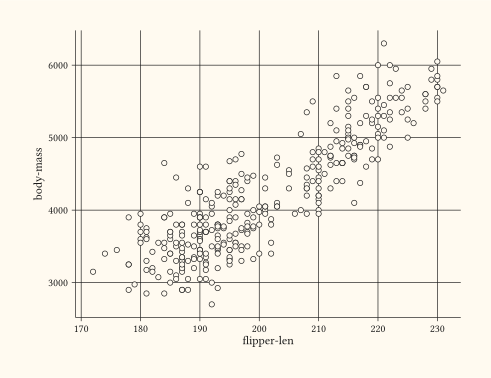
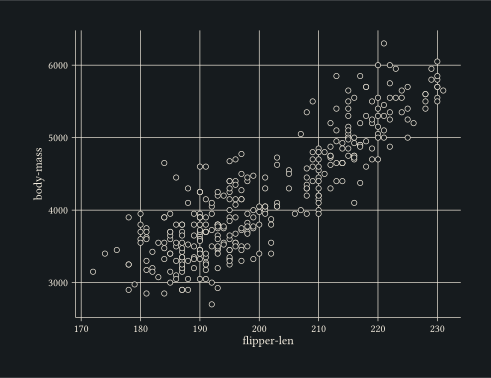
Every plot starts with a dataset and an aes mapping that binds column names to visual channels. At minimum geom-point needs x and y.
#plot(
  data: penguins,
  mapping: aes(x: "flipper-len", y: "body-mass"),
  layers: (geom-point(size: 2pt),),
  width: 12cm,
  height: 9cm,
)
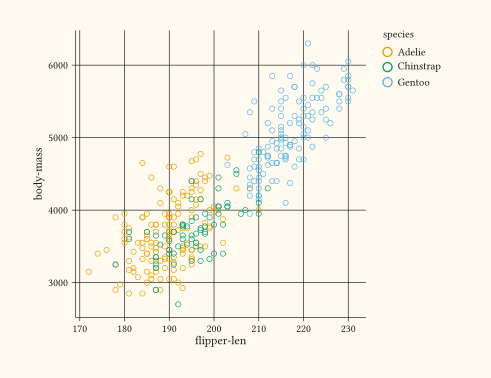
2. Encode a third variable through colour
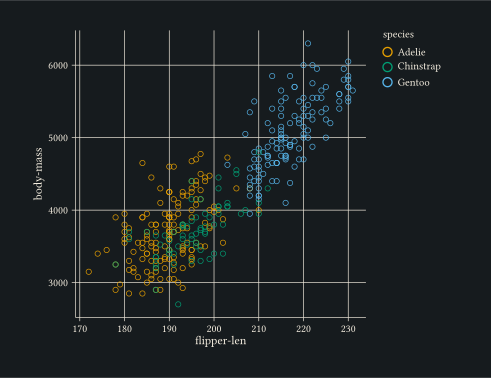
Add colour: "species" to the mapping and the points split visually by group. Every aesthetic mapping is independent of the geom, so the same colour scale applies to whatever layers you stack on top.
#plot(
  data: penguins,
  mapping: aes(
    x: "flipper-len",
    y: "body-mass",
    colour: "species",
  ),
  layers: (geom-point(size: 2pt, alpha: 0.85),),
  width: 12cm,
  height: 9cm,
)
3. Stack a second layer (geom-smooth)
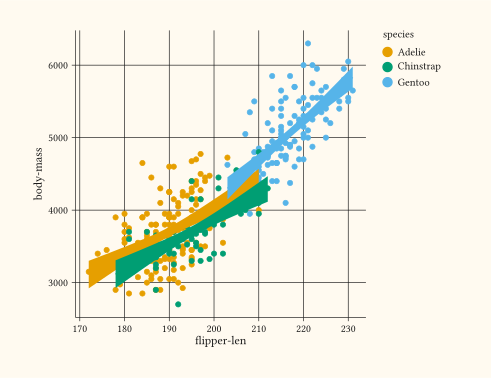
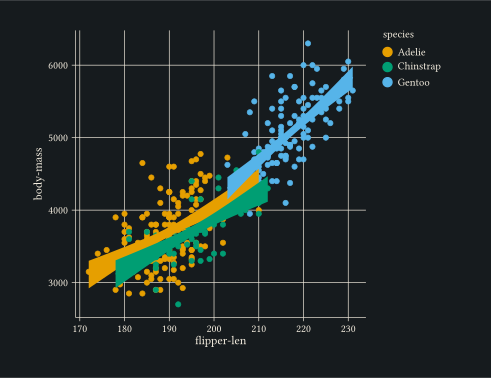
Layers stack in order. A geom-smooth layer draws one fitted line per colour group because it inherits the colour aesthetic from the plot-level mapping.
#plot(
  data: penguins,
  mapping: aes(
    x: "flipper-len",
    y: "body-mass",
    colour: "species",
    fill: "species",
  ),
  layers: (
    geom-point(size: 2pt, alpha: 0.6),
    geom-smooth(method: "lm", alpha: 0.2),
  ),
  width: 12cm,
  height: 9cm,
)
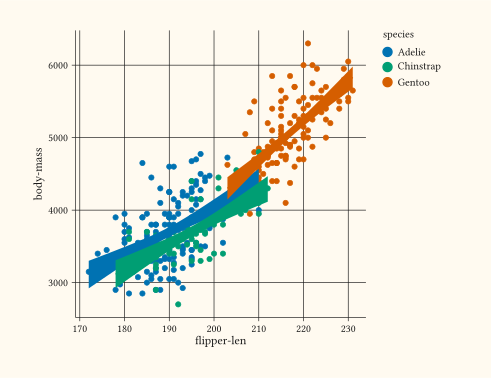
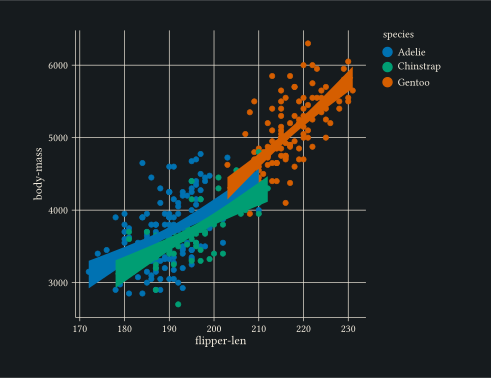
4. Pick a custom colour palette
scale-discrete replaces the default palette. A matching scale-discrete keeps the smooth ribbon’s fill in sync with the points.
#let cb = (
  rgb("#0072B2"),  // blue
  rgb("#D55E00"),  // vermillion
  rgb("#009E73"),  // bluish green
)

#plot(
  data: penguins,
  mapping: aes(
    x: "flipper-len",
    y: "body-mass",
    colour: "species",
    fill: "species",
  ),
  layers: (
    geom-point(size: 2pt, alpha: 0.6),
    geom-smooth(method: "lm", alpha: 0.2),
  ),
  scales: scales(colour: scale-discrete(palette: cb), fill: scale-discrete(palette: cb)),
  width: 12cm,
  height: 9cm,
)
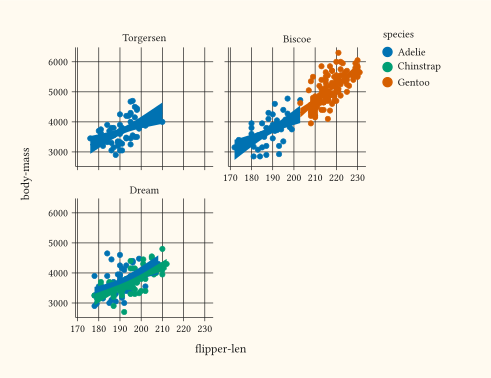
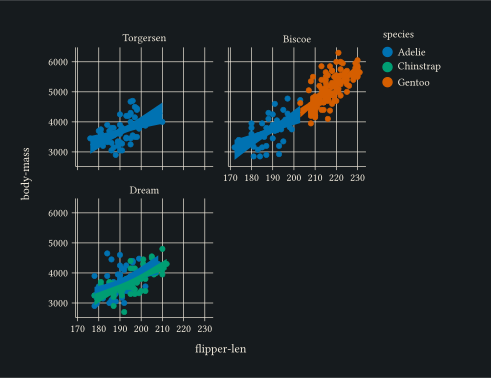
5. Split into small multiples with facet-wrap
facet-wrap lays one panel per level of a discrete column. The same scales apply to every panel, so you can compare the species clusters across islands.
#let cb = (
  rgb("#0072B2"),
  rgb("#D55E00"),
  rgb("#009E73"),
)

#plot(
  data: penguins,
  mapping: aes(
    x: "flipper-len",
    y: "body-mass",
    colour: "species",
    fill: "species",
  ),
  layers: (
    geom-point(size: 2pt, alpha: 0.6),
    geom-smooth(method: "lm", alpha: 0.2),
  ),
  scales: scales(colour: scale-discrete(palette: cb), fill: scale-discrete(palette: cb)),
  facet: facet-wrap("island"),
  width: 12cm,
  height: 9cm,
)
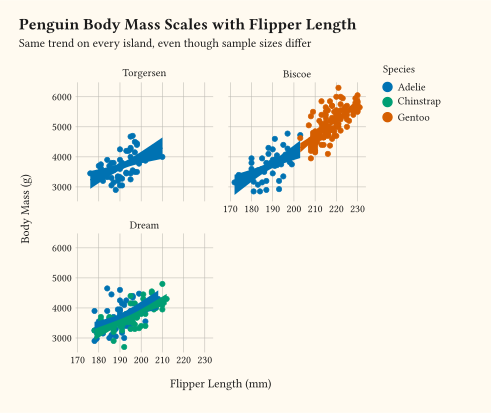
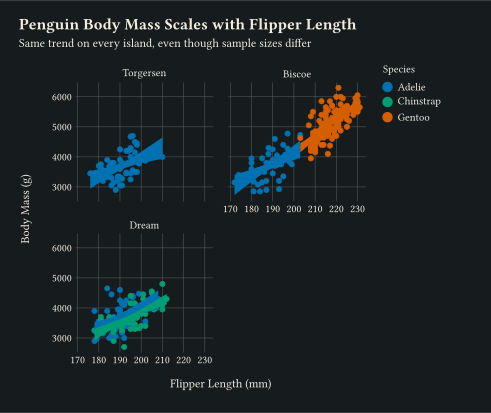
6. Polish with theme() and labels()
theme-minimal drops most of the chrome. labels sets the title block and renames every axis and legend. The single theme call further tweaks the title surface.
#let cb = (
  rgb("#0072B2"),
  rgb("#D55E00"),
  rgb("#009E73"),
)

#plot(
  data: penguins,
  mapping: aes(
    x: "flipper-len",
    y: "body-mass",
    colour: "species",
    fill: "species",
  ),
  layers: (
    geom-point(size: 2pt, alpha: 0.6),
    geom-smooth(method: "lm", alpha: 0.2),
  ),
  scales: scales(colour: scale-discrete(palette: cb), fill: scale-discrete(palette: cb)),
  facet: facet-wrap("island"),
  labels: labels(
    title: "Penguin Body Mass Scales with Flipper Length",
    subtitle: "Same trend on every island, even though sample sizes differ",
    x: "Flipper Length (mm)",
    y: "Body Mass (g)",
    colour: "Species",
    fill: "Species",
  ),
  theme: theme-minimal(
    plot-title: element-text(size: 12pt, weight: "bold")
  ),
  width: 12cm,
  height: 9cm,
)
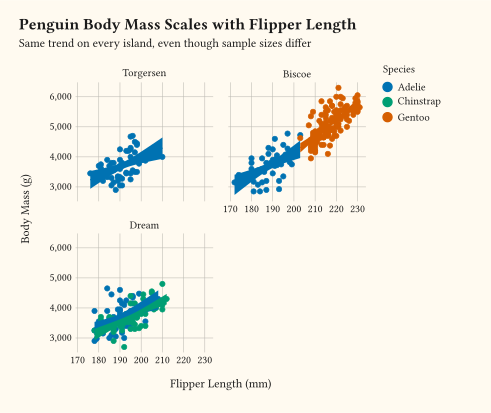
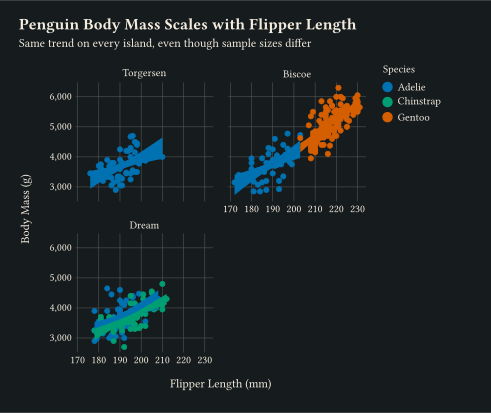
7. Format tick labels with format-comma
Tick labels accept any formatter callable. scale-continuous with labels: format-comma() renders body mass as 3,000, 4,000, … instead of bare digits. Sibling formatters format-percent, format-currency, and format-scientific share the same call shape.
#let cb = (
  rgb("#0072B2"),
  rgb("#D55E00"),
  rgb("#009E73"),
)

#plot(
  data: penguins,
  mapping: aes(
    x: "flipper-len",
    y: "body-mass",
    colour: "species",
    fill: "species",
  ),
  layers: (
    geom-point(size: 2pt, alpha: 0.6),
    geom-smooth(method: "lm", alpha: 0.2),
  ),
  scales: scales(colour: scale-discrete(palette: cb), fill: scale-discrete(palette: cb), y: scale-continuous(labels: format-comma())),
  facet: facet-wrap("island"),
  labels: labels(
    title: "Penguin Body Mass Scales with Flipper Length",
    subtitle: "Same trend on every island, even though sample sizes differ",
    x: "Flipper Length (mm)",
    y: "Body Mass (g)",
    colour: "Species",
    fill: "Species",
  ),
  theme: theme-minimal(
    plot-title: element-text(size: 12pt, weight: "bold")
  ),
  width: 12cm,
  height: 9cm,
)
8. Render Typst markup in the subtitle with element-typst
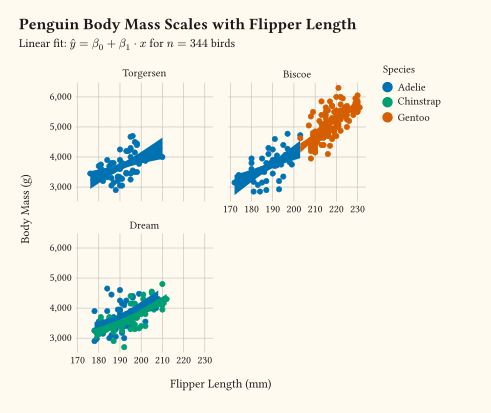
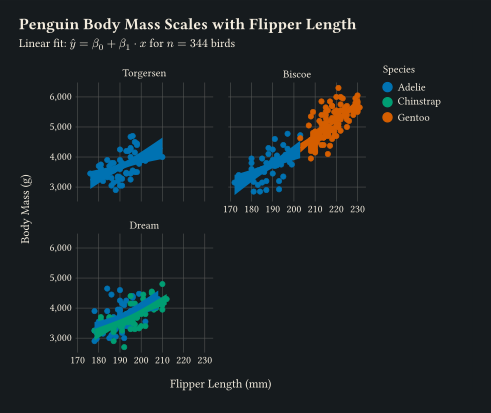
element-typst is a drop-in replacement for element-text that evaluates plain strings as Typst markup. Wiring it to the plot-subtitle theme surface lets the subtitle mix prose with math. Anything between $ $ becomes a rendered formula, and the rest reads as ordinary text.
#let cb = (
  rgb("#0072B2"),
  rgb("#D55E00"),
  rgb("#009E73"),
)
#let n = penguins.map(r => r.species).len()

#plot(
  data: penguins,
  mapping: aes(
    x: "flipper-len",
    y: "body-mass",
    colour: "species",
    fill: "species",
  ),
  layers: (
    geom-point(size: 2pt, alpha: 0.6),
    geom-smooth(method: "lm", alpha: 0.2),
  ),
  scales: scales(colour: scale-discrete(palette: cb), fill: scale-discrete(palette: cb), y: scale-continuous(labels: format-comma())),
  facet: facet-wrap("island"),
  labels: labels(
    title: "Penguin Body Mass Scales with Flipper Length",
    subtitle: "Linear fit: $hat(y) = beta_0 + beta_1 dot.c x$ for $n = " + str(n) + "$ birds",
    x: "Flipper Length (mm)",
    y: "Body Mass (g)",
    colour: "Species",
    fill: "Species",
  ),
  theme: theme-minimal(
    plot-title: element-text(size: 12pt, weight: "bold"),
    plot-subtitle: element-typst(size: 9pt),
  ),
  width: 12cm,
  height: 9cm,
)
9. Annotate inside the panel with geom-typst
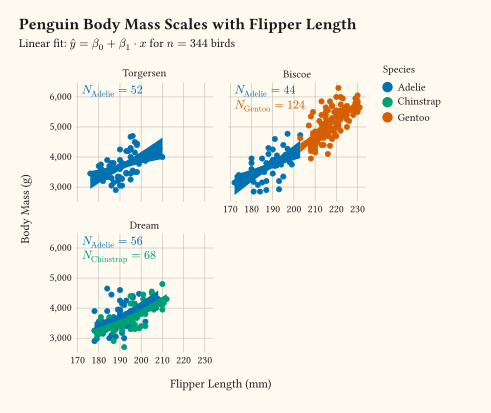
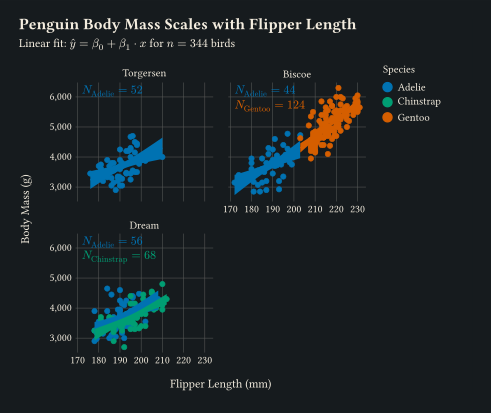
geom-typst is the Typst-markup sibling of geom-text. Every value of the label aesthetic renders as Typst at the row’s (x, y). The annotation layer carries one row per (species, island) cell so each $N_"species" = ...$ label rides the colour scale defined in step 4. Every row also carries an island value so facet-wrap routes it to the right panel.
#let cb = (
  rgb("#0072B2"),
  rgb("#D55E00"),
  rgb("#009E73"),
)
#let n = penguins.map(r => r.species).len()

#let species-counts = (
  (island: "Torgersen", flipper-len: 172, body-mass: 6200, species: "Adelie",    label: $N_"Adelie" = 52$),
  (island: "Biscoe",    flipper-len: 172, body-mass: 6200, species: "Adelie",    label: $N_"Adelie" = 44$),
  (island: "Dream",     flipper-len: 172, body-mass: 6200, species: "Adelie",    label: $N_"Adelie" = 56$),
  (island: "Dream",     flipper-len: 172, body-mass: 5700, species: "Chinstrap", label: $N_"Chinstrap" = 68$),
  (island: "Biscoe",    flipper-len: 172, body-mass: 5700, species: "Gentoo",    label: $N_"Gentoo" = 124$),
)

#plot(
  data: penguins,
  mapping: aes(
    x: "flipper-len",
    y: "body-mass",
    colour: "species",
    fill: "species",
  ),
  layers: (
    geom-point(size: 2pt, alpha: 0.6),
    geom-smooth(method: "lm", alpha: 0.2),
    geom-typst(
      data: species-counts,
      mapping: aes(
        x: "flipper-len",
        y: "body-mass",
        colour: "species",
        label: "label",
      ),
      inherit-aes: false,
      anchor: "west",
      size: 9pt,
    ),
  ),
  scales: scales(colour: scale-discrete(palette: cb), fill: scale-discrete(palette: cb), y: scale-continuous(labels: format-comma())),
  facet: facet-wrap("island"),
  labels: labels(
    title: "Penguin Body Mass Scales with Flipper Length",
    subtitle: "Linear fit: $hat(y) = beta_0 + beta_1 dot.c x$ for $n = " + str(n) + "$ birds",
    x: "Flipper Length (mm)",
    y: "Body Mass (g)",
    colour: "Species",
    fill: "Species",
  ),
  theme: theme-minimal(
    plot-title: element-text(size: 12pt, weight: "bold"),
    plot-subtitle: element-typst(size: 9pt),
  ),
  width: 12cm,
  height: 9cm,
)
The grammar in one diagram
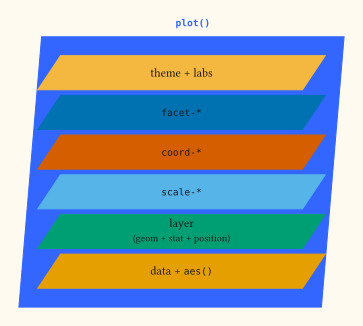
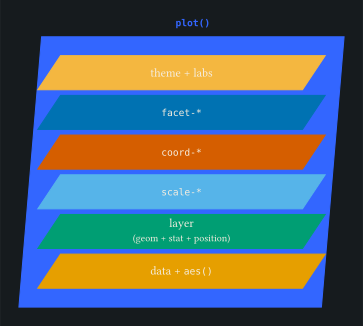
Every plot you build composes the same pieces. plot() wraps a stack of layers, each sheet sitting on the one below, from data and mapping at the foundation up through theme and labels.