Where Gribouille stays fast, and where a chart grows too heavy to compile.
Every Gribouille chart is compiled by Typst, and most layers draw one mark per data row. That makes compile cost rise with the number of marks on the page. A chart that is instant at a few hundred points can become impractical at tens of thousands. This page measures that growth against the row count, so you can judge, before you build a chart, whether your data volume suits the library.
How the numbers are produced
A small harness under tools/benchmark/ compiles a fixed set of charts across a range of row counts and the three output formats. For each cell it records the compile time, the output size, and whether the compile finished within a fixed time budget. A chart that exceeds the budget is recorded as a timeout rather than measured. Past that point the library is no longer a practical choice for that workload.
The figures below read the recorded data and are themselves drawn with Gribouille. The numbers are illustrative and depend on the machine that produced them, so read the shape of each curve rather than its absolute values.
Procedure
Each case is a standalone Typst file that reads its row count from sys.inputs, so one file covers every size. Every case builds that many rows. What a row becomes differs: a mark of its own in the per-row cases, one vertex of a ring in the polygon case, one contribution to a bin in the aggregating cases. Each case also builds deterministic synthetic data, so a given size renders the same chart on every run. The harness compiles the cases one at a time, never in parallel, so concurrent compiles cannot contend for the processor and distort the timings. It wraps each compile in /usr/bin/time, takes the median wall time over a few repetitions, and records the output file size. It stops any compile that exceeds the time budget and marks it as a timeout.
The committed dataset behind the figures on this page was produced with:
The full harness, every other case, and the command-line options are in tools/benchmark/.
Compile time against row count
Typst source for this figure
// Compile time versus row count, read from the committed benchmark dataset// and drawn with gribouille itself.//// Compile from the project root for debugging://// typst compile --root . docs/guides/_benchmarks-time.typ docs/guides/_benchmarks-time.pdf//// The .qmd page reuses this file via the `file: _benchmarks-time.typ` chunk// option; do not move or rename it without updating that reference.#import"/lib.typ":*#setpage(width:auto, height:auto, margin:0.25cm)#letbudget=90#letrows= csv("/docs/benchmarks/results.csv", row-type: dictionary)#letdone=( rows .filter(r => r.status =="ok") .map(r =>( case: r.case, n: int(r.n), format: r.format, time: float(r.time_s),)))#letstalled=( rows .filter(r => r.status =="timeout") .map(r =>(case: r.case, n: int(r.n), format: r.format, time: budget)))#plot( data: done, mapping: aes(x:"n", y:"time", colour:"format"), layers:( geom-hline(yintercept: budget, linetype:"dashed", colour: rgb("#999999")), geom-line(), geom-point(size:2.5pt), geom-point(data: stalled, shape:"cross", size:3.5pt),), scales: scales(x: scale-log10(), y: scale-log10()), facet: facet-wrap("case", ncolumn:3), labels: labels( title:"Per-row layers reach the time budget, path and aggregating layers do not", subtitle:"Crosses mark sizes that exceeded the "+ str(budget)+"s budget", x:"Rows (log scale)", y:"Compile time, seconds (log scale)", colour:"Format",), theme: theme-minimal(), width:24cm, height:13cm,)
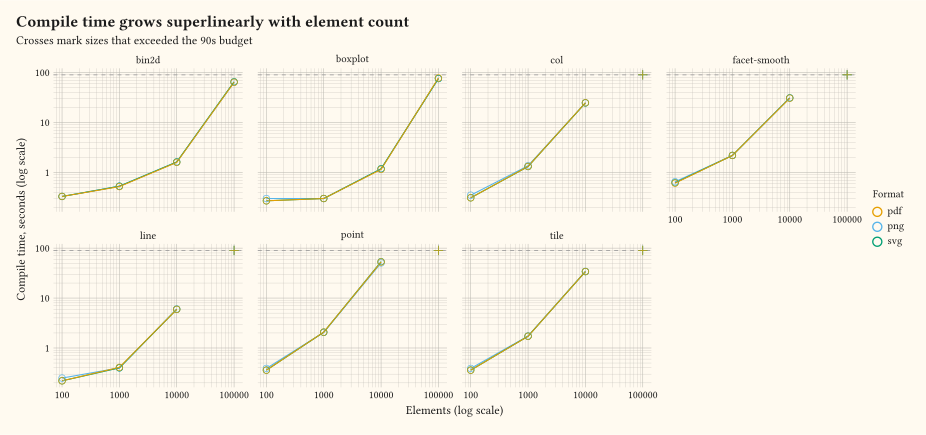
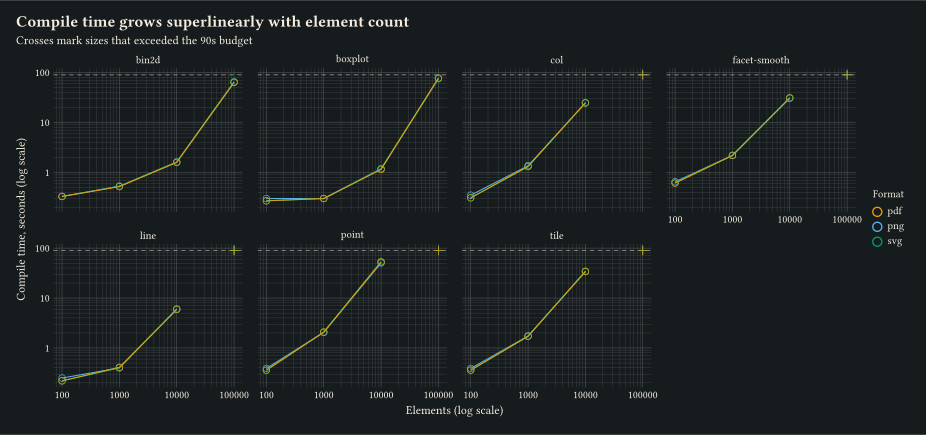
Figure 1: Compile time against row count for each chart type, on log scales. Layers that draw one mark per row reach the time budget first, while the path, polygon, and aggregating layers stay inside it.
Cost follows the number of marks a chart draws, not the number of rows it reads. Per-row layers (geom-point, geom-col, geom-tile) draw one mark per row, so their cost rises in step with the row count. On the test machine a scatter of one thousand points compiles in under two seconds, ten thousand points take about fifteen seconds, and one hundred thousand do not finish inside the budget.
A layer that carries many rows on few marks is far cheaper. geom-line holds every row as a vertex of one path: ten thousand rows take under two seconds, and one hundred thousand finish in about thirty-five as PNG, or closer to sixty as SVG. geom-polygon behaves the same way, and draws twelve rings holding one hundred thousand vertices in about thirteen seconds. So a dense trace or an outline is not the problem that a dense scatter is.
Aggregating layers move the ceiling further out again. A two-dimensional bin or a boxplot collapses the rows to a small, fixed number of marks. One hundred thousand rows then cost about five seconds and about two seconds. Those layers too slow as the row count climbs, because they still read every row.
Output size against row count
Typst source for this figure
// Output size versus row count, read from the committed benchmark dataset// and drawn with gribouille itself.//// Compile from the project root for debugging://// typst compile --root . docs/guides/_benchmarks-size.typ docs/guides/_benchmarks-size.pdf//// The .qmd page reuses this file via the `file: _benchmarks-size.typ` chunk// option; do not move or rename it without updating that reference.#import"/lib.typ":*#setpage(width:auto, height:auto, margin:0.25cm)#letrows= csv("/docs/benchmarks/results.csv", row-type: dictionary)#letdone=( rows .filter(r => r.status =="ok" and r.bytes !="") .map(r =>( case: r.case, n: int(r.n), format: r.format, kb: float(r.bytes) / 1024,)))#plot( data: done, mapping: aes(x:"n", y:"kb", colour:"format"), layers:( geom-line(), geom-point(size:2.5pt),), scales: scales(x: scale-log10(), y: scale-log10()), facet: facet-wrap("case", ncolumn:3), labels: labels( title:"Vector output balloons with the row count, raster stays compact", subtitle:"SVG stores one node per mark and one point per vertex", x:"Rows (log scale)", y:"Output size, KB (log scale)", colour:"Format",), theme: theme-minimal(), width:24cm, height:13cm,)
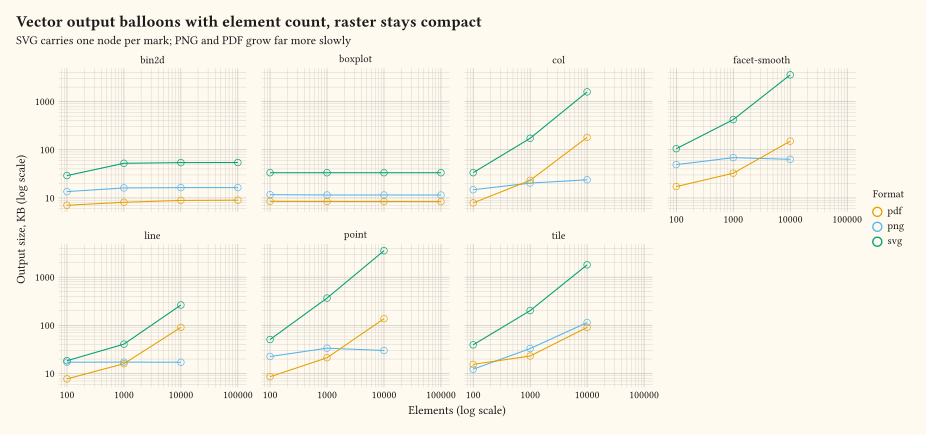
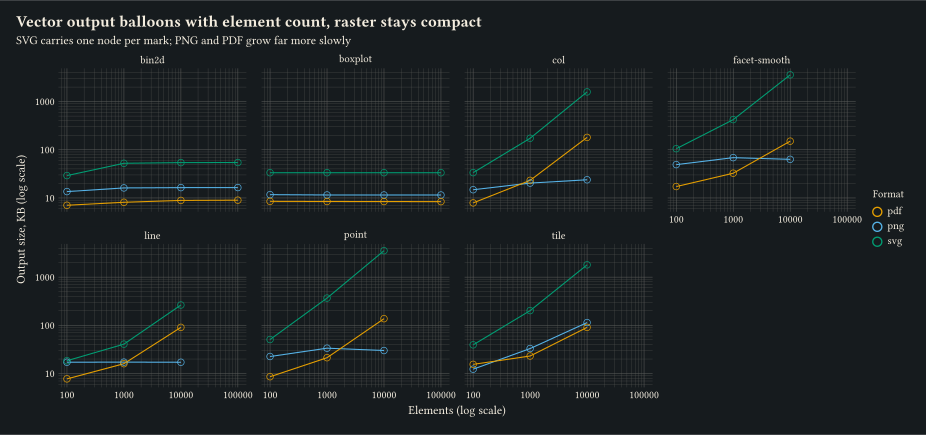
Figure 2: Output size against row count for each chart type, on log scales. Vector output grows with the number of marks and vertices, while raster output stays compact.
Format matters as much as count. SVG stores one node per mark and one point per vertex, so a dense scatter, a long line, and a detailed outline all produce a very large file. A polygon chart of one hundred thousand vertices writes about 2.5 MB of SVG, which is the price of keeping the geometry. PNG rasterises to a fixed grid and stays compact whatever the chart holds. PDF usually starts below PNG where a chart draws few marks, because there is then little geometry to write, and rises above it as the mark or vertex count grows. For a chart with many thousands of marks or vertices, prefer a raster format unless you need vector output.
What this means for your charts
A few hundred to a few thousand marks per chart compile comfortably in any format.
Tens of thousands of per-row marks take ten to fifteen seconds, and a raster format is the only sensible choice.
One hundred thousand per-row marks exceed the budget, so reshape the work instead of drawing every mark.
Count the marks, not the rows. One hundred thousand points on one line, or on a handful of polygons, compile inside the budget, where the same number of separate markers does not.
When the data is large, reach for a layer that aggregates first, such as geom-bin-2d, geom-hex, geom-histogram, or geom-boxplot. These layers collapse the rows to few marks and push the practical ceiling much further out. Very large row counts still cost time.
When even the aggregation is heavy, do the summarising in a dedicated computing language such as R or Python. Then pass the small, pre-computed result to Gribouille to draw.