Theming
Map every visible region of a plot to the theme() key that styles it.
A Gribouille plot is a stack of named regions. Those regions are an outer canvas, an inner panel (or grid of panels), a strip band for facets, a legend column, a title block on top, a caption underneath, and axes around the edges. Each region is one entry in the theme() dictionary, set with an element-text, element-line, element-tick, element-rect, element-blank, or margin value. This page is a map. It shows where each region sits on a real plot, and names the theme() key that controls it. It also links worked examples for the common overrides.
Anatomy of a plot
The diagram below is a real plot. Each region carries a deliberate fill so you can see where it sits, and a callout names the theme() key that styles it. Compose your own overrides by replacing any of those keys.
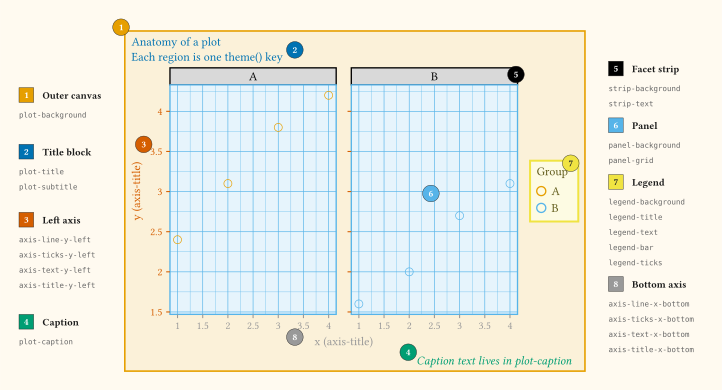
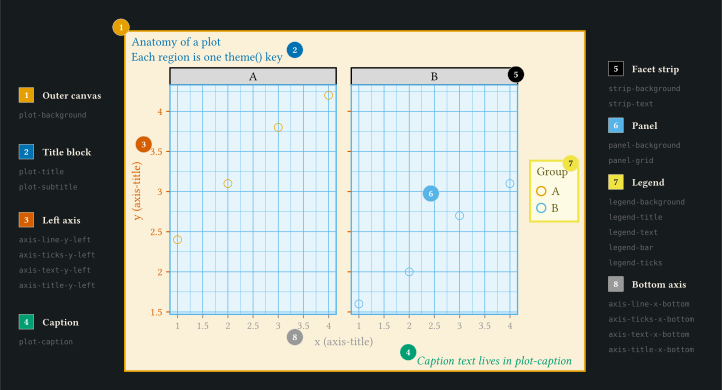
theme() entry, with numbered markers tied to a left/right legend table.
Region to theme key reference
The table below names every region the renderer styles and the theme() key that controls it. Each axis family cascades in three steps: per-side (-x-bottom, -x-top, -y-left, -y-right) falls back to per-axis (-x, -y), which falls back to the unprefixed family. Setting axis-text alone styles all four sides at once. The panel grid cascades by weight then axis: per-axis (-x, -y) falls back to the weight (panel-grid-major, panel-grid-minor), which falls back to panel-grid. Minor gridlines default to half the major weight in the same colour, and a blank panel-grid blanks both weights. A discrete axis draws no gridlines from panel-grid alone, because its ticks already mark every level. To get them, set the grid on panel-grid-major or on one axis with panel-grid-major-x or panel-grid-major-y. A discrete axis draws no minor gridlines at all, because a gap between two levels has no subdivision. A coord-radial() panel draws one grid weight for both its circles and its spokes, so its circles read panel-grid-major only, and a discrete radial axis draws them without tick labels.
| Region | Key(s) | Element type |
|---|---|---|
| Outer plot rectangle. | plot-background. |
element-rect. |
| Breathing room around content (painted rect grows outward to wrap it). | inset on plot-background and legend-background. Ignored on panel-background, strip-background, legend-bar. |
margin. |
| Outer whitespace reservation. | outset on plot-background, panel-background, legend-background, legend-bar. Ignored on strip-background. |
margin. |
| Title, subtitle, caption. | plot-title, plot-subtitle, plot-caption. |
element-text. |
| Drawing area inside a facet. | panel-background. |
element-rect. |
| Gridlines inside the panel, by weight and axis. | panel-grid, panel-grid-major, panel-grid-minor, panel-grid-major-x, panel-grid-major-y, panel-grid-minor-x, panel-grid-minor-y. |
element-line. |
| Facet header band. | strip-background, strip-text. |
element-rect, element-text. |
| Axis line, per side. | axis-line, axis-line-x, axis-line-y, axis-line-x-bottom, axis-line-x-top, axis-line-y-left, axis-line-y-right. |
element-line. |
Axis ticks (stroke, colour, and length), per side. Under coord-radial the same surfaces ring the circle, read off the scale that carries the sweep: x on a rose or radar, y on a pie. |
axis-ticks, axis-ticks-x, axis-ticks-y, axis-ticks-x-bottom, axis-ticks-x-top, axis-ticks-y-left, axis-ticks-y-right. |
element-tick. |
Minor tick marks (log sub-decade ticks), per axis. Under coord-radial these are the half-step marks of guide-axis-theta(minor-ticks: true), again read off the sweep axis. |
axis-ticks-minor, axis-ticks-minor-x, axis-ticks-minor-y. |
element-tick. |
| Axis tick labels, per side. | axis-text, axis-text-x, axis-text-y, axis-text-x-bottom, axis-text-x-top, axis-text-y-left, axis-text-y-right. |
element-text. |
| Axis title, per side. | axis-title, axis-title-x, axis-title-y, axis-title-x-bottom, axis-title-x-top, axis-title-y-left, axis-title-y-right. |
element-text. |
| Discrete legend box. | legend-background, legend-title, legend-text. |
element-rect, element-text. |
Continuous colour bar (chrome reuses legend-background / legend-title / legend-text). |
legend-bar, legend-ticks. |
element-rect, element-line. |
| Shared cascade parents (fields inherit down to every descendant surface unset on the child). | text, line, rect. |
Element constructors. |
| Base colour roles (drive geom colour resolution and theme mixing). | ink, paper, accent. |
Colour. |
Default palette for discrete colour and fill scales (auto uses Okabe-Ito). |
palette. |
Array of colours. |
| Layer aesthetic defaults. | geom. |
element-geom. |
You can hide any key with element-blank in place of its normal element. That is how theme-minimal drops the axis line, the panel background, and the tick marks, for example. A blank surface also reserves no space, so blanking axis-ticks reclaims the tick depth. Blanking axis-text on one side, such as axis-text-y-right, hides that side’s tick labels and the width they would have taken.
Inheritance cascade
Every styled surface walks a parent chain root-to-leaf at render time. The most specific record wins; unset fields inherit from the parent. Two patterns repeat: base records (text, line, rect) feed every descendant surface, and each axis family fans out by axis then by side.
Text sizes accept either an absolute length or a ratio. A ratio such as 80% scales the parent surface size. Setting the base text size therefore rescales every surface that inherits via a ratio (axis titles, tick labels, legend text, and so on). An absolute length such as 12pt pins that surface outright and ignores the cascade.
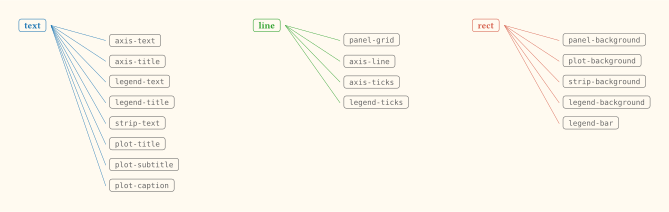
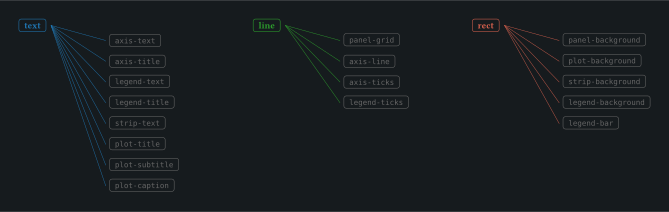
text, line, or rect cascades to every surface in its column; fields unset on the child inherit from the parent.
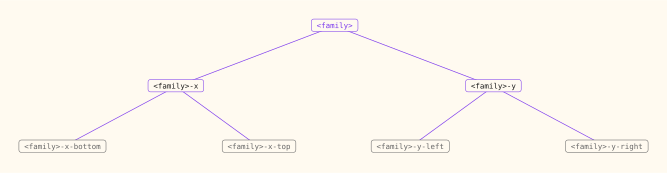
<family> with axis-line, axis-ticks, axis-text, or axis-title. Per-side leaves cascade up to per-axis, then to the family root. axis-ticks-minor hangs off axis-ticks with a per-axis variant of its own.
Override one region
The lightest possible change is to pass a single record into theme() for the region you care about. The example below lifts the axis-title and axis-text sizes, paints the panel-background cream, and softens the panel-grid. Every other surface keeps its default.
#let df = range(0, 12).map(i => (x: i, y: i * i * 0.1))

#plot(
  data: df,
  mapping: aes(x: "x", y: "y"),
  layers: (
    geom-line(stroke: 1.2pt, colour: rgb("#d6604d")),
    geom-point(size: 3pt, fill: rgb("#d6604d")),
  ),
  theme: theme(
    axis-title: element-text(size: 12pt),
    axis-text: element-text(size: 10pt),
    panel-background: element-rect(fill: rgb("#f7f0e7")),
    panel-grid: element-line(colour: rgb("#d9cfbf")),
  ),
  labels: labels(
    title: "theme() overrides",
    subtitle: "Larger axis titles, a cream panel fill, and a soft grid",
    x: "Step",
    y: "y = 0.1 × x²",
  ),
  width: 12cm,
  height: 7cm,
)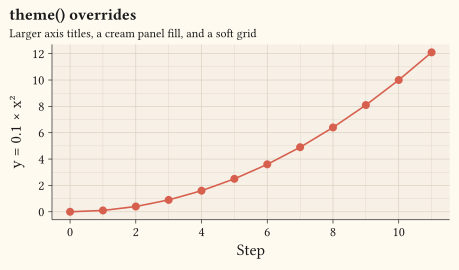
Each line maps directly to one row in the region table: change a single key, the matching region updates, nothing else moves.
Ticks and their labels
Tick marks are one record: element-tick carries the mark’s colour, stroke, and length together, on axis-ticks and its per-axis, per-side, and minor variants. A length given as a ratio scales the length inherited from the parent surface, exactly as size and stroke do elsewhere. The y ticks below therefore come out half the length of the x ticks, without naming an absolute value.
#let df = range(0, 12).map(i => (x: i, y: i * i * 0.1))

#plot(
  data: df,
  mapping: aes(x: "x", y: "y"),
  layers: (geom-point(size: 3pt, fill: rgb("#d6604d")),),
  scales: scales(y: scale-continuous(secondary: dup-axis())),
  theme: theme(
    axis-line: element-line(stroke: 0.5pt),
    axis-ticks: element-tick(length: 0.25cm, stroke: 0.8pt),
    axis-ticks-y: element-tick(length: 50%),
    axis-text-y-right: element-blank(),
  ),
  labels: labels(x: "Step", y: "y = 0.1 × x²"),
  width: 12cm,
  height: 7cm,
)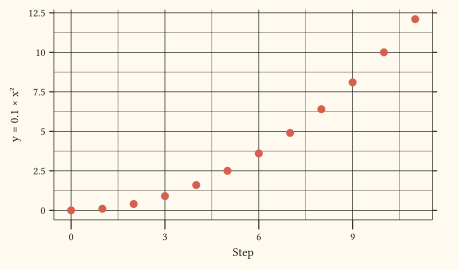
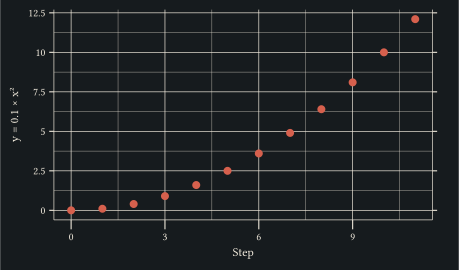
Tick labels live entirely in axis-text, so hiding them is the same per-side element-blank as anywhere else. The duplicated right-hand axis above keeps its marks and drops its labels, along with the width they would have reserved. Blanking axis-ticks on a side does the same for the marks. Minor marks inherit that record through axis-ticks-minor, and default to half the major length in the same stroke. Those are the sub-decade ticks that guide-axis-logticks adds on a log axis.
Tune the outer canvas
Grow the outer plot rectangle past its content with element-rect’s inset field (inner padding). Reserve whitespace around the rectangle with the outset field (outer margin). Each takes a margin with any subset of top, right, bottom, left; sides left at auto add nothing.
#let accent = rgb("#1f77b4")
#let d = range(0, 10).map(i => (x: i, y: i * 0.5))

#let panel(title, theme-arg) = plot(
  data: d,
  mapping: aes(x: "x", y: "y"),
  layers: (
    geom-line(stroke: 1pt, colour: accent),
    geom-point(size: 2pt, fill: accent),
  ),
  labels: labels(title: title, x: "X", y: "Y"),
  theme: theme-arg,
  width: 12cm,
  height: 6cm,
)

#grid(
  columns: 1,
  row-gutter: 0.4cm,
  panel("Default plot-background", theme-minimal()),
  panel(
    "plot-background: element-rect(inset: margin(top: 0.6cm, right: 0.6cm, bottom: 0.9cm, left: 1.6cm))",
    theme-minimal(plot-background: element-rect(
      fill: rgb("#f7f0e7"),
      inset: margin(
        top: 0.6cm,
        right: 0.6cm,
        bottom: 0.9cm,
        left: 1.6cm,
      ),
    )),
  ),
)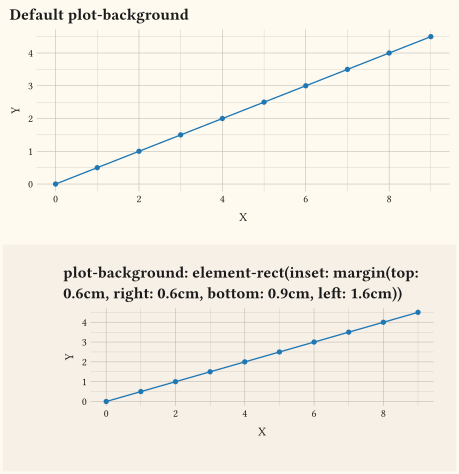
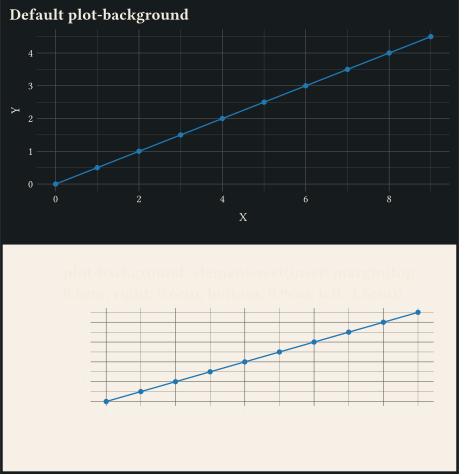
inset grows the painted rectangle outward to wrap its content; only plot-background and legend-background honour it. outset reserves outer whitespace. On panel-background, legend-background, and legend-bar, the reservation widens the surrounding cetz chrome slot and shrinks the panel canvas. A legend placed on a plot side widens that slot by its inset as well, so the painted backdrop stays inside the requested width and height. On plot-background, outset wraps the rendered block in pad(). strip-background ignores both fields: the facet band has no surrounding slot to grow or reserve into. Facet column and row gutters come from panel-spacing, which defaults to 0.5cm. Set a length to space both axes equally, or a (x:, y:) dictionary to space them independently. A per-facet facet-wrap(gutter:) or facet-grid(gutter:) overrides the theme. axis-title.margin controls the gap between tick labels and the axis title. Gaps around any other text surface use the per-element margin field on its element-text.
Complete vs partial themes
theme() is the full base: it populates every surface listed in the reference table. Use it when you want to start from scratch and define each region yourself.
The library ships nine curated overrides on top of that base. Each one is a thin function that returns a theme with a handful of fields replaced. Everything else cascades from theme().
| Function | Effect |
|---|---|
theme-minimal. |
Drops the axis line, the panel background, and the tick marks. The library default. |
theme-bw. |
Black-and-white frame, white panel, light grid. |
theme-classic. |
Axis lines only, no grid, no panel background. |
theme-grey. |
Grey panel background with a white grid. |
theme-light. |
Light frame and grid on a white panel. |
theme-dark. |
Dark frame and grid on a dark panel. |
theme-linedraw. |
Black frame, dark grid, white panel. |
theme-void. |
Everything removable removed; useful for inset thumbnails. |
theme-brand. |
Colours, fonts, and palette taken from a parsed _brand.yml. |
The theme-sub-* helpers go one level finer: they bundle the keys that move together for a single region. For example, theme-sub-axis accepts line, ticks, text, title, and rewrites the four corresponding theme() keys for you. The full set is theme-sub-axis, theme-sub-axis-x, theme-sub-axis-y, theme-sub-axis-bottom, theme-sub-axis-top, theme-sub-axis-left, theme-sub-axis-right, theme-sub-legend, theme-sub-panel, theme-sub-plot, and theme-sub-strip.
Finally, theme-set installs a theme as the document-wide default so subsequent plot() calls pick it up without an explicit theme: argument.
Where to go next
- Browse the themes gallery for side-by-side renders of every built-in theme, alongside the other theme examples.
- See
theme-sub-*in action for compact ways to retouch one region at a time. - The full themes reference lists every element constructor and every cascade rule.