Draw attention to a total
Shading a subtotal row, colouring a grand total, and marking either with a note.
A subtotal is addressed like any other cell, through cells-summary and cells-grand-summary, so a total can be shaded, recoloured, or footnoted without anyone counting rows.
// Styling and marking the summary rows, addressed with cells-summary and
// cells-grand-summary.

#import "@preview/keisen:0.0.1": *

#set page(width: auto, height: auto, margin: 0.5cm)
#set text(font: "Libertinus Serif", size: 10pt)

#display-table(
  (
    region: ("North", "North", "South", "South"),
    product: ("Bolt", "Nut", "Beam", "Plate"),
    units: (1250, 860, 430, 2100),
    revenue: (18750.5, 12900.25, 21500, 31500.75),
  ),
  table-header(title: [Regional sales], subtitle: [Financial year 2025 to 2026]),
  table-stub(rowname: "product", group: "region", label: [Product]),
  columns-label(units: [Units], revenue: [Revenue]),
  // The stub takes an alignment of its own. The stubhead above it and the
  // summary labels below it follow it, so the column reads as one column.
  columns-align(end, columns: "product"),
  format-integer("units"),
  format-number("revenue", decimals: 2),
  summary-rows(functions: (Subtotal: aggregate-sum), columns: ("units", "revenue")),
  grand-summary-rows(functions: (Total: aggregate-sum), columns: ("units", "revenue")),
  // The whole subtotal row, its label included, and then the grand total alone.
  table-style(style(fill: luma(235)), locations: cells-summary()),
  table-style(
    style(text: (fill: rgb("#08519c"))),
    locations: cells-grand-summary(columns: "revenue"),
  ),
  // On the row once, through its label cell, rather than on every cell of it.
  table-footnote(
    [Subtotals exclude intra-group sales.],
    locations: cells-summary(groups: "North", columns: none),
  ),
  table-footnote([Audited.], locations: cells-grand-summary(columns: "revenue")),
  // A style that changes the text makes the column's padding boxes the wrong
  // size, so this cell takes the column alignment instead of the padding. Set
  // at the same size it would otherwise be, so the total still reads as a total.
  table-style(style(text: (size: 1.2em)), locations: cells-grand-summary(columns: "units")),
  table-source-note([Source: internal ledger.]),
  theme: theme-booktabs(),
)

#v(1em)

// With no stub the summary label takes the first column, and it follows that
// column's edge as every other cell in it does. Here the first column is set
// against the end edge, so a label drawn at the start edge sits opposite the
// names above it.
#display-table(
  (product: ("Bolt", "Nut"), units: (1250, 860)),
  table-header(title: [No stub, first column at the end edge]),
  columns-align(end, columns: "product"),
  format-integer("units"),
  grand-summary-rows(functions: (Total: aggregate-sum), columns: ("units",)),
)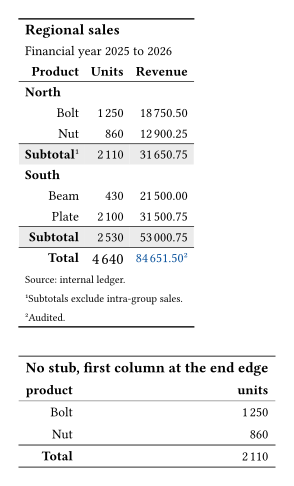
columns-align names the stub here, so each total’s label sits beside the figures it totals rather than a column away from them. The stubhead follows the same edge, since a header on the opposite side from its column reads as a mistake.
cells-summary() with no arguments takes the whole row, its label cell included. columns: none is that label cell alone, which is how the note lands on the row once instead of on each of its cells.
A summary row answers to its label as readily as to its position, so rows: "Subtotal" says what rows: 0 says. The label is the better of the two: it survives a row being added above it.
Without a stub
With no stub the label takes the first column instead, and follows that column’s edge as every other cell in it does. The second table in the picture above is this one.
#display-table(
  (product: ("Bolt", "Nut"), units: (1250, 860)),
  table-header(title: [No stub, first column at the end edge]),
  columns-align(end, columns: "product"),
  format-integer("units"),
  grand-summary-rows(functions: (Total: aggregate-sum), columns: ("units",)),
)