Carry a table across pages
Column labels and the current group both reprinted overleaf.
A Keisen table breaks by default, reprinting its column labels and its row-group label on each new page. The show rule a figure needs to do the same.
A table breaks by default, so this needs nothing said. The page height is the only thing the listing sets that the others do not: a page that grows to hold the table never breaks, and breaking is the point here.
// A table long enough to break across pages. The column labels and the current
// group label print again at the top of each new page.

#import "@preview/keisen:0.0.1": *

// The page height is fixed, so the table breaks. The width fits the table.
#set page(width: auto, height: 9cm, margin: 1cm)
#set text(font: "Libertinus Serif", size: 9pt)

#let count = 22

#display-table(
  (
    station: range(count).map(index => "Station " + str(index + 1)),
    region: range(count).map(index => if index < 11 { "North" } else { "South" }),
    temperature: range(count).map(index => 12.5 + index * 0.75),
    humidity: range(count).map(index => 60 + calc.rem(index * 7, 30)),
  ),
  table-header(title: [Station readings]),
  table-stub(rowname: "station", group: "region", label: [Station]),
  columns-label(temperature: [Temperature], humidity: [Humidity]),
  columns-width(("station": 3.2cm)),
  format-number("temperature", decimals: 2),
  format-integer("humidity"),
  summary-rows(functions: (Mean: aggregate-mean), format: format-number(auto, decimals: 2)),
  table-source-note([Source: station log.]),
)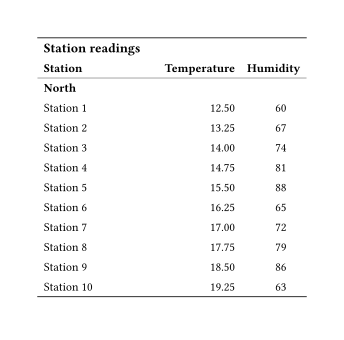
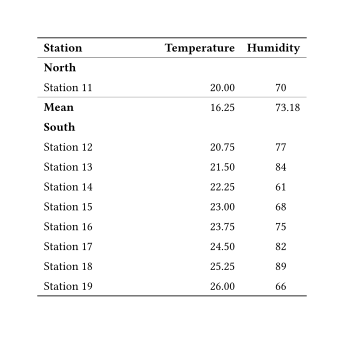
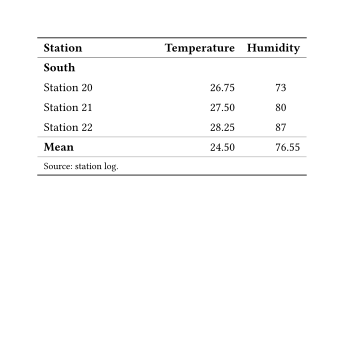
The second page is the point. Row groups are rendered as native level-3 subheaders, so a group carrying on past a page break reprints its own label under the repeated column labels, and the next group retires it automatically.
Inside a figure
A table inside a #figure does not break, whatever the table was told, until this is in force:
#show figure: set block(breakable: true)That is the first thing a long table runs into, and nothing about the wrapping says so. The reference says more about it under Figures and Quarto.