Total a table by group
A subtotal closing each block, and a grand total closing the table.
The data carries a column saying which block each row belongs to. A stub turns one column into row names and that one into groups, then summary-rows closes each group and grand-summary-rows closes the body.
// Rows grouped by region, with a subtotal for each group and a grand total.

#import "@preview/keisen:0.0.1": *

#set page(width: auto, height: auto, margin: 0.5cm)
#set text(font: "Libertinus Serif", size: 10pt)

#display-table(
  (
    product: ("Bolt", "Nut", "Beam", "Plate"),
    region: ("North", "North", "South", "South"),
    units: (1250, 860, 430, 2100),
    revenue: (18750.5, 12900.25, 21500, 31500.75),
  ),
  table-header(title: [Regional sales], subtitle: [Financial year 2025 to 2026]),
  table-stub(rowname: "product", group: "region", label: [Product]),
  columns-label(units: [Units], revenue: [Revenue]),
  table-spanner([Performance], ("units", "revenue")),
  format-integer("units"),
  format-number("revenue", decimals: 2),
  summary-rows(functions: (Subtotal: aggregate-sum), columns: ("units", "revenue")),
  grand-summary-rows(functions: (Total: aggregate-sum), columns: ("units", "revenue")),
  table-source-note([Source: internal ledger.]),
  table-options(row-striping: true),
)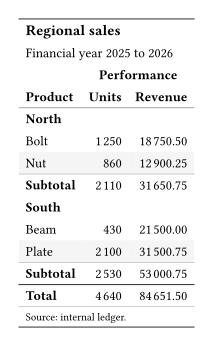
functions maps the label the row will carry to the aggregation that fills it, so (Subtotal: aggregate-sum) names both at once. aggregate-sum stays in decimal arithmetic, so the totals are exact rather than nearly right.
Striping counts body rows alone, so a group label never takes a stripe or shifts the phase.
Summary rows need groups. A table with none is closed by grand-summary-rows on its own, and rows that no group claims are counted there rather than in a subtotal. Where the data has no column to group by, declare the groups in the document.