scale-y-continuous
Continuous y scale: axis title, limits, breaks, labels, and transformation.
transform accepts "identity", "log10", "sqrt", and "reverse".
Usage
scale-y-continuous(
  name: none,
  limits: none,
  oob: "drop",
  breaks: auto,
  minor-breaks: auto,
  n-minor: auto,
  labels: auto,
  transform: "identity",
  expand: auto,
  secondary: none,
)
Parameters
| Parameter | Default | Description |
|---|---|---|
name |
none |
Axis title. Overrides any name set via labels when both are present. |
limits |
none |
Pair (lo, hi) clipping the trained domain, or none for automatic limits. Either element may be auto to keep the trained bound on that side. |
oob |
"drop" |
Out-of-range policy: "drop" (default) removes rows whose value falls outside limits; "squish" clamps them to the nearest endpoint. |
breaks |
auto |
Array of break values, or auto for automatic tick selection. |
minor-breaks |
auto |
Array of minor gridline positions, or auto to derive them automatically (midpoints between major breaks, extended one step beyond each end). |
n-minor |
auto |
Number of minor gridlines between adjacent major breaks when minor-breaks is auto; auto resolves to 1. |
labels |
auto |
Array of tick labels aligned with breaks, or auto. |
transform |
"identity" |
Transformation keyword: "identity", "log10", "sqrt", or "reverse". |
expand |
auto |
Padding around the domain. Accepts a ratio (5%) for proportional breathing room, a length (5pt) for canvas-space padding, a relative (5pt + 5%) for both, or a (lo, hi) 2-tuple for asymmetric padding, where either element may be auto to keep the per-scale default on that side. auto keeps the per-scale default; false collapses to zero. |
secondary |
none |
Secondary axis spec from dup-axis or sec-axis, or none. |
Returns
Scale object consumed by plot.
Examples
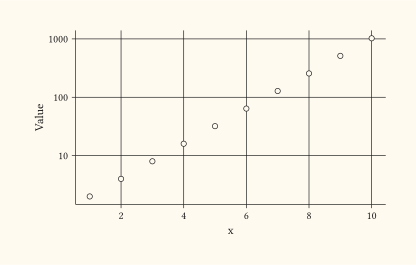
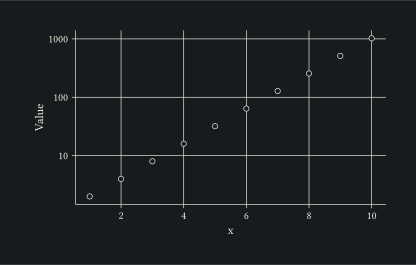
Log-10 transform compresses an exponential growth curve into a near-linear axis.
#let d = range(1, 11).map(i => (x: i, y: calc.pow(2, i)))
#plot(
  data: d,
  mapping: aes(x: "x", y: "y"),
  layers: (geom-point(size: 2pt),),
  scales: (scale-y-continuous(name: "Value", transform: "log10"),),
  width: 10cm,
  height: 6cm,
)
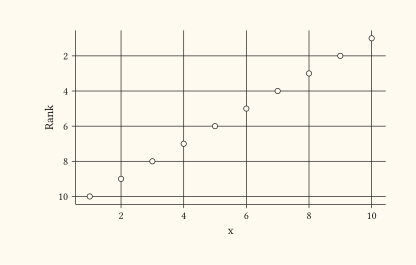
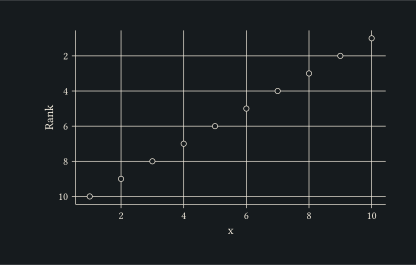
Reverse the y axis to put the largest values at the bottom, useful for ranks where lower numbers are better.
#let d = range(1, 11).map(i => (x: i, y: 11 - i))
#plot(
  data: d,
  mapping: aes(x: "x", y: "y"),
  layers: (geom-point(size: 2pt),),
  scales: (scale-y-continuous(name: "Rank", transform: "reverse"),),
  width: 10cm,
  height: 6cm,
)