geom-quantile
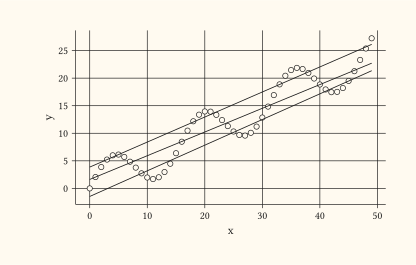
Quantile-regression layer: a fitted line per requested τ.
Default quantiles are (0.25, 0.5, 0.75). The lines are drawn through geom-line on top of the stat’s grouped output. Set colour per layer to colour all lines uniformly; for per-quantile colour, map an aesthetic to the _quantile column emitted by the stat.
Usage
geom-quantile(
  mapping: none,
  data: none,
  quantiles: (0.25, 0.5, 0.75),
  n-samples: 64,
  stroke: auto,
  colour: auto,
  alpha: auto,
  linetype: auto,
  linewidth: auto,
  position: "identity",
  stat: auto,
  key: auto,
  inherit-aes: true,
)
Parameters
| Parameter | Default | Description |
|---|---|---|
mapping |
none |
Layer-specific aesthetic mapping built with aes. Falls back to the plot mapping when none. |
data |
none |
Layer-specific dataset, or a function applied to the plot data returning the layer frame. Falls back to the plot data when none. |
quantiles |
(0.25, 0.5, 0.75) |
Array of τ values in (0, 1) to fit. |
n-samples |
64 |
Number of evenly-spaced x positions sampled per fitted line. |
stroke |
auto |
Line thickness (a Typst length). |
colour |
auto |
Fixed line colour. auto resolves via the colour scale or a neutral default. |
alpha |
auto |
Line opacity in [0, 1]. |
linetype |
auto |
Dash keyword. auto honours the linetype scale. |
linewidth |
auto |
Multiplier on line thickness, mapped via the linewidth scale. |
position |
"identity" |
Position adjustment name. Usually "identity". |
stat |
auto |
Statistical transform. auto builds the geom’s default stat from the parameters above; pass a stat name or stat object to override. |
key |
auto |
Legend glyph override built with a draw-key-* helper. auto picks the default for the geom. |
inherit-aes |
true |
Whether to merge the plot-level mapping into this layer’s mapping. |
Returns
Layer dictionary consumed by plot.
Examples
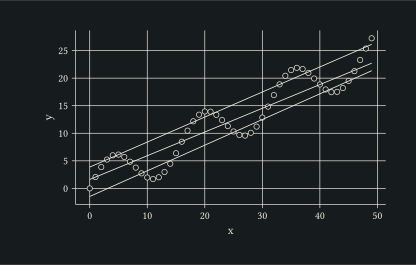
Median plus quartile bands over a noisy linear trend.
#let d = range(0, 50).map(i => (
  x: i,
  y: i * 0.5 + calc.sin(i * 0.4) * 4,
))
#plot(
  data: d,
  mapping: aes(x: "x", y: "y"),
  layers: (
    geom-point(size: 2pt, alpha: 0.4),
    geom-quantile(),
  ),
  width: 10cm,
  height: 6cm,
)