position-fill
Fill position adjustment: stack and normalise each x bucket to sum = 1.
Typically set on a layer as position: "fill" rather than constructed directly; the constructor exists for symmetry with the other positions.
Usage
position-fill()Returns
Position dictionary with name: "fill", consumed by plot.
Examples
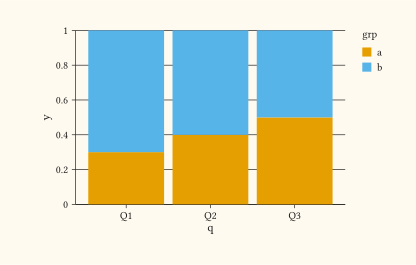
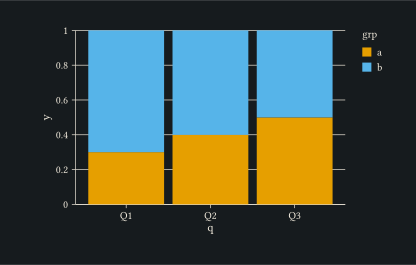
Stacked bars normalised so each quarter sums to one, useful for showing share of total.
#let d = (
  (q: "Q1", grp: "a", y: 3),
  (q: "Q1", grp: "b", y: 7),
  (q: "Q2", grp: "a", y: 4),
  (q: "Q2", grp: "b", y: 6),
  (q: "Q3", grp: "a", y: 5),
  (q: "Q3", grp: "b", y: 5),
)
#plot(
  data: d,
  mapping: aes(x: "q", y: "y", fill: "grp"),
  layers: (geom-col(position: "fill"),),
  width: 10cm,
  height: 6cm,
)
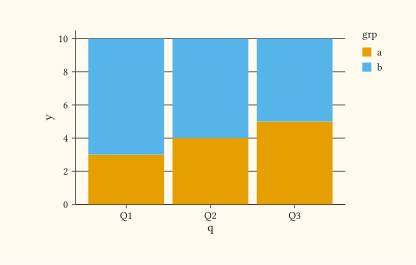
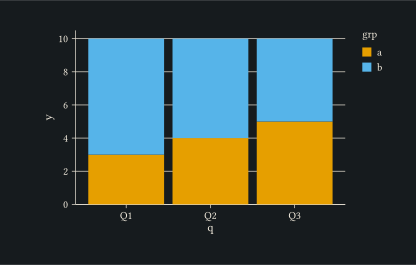
Compare with position-stack to show the same data in absolute counts instead of proportions.
#let d = (
  (q: "Q1", grp: "a", y: 3), (q: "Q1", grp: "b", y: 7),
  (q: "Q2", grp: "a", y: 4), (q: "Q2", grp: "b", y: 6),
  (q: "Q3", grp: "a", y: 5), (q: "Q3", grp: "b", y: 5),
)
#plot(
  data: d,
  mapping: aes(x: "q", y: "y", fill: "grp"),
  layers: (geom-col(position: "stack"),),
  width: 10cm,
  height: 6cm,
)