theme-brand
Brand theme: a theme built from a parsed _brand.yml.
brand.yml is a tool-independent standard for a single brand definition, specified at https://posit-dev.github.io/brand-yml/. Quarto, Shiny for R, and Shiny for Python all read the same file, so one brand file can cover a document, an application, and the plots in either.
Takes the dictionary yaml() produces, not a path: Typst resolves a relative path against the file that calls yaml, so the package cannot resolve one on your behalf. Read the file yourself and pass the result.
The brand’s color.foreground, color.background and color.primary become the theme’s ink, paper and accent; every other surface is derived from that pair the way theme-minimal derives it, so gridlines and strips re-tint themselves and stay legible in either mode. The remaining data-ink roles (secondary, tertiary, success, info, warning, danger) are de-duplicated in that order into the discrete palette every colour and fill scale falls back to.
Semantic colours may be hex strings, names of color.palette entries, aliases of other entries, or light / dark variants; all of these resolve. A role the brand omits keeps the library default, but a role that is present and malformed fails. color.light, color.dark, logo, meta and defaults are ignored, as are all font properties other than the family name: Typst can only use a family already available to the compiler.
Nothing checks that the brand’s foreground and background contrast, so a brand that pairs two dark colours yields a theme you cannot read.
Usage
theme-brand(
  brand,
  mode: "light",
  palette: auto,
  ..fields,
)
Parameters
| Parameter | Default | Description |
|---|---|---|
brand |
Dictionary parsed from a _brand.yml, e.g. yaml("_brand.yml"). An empty dictionary yields the theme-minimal defaults. |
|
mode |
"light" |
Which side of the brand’s light / dark colour variants to use: "light" or "dark". A colour with no variants is used in both. Default: "light". |
palette |
auto |
Discrete palette override. auto derives one from the brand’s data-ink roles; none keeps the library default (Okabe-Ito); an array of colours is used as-is. |
..fields |
Extra overrides forwarded to theme; see its docs for the full catalogue of structured and flat keys. |
Returns
Theme dictionary consumed by plot.
Examples
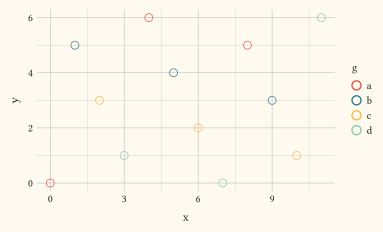
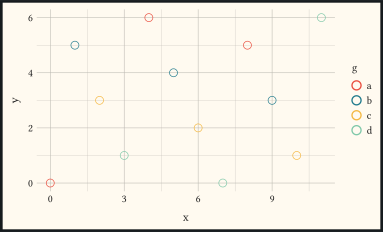
Brand chrome and a palette derived from the brand’s data-ink roles.
#let brand = (
  color: (
    palette: (cream: "#FFFAF0", charcoal: "#1A1A1A"),
    foreground: "charcoal",
    background: "cream",
    primary: "#E94C3D",
    secondary: "#1F7A8C",
    tertiary: "#F4B740",
    success: "#7FC8A9",
  ),
)
#let d = range(0, 12).map(i => (
  x: i,
  y: calc.rem(i * 5, 7),
  g: ("a", "b", "c", "d").at(calc.rem(i, 4)),
))
#plot(
  data: d,
  mapping: aes(x: "x", y: "y", colour: "g"),
  layers: (geom-point(size: 3pt),),
  theme: theme-brand(brand),
  width: 10cm,
  height: 6cm,
)
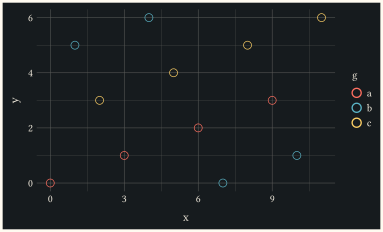
Take the dark side of every colour variant the brand declares.
#let brand = (
  color: (
    foreground: (light: "#1A1A1A", dark: "#F4EDDF"),
    background: (light: "#FFFAF0", dark: "#161B1E"),
    primary: (light: "#E94C3D", dark: "#FF6F60"),
    secondary: (light: "#1F7A8C", dark: "#5BB5C7"),
    tertiary: (light: "#F4B740", dark: "#FFD166"),
  ),
)
#let d = range(0, 12).map(i => (
  x: i,
  y: calc.rem(i * 5, 7),
  g: ("a", "b", "c").at(calc.rem(i, 3)),
))
#plot(
  data: d,
  mapping: aes(x: "x", y: "y", colour: "g"),
  layers: (geom-point(size: 3pt),),
  theme: theme-brand(brand, mode: "dark"),
  width: 10cm,
  height: 6cm,
)
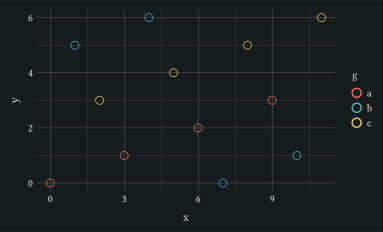
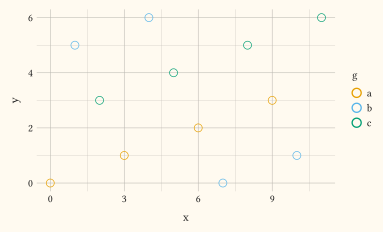
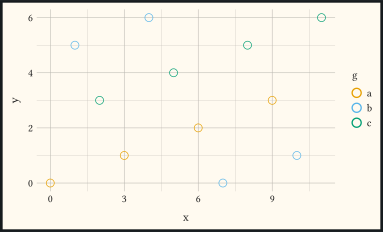
Keep the brand’s chrome but draw the data in the library’s colour-vision-deficiency-safe default.
#let brand = (
  color: (
    foreground: "#1A1A1A",
    background: "#FFFAF0",
    primary: "#E94C3D",
    secondary: "#1F7A8C",
  ),
)
#let d = range(0, 12).map(i => (
  x: i,
  y: calc.rem(i * 5, 7),
  g: ("a", "b", "c").at(calc.rem(i, 3)),
))
#plot(
  data: d,
  mapping: aes(x: "x", y: "y", colour: "g"),
  layers: (geom-point(size: 3pt),),
  theme: theme-brand(brand, palette: none),
  width: 10cm,
  height: 6cm,
)
Read the brand file yourself and set the theme once for the whole document. The path resolves against the file calling yaml, so this only works where you write it, not inside the package.
#theme-set(theme-brand(yaml("_brand.yml")))